Silent PC GPU upgrade
TL;DR
Nvidia have ended Linux support for my ‘Pascal’ GTX 1050 Ti GPU. I’ve been able to fit an RTX 5050 card in its place, though the process was problematic due to driver issues. And I’m still concerned that it can only be limited to 110W when my passive cooling is rated up to 75W.
Background
When I upgraded my silent PC earlier in the year I kept the original graphics card, with an Nvidia GTX 1050Ti. I couldn’t find anything better that fitted into the 75W power budget.
Then I saw Justin Garrison’s post linking to ‘NVIDIA Drops Pascal Support On Linux, Causing Chaos On Arch Linux‘.

I replied:
Grrr. I was considering options to upgrade the 1050Ti in my silent desktop, but nothing was compelling (mostly as Nvidia don’t do a 75W card any more).
Forced obsolescence sucks 🙁
It was clear that I was now on an obsolete platform, and I’d need a new card sooner or later. I decided to get the trouble out of the way before the Christmas break ended.
New card
A quick look at Quiet PC suggested that the Palit GeForce RTX 5050 StormX 8GB Semi-fanless Graphics Card would be the way to go. Unfortunately they were closed for Christmas.
Luckily Scan also had the card, and they were offering next day delivery. I opted to save £8.99 by not going for Sunday delivery, but (hurrah) it came on Sunday anyway. Top marks to Scan (and DPD) :)
Although it’s a 130W card, I found these instructions showing how to limit power usage – ‘Set lower power limits (TDPs) for NVIDIA GPUs‘.
I also ordered a 6pin to 8pin PCIe converter cable, as I knew my PSU didn’t have a newer GPU cable.
Cooling
Job 1 was to remove the heatsink and fan, which just needed a few screws to be taken out. I then set about swapping the DB4 GPU cooling kit from the old card to the new. Thankfully it was possible to do that without completely dismantling the PC. I was even able to leave everything apart from the display cables and power plugged in.
The mounting holes for the heat pipe cooler block were in the same spacing as before, and there was just enough space around the GPU. So no drama with this bit. I also had some heatsinks spare that I could attach to the RAM and other chips that were in contact with the OEM heatsink/fan arrangement.
Power
I’d bought the 6pin to 8pin converter knowing that I didn’t have an 8pin connector; but falsely thinking that the existing card used a 6pin.
It did not :( The old card just took power from the PCIe bus, which can supply the 75W it used.
There is a 6pin connector, but that goes to the motherboard.
So… I did this crime against cabling by sacrificing the SATA and Molex cables I don’t use and splicing their power to the adaptor cable I’d bought.
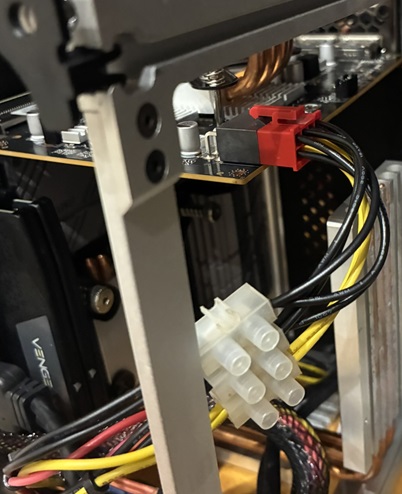
That got me to a system that would power up and show a screen, which is when the real fun began.
Drivers
As I already had an Nvidia card using their official drivers I expected the new card to ‘just work’. It did not.
I got a BIOS boot screen, and then the Kubuntu splash screen as it booted. But no login screen. Just a cursor blinking top left of an empty black screen.
Worse still, the keyboard driver was being disabled at some stage during boot, so I couldn’t just jump into a console and fix things from there.
When I tried unplugging the keyboard and plugging it back in again I got:
usbhid: couldn't find an interrupt endpointDisabling secure boot in the BIOS didn’t improve things.
Getting to grub
I needed to get to a console, which meant interrupting the regular boot.
According to many sources online all I needed to do was hold down (right) shift during boot. This accomplished nothing.
Next I tried hitting Esc. Unfortunately my repeated presses bounced me through the grub menu and into the grub command line. I needed to hit Esc, once, at precisely the right time.
On one of my failed attempts Esc got me the dmesg output during a regular boot, which revealed this gem:
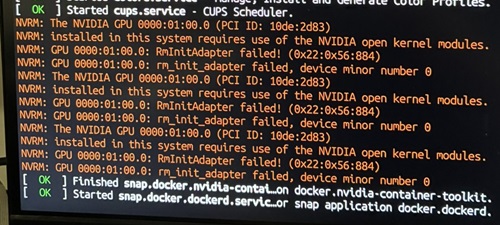
Eventually I hit Esc at just the right time, which let me boot into the console and uninstall the existing Nvidia drivers with:
apt purge ^nvidia-.*That got me a system that would properly boot. But only a single screen. I still needed the proper drivers:
sudo apt install nvidia-driver-580-open
Finally… I was back to a proper multi monitor setup. All that remained was to configure power limiting. Unfortunately it turns out I can’t set things to 75W, as the lowest limit is 110W. On the other hand it does seem that quiescent power consumption is about half what the old card used to consume, so maybe I’ll save some pennies on my electricity bill :/
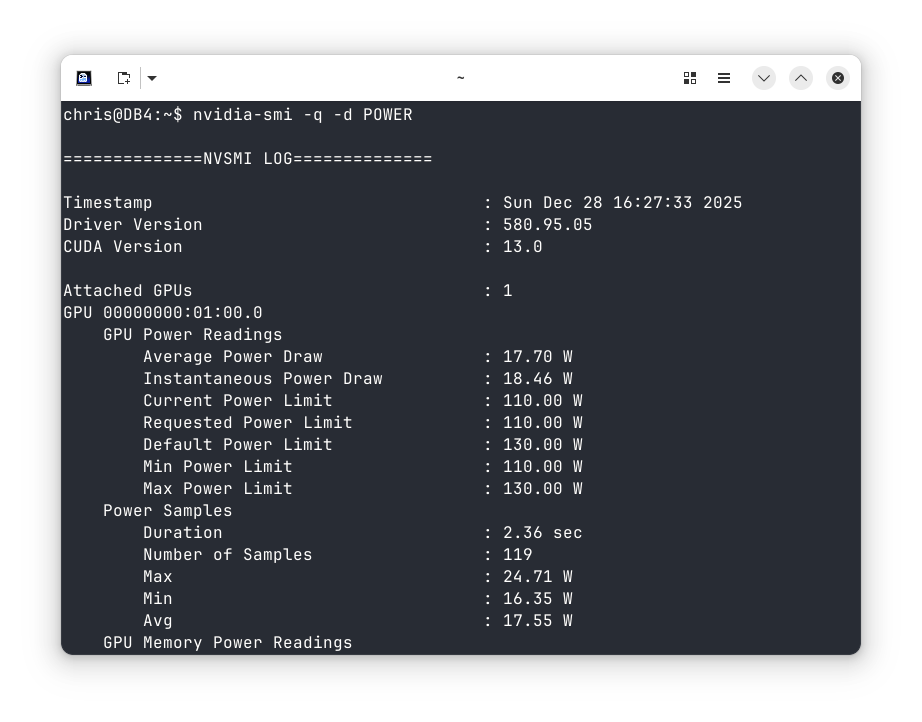
This could have gone much easier if…
- I’d known to uninstall the existing drivers first (and maybe even get the -open drivers in place)
- I’d reconfigured grub to make it easier to get into a console.
Performance (per watt)
I’ve not noticed any improvement in performance, but then I don’t generally use this PC for gaming.
According to GPU Monkey my old 1050 Ti scores 2mp or 0.0267mp/W.
The new 5050 scores 11mp, so 5.5x faster, but also consumes 130W to do that, so 1.73x more power. So only a 3.17x improvement in performance per Watt to give 0.0846mp/W.
Conclusion
This was an upgrade for necessity rather than something I really wanted. My daily use of the PC isn’t improved in any noticeable way.
I’m also a little concerned that I can’t limit the power to the rated capacity of the passive cooling, so if I ever do drive it hard with some gaming it’s likely to overheat and hit thermal throttling.
Filed under: howto, technology | Leave a Comment
Tags: 1050 Ti, 5050, console, cooling, drivers, GPU, grub, GTX, Kubuntu, Linux, NVidia, Palit, passive, power, RTX, silent, StormX
Subscribe
Recent Comments
Chris Swan on Milo cancer diary part 20… Chris Swan on Milo cancer diary part 20… Chris Swan on USB C Charger Reviews Peter on USB C Charger Reviews “Yes, ma’am” – being… on July 2025  Pinboard.in bookmarks
- An error has occurred; the feed is probably down. Try again later.


 Chris Swan's Weblog
No Responses Yet to “Silent PC GPU upgrade”