TL;DR
The DNS you’re using for a given domain may not have a suitable API for automating DNS-01 challenges, but that can be worked around by delegating to a sub domain (say acme.example.com) hosted somewhere that has a decent API.
Background
I was recently setting up some new services that would need TLS certificates. One of those services would not be publicly accessible, so HTTP-01 challenges weren’t going to work. No problem, I was planning to use Caddy on the front end, and I’d already used it elsewhere with DNS-01 challenges being answered by DigitalOcean DNS[1].
The problem was that the domain I was working with had DNS on NameCheap, and whilst they do have an API it’s terrible. I seemed to be faced with choosing the lesser evil of:
- Move the entire domain to another DNS provider, which is lots of busywork, and some risk of causing failures for existing stuff.
- Put the new services onto a subdomain, which would mean different URLs from what had been agreed (service1.something.example.com rather than service1.example.com).
- Create a DNS delegation for the subdomain representing each of the new services (service1.example.com etc.) – more busywork.
I didn’t like any of those, but I was leaning towards the latter (even though I feared it might cause issues around moving the apex).
DNS delegation to the rescue
I then discovered that I could work around things with a few DNS (and Caddy) tricks. Better still, there was already a subdomain delegated to DigitalOcean, so I could simply reuse that.
All I had to do was CNAME _acme-challenge.service1 to _acme-challenge.service1.acme.example.com
That would mean that the ACME challenge TXT records for service1 would be found in the delegated acme subdomain.
But… I also needed to ensure that the TXT records would be created in the right place. Thankfully Caddy has a setting for that, and I simply had to add this to the tls section of Caddyfile:
dns_challenge_override_domain _acme-challenge.service1.acme.example.com
Hopefully this all goes away soon
Once the DNS-PERSIST-01 challenge validation gets widely implemented there will no longer be any need for the workaround described above. I should be able to simply bind a domain to an ACME account key, and then get certificates for any name within that domain.
Note
[1] I even have a little CD pipeline to automate building Docker images with the DigitalOcean module for Caddy baked in.
Filed under: howto, security | Leave a Comment
Tags: ACME, API, Caddy, DigitalOcean, DNS, DNS-01, DNS-PERSIST-01, tls
October 2026
Pupdate
The month started out unusually warm and dry, so we got in some good long walks before the paths turn muddy.
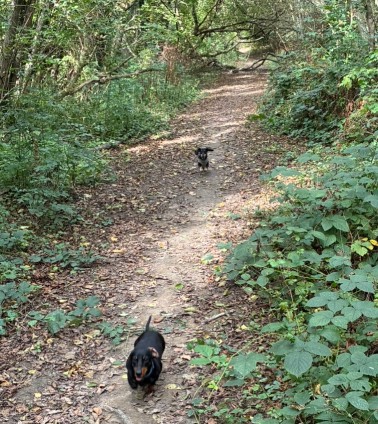
By the end of the month their coats were back in use, as it had got cold and wet :(
Rachel Parris
We’ve been fans of Rachel Parris since first seeing her in one of our early trips to Edinburgh Fringe. We loved her on The Mash Report, and Tuesday Night Club with husband Marcus Brigstocke is one of the things that helped us survive COVID lockdown. So when her tour passed by our way of course we grabbed tickets.
Her set at Lewes Con Club was very much old skool Rachel Parris, with her singing catchy funny dittys, including ‘Hen Do On A Train‘, which naturally follwed on of the warm up acts (and also fits well for a venue close to Brighton).
Kubuntu upgrade
This should have been so simple – press the button, let the upgrader do its thing, carry on with what I was doing.
It’s a good job that I chose a quiet Saturday to upgrade to Kubuntu 26.04, because after rebooting I got no login screen. After many reboots and much fiddling (including switching away from Plasma to the regular Ubuntu desktop – ugh) I tracked it down to a USB device driver issue. It seems that Plasma needed libusbmuxd-2.0.so.6, but I’d been upgraded to libusbmuxd-2.0.so.7. A symlink sorted things out and I had my desktop back :)
More RCBOs
The ‘nuisance trips’ I wrote about almost a decade ago in ‘Restoring Power‘ were back. But not on any of the circuits that had been moved to residual current circuit breakers with overcurrent protection (RCBOs). The problem was all of the things left hanging off a single residual current device (RCD). Or more accurately all the things that had been added to that RCD: the heat pump, the solar panels, and the iBoost water heater. All those new things have inverters, and associated big capacitors, which can create the impression of earth leaks – especially when they’re all ganged up. The heat pump seemed particularly problematic[1], which isn’t surprising given that it’s sat outside in what’s been some atrocious weather. On resetting the RCD it would quite often get about a minute into it’s startup cycle and then trip everything again. I made sure it wasn’t full of cobwebs and other detritus, but that wasn’t enough – the trips kept coming.
So… (once again) out with the MCBs off a single RCD, and in with an individual RCBO for each circuit. Nick from CSK Electrical quoted me £300 for the job (including the new breakers), and he was done in less than an hour :)
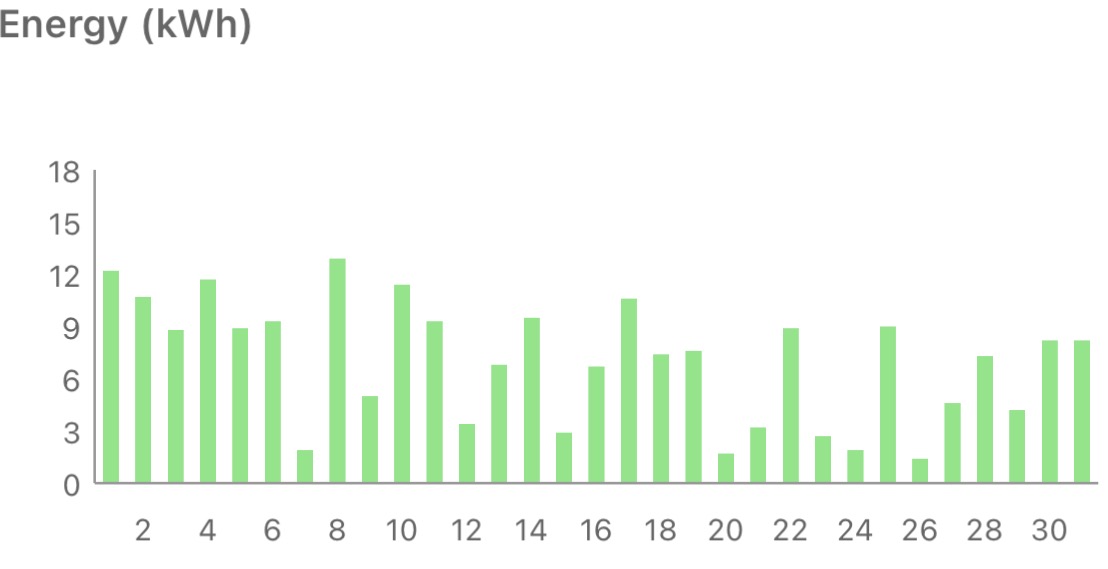
Solar diary
Better than the last couple of Octobers, but not as good as the first couple.
Note
[1] Nick the Electrician pointed me to The RCD Problem Nobody Warned You About!, which takes a very detailed look at the complexities of heat pump protection. As it turns out Daikin doesn’t specify a type for my heat pump, and Contactum doesn’t make Type B (or F) RCBOs; so we took the simple/cheap option of fitting a regular Type A.
Filed under: monthly_update | Leave a Comment
Tags: RCBO, pupdate, solar, Miniature Dachshund, Rachel Parris, Kubuntu, 26.04
Private keys for eight eMudhra intermediate Certificate Authority (CA) certificates have been compromised, making it trivial for attackers to forge certificates that would be trusted by unpatched roots of trust. Six of the impacted certificates were for Transport Layer Security (TLS) and trusted by the Apple, Chrome, Microsoft and Mozilla root programs. The other two certificates were for codesigning and trusted by Microsoft. Browsers were able to block the affected intermediate CAs using their background revocation blocklists, but most other software relying on web public key infrastructure (PKI) lacks any mechanism to filter intermediate CAs. In order to defend against rogue certificates from the compromised intermediate CAs many projects have chosen to remove the emSign ECC Root CA – G3 from their roots of trust. That removal is causing collateral damage for all legitimate certificates previously issued by CAs chained to that root.
Filed under: InfoQ news, security | Leave a Comment
Tags: CA, certificate, PKI, tls, trust
September 2026
Pupdate
The heat wave(s) finally let up, but much of the month was still warm and sunny, allowing for some good walks.
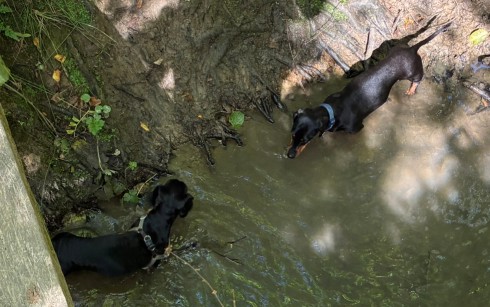
As I covered in an earlier post, Milo’s back in remission :)
Caskmaster
The Scotch Malt Whisky Society (SMWS) has started running a tasting competition called Caskmaster, with heats in various tasting rooms around the country and a final in November in Leith. I think it’s intended to get people into the new flavour profiles, but it was also an excuse to get some friends together for the London heat.
None of us scored very well, so we won’t be headed to Leith; though we made friends with an attendee on their own at a table next to us. He will be headed to the final, and our whole group is rooting for him.
Buxted Park
When we went to a wedding at Buxted Park it stood out as somewhere we might return to for our anniversary. We were blessed with a beautiful day for it.

Surprisingly there wasn’t a wedding happening (on what’s often one of the most popular weekends), which likely explains how we were able to get a room. We were able to walk from our room to a park bench in the grounds and enjoy the scenery and some bubbles before a wander around the grounds. Dinner was delicious, and breakfast was also excellent. Certainly somewhere we’ll consider returning to.
Cory Doctorow
The tour for ‘The Reverse Centaur’s Guide to Life After AI‘ came by Brighton which gave my pal Gav and I the excuse we needed for an evening out (and a few beers). Carole Cadwalladr did an excellent job of interviewing Cory, and certainly brought a lot of her own perspective to the discussion.
RC2014 Assembly 2.0
Last year’s gathering of the retro Z80 clan was great fun, so I’m glad that Spencer organised another this year. The National Museum of Computing (TNMOC) is such a great venue, and I really enjoyed the new ‘From Flowers to Fibre‘ exhibit. As with last time it was good to meet people in the community, and chat to some of the museum volunteers.
I was also very glad to have taken the train, as the queue of traffic to get into Bletchley (Theme) Park was insane (apparently because they had some kind of 40s revival event going on).
Repair
Two laptop repairs this month:
- I noticed that my gaming laptop wasn’t charging, and diagnostics showed a fault with the battery. So I ordered a Seaplant SR04XL (affiliate link) replacement, and followed this Ifixit guide to fit it. The whole process was very simple and done in a few minutes.
- Quite the contrast was replacing the keyboard on $son0’s gaming laptop. This video showed me how to do it, which is essentially a total strip down of the laptop (except the screen). It took hours; and the most frustrating bit was having to melt off dozens of plastic fasteners. I guess some genius at HP managed to shave a few cents off the build costs at the expense of making repair a total nightmare[1].
I also had to replace a rubber strip on my Horizon Andes 7i elliptical trainer. Towards the end of a workout one day it started to make a nasty bumping noise on each rotation, which I could also feel. It took me a while to track that down to a split rubber strip under one of the guide runners. Johnson Health Tech seem to have now hidden their parts info behind a registration wall, and I didn’t even hear back from them until after the repair was done (and I’ve still not got any access as they’re demanding more info beyond what was already asked in the registration form). Luckily I was able to find self adhesive rubber strip of similar dimensions on Amazon (affiliate link). The hardest part was cleaning off the residue of the old strip.
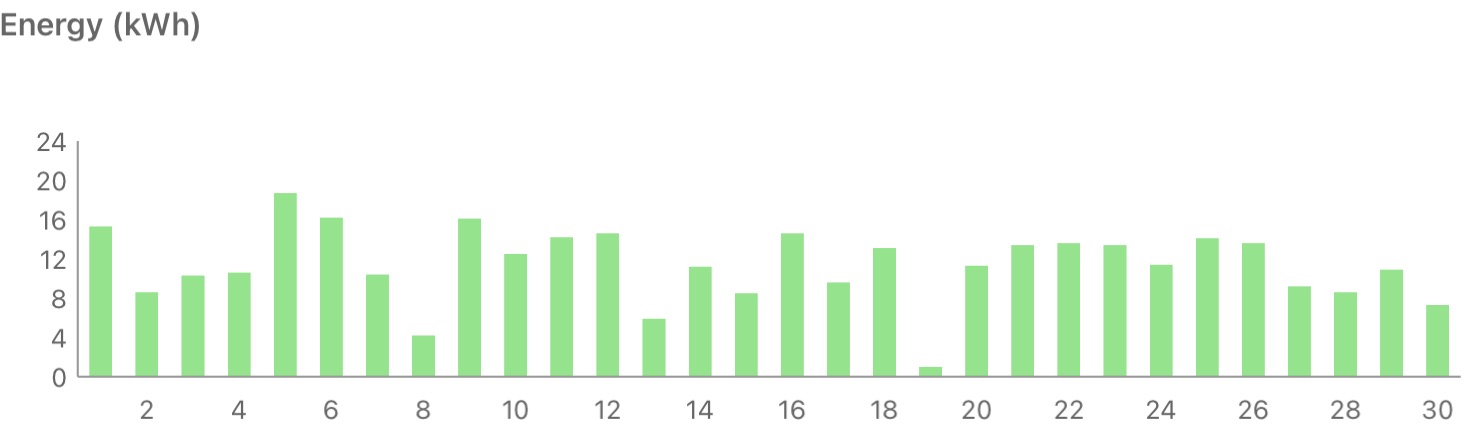
Solar Diary
The streak of breaking records came to an end, with a pretty average September compared to past years.
Note
[1] Since firms like HP are on the hook for repairing laptops whilst in warranty I wonder if anybody ever runs the numbers for trade offs like this where a slightly lower cost to manufacture leads to a much increased cost to repair?
Filed under: monthly_update | 1 Comment
Tags: Buxted Park, Cory Doctorow, laptop, Miniature Dachshund, pupdate, RC2014, repair, retro, SMWS, solar, whisky
This is very much a repeat of part 22 ‘remission again’ from earlier in the year.

The fifth protocol has worked, and once again everything went smoothly until the visit to NDSR for Epirubicin where we had to delay things a little whilst his neutrophils recovered. I should probably pay more attention to the treatment tracker spreadsheet to adapt things to past patterns so we’re not wasting time and money on vet visits.
Past parts:
Filed under: MiloCancerDiary | Leave a Comment
Tags: cancer, chemo, chemotherapy, CHOP, Epirubicin, lymphoma, Miniature Dachshund, remission, scan
The stories we tell
TL;DR
Large Language Model (LLM) based Artificial Intelligence (AI) may be great at cranking out plausible sentences. But stringing those sentences together to form some kind of narrative doesn’t get a good story. That’s a problem, and an opportunity; because humans run on stories, and (for now at least) it seems that we still need humans to craft good stories.
Accelerating the epistemic crisis
I’m pretty sure we were in an epistemic crisis before LLM based AI came along, which is how we got filter failure at the outrage factory etc. But the torrent of slop sure isn’t helping. Search results are being poisoned, but that hardly matters, because search was already being enshittified; and now search is trumped by hallucinatory AI summaries[1].
But… there’s always an opportunity to do better. It’s becoming clear that AI is atrocious at telling good stories, which makes it clear where humans can add value.
The ‘triple threat’ data scientist
In my last job I talked about data scientists needing to be skilled in three areas:
- Statistics – being able to understand the shape of data, and what analysis actually meant
- Domain expertise – knowing enough about the context of data to get how it applied to a particular problem
- Storytelling – crafting a compelling narrative that drove understanding of why things needed to change
There were plenty of science/maths folk who could do (1), and they were generally quick studies who could easily grasp (2); so it was the storytelling (3) that was the real differentiatior[2].
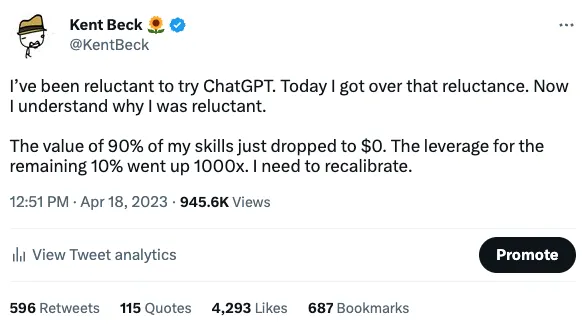
The grim reality was that these highly skilled (and highly compensated[3]) people spent around 90% of their time on ‘janatorial’ work, cleaning up the data so that it could be analysed. I sense that things aren’t the same with that any more, but it just makes the storytelling more important. As Kent Beck put it: ‘90% of My Skills Are Now Worth $0
…but the other 10% are worth 1000x‘.
Plausible sentences and slop grenades
I quite like Cory Doctorow’s description of LLMs as ‘plausible sentence generators‘, and when I need a plausible sentence generated, that I can’t just pull from my own thoughts, I’m happy to reach for one.
But a string of plausible sentences doesn’t get us to clear and concise explanations of things. I recently heard Shopify founder Tobias Lütke talking about ‘slop grenades‘, which for me perfectly captures the challenge of wading through wordy protracted things that might be ‘right’, but take far too long getting the point over. Work is being transferred from the writer (where the human pressing some buttons may also have zero comprehension) to the reader.
It’s the XML problem all over again. Easy to create, and a pain to parse.
I have proof
Nowhere is this problem more telling than the recent (much hyped) AI breakthroughs on longstanding maths problems like Navier-Stokes. OpenAI might trumpet that they have a ‘solution‘, but it’s incomprehensible garbage that’s come from the application of brute force. It doesn’t advance our understanding of maths, because no human mathematician can articulate the ‘proof’ as a story. Eamon Duede perfectly encapsulates this in his (great story) ‘After Math‘[4], and of course he references the declaration from past Fields Medallists ‘A Severe Misalignment of AI in Mathematics‘.
What to do…
We can tell better stories, and we can learn to get better at telling stories. Writing is thinking, and writing more frequently (not more volume) tends to improve our skill.
Notes
[1] I’m still cross about trying to visit somebody in hospital at 1000 a few weekends back only to find that visiting started at 1400, because I’d made the mistake of believing an AI summary rather than checking a source for truth.
[2] I suspect this largely comes down to the fork in education between science and humanities, where the science kids suddenly stop doing anything that hones their storytelling skills.
[3] We couldn’t actually hire full time data scientists, as they simply didn’t fit into the ‘ladders and levels’ that HR stomped onto everything. A relatively junior data scientist commanded the salary of a time served VP, and that would not do. So those we worked with all came from ‘partner’ companies.
[4] Bonus points for punny title.
Filed under: AI | Leave a Comment
Tags: AI, data science, epistemic crisis, ffof, LLM, mathematics, maths, proof, slop, slop grenade, stories, story, writing
The impersonal AI advantage
TL;DR
Open source projects that I contribute to have adopted AI bots to ease the pull request (PR) process. It might just be me (though I doubt it), but somehow it feels less like a personal attack when a bot tells you what’s wrong with your PR than when it’s a person doing it. This is likely a multiple win for maintainers – less toil, fewer confrontations, and thus more precious attention to focus on making their project better.
Easier to swallow
I love open source, and it’s been my honour to contribute to many of the projects I admire over the years. But contributing can be a difficult and fractious process, especially for a first time contributor to a mature project. Maintainers may have spent years establishing their project culture – ‘how things work around here’, and that doesn’t necessarily get completely captured in contributing.md. They also know their way around the code to an extent that a less involved contributor never will.
Somebody (like me) shows up eager to make things even better, but that enthusiasm can be quickly dented by (seemingly) negative feedback from the maintainers. Your being told, by a person, that your work isn’t good enough. It takes some fortitude on both sides – the contributor has to accept the feedback and keep on trying, whilst the maintainer(s) need to keep expending effort that’s unlikely to be worth it for a single PR[1]. Hopefully they’re shaping a future contributor who’ll come back with more improvements, and fewer silly mistakes – next time.
Bots take the person, and the emotion out of the picture.
If my PR fails a bunch of continuous integration (CI) tests, then I don’t get angry with the tests; I just know that I’ve made a foolish mistake that needs to be fixed.
Similarly if a large language model (LLM) based bot tells me to sharpen things up (in aspects that maybe aren’t so easy to turn into CI tests) then I know there’s no point in trying to argue with it. Just do the thing and hope that the next pass works better.
Infinitely patient
All too often maintainers aren’t great at telling you what’s needed to make things satisfactory. They know what good looks like, you should know too – it’s all there in the repo, and past PRs. Do they really have to spoon feed you every little detail? It’s all so tiresome.
The bot doesn’t get bored, or frustrated, or come across as antagonistic. It just says what’s wrong, and suggests how to make it right.
Easing toil
There have been a lot of words typed on blogs and opinion pieces, or said on podcasts, about how AI is destroying open source; where torrents of slop are inundating maintainers.
And this feels like the fight back. AI tools to do the tiresome stuff, the toil, so that maintainers can spent their precious time and mental sanity on things that really matter.
My personal experience of this has been with ‘artisan’ PRs lovingly created by hand. Though I suspect things work much the same for PRs made my agents. The contributing agent can iterate with the reviewing bot until things are in shape – it’s all just part of the ‘loop’.
Conclusion
There’s been a lot of gloom about open source in a post AI world, and this feels like a ray of hope.
Just like it’s ‘better’ to deal with a website than a call centre, it can also be better to deal with a bot than a real person – on both sides of the relationship.
Note
[1] My first PR for one project ran to 29 comments, from 4 maintainers, resulting in 15 commits. It felt like a hazing ritual.
Filed under: AI, did_do_better, software | Leave a Comment
Tags: AI, bot, contributor, maintainer, open source, PR, pull request, toil
August 2026
Pupdate
We were back in the Lake District (more on that later), so the boys were able to get out for some nice long walks.

Going a month later than usual meant that there were no grouse on the estate but there were loads of ripe blackberries, which the boys enjoyed browsing.
Sadly Milo’s scan when we got back showed that he’s relapsed, so he’s had to start chemo again – his fifth protocol :(
Chapel Down
Chapel Down have been doing a ‘Taste of England’ series of dinners with chefs selected from a competition. We were able to make the one with Ethan Pack, who’s head chef at Three Sheets, Soho.

Since we were going to be at Tenterden we also booked an afternoon wine tasting, and got to see first hand that the 2026 harvest is shaping up to be tremendous after all the sunny warm days of June/July/August.
Ethan’s dinner was delicious, and was complemented beautifully by the chosen wines.
We stayed at the White Lion again, which is becoming a firm favourite as the bar snacks and breakfast are delicious.
Lakes
After a couple of years in the smaller Dove Cottage we returned to Keepers Cottage (along with more of the family to fill the place up). The main difference was that it now has Starlink based Internet, which is way faster than the previous ADSL :) Though it was also nice that the path has been cleared around the fishing lake over the road, making it viable for a walk.

Over the years we’ve been up to ‘The View’ a few times, but this year we walked a trail that we’ve not been on before, and stumbled across an even better view:

We also walked the West Windermere Way again, this time going all the way to The Swan Hotel at Newby Bridge. That set a new record for longest walk that the boys have done, at 20.6km (12.8 miles).

By the end of the week it felt like we’d been there for about 3 days, a sure sign of a great holiday.
OSHcamp
It wasn’t long until I was heading up North again, to Hedben Bridge for Open Source Hardware camp 2026. Driving up on a bank holiday weekend wasn’t my smartest plan ever, and if I was just going to OSHcamp I’d have taken the train; but I needed the car to visit family and friends afterwards.
There’s a bit of overlap between the OSHcamp community and EMFcamp, so in some ways the event felt like an EMF afterparty. One of the organisers also mentioned that registration leapt up in the wake of EMFcamp.
I gave a talk on ‘RISC-V — the road to ubiquity’ just before lunch, which led to some great lunchtime conversations (and more in the pub later).
Vespa repair
My Vespa still isn’t working. It seems a bit cursed at the moment.
When I went to fit the new piston I found that the small end bearing from the last kit was too large. So I then had to wait for another to be delivered, meaning it was the next weekend before I could resume work.
Then I sheared a cylinder stud whilst torquing down the cylinder head, meaning another wait for delivery, and waiting until I was back from the Lakes to resume work.
After getting the top end back together (third time lucky) it won’t start, with the issue looking like low compression.
I’m starting to reconsider selling it as a project, especially as the Honda CUV e scooters I’ve got my eye on seem to be coming down in price.
Universal remote
I still have an old school digital video recorder (DVR), and its remote has been getting a bit frail and unreliable. It’s also annoying that I need three different remotes to watch something – TV, DVR and AV receiver. So… I got a One for All Essence 4 universal remote, and it’s worked out pretty well. It was a little fiddly to get programmed, as I had to ‘learn’ some of the buttons from the old remote(s) (mainly the DVR); but it’s taken over duty now, and the rest of the household seem to have adjusted to using it :)
Solar diary
Another record breaking month.
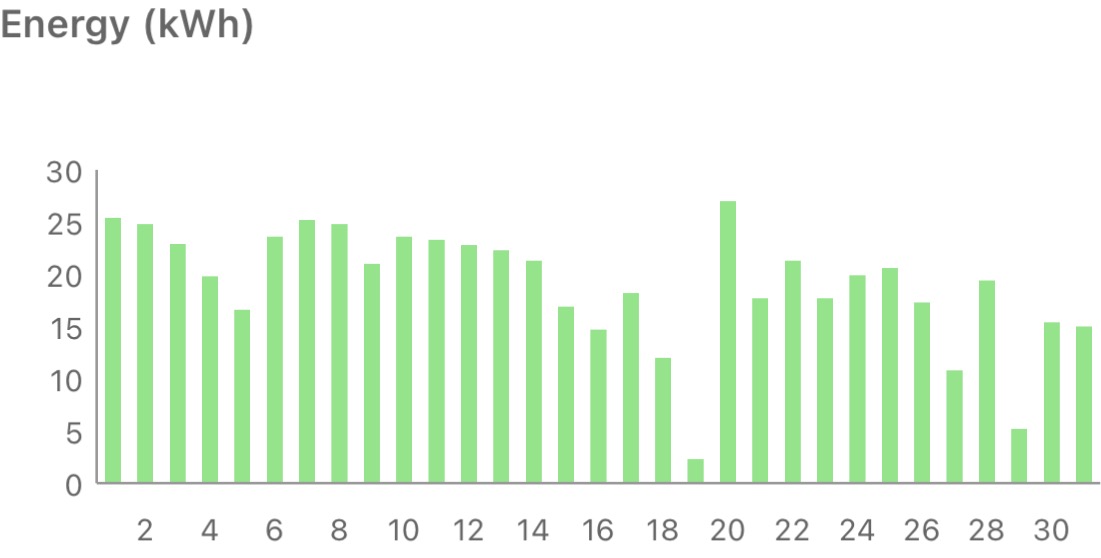
Something seemed to go a little odd with the data logging on the 19th :0
Filed under: monthly_update | Leave a Comment
Tags: Chapel Down, food, Lake District, Miniature Dachshund, OSHcamp, pupdate, solar, Universal remote, Vespa, wine, wine-tasting
It’s been a couple of months since Milo finished his fourth (modified) CHOP/CEOP protocol, and he’s been able to enjoy the summer without any vet visits[1].

We’d been hoping for a nice long remission like last year, but that wasn’t to be. A scan at the start of this week found a lesion on his duodenum, and the advice was to restart chemotherapy.
Our local vets The Mewes continue to be amazing, and they were able to get him in for vincristine the following day.
Ordering cholrambucil online from Weldricks went much smoother this time too, perhaps because I knew that I needed to mail in the prescription. The pills are already sat in my fridge for next week (so no worries about Bank Holiday related delays).
The oncologist we normally see at North Downs Specialist Referals (NDSR) was on leave (it’s still school holidays) and won’t be back until next week, so it’s not entirely clear yet whether we’re sticking with epirubicin or possibly switching to (something like) mitoxantrone; but we have a few weeks to figure that out.
Both insurance claims (for the scan at the specialist’s and the chemo the next day) got paid same day, so I stay very happy with the service from ManyPets. The policy has just renewed, so there was a fresh excess to pay.
Note
[1] He was supposed to have his annual vaccinations in the middle of August and there were no slots available that week in the online booking system so I just grabbed one for when we returned from holiday. I’m now wishing that I’d called up to squeeze him in, as he now won’t be able to get his boosters until after the protocol is done.
Past parts:
Filed under: MiloCancerDiary | Leave a Comment
Tags: cancer, chemo, chemotherapy, CHOP, Epirubicin, insurance, lymphoma, Miniature Dachshund, Mitoxantrone, relapse, scan
TL;DR
The attention economy dynamics for AI chatbots and agents are very different from social media, and so we’re seeing a whole new approach to capturing (and keeping) our attention. This comes down to fundamental human nature – the strongest fuel for groups is outrage; and whilst it might burn dirty and contaminate everything around it, it burns hot, and that keeps the money wheels turning. But as individuals, in what we perceive as one-to-one conversations, we prefer adoration; and that’s why AIs are sycophantic.
Outrage factories and their pollution
Social media platforms are outrage factories. They’re fuelled by outrage because (in social groups) outrage drives engagement, and engagement drives ad views, and ad views drive profit. It’s really that simple.
We could have social networks where we share pet pictures and nice stuff[1]; but they’d be a bit less profitable (even if the people using them would be a bit more happy).
I wrote Filter Failure at the Outrage Factory 7.5y ago, and more recently Clocking on at the Outrage Factory. In the mean time we’ve seen the man who (briefly) became the world’s first trillionaire buy their own outrage factory. What would you do with your outrage factory?
In the years that have passed I’ve seen no sign of people figuring out the harm that’s being caused. It’s also clear that politicians are blind to it. There are presently efforts across the Western world to age gate the Internet because of the harms to children (which are acknowledged). But almost nobody is saying “let’s stop the pollution” (for everybody) rather than “let’s stop kids from drinking from this poisoned well”.
I live in hope that eventually we/they get a clue. We did after all (eventually) deal with the pollution of the industrial age robber barons. On the other hand we have more pressing problems with CO2 pollution and climate change. Though on the other, other hand I’m pretty sure that pollution of our information space (by the outrage factories) is one of the things standing in the way of sensible discourse and coordinated action.
Enter the sychophants
Outrage might be powerful dirty fuel for group dynamics, but it’s pure poison one on one. When we meet people who repeatedly cause outrage in individual conversations we tend to label them as assholes and disengage. That’s why our AI chatbots and agents don’t take the position of edge lord provocateurs[2]. Instead, they tell us we’re brilliant.
Once again this is a move (sometimes by the same companies that run the outrage factories) to hold our engagement.
Once again, we might be selling our attention too cheaply.
In the Science article ‘Sycophantic AI decreases prosocial intentions and promotes dependence‘ the editor’s summary states:
The sycophantic (flattering, people-pleasing, affirming) behavior of artificial intelligence (AI) chatbots, which has been designed to increase user engagement, poses risks as people increasingly seek advice about interpersonal dilemmas. There is usually more than one side to a story during interpersonal conflicts. If AI is designed to tell users what they want to hear instead of challenging their perspectives, then are such systems likely to motivate people to accept responsibility for their own contribution to conflicts and repair relationships? Cheng et al. measured the prevalence of social sycophancy across 11 leading large language models (see the Perspective by Perry). The model’s responses were nearly 50% more sycophantic than humans’, even when users engaged in unethical, illegal, or harmful behaviors. Users preferred and trusted sycophantic AI responses, incentivizing AI developers to preserve sycophancy despite the risks.
But the key here is ‘promotes dependence’. That $Tn infrastructure bubble isn’t going to pay itself down; it needs hooked users.
Sycophancy (artificial intelligence) already has its own page on Wikipedia (and it’s not a short one).
Conclusion
AI chatbots and agents are sycophantic for the same reason that social media platforms algorithmically amplify outrage – to hold our attention. The mechanics are different, but the intention (and outcomes) are the same. The harms may also be different, but that doesn’t mean there’s no harm. As before, proceed with caution, and think about whether you’re spending your attention wisely.
Notes
[1] Ah… Facebook in 2008.
[2] And they could if they wanted to, as I’m sure the training data has scrapes of 4Chan etc.
Filed under: technology | Leave a Comment
Tags: adoration, agent, AI, attention, chatbot, groups, individuals, outrage, pollution, social media, sychophant


