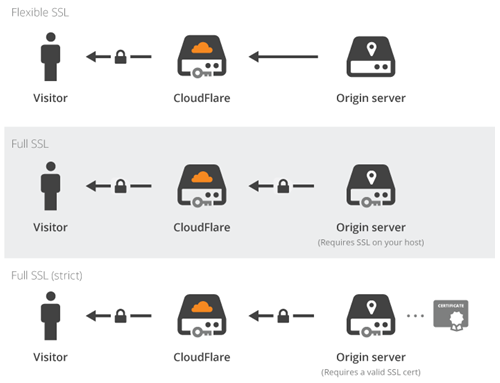
CloudFlare have made SSL available to all free subscribers to its content delivery network (CDN) with Universal SSL. The move addresses both cost and complexity issues that have previously confronted web site and application owners wanting to deploy SSL. CloudFlare takes care of issuing a certificate at no cost to the end user, and enabling SSL becomes a selection from a dropdown menu.
continue reading the full story at InfoQ
Filed under: InfoQ news, security | Leave a Comment
Tags: CA, CDN, certificate, CloudFlare, security, SSL, tls, web
The WRTnode is a great new open source hardware dev board that takes the guts of a typical home router and makes it hackable. It’s more than an Arduino, less than a Raspberry Pi, and very network capable. WRTnode runs the OpenWRT Linux distribution, which I’ve used in the past on some of my home routers (to replace the awful firmware that gets shipped by OEMs).

One of its neat little party tricks is that it can be used to share a WiFi connection to multiple devices, so as I type I’m making use of that to share a hotel WiFi connection between my laptop, tablet and phone.
Developing for the WRTnode
The WRTnode Wiki has a section on OpenWRT Development with a classic HelloWorld application that’s build from source, packaged into an ipk file and installed. I struggled with this because copy/paste of the make files from the web to my text editor stripped out the tabs, and make needs those tabs otherwise you get ‘Make error: missing separator’.
Introducing wrthelp
The WRTnode has a number of commands to simplify getting online, which are covered in the Starting section of the Wiki. That’s fine if you can see the Wiki, but what if you need reminders of the commands so that you can get online (in order to see the Wiki)?
wrthelp is a simple command line tool (adapted from the helloworld example) that prints out the key instructions needed to get the WRTnode connected to a WiFi access point. The Github repo contains the source code and details for how to build, install and run.
Todo
Getting a working SDK was something of a pain, so I should probably Dockerise the one that I have to make it easily accessible.
I’m looking forward to doing some proper hacking with WRTnode (probably at the ThingMonk hack day.)
Update
1. The WRTnode SDK can be run in a Docker container using:
sudo docker run -it cpswan/wrtnodesdk
Take a look at the image and Dockerfile on Docker Hub and Github if you’re interested in the details.
Filed under: networking, WRTnode | 1 Comment
Tags: helloworld, OpenWRT, SDK, wrthelp, WRTnode
Docker Networking
Here’s my presentation from container.camp:
If you’re interested in a deeper dive then take a look at the Container Networking Tutorial I did for ONUG.
Filed under: Docker, networking, presentation | 2 Comments
Tags: Docker, Flocker, network, networking, ODCA, OpenVSwitch, OVS, pipework, vxlan, Weave
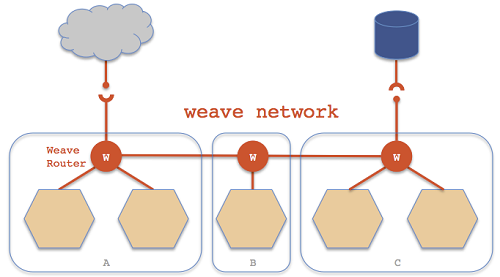
Weave is an overlay networking system for Docker containers. Whilst Docker can already link containers on a single host, Weave provides connectivity for containers that are spread across multiple hosts. It has been released under the Apache 2 open source license by Zettio, a new company targeting ‘apps for the zettabyte era’ founded by RabbitMQ creators Alexis Richardson and Matthias Radestock.
continue reading the full story at InfoQ
Filed under: Docker, InfoQ news, networking | Leave a Comment
Tags: Docker, InfoQ, networking, SDN, Weave
One of the big news items from last week’s VMworld was the launch of EVO:RAIL, a ‘hyperconverged infrastructure’ reference design with software from VMware and hardware from a variety of partners. The RAIL part of the name comes from the smallest unit of deployment that fits into 2U of standard rack space, and onto a single rail within that rack. EVO:RAIL is described as delivering ‘compute, network, storage and management’, and it’s worth picking apart what’s going on in each of those areas.
Continue reading at The Stack
Filed under: networking, The Stack | Leave a Comment
Tags: compute, EVO:RAIL, hyperconverged, management, network, SDN, storage, VMware, WMworld
This is my first longer article for InfoQ (rather than being a news item), and it’s intended to be a comprehensive backgrounder on Docker: ‘an overview of the Docker journey so far and where it is headed along with its growing ecosystem of tools for orchestration, composition and scaling. This article provides both a business and a technical point of view on Docker and separates the hype from the reality.’
Filed under: Docker, InfoQ news | Leave a Comment
Tags: Docker
I got my Lenovo X230 when I started with CohesiveFT almost 18 months ago. I’ve generally been very happy with it, but the cracks are starting to show – literally:
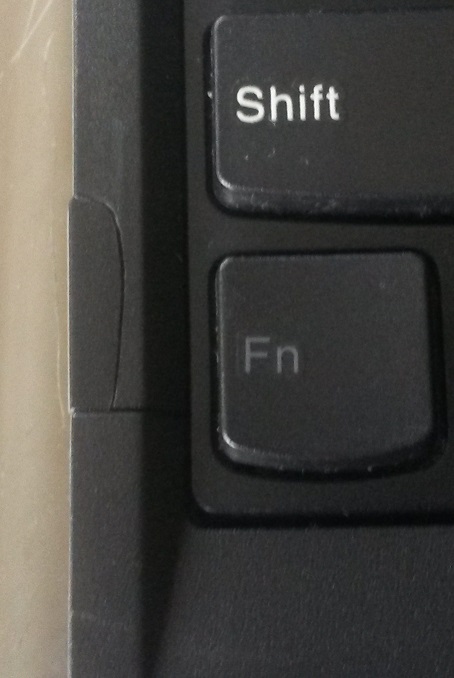
Frame above wrist pad coming away, and also a hairline crack at the top of the ExpressCard slot.
Not as robust
I’ve had a succession of ThinkPads – T20[1], T41, X60T, X201T, a loaner X220 from the good people at Bromium, and now my X230. They’ve all been pretty indestructible apart from the X230. The screen has always felt a bit flimsy, but now other bits are falling off it. Earlier in the week the ThinkPad logo on the wrist rest came off:
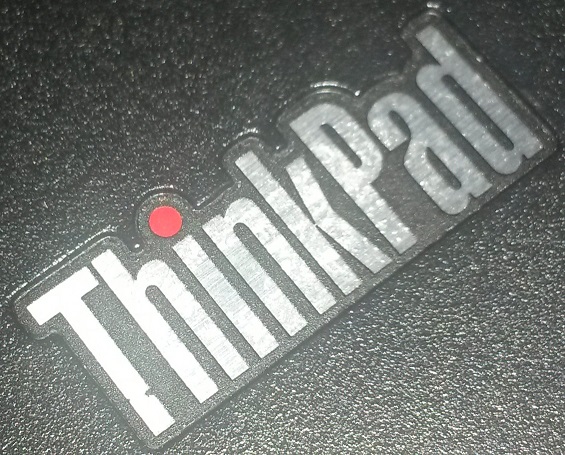
Look closely and see the marks from the superglue I used to put this back
and now I see that the indicator cover for the top LEDs has gone missing:
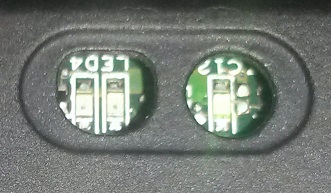
I don’t think I’ve been treating this one any harder than other ThinkPads I’ve owned, so I can only conclude that build quality is being compromised. I’d also note that my other Thinkpads have generally done 3 years of service before being retired, meaning that this one should only be half way through its journey. It also needs a new battery, as endurance has fallen from 5hrs to just over an hour – at least the battery is replaceable (and not too expensive).
The reason I got it in the first place
I chose the X230 because it can take 16GB RAM (and because I know from experience that 8GB isn’t enough for my typical usage). The newer X240 only takes 8GB RAM, which seems to me a significant step back.
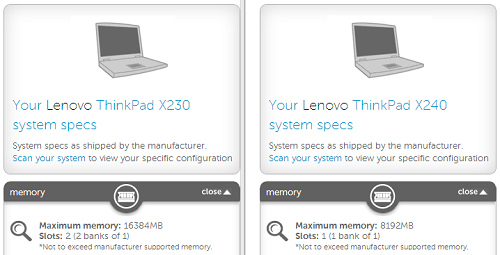
From the Crucial memory configurator
I’ll soldier on for the time being
As there really aren’t any great alternatives. I quite liked the Dell XPS13 that I got on loan a little while ago, but that also tops out at 8GB RAM. At a push I might go for a 13″ MacBook Pro with 16GB RAM, but what I really want is an 11″ (or better still 12″) MacBook Air with 16GB RAM (and a 1TB SSD[2]). My fingers are crossed that after this year’s Intel Developer Forum we see some serious machines with lots of RAM and storage in a lightweight and robust package (and not more gimmicky convertible tablety things).
Update 23 Apr 2020
The X230 wasn’t my last Lenovo in the end. I got an X250 when I changed jobs that’s lasted brilliantly for over 4 years, and more recently got a used X270 for my wife.
Notes
[1] My T20 survived an incident where a Newark taxi driver slammed the trunk down on my bag carving a gouge into the lid of the laptop. I’m pretty sure that most lesser machines would have been smashed to bits by that. My T20 came through with a scar, but it had no effect on how I used it, and it delivered a few more years of reliable service.
[2] I recently swapped out the Samsung 840 500GB SSD that I put in when I got the X230 for a Samsung 840 evo 1TB mSATA SSD. The process was pretty painless as I was able to have both drives in the laptop at once. Having completed the migration I moved the new SSD to an mSATA to SATA adaptor, as the mSATA port on the X230 is only SATA2, so I was missing the full (and impressive) speed of the newer drive.
Filed under: could_do_better, review | 11 Comments
Tags: lenovo, X230


 Chris Swan's Weblog