Raspberry Pi Satellite TV
My kids got quite into a few of the FreeSat channels whilst on a recent holiday, so I thought that after all the fun I had getting DVB-T to work on my Raspberry Pi I’d have a go at DVB-S.
Another cheap receiver off eBay
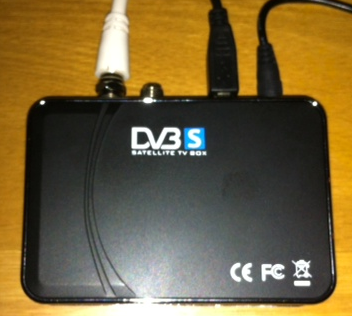
A quick search of ‘USB DVB-S’ led me to this receiver for the bargain price of £15.86, and the Linux TV Wiki seemed to confirm that it was supported. Sadly I was about to find out the difference between ‘supported’ and working out of the box; though not straight away, as it took many weeks for the receiver to get to me from Hong Kong.
Driver drama
After plugging it into my Raspberry Pi running a recent build of OpenELEC nothing happened. This wasn’t a total surprise, as I’ve recently been doing a fair bit of digging around in the driver mechanism getting DVB-T cards working for various devices.
When I took a look in ~/OpenELEC.tv/projects/RPi/linux/linux.arm.conf I found:
# CONFIG_DVB_USB_LME2510 is not set
I changed this as follows, cleared out the build directory and kicked off a rebuild:
CONFIG_DVB_USB_LME2510=m
Whilst OpenELEC was building I hooked the receiver up to my Windows 8 Microserver to prove to myself that it was working. I had issues there with drivers too, as the ones supplied aren’t signed, meaning that I had to restart Windows and allow the installation of unsigned drivers (thankfully the Arduino folks have a useful HowTo guide for this).
I got Satellite TV working using the supplied Blaze software, but the Pop Girl channel that my daughter likes was missing. It turned out that the Blaze setup for Astra at 28.2E didn’t include the multiplex, and I had to add it manually using details from KingOfSat. For good measure I also tried out Windows Media Center (having got a free license key from the recent Microsoft Promotion). The setup process gave me some confidence that I’d end up with a sensible EPG/channel list, but in reality there was loads missing. I’m now glad that I didn’t pay for Media Center.
With Windows play over I went back to the RPi with my lme2510 build, and things were looking promising (dmesg | grep 2510):
[ 8.644049] LME2510(C): Firmware Status: 6 (44)
[ 13.482794] LME2510(C): FRM Loading dvb-usb-lme2510c-rs2000.fw file
[ 13.482828] LME2510(C): FRM Starting Firmware Download
Sadly the adaptor wasn’t showing up in TV HeadEnd.
Firmware frustration
A quick look in /lib/firmware on my RPi showed that there wasn’t any dvb-usb-lme2510c-rs2000.fw file to be downloaded. The Linux TV Wiki and TvBoxSpy[1] had instructions for creating the firmware file, but it wasn’t obvious to me that I needed to start out with the Windows driver.
My attempt with the US2B0D_x64.sys that had installed on my Windows 8 box failed, so I installed onto an old XP netbook and pulled USB2B0D.sys off there. That didn’t work either, probably because it was a newer file. In the end I found the right version of the driver file in a forum post. All this fuss because the manufacturers don’t support Linux, and exert copyright on their Windows drivers (and parts thereof) is a real pain – it’s hardly like the driver firmware is of any use without the hardware.
Having found and spliced the right Windows driver file into a Linux firmware file I then had to drop it into OpenELEC, which meant mounting up the SYSTEM file with squashfs, copying everything out, adding the firmware to /lib/firmware and then using mksquashfs to build a new SYSTEM file (and md5sum to create a new SYSTEM.md5).
With new SYSTEM files in hand I combined them with unchanged KERNEL files and put them (with checksums) into the upgrade folder on my OpenELEC RPi. One more reboot and I finally had a system that would register the DVB device:
[ 7.797065] LME2510(C): Firmware Status: 6 (44)
[ 13.044104] LME2510(C): FRM Loading dvb-usb-lme2510c-rs2000.fw file
[ 13.044131] LME2510(C): FRM Starting Firmware Download
[ 15.492746] LME2510(C): FRM Firmware Download Completed – Resetting Device
[ 15.493023] usbcore: registered new interface driver LME2510C_DVB-S
[ 16.980020] LME2510(C): Firmware Status: 6 (47)
[ 16.980055] dvb-usb: found a ‘DM04_LME2510C_DVB-S RS2000’ in warm state.
[ 16.981327] DVB: registering new adapter (DM04_LME2510C_DVB-S RS2000)
[ 17.059523] LME2510(C): FE Found M88RS2000
[ 17.059573] DVB: registering adapter 0 frontend 0 (DM04_LME2510C_DVB-S RS2000 RS2000)…
[ 17.059993] LME2510(C): TUN Found RS2000 tuner
[ 17.060059] LME2510(C): INT Interrupt Service Started
[ 17.182799] Registered IR keymap rc-lme2510
[ 17.186119] dvb-usb: DM04_LME2510C_DVB-S RS2000 successfully initialized and connected.
[ 17.186160] LME2510(C): DEV registering device driver
Final furlong
The last bit of config was in TV HeadEnd. At last I could see the DVB-S receiver in the Configuration->TV Adaptors drop down menu. Next I manually added the mux I wanted (thank you again KingOfSat), and after some trial, error and a few restarts I had services found and channels mapped.
When I browsed to tv -> BSkyB and pressed play on Pop Girl I got a frozen screen, but a little more playing around resulted in a watchable ‘Sabrina the Teenage Witch’ (even if it was squashed up from an aspect ratio perspective). Sadly it wasn’t too long before the system lost lock, and needed a cold boot and a bit more playing around to get working again.
ToDo
I’m not on the latest version of TV Headend, so an upgrade might cure the aspect ratio issue and may even help with stability.
Conclusion
I was able to get Satellite TV playing on my Raspberry Pi. The (un)reliability means that that I’d qualify this as a science project rather than a dependable piece of consumer electronics. Maybe that will improve over time, or maybe I just spent almost £16 and a day of my time learning the hard way about DVB-S on Linux.
Notes
[1] Enormous thanks are due to Malcolm Priestly as creator of the LME2510 driver that’s in the Linux kernel. He has also answered a number of forum posts that got me pointed in the right direction.
Filed under: howto, media, Raspberry Pi, technology | 13 Comments
Tags: 22f0, 2510, 28.2E, 3344, Astra, dm04, driver, dvb, DVB-S, Eutelsat, frimware, LFE2510, M88RS2000, openelec, Pop Girl, Raspberry Pi, Raspi, RPi, satellite, tv, TVHeadEnd, XBMC
Subscribe
Recent Comments
Chris Swan on July 2026 Tim Swan on July 2026 Chris Swan on Brewster’s Trillions Ian Osborne on Brewster’s Trillions Monki Gras 2026: Wra… on Monki Gras 2026  Pinboard.in bookmarks
- Minimal SSH primer
- The Flat Curve Society
- Your Container Is Not a Sandbox: The State of MicroVM Isolation in 2026
- sideprojectslab/PD-64: A USB-PD switching PSU replacement for the C64 that also delivers galvanically insulated AC voltage
- Deepfakes are everywhere. The godfather of digital forensics is fighting back
- Tempest vs Tempest | The Making and Remaking of Atari's Iconic Video Game
- RISE RISC-V Runners: free, native RISC-V CI on GitHub
- The web is bearable with RSS
- House of Lords Digital & Communications Committee - AI, copyright & the creative industries
- CI/CD for Context in Agentic Coding: Same Pipeline, Different Rules


 Chris Swan's Weblog
Try looking at DVBlink on
youtube
DVBlink clearly manages to do DVB-S on Linux boxes (like the Synology NAS), but I’m not sure that it helps much with the issues I faced as it seems to be limited to a small list of well supported (and expensive) adaptors.
Chris, do you remember how you got TVHeadend to detect available services. My unit seems to detect muxes great, but the initial scan always returns 0 services.
No wories if not, it’s been a couple of months since you posted this, and the info here has been a great help getting to this point already.
I don’t remember how I did it, but I do recall that it was a fiddly process, and required more than my usual patience.
Nice efforts from Priestly and Palosaari, but it’s typical EZCrAP quality making more money by changing tuner design to such low quality M88RS2000 buggy firmware based chips and hiding for good reason under manufacturer unbacktrackable “DM04x” marketing label
community developers can do not much about with a better driver
because the firmware is just crap and will never get fixed,
http://www.montage-tech.com/index.html (no support, no drivers, no firmware fixes)
windos and linux dvb user reports agree on this:
http://core.adriel.co.nz/USB_Satellite_TV#DM04_.28cheap_and_buggy.29
Although, SZFV has already dropped support for this crap in 2008(!)
http://www.szforwardvideo.com/support/Supp_19_7.html (dead download links),
some chinese Ebay crooks still want to rip non-english speaking consumers which cannot read the above test reports, off with prices up to 30 US$ for such electronic waste they throw in the U.S. with 1cent(!) US$ Ebay auctions!
Don’t buy this shit and feedback those seller gangs respectively and claim Ebay BP if You’ve already bought and suffer!
Has anyone got a device with the M88RS6000?
It has more pins
http://www.montage-tech.com/Product_RS6000.htm
so hopefully they dropped the failed firmware based design and this chip could maintain an acceptable quality by good (OSS) drivers.
Chris, are you still using your DVB-S tuner with Raspbmc? I have one and once I get it working it goes ok for a little while. But then it seems to go asleep, and then I have to power cycle the DVB-S tuner (and reboot Rasp Pi).
I have a DVB-T tuner aswell, and that works fine (even with one HD channel).
But with the DVB-S tuner, I keep needing to reset/restart/reboot all the time.
Is yours working stable?
Thanks.
The DVB-S tuner that I got was never reliable enough for me to continue using it.
Thanks Chris,
I was thinking maybe it’s unreliable because of some interference on the USB bus with my other tuner (DVB-T) which is connected at the same time.
But, I take it you were only using one DVB-S tuner (and not using another tuner at the same time?). And it was still unreliable?
Probably the best one for Raspbmc seems to be the sundtek one
(http://sundtek.com/shop/Digital-TV-Sticks-oxid/Sundtek-SkyTV-Ultimate-DVB-S/S2.html)
(I’m a bit reluctant to buy another one … in case I just end up with the same unreliability issues again)
Thanks.
Best regards,
Niall.
Yes, I was only using one type of DVB at a time, and my cheap DVB-S was very flaky. I’d expect that the problems were with the firmware, so if others have found a different model that is reliable then it’s probably worth a go. I haven’t persisted as I simply don’t have that much need for satellite TV, so I was OK with it being an experiment that didn’t quite work out.
You are amazing, good work.
I have the same device and am absolutely struggling to get it to work in Windows 8 x64, or find a full windows xp 32 bit driver (I know of the dll you reference up there but does the driver need more? I am currently installing a vm to run windows xp and try to get it to work there, but lack a cd drive just this second.
I also tried debian but ran into complicated build errors with v4l that I plan on working through, but figure I will try xp first.
It seems like a Windows 8 x64 driver (even with driver signing off to try other x64 drivers) doesn’t exist…
I’m thinking the actual answer might be get a cd drive and try the cd it came with?
Really awesome work. Would it be possible for you to upload a copy of the working Windows 8 driver files? I am having a very hard time with this card and the drivers that shipped with my cd tell me
“Driver is not intended for this platform”
even though I have disabled driver signature checking.
It’s been way too long since I did this, and the only part of the project I can find right now is the power supply – so it seems that I’ve lost the install CD.
I got it working, am watching TV now. Had to disable driver signing via the royal sniper bna driver guide, modify the inf changing stuff about nt64, keep driver signing off using the hold shift key, reboot with advanced, option 7, find temp folder that driver stores itself in, install driver from found cd copied onto thumb drive at local library and then it worked after installing progdvb and setting lnb