VLANs on Sodola managed switches
TL;DR
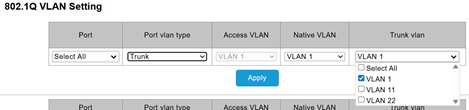
There’s an aspect to the web user interface of Sodola switches that’s far from obvious, and not documented :/ When setting up trunk ports it’s necessary to select all the VLANs that will be carried, and the default is only to select VLAN 1.
Background
I’m starting to accumulate a small selection of things with 2.5gbe ports – my GL.iNet Flint 2 router, the motherboard in my silent desktop, and the Zyxel NWA50AX Pro access point I got to complement the Flint 2 (running OpenWrt naturally). It wasn’t practical to plug everything directly into the Flint 2, so I needed some new switches.
With some building work going on in the house the physical trunk running between the coat cupboard containing the router and my office with the PC and access point was open, so I took the opportunity to drop a fiber SFP cable (affiliate link) to create a 10G network trunk. I just needed a pair of switches to light up that link, and I went for a Sodola 6 port (SL902-SWTGW124AS) and 9 port (SL902-SWTGW218AS) [affiliate links] to replace 5 port and 8 port TP-Link gigabit switches.
VLANs
My VLANs setup is fairly straightforward with the following 802.1Q tags:
- 1 – Default home network
- 11 – Guest network (mainly used for WiFi)
- 22 – Devices network
The 6 port switch needed tag 22 to emerge on the wire for the network dongle in my Growatt inverter[1]. Here’s the config I ended up with:
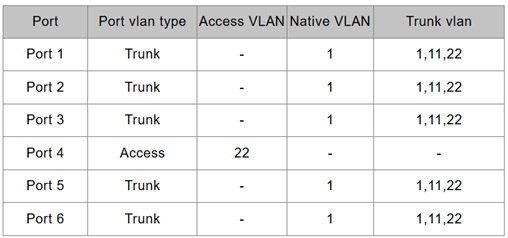
This wasn’t working initially because the default when creating a trunk is to select just VLAN 1, and the checkboxes to select all (or pick specific tags) wasn’t obvious to me.
Saving config
A few reviews for these switches complain about them being forgetful, and I can see why. I tripped across this myself after setting an IP on my home network subnet, and then relocating the switch and finding it had returned to default 192.168.2.1 :(
All that’s needed is to press the ‘Save configuration’ button after making changes, but that’s a break from usual expectation that changes stick.
Conclusion
With VLANs set and config saved I’m happy with these switches, and I can see myself adding more as I add more 2.5G and 10G to my network.
Filed under: networking, review | Leave a Comment
Tags: 10G, 2.5G, 6 port, 802.1Q, 9 port, config, fiber, OpenWRT, SFP, SFP+, SL902-SWTGW124AS, SL902-SWTGW218AS, Sodola, tag, trunk, UI, UX, VLAN, VLANs
Subscribe
Recent Comments
Chris Swan on July 2026 Tim Swan on July 2026 Chris Swan on Brewster’s Trillions Ian Osborne on Brewster’s Trillions Monki Gras 2026: Wra… on Monki Gras 2026  Pinboard.in bookmarks
- On proof and progress in mathematics (pdf)
- Minimal SSH primer
- The Flat Curve Society
- Your Container Is Not a Sandbox: The State of MicroVM Isolation in 2026
- sideprojectslab/PD-64: A USB-PD switching PSU replacement for the C64 that also delivers galvanically insulated AC voltage
- Deepfakes are everywhere. The godfather of digital forensics is fighting back
- Tempest vs Tempest | The Making and Remaking of Atari's Iconic Video Game
- RISE RISC-V Runners: free, native RISC-V CI on GitHub
- The web is bearable with RSS
- House of Lords Digital & Communications Committee - AI, copyright & the creative industries


No Responses Yet to “VLANs on Sodola managed switches”