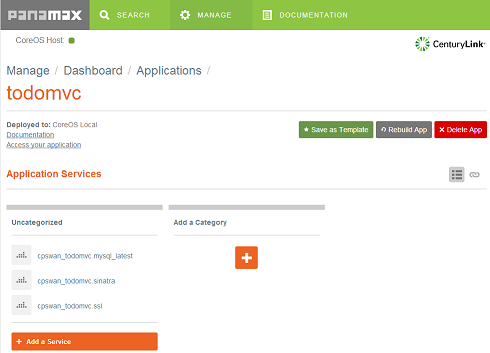
CenturyLink has launched Panamax, a tool that they describe as ‘Docker Management for Humans’. Panamax distinguishes itself from other composition tools for Docker by offering a web based user interface, which can be used to compose multiple Docker containers into templates that can then be shared on GitHub. Alongside the launch of the open source project CenturyLink are running the ‘Panamax App Template Challenge 2014’, a competition offering $100,000 in prizes for the best submissions across a variety of categories.
continue reading the full story at InfoQ
Filed under: cloud, Docker, InfoQ news | Leave a Comment
Tags: CenturyLink, cloud, composition, Docker, Panamax
USB Shaver Charger
TL;DR
I hacked together my own USB shaver charger using a cheap DC-DC converter I bought on eBay, so fewer worries (and things to carry) next time I’m travelling.

Background
I use an electric shaver most days, and I travel a fair bit. Usually the battery is enough to get me through a trip, but if I’m away for weeks then I need to recharge.
The charger that came with my shaver (in the UK) is a European type like this:
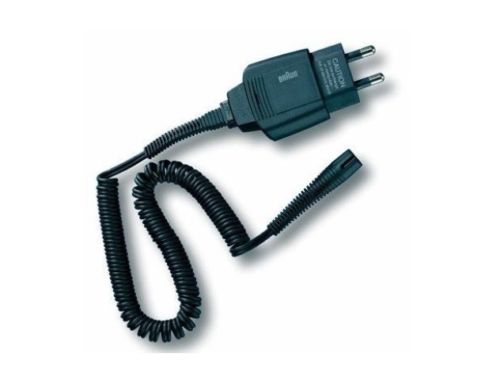
If I had a US charger, I’d be fine, because most places in Europe have both types. Sadly the reverse isn’t true, so it’s less common to find European sockets in the US.
To make things worse the European shaver plug looks like a Swiss style plug, but actually has larger prongs, so it doesn’t just fit into a multinational adaptor. Here’s the hideous jury rig I had to put together on my most recent trip to get a charge:
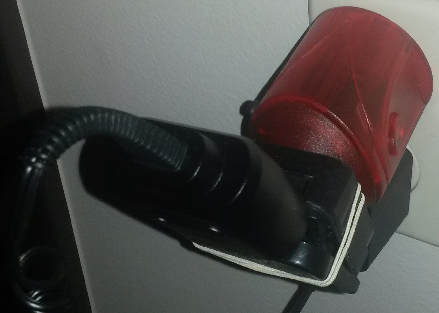
That photo has a European shaver charger, a euro to UK adaptor (from my wife’s GHDs), a Swiss World Travel adaptor, and an elastic hair band.
I’ve thought in the past that it would be a good idea if somebody like iGo did shaver tips for their travel chargers, but that hasn’t happened. Of course most smaller devices these days use USB for charging.
USB shavers
They do exist, but they don’t look great. I’ll stick with my Braun.
Why not USB?
It’s a mystery to me why the shaver manufacturers like Braun, Philips etc. haven’t shifted to using 5v for charging and supplying a USB charger. I guess they’re stuck in the same place the mobile phone makers were a decade ago (before the European commission mandated microUSB).
The solution
My shaver charger is 12v at 400mA. I got a MC34063A based DC-DC converter module from eBay for £1.68. It’s claimed to be 78% efficient and can output up to 1.5A (though it’s recommended that it’s only pushed to 800mA).

Crunching the numbers:
12v * 400mA = 4.8W
4.8W output/ 78% efficiency = 6.15W input
6.15W/5V = 1.23A
1.23A is well inside the capabilities of a typical USB travel charger for something like a tablet, and even a more mundane 1A charger is likely to be sufficient – worst case the shaver will charge fractionally slower.
The voltage converter came already set up for 12v, so it was simply a matter of dismembering an existing charger cable, and a spare USB cable, followed by a quick bit of soldering and heat shrinking. The picture at the top of the post shows the finished article (with the coiled shaver cable wrapped around the USB charger cable to keep things tidy).
Improvements
At the moment both cables come out of the same side of the converter, and it would be better if it was just a bump in the wire; and that bump could be more elegant than a lump of heat shrink encased electronics.
I’m probably not going to bother polishing this thing any further myself. It works, and I’m happy with it.
Maybe some enterprising Chinese manufacturer will come up with something properly designed, with variants (or even interchangeable plugs) for different shaver types.
Filed under: making | 6 Comments
Tags: adaptor, Braun, cable, charger, DC-DC, hack, MC34063A, shaver, USB
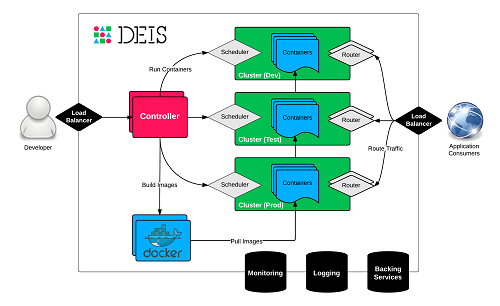
Docker based platform as a service (PaaS) Deis has announced integration with Docker Hub as a source for container images. This complements their existing integration with git. The open source platform is built on Docker and CoreOS to present a Heroku inspired workflow.
continue reading the full story at InfoQ
Filed under: cloud, Docker, InfoQ news | Leave a Comment
Tags: Deis, Docker, InfoQ, paas
This post originally appeared on the CohesiveFT blog
The Docker subsystem available since version 3.5 allows additional virtualized network functions (VNFs) to be run on VNS3. I’ve previously written about using this capability for content caching, SSL termination and load balancing. This time I’ll cover using it as a network intrusion detection system (NIDS).
Introducing Suricata

The archetypal NIDS system for Linux is Snort. Suricata is the newer alternative developed by the Open Information Security Foundation. It’s multi threaded, to make it more scalable, has improved protocol and file identification, and is somewhat easier to install and configure (though that’s taken care of with a Dockerfile anyway).
The demo application
For a little while I’ve used an application based on Nginx, Sinatra and MySQL to demo VNS3. It’s gratuitously three tier, but it’s a good way of showing off the various moving parts of an overlay network. The app implements a simple web based todo list with persistence to the database
Getting the traffic into the NIDS
Firstly I uploaded my suricata-demo Dockerfile to VNS3 to become a container image, then I allocated a container from it, which was given the first available IP of 198.51.100.2. Getting traffic off the overlay and into the container just needs an entry like this in the firewall:
# copy all traffic from the overlay network to the NIDS container
MACRO_CUST -j COPY --from tun0 --to 198.51.100.2 --bidirectional
Whilst I’m there it’s also worth putting in the rules so that I can connect to the container over SSH (in order to see detection in action):
# enable NAT to allow containers to talk to the outside world
-o eth0 -s 198.51.100.0/28 -j MASQUERADE
# forward port 2222 from the VNS3 manager to port 22 on the container
PREROUTING_CUST -i eth0 -p tcp -s 0.0.0.0/0 --dport 2222 -j DNAT --to 198.51.100.2:22
Application specific rules
A nice thing about application centric networks is that they can have application specific rules for intrusion detection – there’s no need to have a kitchen sink list of rules to catch every possible attack that would apply to an entire enterprise network.
For demo purposes I have a single rule that detects Mastercard numbers:
alert tcp any any any any (pcre:"/5\d{3}(\s|-)?\d{4}(\s|-)?\d{4}(\s|-)?\d{4}/"; msg:"MasterCard number detected in clear text";sid:9000001;rev:1;)
This rule is looking for the pattern 5XXX-XXXX-XXXX-XXXX where each X is a digit and each – could be a dash, a space, or nothing. It’s not doing any validation that the numbers are valid Mastercard numbers, it’s just picking up the pattern of something that looks like a Mastercard number
When this triggers (by putting a Mastercard number into the todo list) an alert can be seen in Suricata’s fast.log file e.g.:
07/22/2014-19:51:20.753227 [**] [1:9000001:1] MasterCard number detected in clear text [**] [Classification: (null)] [Priority: 3] {TCP} 192.168.56.111:4567 ->; 10.0.6.50:37589
Try it for yourself
The full cohesiveft/suricata image is available on Docker Hub (and Github). It uses Oinkmaster to pull a full set of rules from Emerging Threats.
The cut single rule down demo version cohesiveft/suricata-demo described above is also available on Docker Hub (and Github).
Whether you start out with a full rule set, and cut out the stuff that causes too much noise, or come at it the other way to build up a rule set to address specific concerns – the choice is yours.
Filed under: CohesiveFT, Docker, networking, security | 1 Comment
Tags: Docker, intrusion, NIDS, rules, Snort, Suricata, VNS3
This post originally appeared on the CohesiveFT blog
Amazon recently announced the new t2 family of low end instances, which I wrote about on InfoQ. Pricing wise the headline is that the t2.micro is ¢1.3/hr, which is a fair bit cheaper than the ¢2/hr of the t1.micro it replaces. It also has much better performance, and more consistent performance, and more transparent performance characteristics, and more RAM.
¢1.3/hr is good, but it’s still not sub penny. It somehow reminds me of the big old pre decimal pennies that people still had in little china pots when I was a kid.

¢1.3/hr is however the on demand pricing. It’s also possible to get t2.micro reserved instances in medium and heavy usage varieties. Pushing things to the max gets a 3yr heavy utilisation reserved instance that costs $109 up front and ¢0.2/hr. If we leave the instance up for the full 3 years, and amortise the $109 up front then that comes out to ¢0.615/hr – a little less than half the on demand pricing.
¢0.615/hr – now that’s sub penny :)
Filed under: cloud, CohesiveFT | Leave a Comment
Tags: amazon, aws, cloud, iaas, penny, pricing
Conventional wisdom says that high performance networking needs inflexible hardware based on application specific integrated circuits (ASICs). That same conventional wisdom says that software implemented networks – aka Network Function Virtualization (NFV) – are slow, particularly if implemented on top of the convoluted networking stack in Linux. Snabb Switch defies that conventional wisdom by putting high performance switching software into Linux on regular Intel-based servers (and even virtual machines).
Continue reading at The Stack
Filed under: networking, The Stack | Leave a Comment
Tags: Neutron, NFV, OpenStack, Snabb, switch
Docker Inc have announced their acquisition of Orchard Labs, a provider of hosted Docker services. Orchard are also the developers of Fig, a composition and orchestration tool for multi container Docker applications. The London based Orchard team is two strong, with prolific developers Ben Firshman and Aanand Prasad.
Filed under: Docker, InfoQ news | Leave a Comment
Tags: Docker, Orchard Labs
Multi tier Docker apps with Fig
I had a play with Fig whilst researching my InfoQ story on Docker’s acquisition of Orchard Labs.

Rather than just going through the quick start guide and firing up their example app I thought I’d try out my own three tier demo from when I last wrote about multi tier apps with Docker. The three docker run commands get placed into a Fig config file[1]:
todomvcdb:
 image: cpswan/todomvc.mysql
 expose:
 - "3306"
 volumes:
 - /data/mysql:/var/lib/mysql
todomvcapp:
 image: cpswan/todomvc.sinatra
 expose:
 - "4567"
 links:
 - todomvcdb:db
todomvcssl:
 image: cpswan/todomvc.ssl
 ports:
 - "443:443"
 links:
 - todomvcapp:app
It’s as simple as that[2]. The application is then brought up using[3]:
sudo fig up
Whilst at one level this is simply moving complexity from one place (docker run) to another (fig.yml) the result is more manageable and elegant. I look forward to seeing what happens to Fig as the Orchard team integrate into Docker.
Notes:
[1] Sadly WordPress doesn’t support YAML with it’s code tag.
[2] Though I did need to remove the underscore separators I’d previously had e.g. todomvc_app.
[3] The need for sudo isn’t pointed out in the Fig docs :(
Filed under: Docker | 2 Comments
Tags: Docker, Fig, Orchard Labs
This was a warm up for a presentation I’ll be doing at AppSec USA later in the year.
I got some good feedback on the night, but if you have more then please make a comment below.
Filed under: CohesiveFT, Docker, presentation, security | Leave a Comment
Tags: Chicago, DevOps, Docker, meetup, security
Amazon has launched new web services designed to simplify the building and operation of mobile applications using their cloud as a back end. Cognito provides an identity management platform and key/value store, and is complemented by Mobile Analytics. The AWS Mobile SDK has been updated to version 2.0 to provide integration with the new services, and there are samples in github for iOS and Android.
Filed under: cloud, identity, InfoQ news, mobile | Leave a Comment
Tags: amazon, analytics, android, aws, Cognito, identity, iOS, mobile


 Chris Swan's Weblog