Dependabot Wishlist
GitHub is at the heart of how I do work, and Dependabot is one of the core tools. Even before we started using OpenSSF Scorecards, which pushed us to pin dependencies, Dependabot was something we used a lot to ensure that things were up to date.
But, Dependabot isn’t perfect, and looking at the discussion threads involving those who support it, there might be some underlying problems that are stopping things from being improved. That of course leaves the door open to new tools, which can hopefully do what Dependabot does and more (or perhaps augment Dependabot functionality – maybe I just need a bot for my bot).
Rollups
For many package managers I need to configure Dependabot for each location that it will find files defining dependencies. If I have Dockerfiles in four places then I’ll get four pull requests (PRs), even if the FROM line is the same across them. Merging those PRs separately gets time consuming, as each merge to trunk turns into a rebase for the next PR, and each rebase means another run through continuous integration (CI) tests.
Nobody wants to sit and wait for tests to run.
The workaround for this is to rollup the PRs. I can git checkout the first PR’s branch, and then git merge each of the subsequent PR branches. One approval, one run through CI, one merge that closes all the PRs at once.
But that’s a manual process. I’d much rather say (in PR #1234): @dependabot rollup #1235 #1236 #1237 and it can take care of the merges for me.
Of course all of the above would be less of an issue if we could configure Dependabot with lists of locations rather than have to repeat configs around single locations…
Class approval
We have the OpenSSF Scorecards action deployed to 13 repos, which means every time ossf/scorecard-action gets bumped that’s 13 PRs, and every time github/codeql-action/upload-sarif gets bumped that’s another 13 PRs. This quickly gets tedious.
What I’d like to do instead is one review (an instance of the class), which then automatically approves (and merges) all the others.
Dealing with Dependency Cascades
There are places in the Atsign code base where I’ve consciously decided not to pin dependencies, because every release results in a new Docker image, and every new Docker image would yield in a new SHA that has to be pinned against – a dependency cascade, which potentially becomes a dependency cyclone, only moderated by the Dependabot (typically daily) schedule.
Of course circular dependencies are a problem almost as old as using dependencies, and there’s no easy answer here; but I’d like to be able to define some behaviours e.g. these hashes come from the last release, don’t create another release when they’re merged to trunk, or we’ll be at this forever.
Filed under: could_do_better, software | Leave a Comment
Tags: Dependabot, dependencies, dependency management, github, rollup, wishlist
Queuing Theory for Politicians
Queueing theory is the mathematical study of waiting lines, or queues.
Wikipedia – Queueing theory
This is timely, as the big news of the day is that our Prime Minister, Rishi Sunak, wants all pupils to study maths to age 18. So maybe this is one of the things people should be learning about (in addition to bank balances, household budgets, taxes, interest rates etc.).
An example
Imagine a busy Accident & Emergency department that only has one bay free. Patients take an average of just 10 minutes to triage and treat, and they arrive at the rate of 5.8 per hour.
What will the expected waiting time be?
With only one bay open, patients will have to wait nearly five hours on average before they are seen.What happens if you’re able to free up another bay?
If you open a second bay, the average waiting time is not just cut in half; it goes down to about 3 minutes. The waiting time is reduced by a factor of 93x.
Why was the wait so long with one bay?
There’s not enough slack in the system.
Patients are arriving every 10.3 minutes on average and are taking 10 minutes to see on average. If patient arrivals were exactly evenly spaced and each took exactly 10 minutes to treat, there would be no problem. Each patient would be seen before the next arrived. No waiting.
BUT… the service and arrival times have to be very close to their average values to avoid a line, and in reality that’s not how things happen. On average there will be a long line, 28 people. But with a second bay, it’s not likely that even two people will arrive before one of the bays is free.
Adapted from What happens when you add a new teller? by John D. Cook
Why does A&E only have one bay free?
Back pressure.
There’s a queue of ambulances outside of A&E because at any given moment all the bays are busy (and the corridors are already full of trolleys).
A&E can’t move patients onto wards because their beds are full.
Wards can’t discharge patients who are fit to leave because there’s no social care available (whether they should go to a care home, or get a care package in their own home).
Nobody is accountable end to end
If the scope of these problems was (say) a factory, then we could pull out Theory of constraints and go looking for bottlenecks and resolving them. But that sort of approach assumes that there’s somebody who can look at then fix the end to end flow.
But as we look at the back pressure, it builds up across the dividing lines between organisations, with nobody empowered or accountable to free up capacity for the stage before them.
This isn’t just about hospitals
Across the public sector and private sector the relentless pursuit of efficiency has resulted in services that might be approaching 100% efficient, but are also approaching 0% effective. Everybody is waiting, nobody is getting served.
You’re efficient when you do something with minimum waste. And you’re effective when you’re doing the right something.
The Knowledge Project blog – Efficiency is the Enemy
It might seem good for profits (or spending of precious taxpayer money) to be sweating every last asset, but what about the effect on the overall economy? If everybody’s busy doing nothing, because they’re waiting on hold or whatever, then overall productivity has taken a nosedive.
Filed under: politics | Leave a Comment
Tags: A&E, constraints, economy, effectiveness, efficiency, hospital, maths, queue, queueing, queuing, slack, social care, theory
USB C Charger Reviews
I’ve had a few things that charge from USB-C for a while: my Planet Gemini, Nintendo Switch, Oculus Quest, SteamDeck, GL-MT1300 travel router, and a bunch of Raspberry Pi 4s; but the arrival of my Lenovo X13 has had me kitting myself out with a bunch of new chargers. So here follows some reviews (with affiliate links if you also want to buy the same)…
Power banks
Anker 737
I’ll start with the Anker 737, as I’ve been using its metering and OLED display to measure the output of the other chargers.

It’s a BIG beast of a thing, properly deserving to be called a ‘power brick’, weighing in at 2/3kg, but that gets a LOT of battery with 24000mAh (pretty near the limit for many airlines), and it can output 100W to a single port and 140W across its three ports (2 x USB C PD, 1 x USB A IQ), making it quite capable of charging two laptops and a phone or tablet all at once.
Pros:
- Huge capacity
- Can push out a lot of power (which might avoid having to carry multiple power banks)
- OLED display is great to show what’s going on
- Comes with a nice little carry bag that has room for a wall charger and a bunch of cables
Cons:
- Heavy
- Expensive (I paid £99.99, though the RRP is £40 more)
- Only comes with one cable, though that is a 100W USB C-C
Anker 525
Also known as the PowerCore Essential 20K PD this is a 20000mAh brick with a single USB C PD input/output and a USB A IQ output.

I bought this for a work demo I was doing at Mobile World Congress (MWC) to power a Raspberry Pi 4, which it does perfectly; but when I tried to power my GL-MT1300 travel router at the same time, it turns out that it doesn’t have sufficient oomf, which is why I now have two of these.
Pros:
- Relatively inexpensive (RRP is £69.99, but I’ve generally paid £40-45)
- Comes with carry bag and a pair of cables
Cons:
- Only 20W output, so it’s only suitable for phones and tablets
Wall Chargers
All of these use Galium Nitride (GaN) power components for reduced size and weight compared to traditional silicon based switched mode power supplies. To verify their output I measured their charging watts into the 737 power bank, and in pretty much every case they showed around 5W down on the advertised output, though it was a similar story with the traditional 65W Lenovo power brick that came with my X13.
Ziwodiv 65W
I’ll start with the charger that’s impressed me most. The Ziwodiv 65W is tiny, cheap, and yet kicks out (close to) the advertised power (I measured 60W when charging the 737).

The only thing I don’t like about it is the captive UK plug, with no options for easy travel (which it would otherwise be great for given the diminutive size and weight).
Pros:
- Inexpensive (RRP for the charger is £22.99, but using a voucher I got the charger and a 2m USB C-C cable for £21.99)
- Tiny
Cons:
- Fixed UK plug
Mu Folding Type-C 20W
Even tinier, but not quite so powerful, is the Mu Folding Type-C 20W PD Fast Charger. With it’s innovative folding UK plug it’s small enough to be pocketable.

It’s just a shame that they don’t do a multi plug version of this for travel (like they did with earlier versions).
Pros:
- Impossibly small for a charger with UK plug when folded
- Reasonably priced at £29 given the quality and design
Cons:
- Only 20W, so only suitable for phones/tablets (or in a pinch charging up a power bank overnight)
- UK plug only
Syncwire PD 67W
I thought this was wonderfully small (until I got the Ziwodiv), and it’s multi country slide on plugs are really neat. It has a US style two blade fold out plug built in, and when folded up those blades can be used to attach UK and EU plugs. That’s won it a place in my US travel bag.

With nothing else connected the C1 output pushed 62W into the 737. It’s presently priced at £42.99, which is a bit steep compared to the £32.29 I paid for mine. It’s probably worth keeping an eye on with a price tracker such as CamelCamelCamel.
Pros:
- Small
- Flip out US plug, and comes with slide on adaptors for UK and EU sockets
- Comes with a solid and long USB C-C cable rated at 100W
Cons:
- Flip out plug arrangement might not work with tight sockets (or might foul adjacent sockets)
- Only 2 USB C outputs, so won’t cover a full range of travel devices.
Anker 543
The Anker 543 is a 65W charger with two USB C PD outputs (one rated at 45W and the other at 20W) and two USB A IQ outputs. That’s enough for everything I usually have with me when travelling (laptop, iPad, iPhone and Apple Watch), which has earned it a place in my UK/EU travel bag.

Although intended to be a desktop charger it’s small and light, making it also good for travel. I also like that it’s got a figure of 8 (aka C8) socket, which means I can use it with a EU plug C7 cable that has a UK adaptor. The 45W USB C output put 41W into the 737. RRP is £44.99, and Amazon presently have then at £32.99.
Pros:
- 2 x USB C and 2 x USB A means not needing to carry other chargers
- C8 input allows for a small and flexible power cable, which is generally better than a ‘wall wart’ design
- Supplied with an adhesive strip for desk mounting
Cons:
- Doesn’t come with any cables or carry pouch
Mackertop USB Type C 65W GaN Laptop Charger
The Mackertop has the form factor of a traditional laptop power brick, with a captive braided USB C cable, and a ‘Mickey Mouse’ C6 socket for its mains cable.

I’d have preferred a C8 socket, as the cables don’t carry the extra size and weight of an (unnecessary) earth cable. As part of my US travel kit it’s now paired up with a C7-C6 adaptor. It supplied 61W when charging the 737. These are presently £29.97 on Amazon (though if I recall correctly they were cheaper before the run up to Christmas).
Pros:
- Captive cable can’t be misplaced
- Smaller and lighter than a traditional laptop power brick
- USB A output
Cons:
- A C8 socket would be better than the C6 ‘Mickey Mouse’ socket, allowing for smaller/lighter mains cable
Samsung 45W UK Travel Adaptor
The Samsung Travel Adaptor is the same form factor as the charger supplied with the Oculus Quest, keeping travel size down by having a slide out earth pin. Mine presently sits in the bag with the 737 so I know I have something to charge it with.

‘Travel’ here would seem to refer to its small size and weight rather than any plug flexibility. These are presently priced at £39.99, but watch out for sales etc. as I bought mine for a much more reasonable £18.63.
Pros:
- Small and light
Cons:
- Pricy at RRP
- UK only plug
- Single USB C output
Conclusion
There’s no perfect adaptor, which is why I’ve ended up with a bunch of different ones, in different bags for different scenarios. That said, I’d be buying a bunch of Ziwodiv adaptors if they had the same flip out plug arrangement as the Syncwire.
Filed under: review, technology | 4 Comments
Tags: adaptor, Anker, cable, charger, GaN, Mackertop, mains, Mu, power, power bank, PSU, review, Syncwire, USB, USB A, USB C, USB-A, USB-C, Ziwodiv
December 2022
Pupdate
We finally got the sizing figured out to order the boys some Equafleece Dachsie Jumpers, which have them looking smart and keeping warm:

Up North
When I grew up in the North East of England everybody I knew lived at the coast. But over time, friends and family have moved on, which meant my trip this month was my first where I didn’t go to the coast at all, because nobody I know lives there any more. It was a bit weird. But also it was nice to catch up with family and friends, and get to see their new places and surroundings.
Snow
My trip up North coincided with the start of a cold snap in the UK. As I was heading for home there were a few light flurries of snow, but nothing too troublesome.
I thought I was escaping to warmer climes down South, but I was very wrong about that, returning home to a few inches of snow (on apparently untreated roads), and accompanying traffic chaos. Getting home from the railway station was NOT the adventure I had planned for my Sunday evening.
New(ish) Laptop – Lenovo X13 Gen 1
I last got a new laptop when I joined CSC over seven years ago, and I’ve previously written a medium term review of my Lenovo X250, and mentioned the swap over to a replacement when I left DXC. The battery life of the replacement has never been great, and it was starting to feel sluggish, so I felt the time had come for a new machine. Given that the X250 had been so good, and family members have been happy with X270s I’ve picked up, the natural choice was a Lenovo X13. The Gen 1 machines are starting to show up on eBay at reasonable prices, and when I saw (more than[1]) the spec I wanted for £375 it was an easy decision to hit the Buy button.
So far I’ve been delighted with the machine. It’s slim, solid, light and fast – everything I want from a laptop. Battery life seems OK (but not amazing), but with USB-C charging it will be easy to keep topped up (even if that means using a portable power bank).
My one niggle is that it doesn’t have a proper Ethernet port, which means having to buy and carry around a little adaptor from the ‘mini RJ45’ to something that has a full sized socket. In terms of design trade offs, I’d rather have a proper port, and for the laptop to be a little thicker (with space for a bigger battery).
The most pleasant surprise is that the laptop I received appears to have spent its life in a cupboard, so I’ve effectively got a new laptop for something like a quarter of the retail price :) After getting things set up with a fresh install of Windows 11 I ran CrystalDiskInfo which reported 26h of run time for the SSD, which I think boils down to:
- Corporate buyer gets new laptop, applies asset sticker, and installs standard corporate image. Laptop then goes into cupboard waiting to be issued.
- Premium warranty expires, so laptop gets replaced with a new one (Gen 3?) and sent to refurbishers, who install their image.
- Laptop shows up at my place, where I immediately do a fresh install of Windows because I want 11 (not 10) and don’t trust what the refurbishers might have installed.
IoTSF Award
Normally my work involves sitting at my desk at home doing backroom boy stuff, but this month brought an exception to my normal routine with a trip up to London for the TechWorks Awards & Gala Dinner where I was delighted to collect the Internet of Things Security Foundation (IoTSF) Champion Award on behalf of my Atsign colleagues.

Solar Diary
As expected, the darkest month wasn’t the best for generation, with just 84.7kWh:
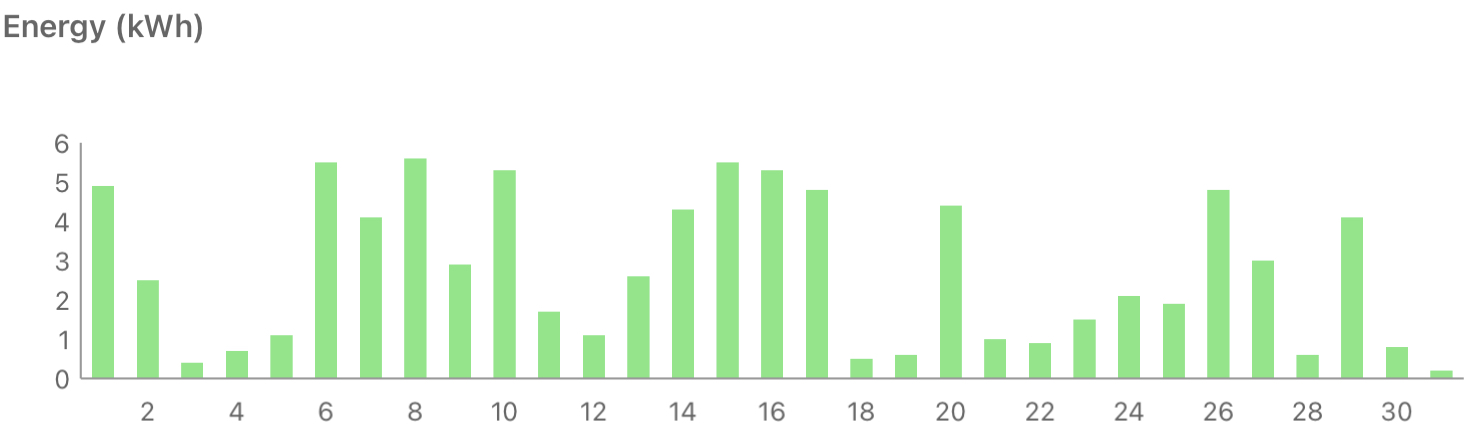
Also no progress on Smart Export Guarantee payments from EDF, who still seem to be dragging their heels. Not that it matters much when I only exported 16.1kWh (<£1) over the month.
Beating Beat Saber
The bad weather and Christmas break have disrupted my usual exercise routine, so the virtual swords have been out again. I bought the recently released Rock pack, which has some all time classic tracks in it. Some of the levels are tantilisingly close to being all perfect cuts at Expert level, but I’m struggling with others. There’s a section near the end of Born to be Wild that’s defeated me on both attempts so far that might need some practice runs.
Note
[1] I’d have happily gone with the same spec I’ve been buying for friends and family for years – i5, 16GB RAM, 1368×768 display. What I got was i7, FHD display, and it even has WWAN (though I’ve yet to try that with a SIM to see if it’s any better than tethering to my phone or iPad).
Filed under: monthly_update | Leave a Comment
Tags: award, Beat Saber, IoTSF, laptop, lenovo, North East, pupdate, snow, solar, X13
TL;DR
I’ve been using Advent of Code as a way to practice Dart, try out ChatGPT, and learn from how other people approach the problems. ChatGPT quickly disappointed, but there’s still been plenty to learn, and I’ve found some things I’ll definitely take into my future coding.
Also (value judgement here) I’m finding it much easier to reason about what other people’s Dart is doing versus what other people’s Rust is doing.
Inspiration
Tim Sneath (the Director of Product and UX for Flutter & Dart at Google) tweeted that he was running a leaderboard for people doing Advent of Code with Dart.
Let’s do this! If you want to participate in Advent of Code 2022 with Dart, join our private leaderboard: https://adventofcode.com/2022/leaderboard
Use code 1671198-6c003f39. Who knows, we might even find some swag for the most committed! #AdventOfCode2022
Tim Sneath
@dart_lang #Flutter
Then I came across Simon Willison’s post about Learning Rust with ChatGPT, Copilot and Advent of Code, and I thought ‘maybe I should try that with Dart’.
It didn’t take long for ChatGPT to go astray
I probably wasn’t as thorough as Simon in documenting my ChatGPT interactions, but like him I kept them in GitHub Issues.
Things started off pretty well in Day 1, with a decent enough example of reading files.
import 'dart:io';

void main() {
  // Open the file for reading
  var file = File('my_file.txt');

  // Read the file line by line
  var lines = file.readAsLinesSync();

  // Print each line to the console
  for (var line in lines) {
    print(line);
  }
}
The first signs of trouble came on Day 3, with ChatGPT offering a sample that looked OK, but resulted in a type mismatch.
Then on Day 5 I found ChatGPT making stuff up that doesn’t exist. Perhaps it would be nice if dart:collection had a Stack class, but it doesn’t. Maybe more worrying was how authentic looking the documentation was for the fictional class.
Since then I’ve occasionally tried to get help from ChatGPT on error messages etc., but service has become pretty unreliable under the huge load that’s been put onto it.
Learning from Tim’s code
Tim has been posting his solutions on GitHub, and I’ve been taking a look at how I might sharpen up my own use of Dart.
Directory structure
The first thing that hit me is the directory structure. Dart (and Flutter) projects tend to be a certain shape, and this keeps to that form. I should probably find (or make myself) a Dart boilerplate repo to start things off properly.
Reading the input file
Tim uses a standard approach to reading the input:
void main(List<String> args) {
  final path = args.isNotEmpty ? args[0] : 'data/day01.txt';
  final data = File(path).readAsLinesSync();
This defaults to reading the day’s input.txt from its appropriate file (in the directory structure already mentioned), but allows easy overriding to test against example input or something else. He also doesn’t dive headlong into tearing the file into lines, but passes that object around whole to other classes that iterate across it.
Final everywhere
I see final all over the place in Tim’s code, where I’m accustomed to seeing various variable declarations.
In some cases this use obviously fits into the pattern of “A final variable can be set only once”, with the path and data example above illustrating that. But there are other times I found myself scratching my head a little, like final in an iterator:
for (final row in data) {
  if (row.isNotEmpty) {
    currentCalories += int.parse(row);
For that block to work it’s quite obvious that the value of row is changing on each iteration, but what is ‘final’ is the amount of memory that needs to be reserved for each row.
Final and lists can also be counterintuitive, but then I find this example in the docs for the Dart type system:
void printInts(List<int> a) => print(a);

void main() {
  final list = <int>[];
  list.add(1);
  list.add(2);
  printInts(list);
}
It doesn’t mean that an immutable list is being created (that wouldn’t be very useful), but rather that each element of the list is immutable, which is a useful cue to the runtime in terms of memory allocation. Of course the use of final in lists is related to using final with lists (or iterables) in an iterator.
Deeply nested operators
There’s a lot going on in something like:
int countContainedIntervals(Iterable<String> rows) =>
    rows.map(convertRaw).map(isIntervalContained).where((e) => e).length;
But each chained operation gets us towards the desired outcome.
Conclusion
After some initial success ChatGPT has been a disappointment (and I suspect it has better training material coming from stuff relating to Rust’s learning cliff), but it’s always worth spending some time reading other people’s code to see what and how they do things differently, and why that might be better.
Filed under: code, Dart | 1 Comment
Tags: Advent of Code, ChatGPT, Dart, Rust
TL;DR
OSSF Scorecards provide a visible badge that lets people see that an open source repo is adhering to a set of practices that minimise risks, measured by a set of automated checks. Getting this right for a single repo can be an involved process, but with that experience in hand applying the learning to a larger set of repos can be fairly straightforward. Implementing Allstar first can help pave the way.
OSSF What?
The Open Source Security Foundation (OpenSSF or OSSF)…
…is a cross-industry organization that brings together the industry’s most important open source security initiatives and the individuals and companies that support them. The OpenSSF is committed to collaboration and working both upstream and with existing communities to advance open source security for all.
https://openssf.org/about/
OSSF Security Scorecards…
…assesses open source projects for security risks through a series of automated checks.
https://securityscorecards.dev/#what-is-security-scorecards
Why?
Over the summer we read about Dart and Flutter enable Allstar and Security Scorecards, which seemed like a good way to show that they cared about security. So if we followed in their footsteps then hopefully we can show the world that we (Atsign) also care about security.
Allstar first
Scorecards looked like a LOT of work, so we started with Allstar:
Allstar is a GitHub App that continuously monitors GitHub organizations or repositories for adherence to security best practices. If Allstar detects a security policy violation, it creates an issue to alert the repository or organization owner. For some security policies, Allstar can also automatically change the project setting that caused the violation, reverting it to the expected state.
https://github.com/ossf/allstar#what-is-allstar
Starting gently
We began with an opt in strategy for a single repo, and that evening Allstar did its thing and spat out a series of issues complaining about branch protection, and a missing SECURITY.md. It took a while to figure out exactly what was wrong with the branch protection settings, but once that was done the issue automatically closed.
Ramping up
Once it was clear what Allstar required from us Terraform was used to get a consistent branch protection config across all the public repos, and Git Xargs was used to ensure that SECURITY.md was in place. Allstar could then be enabled for that full set of repos.
We also tracked down a few repos with binaries in them that belonged in Releases rather than the repo itself.
Then Scorecards
Starting with the same pilot repo as before the Scorecards GitHub Action was dropped into place, and immediately noted 125 issues in the Security tab on GitHub. It turned out that particular repo was maybe the worst place to start, as it has a number of complex GitHub Actions, some of which run a bunch of things in Dockerfiles and Python. That all meant a huge stack of dependencies to be pinned, and a lot of token permissions in workflows to be restricted. Thankfully the StepSecurity App was very helpful in identifying minimal token permissions, and finding SHAs for Actions; leaving some mopping up work for the Docker and Python bits.
OpenSSF Best Practices
Maybe the hardest part on that first repo was completing the questionnaire for the OpenSSF Best Practices Badge Program. This scored us an 84% ‘In progress’, and maybe bumped the Scorecard itself by 0.1. It’s not a process I spent time repeating for the next bunch of repos.
Scaling out
Implementing Scorecards isn’t as scriptable as Allstar, and in the end each repo was done manually, so to keep the work manageable only the repos featured in our GitHub Org profile were added rather than all public repos. Doing that mainly consisted of adding the Scorecards Action, adding the badge to the README.md, and ensuring that dependencies were pinned and token permissions minimised.
The scores are in
At the end of the initial wave the scores looked like this:

I’m very happy with the mid 8s, and OK with anything in the 8s.
That 7.1 has already been improved to a 7.6, and those 7.4s just need some more PRs to run through the post branch protection regime.
ToDo
8.5 is a decent score (the Dart SDK is presently at 8.6, and plenty of the repos for OSSF tools are at or below that level), but obviously there’s still more that can be done, specifically:
- Fuzzing
- Implementing a Static Application Security Testing (SAST) tool
- Best practices for the other repos
- Signing binaries for the repos that have them (and automating that release process)
I suspect though that we’re now in a situation where 20% effort has got 80% score, and the remaining 20% score will take another 80% of effort.
Conclusion
Yesterday brought the first time showing a customer the Scorecards. They seemed impressed, and it registered as a clear signal of caring about security.
Dependency pinning has also shone a light onto things we’re using that aren’t in the Step-Security Knowledge Base (some of which now are), which perhaps we need to pay closer attention to.
atGitHub
For a little more on how Atsign use GitHub (and some links to more resources) check out atGitHub.
Filed under: security, software | Leave a Comment
Tags: Allstar, CI, github, OSSF, scorecard, security
November 2022
Pupdate
It’s been cold, and wet, and windy, so the coats are back on for walks. Some days they aren’t keen to go out at all, and would rather just snuggle up.

TNMOC
The National Museum of Computing (TNMOC) had a pop up exhibition on Charles Babbage, and the work done by volunteers to bring his sketches to life; and that provided a good excuse for the London Retro Computing Meetup to get together there.
Last time I visited TNMOC it was possible to walk through from Bletchley Park (before it became Bletchley Theme Park and fell out with many volunteers). Despite some concerns about a leaky roof, the place felt more together than last time; and it was wonderful to hear from the deeply knowledgeable volunteers.
They now have their own Bombe reconstruction, covering how Enigma was broken; and the volunteers really brought to life the exhibits for Tunny and Witch (along with Colossus, though I’d seen that before).
If you find yourself anywhere near Milton Keynes with time to spare it’s well worth a visit, and if you’re anywhere in the South of England and interested in the history of computing it’s worth a day trip.
Solar Diary
November produced only 119.4 kWh, less than half the figure for October :(
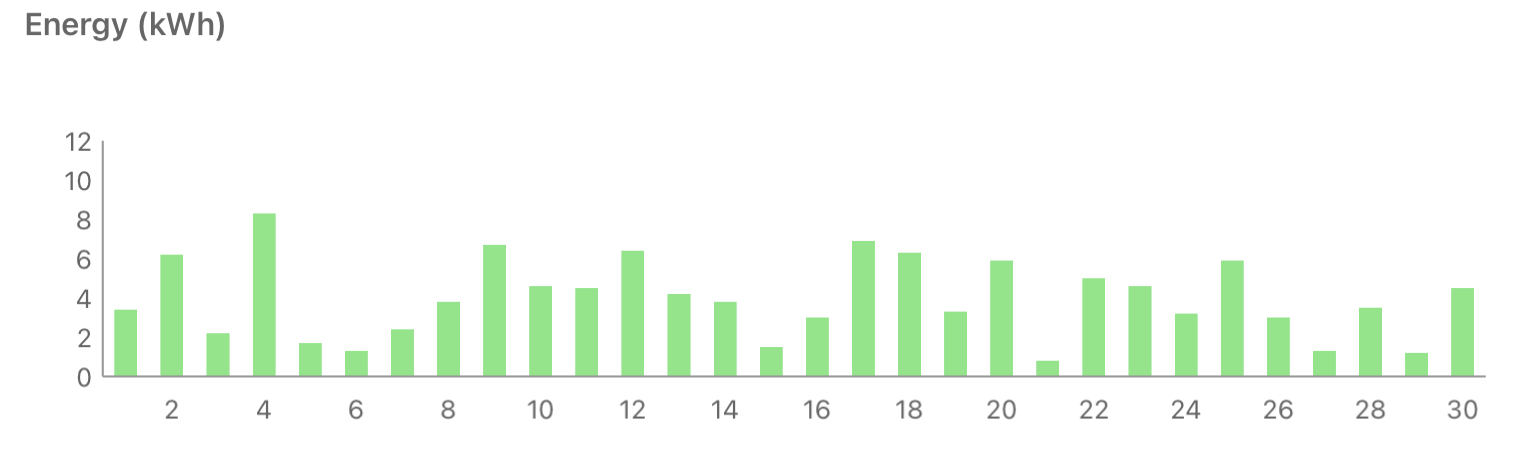
Another month rolled by without any progress by EDF on my Smart Export Guarantee application (other than a specious email about missing info to register an export MPAN, when I already have one that they’ve been told about). But, I guess this matters less in the autumn/winter months when there’s less excess generation – I exported a mere 29.4 kWh this month, which if EDF got its act together they’d have paid a whopping £1.65 for :0
Filed under: monthly_update | Leave a Comment
Tags: computing, museum, pupdate, solar
October 2022
Pupdate
The boys were too frequently pulling on their lead when wearing harnesses, so we did a bit of slip lead training, and now they’ve got collars and they’re walking much more nicely :)

New VPS
I’ve mentioned in past posts that I run a handful of VPSs so that I can emerge from the ‘right’ country on the Internet when required. My venerable VPS in the US fell over, and the hosting service didn’t do a great job of bringing it back up, and it was on the now too long in the tooth OpenVZ platform. So I decided that if I needed to rebuild a server it might as well be a new server, and after a quick look at LowEndBox I found a decent KVM based plan with Racknerd. So far, so good.
Back to the Bay
My last long haul trip before the Covid lockdowns was to Palo Alto, and I returned to the Bay Area for QConSF. The conference was great, and things seemed pretty much as I expected them from the past. It was also nice to finally meet some of my colleagues face to face.
Mini review United Premium Plus
My flights out and back were both packed, which made things ‘interesting’ from the perspective of trying to ensure some comfort. I chickened out of waiting for check-in and paid for Economy Plus on the way out to get an aisle seat with decent legroom. For the return I was offered upgrades to Premium Plus at $529 and Polaris at $2199, so I gave Premium Plus a go.
The ‘hard’ product isn’t much of a step up from Economy Plus. A little more seat width (and much wider fixed armrests, so no risk of next door spilling over), a little more leg room, a bigger screen for the in flight entertainment. But the same food as economy, the same toilets as economy, the same cabin crew as economy. With 2-3-2 seats, it might look a bit like biz class before it became lie flat, but it’s not that comfortable, and there’s nobody offering port and cheese after dinner.
I ended up with a middle seat, which essentially left me trapped between the strangers either side of me trying to get some sleep.
Would I pay sticker price for this? No.
Would I pay to upgrade again? Probably not, especially if I already had an Economy Plus legroom seat locked in.
Do I think the whole thing is a cynical ploy to bring back 4 class cabins and drive higher price differentiation for Polaris? Yes. In the before times I’d generally pick up Polaris upgrades for $769, sadly it looks like those days are over, at least for the newly configured fleet.
20 years
The start of the month marked 20 years since we moved into our house. When we bought the place we had no intention to stay, but over the years we’ve made it what we want it to be, and grown to love the neighbourhood. I’m still not sure it’s our ‘forever’ home, but it will take some effort now to find a place we live in for longer.
Solar Diary
October with 253.5 kWh was much less productive than September at 369.9, and it’s almost possible to see the slide down through the month:

The sun getting lower was also noticeable as I was out on my bike in the last days before everything got wet and leafy.
Meanwhile it’s taken the whole month for EDF to not process my Smart Export Guarantee application, and tell me that they’re missing details needed for an Export MPAN (something I already have, and told them about). It’s almost like they don’t want to pay me for the electricity I’m presently giving away to the grid :/
Filed under: monthly_update, review, technology, travel | Leave a Comment
Tags: Bay Area, home, Premium Plus, pupdate, San Francisco, solar, travel, United, VPS
Background
At home I have a bunch of SSH tunnels from a VM to my various virtual private servers in various places around the world, so I can direct my web traffic through those exit points when needed. I’ve written before about using autossh to do this.
But when I’m travelling I don’t have my home network, and VMs, I generally have an OpenWRT based travel router.
sshtunnel
OpenWRT has an autossh package, but it makes use of the default Dropbear SSH implementation, which doesn’t support dynamic tunnels needed to provide a SOCKS proxy. Thankfully there’s also an sshtunnel package which uses openssh-client under the hood, and that does support dynamic tunnels.
I found this gist from DerekGn very helpful (as tunnelD wasn’t previously documented in the OpenWRT wiki), but I also run into a few rough spots, hence this post (and some updates to the wiki)…
keys
SSH needs a key pair, and the default tools on OpenWRT are for Dropbear keys, but for sshtunnel we need OpenSSH keys.
First, a place to store the keys, and create a Dropbear key:
mkdir .ssh
chmod 700 .ssh/
dropbearkey -t rsa -f /root/.ssh/id_dropbear
That last command will print the public key to the console, which we can copy and paste into a file:
vi .ssh/id_rsa.pubThe same public key can also be copied into ~/.ssh/authorized_keys on hosts we want to connect to.
The Dropbear key needs to be converted, after installing the tool to do that:
opkg install dropbearconvert
dropbearconvert dropbear openssh .ssh/id_dropbear .ssh/id_rsa
Installing and configuring sshtunnel
opkg update
opkg install sshtunnel
The sshtunnel package will pull in openssh-client as a dependency, so everything is now in place for a test SSH connection, which is needed before automation to ensure that the server we’re connecting to is in ~/.ssh/known_hosts:
ssh [email protected]The sshtunnel service needs to be configured by editing /etc/config/sshtunnel:
config server myserver
        option user       me
        option hostname   myserver.com
        option port       22
        option IdentityFile             /root/.ssh/id_rsa

config tunnelD proxy
        option server           myserver
        option localaddress     *
        option localport        12345
With the config in place, the service can be reloaded (and enabled to ensure startup on future boots):
/etc/init.d/sshtunnel reload
/etc/init.d/sshtunnel enable
/etc/init.d/sshtunnel start
If everything is working then the tunnel will show in netstat:
netstat -an | grep 12345
tcp        0      0 0.0.0.0:12345           0.0.0.0:*               LISTEN
tcp        0      0 :::12345                :::*                    LISTEN
Using the tunnel
I can now configure my browser (e.g. Firefox) to use the IP and port of the tunnel as a SOCKS proxy. So the SOCKS Host is set to the router IP (192.168.8.1) and Port (12345).
Filed under: howto, networking | 1 Comment
Tags: keys, OpenWRT, proxy, SOCKS, SSH, sshtunnel, tunnel
September 2022
Pupdate
The boys have been enjoying the sun when it’s been out, as we have the last warm and dry days before autumn descends into winter.

Milo has been particularly enjoying the windfalls from the apple tree:

Solar diary
This might be a regular feature here, at least for a little while (until the novelty wears off).
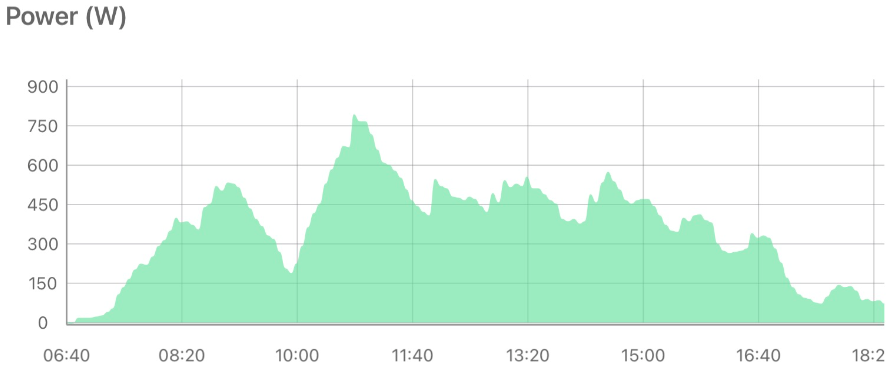
As I noted last month, I got a 16 panel array installed on my roof, but the data logger wasn’t working so I didn’t have a clear idea about what it was doing. A replacement data logger arrived on 6 Sep, and so I can now take a look at the app each day to see how the system is performing:
Here’s a view of the month so far:
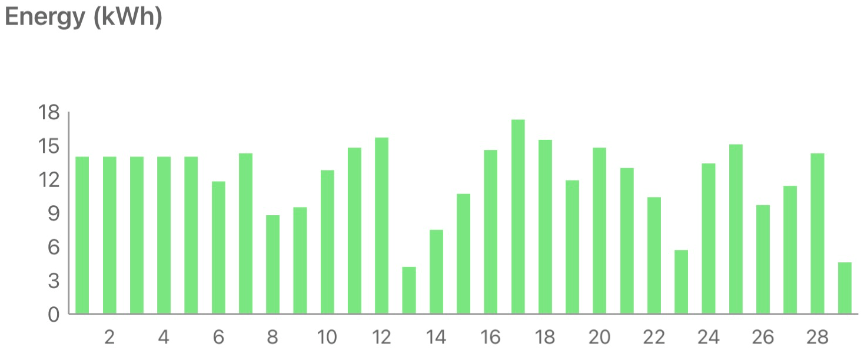
NB the app just divided the production before the logger was installed over the days since the system install, hence things are flat at 14kWh/day for the first few days.
Here’s a zoom in to that best day so far, on the sunny 17th with 17.3 kWh:
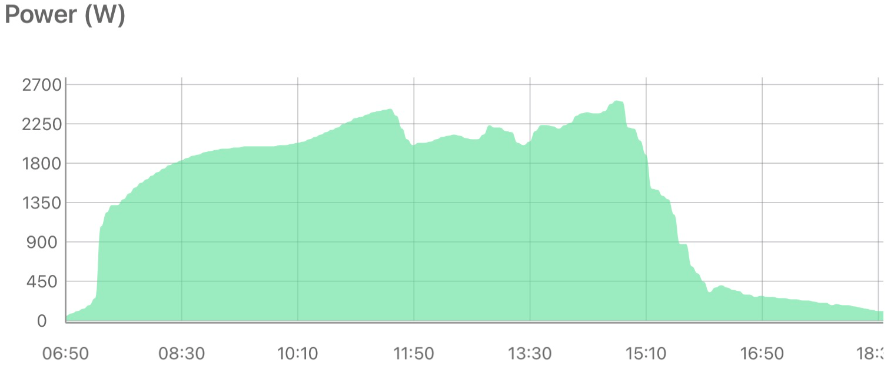
and the worst day, on the very dark and wet 13th with 4.2 kWh (NB different y axis scale):
Looking at my meter readings a couple of days ago it seems that I’m saving almost 40% on my electricity bill, and 26% on my gas bill (by the iBoost diverting excess generation that would go [cheaply] to the grid into an immersion heater). Though the latter is for a summer month with gas just being used for cooking and hot water, that will be a drop in the bucket against winter gas use when the central heating is on.
I’ve not yet got the paperwork to sign up for Smart Export Guarantee (SEG), so I’m presently getting nothing for generation that does go to the grid.
I spent a bit of time trying to find a supplier for a whole house battery capable of doing backup during power cuts (like a Tesla Powerwall), but it seems nobody wants to take on new customers at the moment due to huge wait lists for the batteries (~1y) and lots of busyness with solar installs etc.
I now look at every empty roof as a missed opportunity (especially on new builds), and I wish the UK government was doing more to incentivise renewables (to the extent that’s even necessary given present prices); but clearly there’s a need to train more electricians, and roofers etc.
Update 30 Sep 22 the paperwork for SEG came through, and I figured out how to read the export number from my (not so smart) meter. It seems that 222kWh of the 482kWh generated so far have gone to the grid (~46%), so it will be nice to get some pennies for future exports.
Good Apple
When the iPhone SE 2020 launched I ordered 3 (one of each colour): one for me, one for $wife and one for $daughter0. The latter didn’t survive the rough and tumble of teenage life, and she found herself having to trade it in for a replacement at the start of this year. So it was a huge disappointment when the new one decided it wasn’t going to connect to cell towers anymore.
Thankfully Apple were very accommodating. They could see that the replacement was still in immaculate condition, and hadn’t suffered the abuse of its predecessor, and though it was technically past the warranty period for a replacement they switched it for another new phone :)
University
Moving in day came, and Bath did a really good job of the logistics. A quick drive around an emptied car park to collect an envelope with ID card and key (with the photo on the ID card providing an easy way to verify the correct recipient). Then roll cages provided to cart possessions from the car to the room in a single trip. Much more pleasant than the sweaty experience of lugging stuff backwards and forwards when moving $son0 into his room(s).
The move provided a handy excuse to explore Bath, and have a delightful dinner at Raphael, which I look forward to returning to.
$daughter0 seems to be enjoying freshers’ week :)
Filed under: did_do_better, monthly_update | Leave a Comment
Tags: apple, Bath, iphone, pupdate, solar, university


 Chris Swan's Weblog