This is a follow up to ‘Meltdown and Spectre: What They Are and How to Deal with Them‘ taking a deeper look at: the characteristics of the vulnerability and potential attacks, why its necessary to patch cloud virtual machines even though the cloud service providers have already applied patches, the nature of the performance impact and how it’s affecting real world applications, the need for threat modelling, the role of anti virus, how hardware is affected, and what’s likely to change in the long term.
Continue reading the full story at InfoQ.


Filed under: InfoQ news, security | Leave a Comment
Tags: Meltdown, Spectre
How Not to Sell Bitcoins
This post is the dark mirror of Tim Bray’s How to Sell Bitcoins, and explains how I accumulated some Bitcoin in the first place, then utterly failed to cash out before the (latest) bubble burst.
Background
I might have seen Bitcoin in my peripheral vision earlier, but by the time I started paying any real attention mining was hurtling into ASICs (so I’d missed the days when mining was practical on CPUs then GPUs then FPGAs[1]). At the tail end of 2013 I bought a couple of Bitfury ASIC boards to learn about mining.
Mistake #1 – ASIC Mining was a mugs game. If I’d just spent the money on buying some Bitcoin I’d have something more than 10x the Bitcoin I earned by mining. It didn’t take long for it to become clear that the people fabbing the ASICs were mining the heck out of them before selling them to end users. Quite often this was part of a pre pay scam, where prospective miners paid for ASICs in advance, the fabbers then made the ASICs, mined, drove up complexity, and when the ASICs were economically wrung out they’d finally be delivered to those who funded them.
Paranoid but not paranoid enough
Bitcoin was already becoming the chosen currency of Internet scammers as I started dabbling, so it was obvious that malware would start looking for any unprotected wallets. I therefore chose a very strong password to the private key in my wallet, and furthermore decided not to put it into my password manager on the basis that anything that compromised my wallet might also get into my password manager. This was fine whilst I was frequently using my wallet and exercising the neurons that held the password. It wasn’t great years later – I’d forgotten the password to my wallet.
Mistake #2 – if you’re worried about information security then backstop with physical security. I should have written down my private key password and put it in a safe place (maybe an actual safe).
This story would end there if I hadn’t taken the precaution of backing up my wallet’s private key with a different password – one I could actually remember. The problem I hit then was that the pass phrase had spaces in it, and the wallet software was quite happy using it for exports, but not so much for imports. I had to write a script that was very careful at separator handling to extract my key.
Mistake #3 – I hadn’t tested by backup. In part this was because I didn’t want to create a greater vulnerability surface by creating another wallet, and a silly assumption that the software wouldn’t let me use spaces in the export if they couldn’t be used again for import.
Paying the right transaction fees
With my private key in hand, and a freshly created Coinbase account I was all set. All I had to do was transfer the Bitcoin from my existing wallet and make a sale – simple…[2]
It was clear that the Multibit wallet I’d been using was hopelessly outdated, so a little research took me to Electrum. I even found a HowTo video showing the process of exporting from Multibit to Electrum. This totally didn’t work for me.
Mistake #4 – I should have paid more attention to the options. The version of Electrum shown in the video didn’t have an opening option import a key, it showed using a standard wallet then importing a key to it, which totally didn’t work for me. Had I tried the opening option I’d have been all set, but instead I gave up on Electrum.
When I’d been learning my way around Bitcoin four years ago transaction fees weren’t really a thing. The blocks being added to the blockchain weren’t full, so miners were happy to add transactions without fees. That all changed over the past year, and as the recent bubble has driven transaction volume against the Bitcoin scaling problem it’s become necessary to pay higher fees to get transactions confirmed.
Mistake #5 – I should have researched fees more carefully. A quick Google revealed that fees had spiked, but I didn’t have a good measure of how large (in bytes) my transaction would be so I ended up low balling the transaction fee and sending it into transaction purgatory.
Transactions don’t time out
Bitcoin myth has it that a transaction with too low a fee will be timed out of the mempool after about three days and returned to your wallet. At the time of writing my transaction has been bouncing around for over two weeks. Every time it looks like it’s about to expire it pops up again. I may be going a little conspiracy theorist here, but it feels like ‘Once is happenstance. Twice is coincidence. The third time it’s enemy action‘, and I suspect that the mining community is deliberately keeping the transaction backlog high in order to keep mining fees high.
Mistake #6 – I thought that my transaction would gracefully fail if I got the fee wrong. But instead my Bitcoin are lost in space and time.
Transaction accelerators don’t work
Something new to the Bitcoin scene are transaction accelerators – sites that claim to be able to move your pending transaction into an upcoming block for confirmation. I tried submitting to ViaBTC a few times, but they only take 100 transactions an hour and my timing was never right. The first time I tried ConfirmTX it said my transaction would be accelerated (it wasn’t). I tried again and paid $5 in Bitcoin Cash (BCH) and once again nothing happened, so I suspect reports of it working likely coincide with transactions that would have gone through anyway. PushTX wants hundreds of dollars, so I’m not chancing that.
Mistake #7 – accelerators don’t seem to work, and may also be unhelpful in getting my transaction to expire from the mempool.
The end? Not really
This story hasn’t reached its end. After weeks of hunting for keys and waiting for a transaction to complete I’m still not in a position to actually try selling my Bitcoin. My fingers are crossed that the transaction pools will be quiet over the holiday period and maybe 2018 will bring the chance for me to sell.
Updates
27 Dec 2017
I found this Reddit comment saying that a change was made so that transactions would expire from the mempool after 14 days rather than 3. On checking my wallet (which I’d been keeping closed to prevent it rebroadcasting) I found that the hung transaction had indeed expired and I was able to try again with a higher fee.
5 Jan 2018
Following Adrian Mouat’s suggestion on Twitter I sent my BTC to Coinfloor, waited for the New Year to sell and transferred out my GBP. It took a couple of days for the money to land in my UK bank account, and Coinfloor charged its stated £10. So ultimately this was a (very frustrating) learning experience, but I got what I wanted.
Notes
[1] When I say ‘ASIC’ in a pub conversation I see the eye glaze thing for anybody that’s not spent time at the border of electronics and computing. The point here is that there was a mining arms race as the mining complexity went up and people found more specialist ways of turning electricity into hashing. At the birth of Bitcoin it was possible to mine with CPUs, but then people figured out it could be done with GPUs, and ultimately ASICs (after a brief diversion to FPGAs). Of course each time more efficient hashing came on the scene it drove the complexity up, making any previous approach hopelessly slow and inefficient.
[2] Since I’ve not got my Bitcoin as far as Coinbase I can’t (yet) comment on the ease of selling and cashing out, but I know there was some friction and expense ahead with SEPA payments etc. (as Coinbase doesn’t transact in GBP or connect directly into the UK banking system).
Filed under: Bitcoin | 4 Comments
Tags: Bitcoin, fees, mining
Home Lab/Network
Background
Jess Frazelle has recently been blogging about her Home Lab, which made me realise that over the years I’ve written here about pieces of my own lab, but never the entirety.
Network
Wired networks are better for bandwidth, reliability and latency, so I use wired whenever I can. Taking a queue from Ian Miell’s use of Graphviz I’ve mapped out the network:

It’s a big graph, covering 6 switches (totalling 69 ports) and 3 routers (with another 16 ports), though only one of those is actually used as a router with the others serving as combined switches and access points. I was fortunate enough that the builders of my relatively new home used Cat5 cable for the telephone points, which have mostly been re-purposed for network; though I’ve had to add substantial amounts of Cat5 myself.
Following recommendations from Jess, Troy Hunt and others I keep toying with the idea of installing Ubiquiti gear, but for the number of switch ports I need it would be painfully expensive. Maybe I should just go with some Ubiquiti access points for my WiFi (and disable the radios on the menagerie of routers I have that collectively don’t quite provide the coverage, speed and reliability I’d like). [Update 21 Jan 2018 – I did get a UniFi Access point]
VM Hosts
Unlike Jess I’ve not gone down the bare metal containers route. In part that’s because containers became a thing long after I’d built a lot of the home lab, and in part because I still feel a need for VMs and experience doing stuff with them.
I only run two hosts full time to get some mixture of redundancy and power saving:
- My Dell T110 II has 32GB RAM and a full fat server CPU, so that tends to do the heavy lifting. It lives out in the garage (where I don’t have to hear its fan).
- One of my Gen8 HP Microservers, which has 16GB of RAM and an upgraded (but still low power) CPU picks up duty for not having all my VM eggs in the same basket. It lives in a void space in the loft that’s a short crawl through the access door from my desk; though I almost never have to physically go there due to the magic of Integrated Lights Out (iLO) remote console.
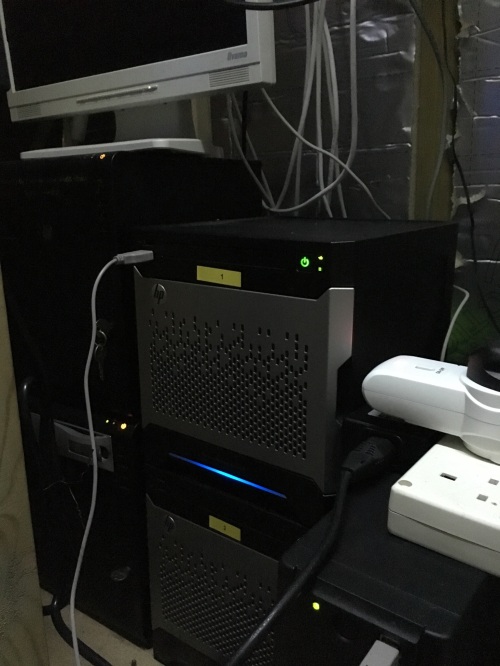
The remaining Microservers only get fired up when I need more capacity (or a lot more physical hosts to try something out). My 5th Microserver that I use as a ‘sidecar’ to my NUC can also be pressed into usage as a VM host, but it’s mostly there for its optical drive and removable HDD bays (and it sits handily above my desk so it’s easy to get at).
I run vSphere on the VM hosts because there was a time when I had to learn my way around VMware, and there are a few Windows guests because there was a time when I had to learn my way around Active Directory. Most of my tinkering gets done on Ubuntu VMs these days.
All of the servers have dual NICs because some of my VMware network experiments needed that. I’ve not gone to the trouble of having physical network isolation because that would need a whole bunch more switches and cabling.
Filed under: technology | Leave a Comment
Tags: home, lab, Microserver, network, VM, VMware
RISC-V[1] is something that I’ve been aware of via the Open Source Hardware Users Group (OSHUG) for a little while, and their most recent meeting was a RISC-V special, with talks on core selection and porting FreeBSD to the platform. Suddenly it seems that RISC-V is all over the news. A sample from the last few days:
- Western Digital to accelerate the future of next-generation computing architectures for big data and fast data environments – ‘Company to Transition Consumption of Over One Billion Cores Per Year to RISC-V to Drive Momentum of Open Source Processors for Data Center and Edge Computing‘
- Esperanto Technologies to develop energy-efficient AI chips on RISC-V architecture
- Big Tech Players Start To Adopt The RISC-V Chip Architecture – repeats the last two stories, but also highlights Nvidia’s adoption of RISC-V
The trigger is the Seventh RISC-V Workshop[2], which Western Digital happens to be hosting, but I get a sense that something more is happening here – that RISC-V is breaking out of its academic origins and exploding into the commercial world. I also get the sense that this might just be the tremors of activity before things really take off in China.
I’ve always been very impressed with ARM‘s positioning in the Internet of Things (IoT) space. It seemed that when Intel’s ambition was to have an x86 device in the hands of every human on the planet, ARM wanted one of their cores funnelling instrumentation data from every paving stone on the planet (and everything else besides). But the problem with ARM (or MIPS or whatever) is that they license proprietary technology, and this creates two barriers to adoption and innovation:
- Cost – the core design vendor takes a small but ultimately significant slice of the pie every time one of its cores is used.
- Asking permission – if what the core design vendor has on the shelf works for a particular application then great, but if changes are needed then that needs to be negotiated, and that takes time and slows things down.
Even at a cent a core the cost stacks up if you’re shipping a billion cores, so Western Digital’s interest is obvious; but I don’t think cost is the main issue here. A huge factor driving innovation in software has been the permission free environment of open source, and the same is playing out here, just with hardware. RISC-V is empowering hardware designers to just get on with doing whatever they want, and that’s hugely beneficial in terms of reducing wait times, and thus improving cycle times. The Observe, Orient, Decide, Act (OODA) loops are tightening.
If I may sound one note of caution, it’s that many of the RISC-V cores developed so far have very permissive licensing. That’s great in terms of making things permission free, but it’s less great in terms of feeding back innovation to the ecosystem (as we’ve seen with Linux and copyleft). In general I’m a fan of permissive licensing, but (like the Linux kernel) there’s perhaps a case to be made for licenses with greater obligations for lower level parts of the ecosystems we build.
Notes
[1] Pronounced ‘RISC five’, just like the iPhone X is ‘iPhone ten’.
[2] Day One and Day Two are covered on the lowRISC blog.
Filed under: technology | Leave a Comment
Tags: ARM, hardware, innovation, open source, RISC-V, x86
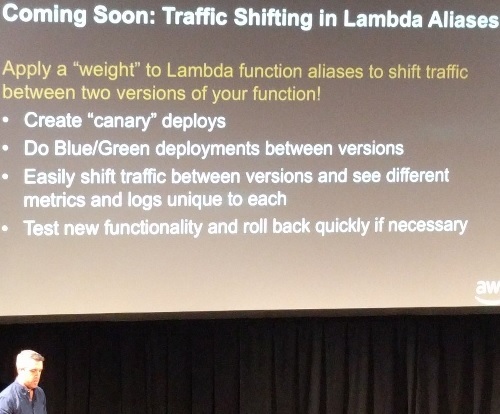
Amazon’s Chris Munns announced at the recent Serverless Conference NYC that AWS Lambda will soon support a feature called traffic shifting. This will allow a weight to be applied to Lambda function aliases to shift traffic between two versions of a function. The feature will enable the use of canary releases and blue/green deployment.
Continue reading the full story at InfoQ.
Filed under: cloud, InfoQ news | Leave a Comment
Tags: aws, Lambda, serverless
I’m writing this for my fellow DXCers, but I’d expect the points I make here likely apply to any open source project.
The first thing I’ll check is the README.md
Because that’s the first thing that somebody visiting the project will see.
Is the README written for them – the newbies – the people who’ve never seen this stuff before?
The next thing I’ll check is the README.md
Does it explain the purpose of the project (why)?
Does it explain what is needed to get the project and its dependencies installed?
Does it explain how to use the project to fulfil its intended purpose?
Then I’ll check the README.md again
Does the writing flow, with proper grammar and correct spelling? Are the links to external resources correct? Are the links to other parts of the project correct (beware stuff carried over from previous repos where the project might have lived during earlier development)?
OK – I’m done with README.md – what else?
Is the Description field filled out (and correct, and sufficient to keep the lawyers happy)?
Is the project name in line with standards/conventions?
Have we correctly acknowledged the work of others (and their Trademarks etc.) where appropriate?
Is the LICENSE.md correct (dates, legal entities etc.)?
Is there a CONTRIBUTING.md telling people how they can become part of the community we’re trying to build around this thing (which is generally the whole point of open sourcing something)?
Are you ready for a Pull Request?
I might just do one to find out; but seriously – somebody needs to be on the hook to respond to PRs, and they need a combination of empowerment (to get things done) and discretion (to know what’s OK and what’s not).
Update 4 Feb 2020
I just found this Sample Readme, which seems like a starting point. Maybe I need to fork it to cover the items above (as it seems like it’s intended for an audience inside a company).
Filed under: DXC | 1 Comment
Tags: documentation, open source, README.md
TL;DR
VMs on public cloud don’t provide the same level of control over sizing as on premises VMs, and this can have a number of impacts on how capacity is managed. Most importantly ‘T-shirt’ type sizing can provide sub optimal fit of workload to infrastructure, and the ability to over commit CPUs is very much curtailed.
Introduction
Capacity Management is an essential discipline in IT – important enough to be a whole area of the IT Infrastructure Library (ITIL). As organisations shift from on premises based virtualisation to the use of cloud based infrastructure as a service (IaaS) it’s worth looking at how things change with respect to capacity management. Wikipedia describes the primary goal of capacity management as ensuring that:
IT resources are right-sized to meet current and future business requirements in a cost-effective manner
I’ll used VMware and AWS as my typical examples of on prem virtualisation and cloud IaaS, but many of the points are equally appropriate to their competitors.
Bin packing
Right sizing a current environment is essentially a bin packing problem where as much workload as possible should be squeezed onto as little physical equipment as possible. This type of problem is ‘combinatorial non-deterministic polynomial time (NP) hard’, which means that we can spend a lot of time and computer cycles coming up with a perfect answer. In practice perfect isn’t needed, and what needs to be packed into the bins keeps changing anyway, so various shortcuts can be taken to a good enough solution.
Inside out
It’s worth noting that the resources consumed within a VM (an inside measure) aren’t the same as the VM’s sizing (an outside measure). The inside measure is what’s really being used, whilst the outside measure sets constraints e.g. if a VM is given 4GB of memory and its running a Java app that never goes over 1.5GB of heap then it’s probably oversized – we could get away with with a 2GB VM, or even a 1.6GB VM.
Hypervisors are great at instrumentation
The hypervisor virtualisation layer has perfect knowledge of the hardware resources that it’s presenting to the VMs running on it, so it’s a rich source of data to inform sizing questions. In the example above the hypervisor can tell us that its guest is never consuming more than 1.6GB of RAM.
#1 important point about IaaS – the cloud service provider (CSP) runs the hypervisor rather than the end user. They may choose to offer some instrumentation from their environment, but it’s unlikely to be at full fidelity. Of course they have this data themselves to inform their own capacity management.
T-shirt sizes and fits
T-shirt sizes
IaaS is generally sold in various sizes like Small, Medium, Large, XL etc. – like (mens) T-shirts. Unlike real life T-shirts that are incrementally bigger cloud T-shirts are generally exponentially bigger, so an XL is twice a Large is twice a Medium is twice a Small, meaning that the XL is 8x as big (and expensive) as a small.
A typical instance type on AWS is an m4.xlarge, which has 4 vPCU and 16 GiB RAM, so if I have a workload that needs 2vCPU and 9 GiB RAM I need that instance type because it’s the smallest T-Shirt that fits (as an m4.large with 8GiB RAM would be short on RAM). In a VMware environment I’d just size that VM to 2 vCPU and 9 GiB RAM, but I don’t have that degree of control in the cloud.
#2 important point about IaaS – T-shirt sizes mean that fine control over capacity allocation isn’t possible.
It’s worth taking a quick detour here to explore the meaning of vCPU, because these are entirely different between VMware and AWS. In a VMware environment the vCPUs allocated to a VM represent a largely arbitrary mapping to the host’s physical CPUs. In modern AWS instances the mapping is much more clearly defined – a vCPU is a hyperthread on a physical core (and thus 2 vCPUs are a whole core). The exception is T2 type instances, which have shared cores, and quite a neat usage credit system to ensure fair allocation.
#3 important point about IaaS – CPU over commit is only possible by using the specific instance types that support it.
T-shirt fits
Just as different T-shirt fits apply to different body shapes, different instance types apply to different workload shapes. The M or T types are a ‘general purpose’ mix, whilst C is ‘compute optimised’ and X or R are ‘memory optimised’ and I are ‘storage optimised’. AWS can use the data from their actual users to tailor the fits to real world usage.
Returning to the misfit above (2 vCPU and 9 GiB RAM workload) this will fit onto an R4.large, which is $0.133/hr – a saving of $0.67/hr versus the M4.xlarge. Comparing to an M4.large at $0.1/hr it’s 33% more expensive for 12.5% more RAM needed, but that’s a whole lot better than 100%.
How do containers change things?
Bin packing is easier with lots of small things, and containers tend to be smaller than VMs, so in general containers provide a less lumpy problem that’s easier to optimise.
This shouldn’t be done manually
As noted above bin packing is NP-hard, so if you ask humans to do it by hand the approximations will be pretty atrocious. This is work that should be left to machines. VMware is great at scheduling work onto CPUs, but it doesn’t optimise a bunch of VMs across a set of machines. This is where 3rd party solutions like Turbonomic come into play, which can take care of rightsizing VMs (fit of outside to inside) and optimising the bin packing across physical machines.
Google has been doing a great job of this on their estate for some time, and I’d recommend a look at John Wilke’s ‘Cluster Management at Google‘. That best practice has been steadily leaking out, and Google’s Kubernetes project now provides a (rudimentary) scheduler for container based workload.
What about PaaS and FaaS?
Platform as a Service (like Cloud Foundry) and Functions as a Service (like AWS Lambda) abstract away from servers and the capacity management tasks associated with them. It’s also worth noting that if containers provide smaller things to pack into capacity bins then functions takes that to en entirely different level, with much more discrete elements of work to be considered in aggregate as workload.
Planning for the future
Most of this post has been about capacity management in the present, but a huge part of the discipline is about managing capacity into the future, which usually means planning for growth so that additional capacity is available on time. This is where IaaS has a clear advantage, as the future capacity management is a service provider responsibility.
Conclusion
IaaS saves its users from the need to do future capacity planning, but it’s less flexible in the present as the T-shirt sizes and fits provide only an approximate fit to any given workload rather than a perfect fit – so from a bin packing perspective it can leave a lot of space in the bin that’s been paid for but that can’t be used.
Filed under: cloud | 2 Comments
Tags: aws, capacity management, cloud, containers, Kubernetes, Turbonomic, VMs, VMware
A little while ago I got myself an original[1] Wileyfox Swift to replace my ageing Samsung S4 Mini. The Amazon page I bought it from gave the impression that it would run Android 7, but that page was (and likely still is)[2] really confusing as it covered multiple versions of the Swift line up.
The phone I received came running Android 5.0.1 (Lollipop), which is pretty ancient, and yet the check for updates always reported that no updates were found. I went looking for a way to manually update, and found Cyanogen Update Tracker. There’s a footnote on the downloads page that specifically refers to my phone and the version of Android it carried (YOG7DAS2FI):
Wileyfox Swift (OLD VERSION) – Install this package only if your Wileyfox Swift is running one of the following Cyanogen OS versions: YOG4PAS1T1, YOG4PAS33J or YOG7DAS2FI.
Afterwards, install the package marked as “LATEST VERSION”.
As things turned out I didn’t need the “LATEST VERSION” as over the air (OTA) updates sprung to life as soon as I did the first update[3].
Doing the manual update
- Check that you’re on ‘Wileyfox Swift (OLD VERSION)’ by going into Settings > About Phone and confirming that the OS Version is YOG4PAS1T1, YOG4PAS33J or YOG7DAS2FI (mine was the latter).
- Download cm-13.0-ZNH0EAS2NH-crackling-signed-9c92ed2cde_recovery.zip (or whatever Cyanogen Update Tracker has on offer) onto the phone, keeping it on internal storage in the Downloads folder[4].
- Turn the phone off.
- Turn the phone on into recovery mode by holding the volume down button whilst pressing the power button.
- Use the volume button to move to and power button to select Install update > Install from internal memory > Browse to Downloads and select the zip file that was downloaded.
- Wait – it will take a while to install the update (Android with spinning matrix in front of it) and a while longer to update apps.
After the manual update
As soon as my phone was ready it started nagging me to accept OTA updates, which eventually took me to Android 7.1.2 (Nougat).
Notes
[1] I got an original Swift rather than the more recent Swift 2X as the original can handle two (micro) SIMs and a MicroSD card at the same time, which suits my travel needs of UK SIM (for Three ‘Feel at Home’), US SIM (for local calls in the US) and MicroSD (for my music and podcasts). Sadly the 2X makes you choose between that second SIM (one of which needs to be a nano SIM) and MicroSD.
[2] An example of an increasingly frequent anti pattern on Amazon where entirely different products have their Q&A and reviews all munged together.
[3] Though perhaps I could have saved some time here, as it took about 4 OTA updates to get me to the latest version.
[4] My initial attempt to upgrade from my MicroSD card didn’t work – perhaps because it’s 64GB.
Filed under: howto | 5 Comments
Tags: android, manual, OTA, recovery, Swift, update, Wileyfox
Wardley mapping resources
I’ve had the links below in a OneNote snippet for some time, so that I can easily email them to people who want to know more about Wardley mapping; but I thought I might as well post them here too:
The CIO magazine articleThe (incomplete) book (as a series of Medium posts by chapter) – Chapter 2 has the key stuff about mapping.
The online course (NB note for DXC/LEF staff on price plans)
Altas2 – the online tool
Update 1 Jun 2018 – Adrian Cockcroft on Mapping Your Stack
Update 4 Jul 2019 – Mike Lamb on Investing in innovation – How situational awareness can put your business on the map
Update 1 Oct 2019 – GitHub repo of Wardely mapping resources curated by John Grant and mentioned in the invite to Map Camp 2019. Also I keep a Pinboard.in tag on mapping for all the interesting things I come across in the space.
Update 24 Nov 2019 – LearnWardelyMapping.com – this is probably the best intro I’ve seen yet, so maybe the best place to start.
Update 26 Nov 2021 – Atlas 2 has been shut down. I now use Online Wardley Maps.
Update 17 Apr 2023 – A series of videos have been published by the AWS Public Sector team starting with How and why to map your business
Filed under: DXC | 1 Comment
Tags: mapping, swardley, Wardley
LessOps
JeffConf have posted the video from my talk there on LessOps (or should that be ‘LessOps), which is how I see operations working out in a world of ‘serverless’ cloud service:
The full playlist is here, and I’ve also published the slides:
Filed under: cloud | Leave a Comment
Tags: DevOps, LessOps, NoOps, serverless


