A buffer overflow bug has caused a small number of requests to Cloudflare proxies to leak data from unrelated requests, including potentially sensitive data such as passwords and other secrets. The issue, which has been named ‘Cloudbleed’, was discovered and documented by Google Project Zero vulnerability researcher Tavis Ormandy. After applying fixes and attempting to clean search engine caches Cloudflare’s John Graham-Cumming provided a detailed explanatory blog post. Despite some sensitive data being leaked Cloudflare’s Founder and CEO Matthew Prince tweeted ‘I think we largely dodged a bullet on the actual impact’.
Filed under: cloud, InfoQ news, security | Leave a Comment
Tags: Cloudbleed, CloudFlare, security
My Asus Tinker Board arrived yesterday from CPC, and I did a quick tweet with unboxing photos. Having taken it for a quick test drive here are my first impressions based on running up their Debian image[1] (I’ve not had the time to try Kodi yet).
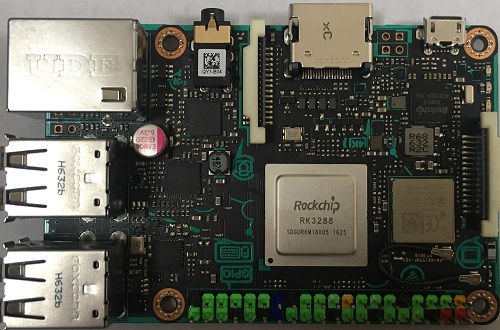
Tinker Board before mounting heatsink on SOC
Reassuringly expensive
The Tinker Board is £55, which is a good chunk more than a RPi3 at £32 – that’s quite a premium for a bit more CPU performance and RAM. I like the annotated PCB, and it’s also good to have a clicky MicroSD slot (like the RPi2 had rather than the cheaper feeling ones on the RPi3).
Desktop
It boots straight into a GUI desktop. Chromium is there, and seems fast enough to be used as a desktop machine (if you can live with a 1080p screen). I guess if I can get by with 2GB RAM on my Chromebook then I can get by with 2GB RAM on this.
I’ve not yet figured out which window manager it’s using (likely whatever Debian default is).
Network
Connecting to WiFi from the desktop was easy – click the button, select the network, enter password.
Getting the gigabit wired network working was not so easy/obvious (for something that should ‘just work’). I could see from my switch that the network was up (and connected at GigE), but the interface didn’t connect and pull a DHCP address and the usual command line invocations like ‘ifdown eth0 && ifup eth0’ weren’t working. Eventually it seems that I clicked something in the desktop UI that provoked action, and at least once it was up it stayed up across power cycles.
The OS image
It’s pretty obvious that somebody at Asus cloned an OS from their working Tinker Board, I can even see their command history for the bits and bobs that they installed by hand. This is not how professionals build and release an image, and I’m guessing my network issues might be related to the hardware MACs on my Tinker Board being different from the ones on the one the snapshot came from. At least the base is relatively stock Debian Jesse.
Security
When the board boots into a desktop it’s with the user ‘linaro’, which happens to have a password ‘linaro’; that user is part of the sudo group, and so can jump straight into doing stuff as root. So we have a hard coded username and password for a user who can get to root.
SSH is listening by default, making it possible to log in remotely (with the hard coded username and password).
The Raspberry Pi foundation did a better job with this stuff, and Asus clearly haven’t learned those lessons, which is a shame.
How could this be better?
If the supplied image booted into a late stage customisation script with the following few options that would be much better:
- Desktop or CLI?
- Username and password?
- SSH (and other exposed services) on or off?
If it was possible to provide a cloud-init like way of supplying customisation to do that without human touch then even better.
It runs hot
I found the included SOC heatsink after I’d done the unboxing photos, and popped it on. It gets pretty hot, so my guess is that it’s needed (or the SOC would be frying). The quick start guide specifies a 2A USB power supply (so that’s 10W). I tried to measure current draw with my PLX Legion Meter, but I couldn’t get it to boot as it seems to try to draw more current than the meter can supply.
That’s it for now
I’ve not had the chance to do anything meaningful with the board yet (let alone build a project around it). Next up I’ll try the Kodi build and see if the x.265 hardware decoding can be used there.
Note
[1] The quick start guide doesn’t have download links (I’m guessing they weren’t ready at the time of printing), and they’re not that easy to find with search. Here’s the download site (though it wasn’t working at the time of writing – sigh). Updated 18 Feb 2017 – There’s a new download site, but it doesn’t seem to have a Kodi image.
Filed under: Raspberry Pi, Tinker Board | 4 Comments
Tags: Asus, board, image, RPi, security, Tinker
The Politics of Data
TL;DR
Organisations of all types are increasingly making decisions based on data and its analysis, but the rigour involved in this hasn’t yet entered our broader social discourse. I’m hopeful that we all start getting better access to data, and better understanding of the analysis and modelling process so that decisions can be made for the right reasons.
All models are wrong, some are merely useful — Simon Wardley channelling George Box
Background
I spend my days encouraging people to make better decisions based on scientific method and data — collect, analyse, model, hypothesize, experiment — rinse and repeat[1]. My work is just a minuscule part of the overall trend towards running companies on data rather than opinion, and the march towards machine learning[2] and artificial intelligence it brings with it. This makes me very critical of data when it’s put in front of me, and how it gets analysed. I’m going to use a news article I read this morning as an example of bad practice in order to illustrate how things can (and probably will) change for the better.
The News
I’m going to pick apart a no byline piece from the BBC ‘Four-year MOT exemption for new cars proposed’. It’s full of facts and figures, but also has all the hallmarks of a rushed together content farm piece as described in ‘the rest is advertising’.
The proposal
The UK Ministry of Transport (MOT) is proposing that new cars be allowed to go an extra year (4 instead of 3) before their first MOT test. This almost certainly is a decision that’s been made in light of the data. The crucial question here, and one that’s not answered by the article is ‘how many cars fail their MOT test when first presented at 3 years old?’. The MOT people surely know the answer to that question, and that answer no doubt informs the statement that “new vehicles are much safer than they were 50 years ago”.
The irrelevant opinion
The article goes on to present data from an Automobile Association (AA) member poll. Apparently 44% were in favour of the change to 4 years, with 26% against.
It’s pretty clear that those AA members weren’t presented with the data that the MOT has, otherwise I’d expect a vary different outcome.
A question asked with facts presented:
The Ministry of Transport has found that 99.9% of cars presented for their MOT test at 3 years old pass the test, and they’re proposing that new cars now start taking the test after 4 years — does that sound reasonable to you?
Gets a very different answer than:
The Ministry of Transport says that new cars are safer than they were in the past. Do you think the MOT should start at 4 years instead of 3 years like it is now?
My bottom line here is: who gives a rats ass what a bunch of ill informed drivers think — where are the facts driving this decision?
This is not (entirely) the writer’s fault
For sure the writer could have gone back to the Ministry and asked for the fail rate data for cars at 3 years old (and 4 years old etc.), and I’m sure a better article would have resulted. But that’s too much to ask in a world of churning out content and reacting to the next press release or politician’s tweet.
If the Ministry was doing a good job of communicating its proposal perhaps it could have also explained its reasoning, and spoon fed the data with the press release.
What’s this got to do with politics?
Everything is politics — Thomas Mann
With Brexit and Trump’s election 2016 brought a moral panic around ‘fake news’ and the whole concept that one person’s opinion can be more valuable that another person’s fact.
Anti-intellectualism has been a constant thread winding its way through our political and cultural life, nurtured by the false notion that democracy means that ‘my ignorance is just as good as your knowledge.’ — Isaac Asimov
Facts come from data, but it’s easy for the causal link between collected data and presented ‘fact’ to become stretched, especially when statistical methods are being used (which is pretty much all ‘data science’). It’s this bending of fact, particularly in social science such as economics that opened the door to statements like this:
Britain has had enough of experts — Michael Gove
It’s interesting to note that the Brexit Leave campaign made extensive use of data science, along with other modern strategic tools like OODA as described by Dominic Cummings in his ‘how the Brexit referendum was won’. It also seems that we’re dealing with the deliberate introduction of noise into Western political discourse per ‘Putin’s Real Long Game’ and ‘Playtime is Over’.
There is a more hopeful angle though. Peter Leyden argues for a positive refrain in his ‘Why Trump’s Inauguration is Not the Beginning of an Era? — ?but the End’, noting that California might (once again) be ahead of the pack in moving on from celebrity politicians to a more data driven and scientific approach.
From Global Politics to Office Politics
The section above touched on major political events, but it’s worth looking more closely at what happens with data based decision making within organisations. Leaning on my own experience it seems to eliminate lots of office politics.
Don’t bring an opinion to a data fight — Kent Beck
Decisions have traditionally been made based on the Highest Paid Person’s Opinion (HiPPO), and perhaps the heart of office politics has been saying and doing what’s thought to keep the HiPPOs happy. As Andrew McAfee observed in ‘The Diminishment of Don Draper’ the HiPPO is being displaced by data and analytics. This can be very empowering to front line people, and in turn displaces traditional political structures. I think this is for the good, as it seems to make workplaces more pleasant and predictable (rather than confrontational and capricious).
Conclusion
In a world where it seems harder than ever to distinguish fact from fiction it’s on all of us to bring our data and clearly explain our analysis, because that provides facts with provenence, facts that can be understood, facts that can be trusted, facts that can triumph over opinion; and there’s nothing more political than that.
I look forward to better data based journalism in our broader social and political discourse, but I also look forward to what data and data science does to the workplace, because I think less political workplaces are nicer workplaces.
Updated 23 Jan 2017 — I meant to add a link to the London School of Economics series The Politics of Data
This post by Chris Swan was originally made to Medium
Notes
[1] For some insight into the work I’ve been contributing to take a look at my GOTO:London 2016 presentation.
[2] One of the ways I like to think of recent advances in machine learning is that computers are finally doing what we might reasonably expect of them — which mainly boils down to not asking a human a question that the machine can reasonably answer for itself.
Filed under: cle, technology | 1 Comment
Tags: data, data science, news, opinion, politics
TL;DR
I need local DNS for various home lab things, but the Windows VMs I’ve been using can be slow and unreliable after a power outage (which happens too frequently). Moving to BIND turned out to be much easier than I feared, and I chose OpenWRT devices to run it on as I wanted reliable turnkey hardware.
Background
My home network is a mixture of ‘production’ – stuff I need for working from home and that the family rely on, and ‘dev/test’ – stuff that I use for tinkering. Both of these things need DNS, which I’ve been running on Windows Active Directory (AD) since it was in Beta in 1999. For many years I had an always on box that ran as an AD server and my personal desktop, but that was before I became more concerned about power consumption and noise. For the last few years my AD has been on VMs running on a couple of physical servers at opposite ends of the house. That’s fine under normal circumstances, but leads to lots of ‘the Internet’s not working’ complaints if a power outage takes down the VM servers.
Why OpenWRT?
I already have a few TP-Link routers that have been re-purposed as WiFi access points, and since the stock firmware is execrable I’ve been running OpenWRT on them for years. They seem to have survived all of the power outages without missing a beat, and restart pretty quickly.
Why BIND?
Despite a (possibly undeserved) reputation for being difficult to configure and manage BIND is the DNS server that does it all (at least according to this comparison). It’s also available as an OpenWRT package so all I needed to do was follow the BIND HowTo and:
opkg update
opkg install bind-server bind-tools
Getting my zone files
Windows provides a command line tool to export DNS from Active Directory, and the files that it creates can be used directly as BIND zone files:
dnscmd /ZoneExport Microsoft.local MSzone.txt
The exports show up in %SystemRoot%\System32\Dns and it’s then a case of copying and cleaning up; the cleaning up being necessary because the exports are full of AD SVC records that I don’t need. I simply deleted en masse the SVC records, and tweaked the NS records to reflect the IPs of their new homes.
With clean zone files it was a simple matter of scping them over to the OpenWRT routers and configuring named.conf to pick them up and use my preferred forwarders[1]. A restart of named then allowed my new BIND server to do its thing:
/etc/init.d/named restart
Conclusion
I’d been put off BIND due to tales of its complexity, but for my purposes it’s a breeze to use. The fact that I was able to export my existing DNS setup straight into files that were suitable for use as BIND zone files made things extra easy.
Note
[1] I used to run a recursive DNS at home, but I found that it can be slow at times, so I’ve been using forwarders ever since. I’m not spectacularly keen on giving a list of everything I visit on the Internet to anybody, but ultimately I’ve settled on this selection of forwarders:
	forwarders {
		64.6.64.6;      # Verisign primary
                64.6.65.6;      # Verisign secondary
                8.8.8.8;        # Google primary
                208.67.222.222; # OpenDNS primary
                8.8.4.4;        # Google secondary
                208.67.220.220; # OpenDNS secondary
                80.80.80.80;    # Freenom primary
                80.80.81.81;    # Freenom secondary
	};
I really wish the a company with strong values (like CloudFlare) ran a service that I’d be happy to forward to, though the snoopers charter is making me reconsider my whole approach to DNS – I may have to tunnel my DNS traffic offshore like I’ve done with my Android tablet – anybody know a DNS server that can be forced to use a SOCKS proxy?
Filed under: networking | Leave a Comment
Tags: AD, Bind, DNS, forwarder, OpenWRT, zone
Restoring Power
TL;DR
I had a huge problem with ‘nuisance trips’ of the residual current device (RCD) in my house, which has been resolved by the installation of residual current circuit breakers with overcurrent protection (RCBOs). More reliable power to individual circuits in the house (and particularly the garage) has forced me to set up better monitoring so that I’m actually aware of circuit breaker trips.
Background
I live in a new build house that was completed in 2002, but it has perhaps the least reliable electricity supply I’ve ever encountered. Brownouts and power cuts (short and long) are all too frequent, so I’ve invested in a number of uninterruptible power supplies (UPSs) to protect power to my home network and the servers (and their files) that live on it.
As part of the wiring regulations that existed at the time all of the power sockets in my house were protected by a single RCD in the consumer unit (aka ‘fuse board’). The RCD was suffering from an increasing number of ‘nuisance trips’ (activating when it wasn’t actually saving me or somebody else from electrocution), taking power to the entire house with it each time it went off.
Why now?
In the run up to Christmas I was experiencing more nuisance trips than ever – three in a single day at one stage; and every time we turned the oven on there was a minute of anticipation about whether it would trip the board again[1].
The incident that spurred me into action happened over New Year. We took a long weekend away with family and friends in the North East of England and Borders of Scotland. On returning home the house was freezing – the power had been out since the evening that we left, and so the central heating had been off. At least the cold weather meant that stuff in the fridges and freezers wasn’t impacted. It took hours to get everything back on – it seemed impossible to have all of the house circuits on at once without tripping the RCD and taking everything down again[2].
RCBOs vs RCD
A bit of online research led me to this Institution of Engineering Technology (IET) forum thread about nuisance RCD trips in a house with ‘a lot of computers’, the response was:
Too many computers, cumulative earth leakage is tripping the RCD.
Ditch the single RCD and install RCBOs.
I’d not previously heard of RCBOs, but they’re basically a device that combines the functions of a Miniature Circuit Breaker (MCB) and an RCD into a single breaker. This has a couple of advantages:
- When a trip happens due to high residual current leakage to earth it only takes out a single circuit rather than the whole board.
- Any background levels of current leakage get spread across a number of breakers rather than accumulating on a single breaker and bringing it ever closer to its tripping point.
I got in touch with a friendly electrician[3] and he’s now installed a new consumer unit along with RCBOs[4] for each of the socket circuits (and in accordance with updated wiring regulations the light circuits are now RCD protected too using a ‘split board’ approach).
Since getting the RCBOs installed there hasn’t been a single trip on any circuit – so mission accomplished :)
A quick detour on suppression
The IET Forum Thread I referenced above also contains some discussion of the problems that come with transient voltage suppressors (TVSs). The issue is that when a there’s a voltage spike the transient suppressor gives it a path to earth, which then causes a residual current leak that trips an RCD.
I removed all of the surge suppressed power strips from the house, but it didn’t make any difference, likely because I left in place my 4 UPSs, which I expect all have their own TVSs within.
Every silver lining…
Now that I had reliable power there was a new problem. How would I know when power to the garage (and the server and freezer out there) went off? A trip on the garage RCBO wouldn’t take out the rest of the house, so it would be far less obvious. If I was away on a business trip it’s possible that the rest of the family wouldn’t notice for days.
The answer was to have better monitoring…
Time to go NUTs
I have a PowerWalker VI 2200 out in the garage looking after my Dell T110 II and associated network switch. Like most UPSs it has a USB port that provides a serial over USB connection. I hooked this up to a VM running on the server and installed Network UPS Tools (NUT) to keep an eye on things.
Email alerts
I use upsmon to run upssched to run a script that sends me an email when power goes out (and another when it’s restored). I’ve dropped the configs and scripts into a gist if you want to do this yourself (thanks to Bogdan for his ‘How to monitor PowerMust 2012 UPS with Ubuntu Server 14‘ for showing me the way here)
Graceful shutdown
My NAS and Desktop NUC both interface directly by USB with their local UPS and are configured to shut down when the battery level goes critical. I needed the same for the VMware vSphere servers running off the other two UPSs (in my garage and loft). Luckily this has been taken care of by René with his ‘NUT Client for ESXi 5 and 6‘ (Google Translation to English) so I just had to install and configure that, pointing at the same NUT servers I used for email alerts.
Conclusion
RCBOs have totally solved the problems I was having with RCD nuisance trips, and I now have monitoring and graceful shutdown in place for when there are real power issues.
Notes
[1] Conventional fault finding would suggest a fault with the oven, but I wasn’t convinced given that it’s only about 18 months old. My take was that a trivial issue with the oven that wouldn’t trip the RCD on its own was taking it over the edge when added to other leakage on other circuits. The fact that the oven doesn’t trip its new RCBO seems to bear that out.
[2] Going through the usual fault finding to identify a single culprit was fruitless. Everything was wrong and nothing was wrong. It didn’t matter which circuit I isolated. My hypothesis became that there was probably about 3-4mA of leakage on each circuit in the house, combining to a total leakage that had the single RCD on a hair trigger of any additional leakage.
[3] Despite being an electronics engineering graduate, a member of the IET (MIET) and a Chartered Engineer (CEng) I’m not allowed to do my own electrical work. I recall that there were ructions about this when the revised regulations with proposed and introduced, but it’s pretty sensible. Messing around with the 100A supplies to consumer units is no business for amateurs, and I was happy to get in a professional.
[4] After a bit of hunting around and price comparison I went for a Contactum Defender consumer unit and associated RCBOs and MCBs from my local TLC Direct. The kit came to just over £200, and getting it professionally installed cost about the same – so if you need to do this yourself budget around £350-500 depending on how many circuits you have.
Filed under: technology | Leave a Comment
Tags: breaker, nuisance, NUT, RCBO, RCD, suppressor, trip, UPS
TL;DR
I thought I could put Squid in front of an SSH tunnel, but it can’t do that. Thankfully Polipo can do the trick.
Why?
I was quite happy when it was just spies that were allowed to spy on me (even if they might have been breaking the law by doing so), but I see no good reason (and much danger) in the likes of the Department of Work and Pensions being able to poke its nose into my browsing history. The full list of agencies empowered by the ‘snoopers charter‘ is truly horrifying.
PCs are easy
I’ve been using Firefox (with the FoxyProxy plugin) for a while to choose between various virtual private servers (VPSs) that I run. This lets me easily choose between exit points in the US or the Netherlands (and entry points on a virtual machine [VM] on my home network or a local SSH session when I’m on the road).
To keep the tunnels up on the home network VM I make use of autossh e.g.
/usr/lib/autossh/autossh -M 20001 -D 0.0.0.0:11111 [email protected]
I can then use an init script to run autossh within a screen session (gist):
### BEGIN INIT INFO
# Provides:   sshvps
# Required-Start: $local_fs $remote_fs
# Required-Stop:  $local_fs $remote_fs
# Should-Start:   $network
# Should-Stop:    $network
# Default-Start:  2 3 4 5
# Default-Stop:   0 1 6
# Short-Description:  Tunnel to VPS
# Description:    This runs a script continuously in screen.
### END INIT INFO

case "$1" in

  start)
        echo "Starting sshvps"
        su chris -c "screen -dmS sshvps /usr/lib/autossh/autossh -M 20001 -D 0.0.0.0:11111  [email protected]"
        ;;
  stop)
        echo "Stopping sshvps"
        PID=`ps -ef | grep autossh | grep 20001 | grep -v grep | awk '{print $2}'`
        kill -9 $PID
        ;;

  restart|force-reload)
        echo "Restarting sshvps"
        PID=`ps -ef | grep autossh | grep 20001 | grep -v grep | awk '{print $2}'`
        kill -9 $PID
        sleep 15
        su chris -c "screen -dmS /usr/lib/autossh/autossh -M 20001 -D 0.0.0.0:11111  [email protected]"
        ;;
  *)
        N=/etc/init.d/$NAME
        echo "Usage: $N {start|stop|restart}" >&2
        exit 1
        ;;
esac
exit 0
That script lives in /etc/init.d on my Ubuntu VM. I haven’t yet migrated to systemd. With the VM running it provides a SOCKS proxy listening on port 11111 that I can connect to from any machine on my home network. So I can then put an entry into the Firefox FoxyProxy Plugin to connect to VM_IP:11111
Android isn’t so easy
It’s possible to define a proxy in Firefox on Android by going to about:config then searching for proxy and completing a few fields e.g.:
- network.proxy.socks VM_IP
- network.proxy.socks_port 11111
- network.proxy.type 2
That however will only work on a given network, in this case my home network.
I could (and sometimes will) use localhost as the SOCKS address and then use an SSH client such as ConnectBot, but that means starting SSH sessions before I can browse, which will get tiresome quickly.
Android does allow an HTTP proxy to be defined for WiFi connections, but it doesn’t work with SOCKS proxies – I needed a bridge from HTTP to SOCKS.
Not Squid
I’ve used Squid before, and in fact it was already installed on the VM I use for the tunnels. So I went searching for how to join Squid to an SSH tunnel.
It turns out that Squid doesn’t support SOCKS parent proxies, but this Ubuntu forum post not only clarified that, but also pointed me to the solution, another proxy called Polipo.
Polipo
Installing Polipo was very straightforward, as it’s a standard Ubuntu package:
sudo apt-get install -y polipo
I then needed to add a few lines to the /etc/polipo/config file to point to the SSH tunnel and listen on all ports:
socksParentProxy = "localhost:11111"
socksProxyType = socks5
proxyAddress = "0.0.0.0"
Polipo needs to be restarted to read in the new config:
sudo service polipo restart
Once that’s done I had an HTTP proxy listening on (the default) port 8123. All I had to do to use it was long press on my home WiFi connection in Android, tap ‘Modify Connection’ , tick ‘Show advanced options’ and input VM_IP as the ‘Proxy hostname’ and 8123 as ‘Proxy port’.
A quick Google of ‘my ip’ showed that my traffic was emerging from my VPS.
Yes, I know there are holes
DNS lookups will still be going to the usual place, in my case a pair of local DNS servers that forward to various public DNS resolvers (though not my ISP’s). If I was ultra paranoid I could tunnel my DNS traffic too.
When I’m using the tablet out and about on public WiFi and cellular networks I’ll not be proxying my traffic (unless I explicitly use an SSH tunnel).
Conclusion
Polipo provided the bridge I needed between Android’s ability to use WiFi specific HTTP proxies and the SSH tunnels I run out of a VM on my home network to various VPSs outside the UK. I don’t for a moment expect this to provide any protection from real spies, but it should prevent casual snooping, and will also guard against the inevitable ISP data protection failures.
Filed under: howto, networking | 2 Comments
Tags: http, IPAct, Polipo, proxy, snoopers charter, SOCKS, Squid, SSH, VPS
Amongst the flurry of announcements at re:invent 2016 was the launch of a developer preview for a new F1 instance type. The F1 comes with one to eight high end Xilinx Field Programmable Gate Arrays (FPGAs) to provide programmable hardware to complement the Intel E5 2686 v4 processors that come with up to 976 GiB of RAM and 4 TB of NVMe SSD storage. The FPGAs are likely to be used for risk management, simulation, search and machine learning applications, or anything else that can benefit from hardware optimised coprocessors.
Filed under: cloud, InfoQ news, technology | Leave a Comment
Tags: aws, cloud, FPGA
Amazon have launched Lightsail, a Virtual Private Server (VPS) service to compete with companies like Digital Ocean, Linode and the multitude of Low End Box providers. The service bundles a basic Linux virtual machine with SSD storage and a bandwidth allowance. Pricing starts at $5/month with tiers by RAM allocation. Each larger configuration comes with more storage and bandwidth, though these scale sub-linearly versus RAM/price.

Filed under: cloud, InfoQ news | Leave a Comment
Tags: amazon, aws, cloud, Lightsail, VPS
I went along to Serverlessconf last week and wrote up a couple of InfoQ news pieces about it:
Day 1 – Serverless Operations is Not a Solved Problem
The emergent theme from day one of the Serverlessconf London 2016 was that far from being ‘NoOps’, Serverless platforms bring with them substantial operational challenges. The physical servers and virtual machines may have been abstracted away, but that doesn’t mean an end to infrastructure configuration; and developers ignore the implications of underlying persistence mechanisms at their peril.
continue reading the full story at InfoQ
Day 2 – Serverless Frameworks
The emergent theme for the second day of Serverlessconf London 2016 was the availability and functionality of management frameworks to address the operational issues highlighted on day one. The Node.js based Serverless Framework featured in at least three talks, and there was also coverage of Zappa, a more opinionated Python based framework.
Filed under: cloud, InfoQ news | Leave a Comment
Tags: frameworks, InfoQ, operations, serverless, Zappa
Review – Lenovo X250
TL;DR
I’ve been very happy with the X250 – it’s given me the same performance I got from my X230, but with better battery life, a smaller form factor and it seems more robust.
Long term review
I started writing this post in January not long after I got my X250, but I never got past the title, and another nine months have rolled by. In that time the X250 has been a faithful companion on a pretty much daily basis.

There are many like it, this is mine
RAM and SSD
My X250 came with 8GB RAM and a 256GB SSD, neither of which is really sufficient for my needs, so I dropped in a 16GB DIMM from Crucial[1] and a 500GB SSD from SanDisk[2]. The X250 can take 2.5″ SATA and/or M.2 SSDs, though I’ve not tried the latter (as I already had a spare 2.5″ drive to hand).
Performance
Subjectively the X250 is no better or worse than the three years older X230. That’s fine, because the older laptop had all of the speed I needed, but it’s interesting to note that laptops have essentially plateaued in performance, offering better battery life instead.
For a less subjective view, the X250 gets a Geekbench 3 multi-core score of 5166 (5083 on battery) versus 4065 for the X230 – so there is some extra quantitative performance there. I expect that the newer GPU would also be much better (but hardly ideal) for gaming e.g. it would provide a noticeable improvement to Skyrim, but it’s not going to cope with No Man’s Sky.
Battery
The X250 actually has two batteries, an integral battery in the main body, and a detachable battery in the usual place. Together they provide around 6hrs of real world use, which is sufficient to get through a day away from power outlets at a conference or similar.
Form factor
The X250 and its 12″ screen provide the same width and depth as the older X230, but it’s a good bit shallower whilst still offering full sized VGA and network ports (so no need to carry a bag of adapters).
Screen
The resolution of the 12″ touchscreen is the same resolution as the screen I had before at 1368 x 768, and it’s nice and bright. It’s thicker than the X230 screen, but more robust as a result.
Resilience
After 10 months a worn down Ultrabook label shows that it’s had plenty of use, but that’s the only sign – nothing seems to be otherwise showing any age or wear and tear. It will be another 8 months before I can do a fair comparison, but it seems to be made of stronger stuff than my old X230. It appears that Lenovo have got the old ThinkPad mojo back for making laptops that can withstand what everyday life throws at them.
Niggles
Every Thinkpad that I’ve previously had sported a removable drive bay, which I’ve generally taken advantage of and hence found useful. The X250 has dispensed with this, which means taking off the base (and dealing with potentially fragile plastic clips) to get at the SSD. It’s the same story for the RAM, which doesn’t have an access door.
The M.2 SSD interface only takes SATA drives, so there’s no option for a further boost with NVMe.
The slimmed down form factor means that Lenovo have changed their 20v power supply jack from circular to rectangular, so I’ve had to buy a bunch of adaptors for the handful of power supplies I already had in my daily use and travel bags.
Should I have waited for an X260?
Perhaps – but they weren’t available in December 2015, and I wasn’t going to refuse a laptop that fitted the bill. The Skylake CPU in the later model might have given me even better battery life, but that’s the only difference that I’d expect to notice.
Conclusion
I’ve been very happy with the X250. It’s fast, small, lightweight, has a full selection of ports and can get through the day without worrying about when the next charging opportunity will come. It also seems to show that Lenovo have restored the build quality that traditionally went with the ThinkPad brand, and perhaps slipped a little a few years ago.
Update 23 Apr 2020
I got a few comments to my earlier X230 posts overnight that caused me to revisit this. 4+ years in and my X250 is going strong. The build quality issues I experienced with the X230 haven’t come up. In fact the only things that stop it from feeling like a new laptop are inevitable long term battery decline, and wear and tear to the keyboard and screen. If somebody offered me a new X395 tomorrow I’d take it, but I’m not beating anybody’s door down to get a new laptop – it’s still entirely fit for purpose for my day to day work – enough speed, enough RAM, enough SSD.
I bought my wife an X270 a little while ago, which seems pretty much the same as the X250 in terms of form factor and build quality.
Update 16 Mar 2021
My original X250 made it past 5 years, but I had to give it back. So… I bought another one, which now carries the SSD and extra RAM I’d bought back in 2015. It doesn’t have a touch screen, but I never used that, and it’s in better condition than the one that clocked up over 325,000 miles with me.
If I didn’t have the SSD and RAM I’d have probably gone for an X270, as I’d prefer an NVMe SSD. But I’m quite happy to keep on trucking with an X250, as it’s proven to be performant, robust, and the right size and weight.
Notes
[1] The DIMM failed after about 8 months causing the laptop to become *very* unstable. A quick run of Memtest86 revealed the culprit, and I swapped back to the OEM DIMM whilst Crucial did their RMA process, which took longer than I might have hoped, but was otherwise painless.
[2] I don’t seem to have filled the SSD anything like as quickly as I did the similar size one I first put into my X230, so there’s been no need yet to upgrade.
Filed under: review, technology | 1 Comment
Tags: lenovo, review, X250


 Chris Swan's Weblog