TL;DR
Anybody wanting a high spec laptop that isn’t from Apple is probably getting a low end model with small RAM and HDD and upgrading themselves to big RAM and SSD. This skews the sales data, so the OEMs see a market where nobody buys big RAM and SSD, from which they incorrectly infer that nobody wants big RAM and SSD.
Background
I’ve been crowing for some time that it’s almost impossible to buy the laptop I want – something small, light and with plenty of storage. The 2012 model Lenovo X230 I have sports 16GB RAM and could easily carry 3TB of SSD, so components aren’t the problem. The newer Macbook and Pixel 2 are depressingly close to perfect, but each just misses the mark. I’m not alone in this quest. Pretty much everybody I know in the IT industry finds themselves in what I’ve called the “pinnacle IT clique”. So why are the laptop makers not selling what we want?
I came to a realisation the other day that the vendors have bad data about what we want – data from their own sales.
The Lenovo case study
I spent a long time pouring over the Lenovo web sites in the UK and US before buying my X230 (which eventually came off eBay[1]). One of the prime reasons I was after that model was the ability to put 16GB RAM into it.
Lenovo might have had a SKU with 16GB RAM factory installed, but if they did I never saw it offered anywhere that I could buy it. The max RAM on offer was always 8GB. Furthermore the cost of a factory fitted upgrade from 4GB to 8GB was more than buying an after-market 8GB DIMM from somewhere like Crucial. Anybody (like me) wanting 16GB RAM would be foolish not to buy the 4GB model, chuck out the factory fit DIMM and fit RAM from elsewhere. The same logic also applies to large SSDs. Top end parts generally aren’t even offered as factory options, and it’s cheaper to get a standalone 512GB[2] drive than it is to choose the factory 256GB SSD – so you don’t buy an SSD at all you buy the cheapest HDD on offer because it’s going in a bin (or sitting in a drawer in case of warranty issues).
The outcome of this is that everybody who wanted an X230 with 16GB RAM and 512GB SSD (a practical spec that was purely hypothetical in the price list) bought one with 4GB RAM and a 320GB HDD (the cheapest model).
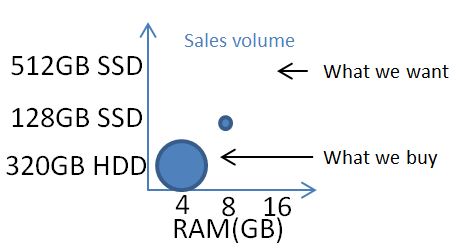
Looking at the sales figures the obvious conclusion is that nobody buys models with large RAM and SSD, so should we be surprised that the next version, the X240, can’t even take 16GB RAM.
The issue here is that the perverse misalignment in pricing between factory options and after-market options has completely skewed what’s sold, breaking any causal relationship between what customers want and what customers buy.
Apple has less bad data
Mac laptops have become almost impossible to upgrade at home so even though the factory pricing for larger RAM and SSD can be heinous there’s really no choice.
It’s still entirely credible that Apple are looking at their sales data and seeing that the only customers that want 16GB RAM are those that buy 13″ Macbook Pros – because that’s the only laptop model that they sell with 16GB RAM.
I’d actually be happy to pay the factory premium for a Macbook (the new small one) with 16GB RAM and 1-2TB SSD, but that simply isn’t an option.
Intel’s share of the blame
I’d also note that I’m hearing increasing noise from people who want 32GB RAM in their laptops, which is an Intel problem rather than an OEM problem because all of the laptop chipsets that Intel makes max out at 16GB.
Of course it’s entirely likely that Intel are basing their designs on poor quality sales data coming from the OEMs. It’s likely that Intel sees essentially no market for 16GB laptops, so how could there possibly be a need for 32GB.
Intel pushing their Ultrabook spec as the answer to the Macbook Air for the non Apple OEMs has also distorted the market. Apple still has the lead on both form factor and price whilst the others struggle to keep up. It’s become impossible to buy the nice cheap 11.6″ laptops that were around a few years ago[3], and the market is flooded with stupid convertible tablet form factors where nobody seems to have actually figured out what people want.
Conclusion
If Intel and the OEMs it supplies are using laptop sales figures to determine what spec people want then they’re getting a very distorted view of the market. A view twisted by ridiculous differences between factory option pricing for RAM and SSD versus market pricing for the same parts. Only by zooming back a little and looking at the broader supply chain (or actually talking to customers) can it be seen that there’s a difference between what people want, what people buy and what vendors sell. Maybe I do live amongst a “pinnacle IT clique” of people who want small and light laptops with big RAM and SSD. Maybe that market is small (even if the components are readily available). I’m pretty sure that the market is much bigger than the vendors think it is because they’re looking at bad data. If the Observation in your OODA loop is bad then the Orientation to the market will be bad, you’ll make a bad Decision, and carry out bad Actions.
Update
20 Aug 2015 – it’s good to see the Dell Project Sputnik team engaging with the Docker core team on this Twitter thread. I really liked the original XPS13 I tried out back in 2012, but that was just before I discovered that 8GB RAM really wasn’t enough, and that limit has been one of the reasons keeping me away from Sputnik. There’s some further objection to (mini) DisplayPort and the need to carry dongles, and proprietary charging ports, but I reckon both of those things will be sorted out by USB-C.
Notes
[1] Though I so nearly bought one online in the US during the 2012 Black Friday sale.
[2] I’ll run with 512GB SSD for illustration as that’s what I put into my X230 a few years back, though with 1TB mSATA and 2TB 2.5″ SSDs now readily available it’s fair to conclude that the want today is 2x or even 4x. I’ve personally found that (just like 16GB RAM) 1TB SSD is about right for a laptop carrying a modest media library and running a bunch of VMs.
[3] That form factor is now dominated by low end Chromebooks.
Filed under: could_do_better, technology | 2 Comments
Tags: apple, Chromebook, data, Intel, laptop, lenovo, MacBook, OODA, RAM, ssd
Upgrading Docker Redux
It’s less than two months since I last wrote about Upgrading Docker, but things have changed again.
New repos
Part of my problem last time was that the apt repos had quietly moved from HTTP to HTTPS. This time around the repos have more visibly moved, bringing with them a new install target ‘docker-engine’, and the change has been announced.
Beware vanishing Docker options
Following Jessie’s guidance I purged my old Docker and installed the new version. This had the unintended consequence of wiping out my /etc/defaults/docker file and the customised DOCKER_OPTS I had in there to use the overlay filesystem.
Without the right options in place the Docker daemon wouldn’t start for me:
chris@fearless:~$ sudo service docker start
docker start/running, process 48822
chris@fearless:~$ sudo docker start 5f4af8edf203
Cannot connect to the Docker daemon. Is 'docker -d' running on this host?
chris@fearless:~$ sudo docker -d
Warning: '-d' is deprecated, it will be removed soon. See usage.
WARN[0000] please use 'docker daemon' instead.
INFO[0000] Listening for HTTP on unix (/var/run/docker.sock)
FATA[0000] Error starting daemon: error initializing graphdriver: "/var/lib/docker" contains other graphdrivers: overlay; Please cleanup or explicitly choose storage driver (-s <DRIVER>)
NB It looks like Docker is running after I start its service, there’s no indication that it immediately fails. I’m also not the first to notice that one part of Docker tells you to use ‘docker -d’, and then another scolds you that it should be ‘docker daemon’ it’s now been fixed.
Don’t use my old script
Last time around I included a script that wrote container IDs out to a temporary file then upgraded Docker and restarted the containers that were running. It’s not just a case of adding the new repo and changing the script to use ‘docker-engine’ rather than ‘lxc-docker’ because if (as I did) you purge the old repos first then there isn’t a ‘docker’ command left in place to run the containers. I’d suggest breaking the script up to firstly record the running container IDs and then go through the upgrade process.
Filed under: Docker | Leave a Comment
Tags: APT, Docker, docker-engine, lxc-docker, repo, repository, upgrade
The United States Federal Communications Commission (FCC) has introduced ‘software security requirements’ obliging WiFi device manufacturers to “ensure that only properly authenticated software is loaded and operating the device”. The document specifically calls out the DD-WRT open source router project, but clearly also applies to other popular distributions such as OpenWRT. This could become an early battle in ‘The war on general purpose computing’ as many smartphones and Internet of Things devices contain WiFi router capabilities that would be covered by the same rules.
Filed under: InfoQ news, technology, WRTnode | Leave a Comment
Tags: android, CyanogenMod, FCC, firmware, open source, OpenWRT, router, wifi, WRTnode
Searching private Gists
I’m a big fan of Github Gist, as it’s an excellent way to store fragments of code and config.
Whatever I feel I can make public I do, and all of that stuff is easily searchable.
A bunch of my gists are private, sometimes because they contain proprietary information, sometime because they’re for something so obscure that I don’t consider them useful for anybody else, and sometimes because they’re an unfinished work in progress that I’m not ready to expose to the world.
Over time I’ve become very sick of how difficult it is to find stuff that I know I’ve put into a gist. There’s no search for private gists, which means laboriously paging and scrolling through an ever expanding list trying to spot the one you’re after.
Those dark days are now behind me now that I’m using Mark Percival’s Gist Evernote Import.

It’s a Ruby script that syncs gists into an Evernote notebook. It can be run out of a Docker container, which makes deployment very simple. Once the gists are in Evernote they become searchable, and are linked back to the original gist (as Evernote isn’t great at rendering source code).
I’ve used Evernote in the past, as it came with my scanner, but didn’t turn into a devotee. This now gives me a reason to use it more frequently, so perhaps I’ll put other stuff into it (though most of the things I can imagine wanting to note down would probably go into a gist). So far I’ve got along just fine with a basic free account.
Filed under: howto | Leave a Comment
Tags: evernote, gist, github, note, search, sync
Apache 2.2 on Ubuntu 14.04
Apache 2.4 changes things a lot – particularly around authentication and authorisation.
I’m not the first to run into this issue, but I didn’t find a single straight answer online. So here goes (as root):
# add Precise sources so that Apache 2.2 can be used
cat <<EOF >> /etc/apt/sources.list
deb http://archive.ubuntu.com/ubuntu precise main restricted universe
deb http://archive.ubuntu.com/ubuntu precise-updates main restricted universe
deb http://security.ubuntu.com/ubuntu precise-security main restricted universe multiverse
EOF
# install Apache 2.2 (from the Precise repos)
apt-get install -y apache2-mpm-prefork=2.2.22-1ubuntu1.9 \
  apache2-prefork-dev=2.2.22-1ubuntu1.9 \
  apache2.2-bin=2.2.22-1ubuntu1.9 \
  apache2.2-common=2.2.22-1ubuntu1.9
If you want mpm-worker then do this instead:
# add Precise sources so that Apache 2.2 can be used
cat <<EOF >> /etc/apt/sources.list
deb http://archive.ubuntu.com/ubuntu precise main restricted universe
deb http://archive.ubuntu.com/ubuntu precise-updates main restricted universe
deb http://security.ubuntu.com/ubuntu precise-security main restricted universe multiverse
EOF
# install Apache 2.2 (from the Precise repos)
apt-get install -y apache2=2.2.22-1ubuntu1.9 \
  apache2.2-common=2.2.22-1ubuntu1.9 \
  apache2.2-bin=2.2.22-1ubuntu1.9 \
  apache2-mpm-worker=2.2.22-1ubuntu1.9
Filed under: howto | Leave a Comment
Tags: 14.04, 2.2, Apache, Ubuntu
All of the major cloud providers now offer some means by which it’s possible to connect to them directly, meaning not over the Internet. This is generally positioned as helping with the following concerns:
- Bandwidth – getting a guaranteed chunk of bandwidth to the cloud and applications in it.
- Latency – having an explicit maximum latency on the connection.
- Privacy/security – of not having traffic on the ‘open’ Internet.
The privacy/security point is quite bothersome as the ‘direct’ connection will often be in an MPLS tunnel on the same fibre as the Internet, or maybe a different strand running right alongside it. What makes this extra troublesome is that (almost) nobody is foolish enough to send sensitive data over the Internet without encryption, but many think a ‘private’ link is just fine for plain text traffic[1].
For some time I’d assumed that offerings like AWS Direct Connect, Azure ExpressRoute and Google Direct Peering were all just different marketing labels for the same thing, particularly as many of them tie in with services like Equinix’s Cloud Exchange[2]. At the recent Google:Next event in London Equinix’s Shane Guthrie made a comment about network address translation (NAT) that caused me to scratch a little deeper, resulting in this post.

What’s the same
All of the services offer a means to connect private networks to cloud networks over a leased line rather than using the Internet. That’s pretty much where the similarity ends.
What’s different – AWS
Direct Connect is a 802.1q VLAN (layer 2) based service[3]. There’s an hourly charge for the port (that varies by the port speed), and also per GB egress charges that vary by location (ingress is free, just like on the Internet).
What’s different – Azure
ExpressRoute is a BGP (layer 3) based service, and it too charges by port speed, but the price is monthly (although it’s prorated hourly), and there are no further ingress/egress charges.
An interesting recent addition to the portfolio is ExpressRoute Premium, which enables a single connection to fan out across Microsoft’s private network into many regions rather than having to have point-to-point connections into each region being used.
What’s different – Google
Direct Peering is a BGP (layer 3) based service. The connection itself is free, with no port or per hour charges. Egress is charged for per GB, and varies by region.
Summary table
| Cloud | Type | Port | Egress |
|---|---|---|---|
| Amazon | VLAN | $ | $ |
| Microsoft | BGP | $ | |
| BGP | $ |
Notes
[1] More discerning companies are now working with us to use VNS3 on their ‘direct’ connections, in part because all of the cloud VPN services are tied to their Internet facing infrastructure.
[2] There’s some great background on how this was build in Sam Johnston’s Leaving Equinix post
[3] This is a little peculiar, as AWS itself doesn’t expose anything else at layer 2.
This post first appeared on the Cohesive Networks Blog
Filed under: cloud, CohesiveFT, networking | Leave a Comment
Tags: amazon, aws, Azure, cloud, direct connect, direct peering, expressroute, GCE, GCP, google, Microsoft, network
A friend emailed me yesterday saying he was ‘trying to be better informed on security topics’ and asking for suggestions on blogs etc. Here’s my reply…
For security stuff first read (or at least skim) Ross Anderson’s Security Engineering (UK|US) – it’s basically the bible for infosec. Don’t be scared that it’s now seven years old – nothing has fundamentally changed.
Blogger Gunnar Peterson once said there are only two tools in security – state checking and encryption, so I find it very useful to ask myself each time a look at something which it is doing (or what blend).
Another seminal work is Iain Grigg’s The Market for Silver Bullets, and it’s well worth following his financial cyptography blog.
Everything else I’ve ever found interesting on the topic of security is on my pinboard tag, and you can get an RSS feed to that.
Other stuff worth following:
Cigital
Light Blue Touch Paper (blog for Ross Anderson’s security group at Cambridge University)
Bruce Schneier
Freedom To Tinker (blog for Ed Felten’s group at Princeton University)
Chris Hoff’s Rational SurvivabilityAlso keep an eye on the papers for WEIS and Usenix security (and try not to get too sucked in by the noise from Blackhat/DefCon).

An important point that emerges here is that even though there’s a constant drumbeat of security related news, there’s not that much changing at a fundamental level, which is why it’s important to ensure that ‘basic block and tackle’ is taken care of, and that you build systems that are ‘rugged software‘.
This post originally appeared on the Cohesive Networks Blog.
Update 17 Nov 2015 – Stephen Bonner pointed out that I should also recommend Krebs on Security.
Update 4 May 2017 – Dick Morrell suggested Cybersecurity Exposed as a more ‘manager level intro’ on the topic.
Update 3 Sep 2019 – I checked in with Gunnar for the original source of ‘two tools’ and he pointed out that the original source was Blaine Burnham at Usenix Security saying ‘in computer security we basically only have two working mechanisms (which aint enough but that’s another story). One is the reference monitor, and the other is crypto.’
Update 15 Dec 2019 – a thread from Goldman Sachs security leader Phil Venables on ‘non-technical’ books for security people. They all look pretty technical to me, but maybe non security.
Filed under: security | 3 Comments
Tags: security
Many of the big data technologies in common use originated from Google and have become popular open source platforms, but now Google is bringing an increasing range of big data services to market as part of its Google Cloud Platform. InfoQ caught up with Google’s William Vambenepe, who’s lead product manager for big data services to ask him about the shift towards service based consumption.
continue reading the full story at InfoQ

Filed under: cloud, InfoQ news | Leave a Comment
Tags: big data, google, InfoQ
Upgrading Docker
Dockercon #2 is underway, version 1.7.0 of Docker was released at the end of last week, and lots of other new toys are being launched. Time for some upgrades.
I got used to Docker always restarting containers when the daemon restarted, which included upgrades, but that behaviour went away around version 1.3.0 with the introduction of the new –restart policies
Here’s a little script to automate upgrading and restarting the containers that were running:
#!/bin/bash
datenow=$(date +%s)
sudo docker ps > /tmp/docker."$datenow"
sudo apt-get update && sudo apt-get install -y lxc-docker
sudo docker start $(tail -n +2 /tmp/docker."$datenow" | cut -c1-12)
I also ran into some problems with Ubuntu VMs where I’d installed from the old docker.io repos that have now moved to docker.com.
I needed to change /etc/apt/sources.list.d/docker.list from:
deb http://get.docker.io/ubuntu docker main
to:
deb https://get.docker.com/ubuntu docker main
The switch to HTTPS also meant I needed to:
apt-get install apt-transport-https
Filed under: code, Docker, howto | 1 Comment
Tags: Docker, script, upgrade
BanyanOps have published a report stating that ‘Over 30% of Official Images in Docker Hub Contain High Priority Security Vulnerabilities’, which include some of the sensational 2014 issues such as ShellShock and Heartbleed. The analysis also looks at user generated ‘general’ repositories and finds an even greater level of vulnerability. Their conclusion is that images should be actively screened for security issues and patched accordingly.
continue reading the full story at InfoQ

Official Images with Vulnerabilities
Filed under: Docker, InfoQ news, security | Leave a Comment
Tags: Docker, InfoQ, security


 Chris Swan's Weblog