In my previous post about Raspberry Pi I noted that it will probably wipe out the existing market for thin client devices. It won’t stop there though. Next up – media players…
Hardware wise the Raspi is very close to existing media players like Apple TV (2nd gen) or something like a WD TV Live – ARM CPU, HDMI, Network and USB connections. All it’s really missing is a box (which is optional anyway if it’s going to be hidden behind a TV) and remote control (or smartphone app). The software side of things has already been sorted out with XBMC, recently demoed on the Raspi (I had originally thought along the lines of VLC media player, but XBMC looks like a more comlete solution). For those that have Apple stuff it looks like AirPlay has also been figured out.

What’s kind of funny here is that most of the popular media players have developed hacking communities around them. How much easier life is going to be once we have hardware (and a software stack) that’s open to tinkering from the get go.
My own aged Kiss DP-600 is sorely in need of replacement, so hopefully the Raspi starts coming off the production line soon. Of course that means I’ll be needing at least two – one for general hacking and another for the living room. Then there’s the upstairs TV, and the kids play room. I can see myself buying LOTS of Raspberry Pis – I think they’re going to need a bigger factory, maybe even a number of bigger factories.
Filed under: media, Raspberry Pi, technology | Leave a Comment
Tags: AirPlay, HDMI, media, player, Raspberry Pi, Raspi, remote, streaming, XBMC
My friend Randy Bias very kindly came in and did a web conference presentation at work this week on his views of cloud computing (which are well summarised in a post he did at the end of last year). Inevitably the topic of security came up, and Randy, drawing on his past experience in the world of infosec, strongly advocated building security in rather than bolting it on. I’m also a fan of this approach, but it raised a couple of questions for me:
- If we’re building security in, then how do we audit the controls?
- Will platform as a service (PaaS) give us a way to build security in such that it can be evaluated independently of the custom code running on it?
The audit paradox – my first encounter
A few years ago I was approached by a team that wanted to build a client facing web service. I explained that they’d need an XML gateway/firewall, and that we’d been looking at various solutions in the marketplace. They asked why such an expensive beast was necessary, so we got into the details of XML attacks and mitigations. I’ll pick on just one thing – schema validation. The XML appliance – a piece of bolt on security – could validate an incoming message to ensure that it conformed to the expected schema.

CC photo by arbyreed
‘No need for that’, they said, ‘we can follow the MSDN guidelines for schema validation’ (they were using .Net) – this was a genuine offer to build security in rather than bolt in on. ‘I think the IT Risk and Security guys will have a problem with that’, was my response, ‘how do they know that you’ve done it right?’.
There lies the issue – bolt on security is easy to audit. There’s a separate thing, with a separate bit of config (administered by a separate bunch of people) that stands alone from the application code.
Code security is hard. We know that from the constant stream of vulnerabilities that get found in the tools we use every day. Auditing that specific controls implemented in code are present and effective is a big problem, and that is why I think we’re still seeing so much bolting on rather than building in.
Can’t bolt on in the cloud
One of the challenges that cloud services present is an inability to bolt on extra functionality, including security, beyond that offered by the service provider. Amazon, Google etc. aren’t going to let me or you show up to their data centre and install an XML gateway, so if I want something like schema validation then I’m obliged to build it in rather than bolt it on, and I must confront the audit issue that goes with that.
PaaS to the rescue?
‘Constraints can be a win’ is one of Randy’s comments that sticks in my head. What if the runtime platform has the security built in rather than my custom code? What if security functionality, such as schema validation, is imposed rather than optional, and it’s the platform that I audit (once for all the applications)? That truly would be a win.

CC photo by WorldSkills
PaaS offers the promise of being able to do this, but frankly we’re not there yet. If we look at the antecedents of PaaS – the language frameworks, then there is cause for cautious optimism in the long term – e.g. Spring Security came along some time after Spring. A change in emphasis is needed though – security frameworks normally have lots of stuff that can be used, but precious little that must be used. If we return to the problem of auditability, the problem that must be solved is clearly providing evidence of a control and its effectiveness. This means that it must be always on, or clearly expressed in some configuration metadata rather than buried in code
Infrastructure as a service shows us that this can be done e.g. the AWS firewall is very straightforward to configure and audit (without needing to reveal any details of how it’s actually implemented). What can we do with PaaS, and how quickly?
Filed under: architecture, cloud, security, software | 6 Comments
Tags: audit, bolt on, build in, cloud, compliance, firewall, gateway, iaas, paas, schema, security, validation, xml
Arduino Simon – a little more
I wanted to add some diagrams to my original post, but didn’t have the right tools at hand.
After some digging around I found a mention from @psd of Fritzing. I’m pretty happy with the results:
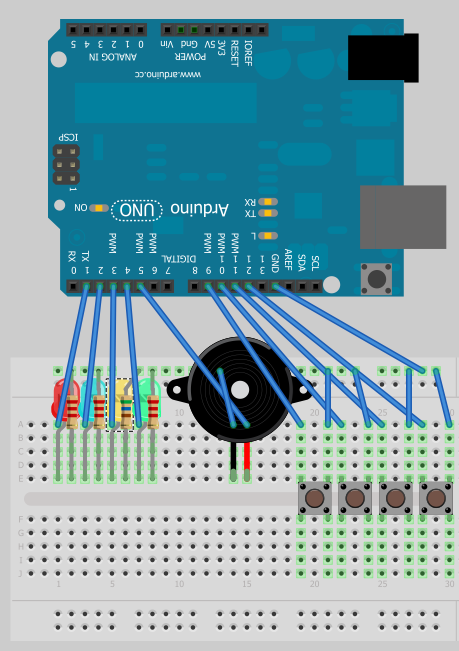
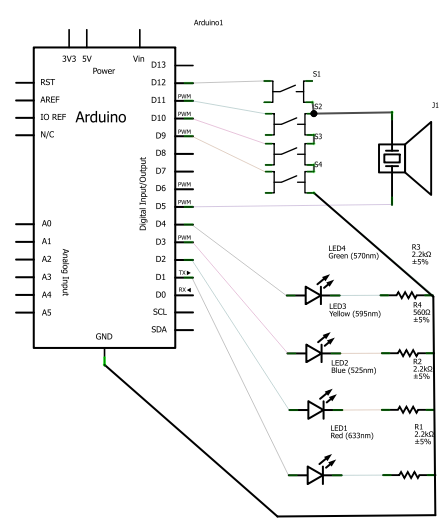
I’ve put the Fritzing file up onto github, and also created a project on the Fritzing site.
Filed under: Arduino, making | 1 Comment
Tags: arduino, breadboard, circuit, diagram, Fritzing, layout, Simon
The title for this post comes from an old naval tradition, where a ‘make and mend‘ was time given to fix up clothing. These days sailors get their uniform from stores, and personal clothes from shops like the rest of us; so a modern day ‘make and mend’ is simply some time off. With the rest of the family engaged in various performing arts yesterday I got some time off.
Mending
I noticed the other day that my Vespa that I use to get to the railway station in the morning wasn’t sitting on its stand properly. The bracket to push the stand down had been bent out of shape, causing it to lift the scooter on one side a little. My attempt to bend it back was a massive fail, as it just snapped off – doh! If there’s a next time I might choose a less freezing day so the metal is less brittle, or maybe even warm things up with a blow torch.
One of the more fun bits of navy engineering training was a series of workshops, which included a couple of days of welding. It didn’t make me any sort of expert, but the instruction, along with an arc welding machine I was given as partial payment for an IT consulting gig as a teenager means that I can at least make an attempt at getting bits of metal together:

I’m sure it won’t last, but it was a bit of fun, and puts off the day of having to buy a new stand.
Making
Having already fixed up the code for my Arduino Simon it was time to make a more permanent toy using some stripboard. I got an Arduino component bundle from Oomlout and some other bits and bobs like switches and a buzzer from eBay. Sadly when I went looking for stripboard I didn’t have a large enough piece to follow the instructables guide, so I had to improvise with what was on hand:
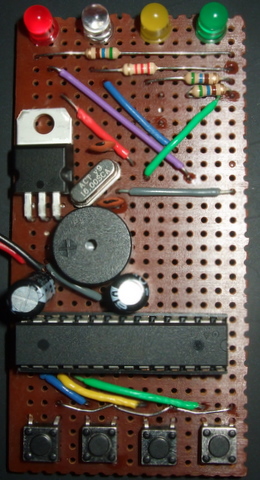
It might be technically possible to fabricate the circuit with a smaller piece of stripboard, but I’m pretty happy with how things came out. The reverse side shows that I was able to keep track cutting to a minimum (and that if I hadn’t been making it up as I went along I could have figured out that the yellow LED could go straight to its output pin):
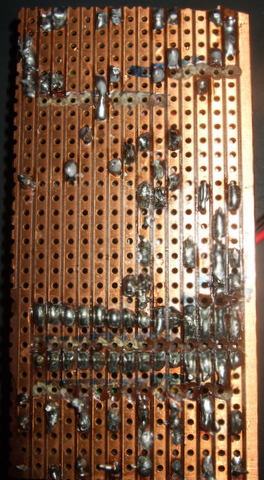
More by good luck than good judgement it seems that I’d chosen the right pins as input and outputs to give me a simple and efficient board layout. The ATMega328 pinout was of course essential to figuring out where things needed to go.
Amazingly it worked perfectly first time with the already programmed chip from the Arduino Uno. I thought I could then just drop the chip from the component bundle into the Uno and leave it at that, but when I went to program the game I got:
avrdude: stk500_getsync(): not in sync: resp=0x00
Oops. This turned out to be because the component bundle comes with a Duemilanove bootloader rather than Uno. I was able to program the game by selecting Duemilanove in the Tools menu of the Arduino IDE, then I swapped the chips over so that my Uno bootloader chip was back in its rightful home.
I have one more change planned before I move on from this project. Right now it’s powered by a 9v battery, which is both clumsy and fragile. I’ve ordered a switchable battery box to hold 4x AAA, and I plan to hot glue the stripboard onto that so that the sharp bits on the bottom are dealt with.
Conclusion
Fixing the stand on my scooter wasn’t the best use of my time, and I’m sure I could have got loads of cheap electronic toys for the time and materials spent on my Simon. But that wouldn’t have been anything like as much fun, and I think it’s great to be able to have home made toys – especially when the kids do some of the soldering.
Filed under: Arduino, code, howto, making | Leave a Comment
Tags: arduino, avrdude, bootloader, code, electronics, game, mend, Simon, stk500_setsync():, stripboard, welding
Arduino Simon
I My son got a great Xmas present in the shape of a Starter Kit for Arduino from Oomlout. After doing some of the basic projects I decided we needed something that we could get our teeth into. After a little pondering Simon came out as a worthwhile challenge. Back in the 80s I’d written a version of Simon that was published in Commodore Computing International, so I thought it would be fun to do a hardware version. A bit of poking around the web revealed that this has been done before, but I decided to start from scratch rather than copying the design and code from others (otherwise where’s the fun?).
I expected that this would be a project that might take a few weekends of tinkering, but in the end I had a playable system done in around 90 minutes. Arduino/Processing is a really productive environment, especially if you’re already familiar with electronics prototyping and a bit of C.
The electronics
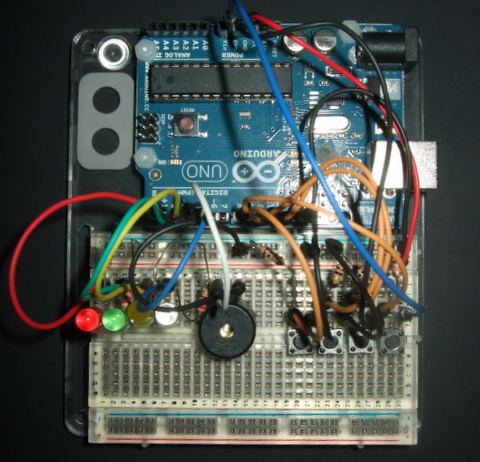
- Lights – 4 LEDs (Red, Green, Yellow and Blue) between digital output pins and ground with appropriate series resistors.
- Sound – a piezo buzzer between a digital output pin and ground.
- Buttons – 4 – between ground and digital inputs. Right now I have 10k pull up resistors, but they’re probably not necessary. Tip – twist the legs of PCB mount buttons through 90 degrees to stop them pinging out of the breadboard.
The code
I’ll let the code speak for itself, but I’ve put it at the bottom to avoid breaking the flow of things[1]. Update 17 Jan – the original code is below, but revised code is on github.
Todo
- Change the tones so that the match up with the original Simon.
- Check for when a correct sequence of 20 is entered, and do some sort of winning ritual (right now the array will just overflow).
- Resequence the inputs. Blue was on Pin 13, but that was before I discovered that Pin 13 is special.
- Make use of the internal pull up resistors for the buttons (and ditch the 10K ones on the board).
- Progressively speed things up when the sequence gets longer.
- Put the code up on Github.
And then
The kids have really got into playing with this, so I’ve bought some components to transfer things onto a more permanent stripboard based version.
I’m also tempted to see if I can transfer things over to an MSP430 based microcontroller. That would be much cheaper to make a permanent toy out of (especially since TI send out free samples), but it brings with it the extra challenge of having to multiplex inputs and outputs as the MSP430s aren’t graced with the number of pins found on Arduino’s ATMega chip. This would probably involve Charlieplexing the LEDs and coming up with a resistor ladder for input.
Update 22 Jan – I did some follow up posts covering the stripboard build and with some diagrams of the original.
[1] The code:
  const int led_red = 1;         // Output pins for the LEDs
  const int led_green = 2;
  const int led_yellow = 3;
  const int led_blue = 4;
  const int buzzer = 5;		 // Output pin for the buzzer
  const int red_button = 10;     // Input pins for the buttons
  const int green_button = 11;
  const int yellow_button = 12;
  const int blue_button = 9;     // Pin 13 is special - didn't work as planned
  long sequence[20];             // Array to hold sequence
  int count = 0;                 // Sequence counter
  long input = 5;                // Button indicator

  /*
  playtone function taken from Oomlout sample
  takes a tone variable that is half the period of desired frequency
  and a duration in milliseconds
  */
  void playtone(int tone, int duration) {
    for (long i = 0; i < duration * 1000L; i += tone *2) {
      digitalWrite(buzzer, HIGH);
      delayMicroseconds(tone);
      digitalWrite(buzzer, LOW);
      delayMicroseconds(tone);
    }
  }

  /*
  functions to flash LEDs and play corresponding tones
  very simple - turn LED on, play tone for .5s, turn LED off
  */
  void flash_red() {
    digitalWrite(led_red, HIGH);
    playtone(1915,500);
    digitalWrite(led_red, LOW);
  }

  void flash_green() {
    digitalWrite(led_green, HIGH);
    playtone(1700,500);
    digitalWrite(led_green, LOW);
  }

  void flash_yellow() {
    digitalWrite(led_yellow, HIGH);
    playtone(1519,500);
    digitalWrite(led_yellow, LOW);
  }

  void flash_blue() {
    digitalWrite(led_blue, HIGH);
    playtone(1432,500);
    digitalWrite(led_blue, LOW);
  }

  // a simple test function to flash all of the LEDs in turn
  void runtest() {
    flash_red();
    flash_green();
    flash_yellow();
    flash_blue();
  }

  /* a function to flash the LED corresponding to what is held
  in the sequence
  */
  void squark(long led) {
    switch (led) {
        case 0:
          flash_red();
          break;
        case 1:
          flash_green();
          break;
        case 2:
          flash_yellow();
          break;
        case 3:
          flash_blue();
          break;
      }
      delay(50);
  }

  // function to build and play the sequence
  void playSequence() {
    sequence[count] = random(4);       // add a new value to sequence
    for (int i = 0; i < count; i++) {  // loop for sequence length
      squark(sequence[i]);             // flash/beep
    }
    count++;                           // increment sequence length
  }

  // function to read sequence from player
  void readSequence() {
   for (int i=1; i < count; i++) {               // loop for sequence length
      while (input==5){                          // wait until button pressed
        if (digitalRead(red_button) == LOW) {    // Red button
          input = 0;
        }
        if (digitalRead(green_button) == LOW) {  // Green button
          input = 1;
        }
        if (digitalRead(yellow_button) == LOW) { // Yellow button
          input = 2;
        }
        if (digitalRead(blue_button) == LOW) {   // Blue button
          input = 3;
        }
      }
      if (sequence[i-1] == input) {              // was it the right button?
        squark(input);                           // flash/buzz
      }
        else {
          playtone(3830,1000);                   // low tone for fail
          squark(sequence[i-1]);                 // double flash for the right colour
          squark(sequence[i-1]);
          count = 0;                             // reset sequence
      }
    input = 5;                                   // reset input
    }
  }

  // standard sketch setup function
  void setup() {
    pinMode(led_red, OUTPUT);      // configure LEDs and buzzer on outputs
    pinMode(led_green, OUTPUT);
    pinMode(led_yellow, OUTPUT);
    pinMode(led_blue, OUTPUT);
    pinMode(buzzer, OUTPUT);
    pinMode(red_button, INPUT);    // configure buttons on inputs
    pinMode(green_button, INPUT);
    pinMode(yellow_button, INPUT);
    pinMode(blue_button, INPUT);
    randomSeed(analogRead(5));     // random seed for sequence generation
    //runtest();
  }

  // standard sketch loop function
  void loop() {
    playSequence();  // play the sequence
    readSequence();  // read the sequence
    delay(1000);     // wait a sec
  }
Filed under: Arduino, howto, making | 4 Comments
Tags: arduino, breadboard, button, buzzer, code, electronics, game, LED, pin 13, Simon
I ordered this card to go in my latest Microserver running the Windows 8 Developer Preview, but before it arrived I found an old NVidia Quadro NVS 285 lying around, which fitted the bill perfectly for doing dual DVI. My next thought was to upgrade the NVidia Geforce 210 in my (now rarely used) workstation. Sadly it doesn’t fit in there, as the heatsink bends around to the other side of the board, which in my workstation means it’s fighting a losing battle against the RAID card below for space. I think it would fit fine into the Microserver, provided that the next door PCIe slot isn’t occupied (or filled with something small).

I could have put it into my ‘sidecar’ Microserver, but that would be a waste since I pretty much never use that machine locally. Thus my daughter’s box became the winner. This had an old X800 in it, which despite being on the recommended hardware list appeared to be insufficient for the task of running Lego Universe.
Installation
The fold over heat sink wasn’t a problem without another board directly below. On booting up the machine (running Windows 7 x64) didn’t pull down a new driver, going for Standard VGA and the low resolutions that entails. I was however able to update the driver via Windows and get back to glorious 1920×1080. This seemed like a better idea than the likely old drivers on the supplied CD or the huge 100MB+ download from ATI (which must have huge amounts of annoying cruft in it).
Performance
The 2D performance took a slight step back in Windows Experience Index (5.8 -> 4.6) but the 3D performance leapt up to 6.1. Oddly this means that the oldest PC still in use in the house now has the highest WEI. Bringing Direct X 10 and 11 to the table surely helps, and the good news is that Lego Universe now starts up perfectly.
Conclusion
Performance wise this is the card I should have bought in favour of the GeForce 210, but I’d have been out of luck fitting it to the intended machine due to the fold over heat sink. If you have sufficient space, and want a low end GPU that can drive a decent size monitor then this card seems to beat the NVidia in almost every measure. It looks like other OEMs like VisionTek make similar cards with different heat sinks, which may in some cases be a better fit. I’m happy that my daughter’s machine can now run stuff that didn’t work before.
Update 1 – 9 Dec 2011 – Toms Hardware has a really good comparison chart showing the relative performance of various families of NVidia, ATI and Intel chipsets.
Filed under: review, technology | Leave a Comment
Tags: 5450, benchmark, DX10, DX11, fit, HD, heatsink, Lego Universe, Microserver, Radeon, Sapphire, WEI
I like to get familiar with new versions of Windows early in the cycle, so it was great to see the Developer Preview being made available ahead of a beta.
First impressions
The new Metro interface hits right between the eyes. I can’t say that I’m a fan yet. It seems well adapted to touch screens, but I’m not comfortable with it on a regular desktop monitor. The worst bit is that it doesn’t take long before needing to scroll over to icons for recently installed apps that sit off screen. A monitor in portrait orientation exacerbates the issue.

Luckily it’s fairly easy to escape back to the familiar desktop, where if regularly used apps are pinned there’s rarely any reason to leave – except the Start button goes right back to Metroland.
The little things
Windows has had accessories for as long as there has been Windows – things like calculator and paint. The executables are still there, but I haven’t yet found the new equivalent of the Accessories folder.
My test hardware
As the HP Cashback deal makes them such a bargain I got myself another one of their wonderful little Microservers. This time it’s one of their new N40L models, which has a slightly faster 1.5GHz Turion processor (versus the older 1.3GHz Athlon) 2GB or RAM as standard [1] (was 1GB) and a lower rated PSU (so hopefully more frugal than ever).

Wireless
The Microserver isn’t somewhere that I can plug it into a wired network, so I got a cheap USB wireless adaptor from eBay. I needed to install drivers to get it going, but the process wasn’t too painful.

Video
The Microserver only has a VGA output, which isn’t a good way to drive the sideways T configured screens on my desk. Luckily I had an old NVidia Quadro NVS 285 card lying around along with a Dual-DVI cable – this is small enough and low power enough to suit the Microserver perfectly [2]. This time around no messing with drivers – on powering up Windows 8 sprang to glorious life across both screens. All I had to do was reorient the left screen for portrait orientation.

If you want to drive a couple of screens from a Microserver, and don’t plan on playing 3D games, then these cards are cheap, readily available and work great.
KVM
So that I can switch between my regular machine and the Microserver I got a USB KVM switch. The V bit is in my case utterly pointless, as I don’t want to switch video, but it seems that switches that just do USB keyboard and mouse aren’t common/affordable [3]. It works pretty well – I just have to double tap Scroll Lock to switch between machines. The only issue is that it insists on having the appropriate VGA cable plugged in – lucky for me the Microserver and my laptop docking station have (now superfluous) VGA outputs.

Overall
If you stay on the desktop, then Windows 8 is very familiar to those who have got used to Windows 7 (or even Vista before). So far everything I’ve installed has run fine – though that’s not too much, as I don’t want to invest time in a build that will time out as the product release cycle grinds forward. This is clearly evolutionary (like 2000 -> XP, or Vista -> Windows 7) rather than revolutionary, but given the issues with previous revolutionary releases that’s probably a good thing.
[1] I got another 2GB in anticipation of running a VM or two in VirtualBox. I should also mention that the preview runs fine in VirtualBox.
[2] Right now this is running without a proper fixing bracket, as the card came with a regular size one rather than low profile, but I’m hopeful that I’ll find a bracket somewhere to fix that up.
[3] As most decent monitors now have multiple digital inputs I don’t quite get why this is a gap in the market. That said those modern monitors don’t make it as easy as it should be to make the switch. On my TV I can go between inputs with just one button. On most of the monitors I use I find myself having to press two or three to achieve the same thing.
Filed under: review, technology | 4 Comments
Tags: desktop, KVM, Metro, Microserver, N40L, USB, wifi, Windows 8, wireless
OpenVPN
For some time I’ve used SSH tunnels as a means to pretend that I’m somewhere else to avoid geography filters, or to otherwise sneak past content filters. This is fine for regular HTTP(S) traffic from a browser, where it is easy to define a proxy server, but doesn’t work so well for other applications – for example the desktop version of TweetDeck seems to completely ignore proxy settings.
I went in search of a network adaptor that would hook up to an SSH tunnel, and what I found was OpenVPN [1]. I set this up on a small cloud server, a process that I can only describe as trivial – the quick start guide is great. This was quite a contrast to my experience of trying to set up L2TP on Ubuntu a few weeks earlier.

By default the OpenVPN daemon listens on port 443, which is the same port that I normally use for SSH tunnels (as most content filters block the regular port 22 for SSH) [2]. The admin interface runs (over HTTPS) on port 943, though I took the precaution of turning off binding to a public IP [3].
Client installation was also straightforward, a simple download and install followed by putting the IP, username and password into the startup dialogue box.

For those that can’t be bothered with running their own cloud server or VPS there’s a service version called Private Tunnel, which charges by bandwidth consumed rather than any other metric like month, machine or whatever. I’ve not used it myself, and the Ts&Cs aren’t as benign as I’d like, but it may well be the easy/cheap option.
My only complaint is that there’s no iOS support, and this isn’t the sort of thing that can be done with an app – it would need to be baked in to a future version of iOS, and sadly I can’t see why Apple would be in any hurry to do that [4].
[1] As the Wikipedia article explains, OpenVPN doesn’t actually use SSH, but it’s certainly close enough, and achieves what I was looking for.
[2] I have once run into trouble with a very clever filter realising that I was using SSH rather than SSL/TLS, though in that particular case it was happy for me to run SSH over port 22, so no harm done.
[3] If I want to do any admin then it’s straightforward enough to SSH into the box and then run a web connection through a tunnel to the localhost loopback.
[4] There does appear to be some support for jailbroken iOS devices, but that isn’t an option for me if I want my Good for Enterprise client to keep passing its compliance checks. It looks like for the time being I’ll have to stick with using iSSH for an SSH tunnel to one of my VPSs running Squid.
Filed under: howto, review, technology | Leave a Comment
Tags: cloud, filter, iOS, iSSH, Linux, OpenVPN, PrivateTunnel, SSH, SSL, tunnel, Ubuntu, vpn, VPS, Windows
If you don’t already know what Raspberry Pi is then take a look at the Wikipedia entry and their web site.

Their mission to recreate the experiences of 8 bit computing that shaped the lives and careers of my generation is laudable, and I’m sure they will achieve great success.

That’s just the start though. Raspberry Pi based boards are going to be everywhere, and that’s going to change the world as we know it.

One of my favourite SF books of all time is Vernor Vinge’s ‘A Deepness in the Sky‘ – whenever I see snow now there’s a little bit of me thinking ‘the sun went out, and the atmosphere has frozen’. The protagonist of the story, Pham Nuwen, makes use of ‘localisers’ – a sort of smart dust to get up to various sorts of hackery that lets him win the day. The Raspberry Pi may be credit card sized rather than dust sized, but it takes us a step closer to that science fiction becoming a reality.
Prediction 1 – one of the first things to be disrupted will be the hardware thin client business. I expect that within a day of release (maybe even before mainstream release) somebody will put together a package that turns a Raspberry Pi into a client for screen remoting protocols like RDP, ICA, VNC etc. For way too long the hardware thin clients have been too big and too near to the cost of a real PC. $25 and the size of a credit card changes that game. It will then be a matter of months before some enterprising monitor maker decides to build Raspberry Pi into the box – the ecosystem will be irresistible to them.
Prediction 2 – lots of things that have dedicated microcontrollers in them now will start to have a Raspberry Pi instead. I liked the idea of ‘Arduino inside’ that I read about in this story of a guy who hacked his dishwasher. The microcontroller on the Arduino is pretty ancient though. Yes, there are plenty of cheap dedicated microcontrollers out there that are more powerful (I’ve done some tinkering myself with the TI MSP-430), but in the end the flexibility of software normally trumps an efficiency of hardware. At first it will be the hackers and makers putting their Raspberry Pis into ordinary kit, but then manufacturers will catch on that the community will be able to add value to products after they’re launched – making them more desirable.
Of course the original aim of Raspberry Pi – getting kids interested in computers again – will spur many other waves of creation and innovation. I can’t wait to see what happens.
Filed under: Raspberry Pi, technology | 8 Comments
Tags: arduino, hack, hacking, ICA, makers, microcontroller, PCoIP, Raspberry Pi, RDP, thin client, VDI, VNC
Race Against The Machine
I’ve been an avid follow of Andrew McAfee’s Blog ever since JP first pointed me in that direction. He’s clearly a man that understands how technology is reshaping how we do business. Whilst I was on holiday a few weeks ago I noticed that he’d published a book along with Erik Brynjolsson – Race Against The Machine. The subtitle does a great job:
How the Digital Revolution is Accelerating Innovation, Driving Productivity, and Irreversibly Transforming Employment and the Economy

The first thing worth noting is that this book has been published only on Kindle, which means it’s bang up to date. I recall seeing data in there from Aug 2011 – only a couple of months old at the time of reading.
The second important point is that it’s short. I got through it in a couple of hours, and I’m not one of those speed readers who can consume an entire novel in the course of a plane ride.
I don’t intend to pick the book apart here, overall I think it’s a great piece of work – perhaps the first thing I’ve come across that does a good job of explaining why the world, its people and our economies are where they are, and how we might use technology to get us somewhere better. What I do want to do is spend some time picking at the recommendations, as I feel this was the weakest area, and that in pursuit of brevity the authors had failed to securely attach many of their recommendations to their main argument. They have 19 specific steps, which I’ll try to tackle in turn:
- Invest in education, starting with paying teachers more. I find this hard to disagree with initially. As I grew up teaching was an admirable profession, and my teachers seemed to be well enough off. Something changed along the way – the only guy that wanted to go into teaching on my degree course got the worst grade on the entire course (though he did graduate, which was better than a third of the original intake). We do seem to have ended up in a vicious circle of teaching being undervalued by society leading to lowering opinion of the career… I feel the remedy is likely to be more transformational than throwing money at the problem. We still predominantly use 19th century teaching methods, as brilliantly illustrated in this video of Sir Ken Robinson speaking at the RSA, and that’s what really needs to change.
- Hold teachers accountable for performance (by eliminating tenure). Since reading the book I finally got around to watching Waiting for “Superman”, and it seems like tenure (and the Unions that keep it in place) really is a huge problem for the US education system. Of course we don’t have tenure in the UK, and it still feels like education is going down the toilet. Attempts by succesive education secretaries to make teachers more accountable seem to have done nothing more than introduce beureacracy, so this topic needs to be approached with care.
- Separate student instruction from testing and certification. I think this one is aimed at the disastrous no child left behind act and the pernicious unintended consequences it’s had on education in the US by stripping teachers of discretion and putting in place a system that’s there to be gamed.
- Keep K-12 students in classrooms longer. Again a very US centric prescription. Unless the race against (or with) the machine is a zero sum game for the planet then I’d have liked to see global recommendations. What’s the right number of hours for kids to spend in classrooms, and where’s the source data for such a recommendation?
- Skilled immigrant visas. Immigration law is a mess just about everywhere, and usually a political/media hot potato. The public debate is all about keeping the wrong people out rather than allowing the right people in – that’s what needs to change first. The EU experiment shows that a (somewhat) borderless labour market works at an individual and state economic level, but the whole situation is bereft with envy and xenophobia.
- Teach entrepreneurship throughout higher education. Who and how? Teachers aren’t entrepreneurs. In most cases even business school teachers aren’t entrepreneurs. Getting this right means schools engaging in a new way with (local) businesses. I was fortunate enough to take part in such a program whilst at 6th form college (=12th grade) but it ran in the margins rather than the mainstream (during a holiday if I recall). I’d go so far as to say that entrepreneurship might be the wrong target here – how about some of the basic skills needed to run a business – book keeping, marketing, CRM etc.?
- Founders visas. I don’t see the difference between a founder and a skilled immigrant. So why repeat the point? My friend Kirk has also gone to some efforts to point out the flaws in any plan aimed at startups.
- Templates for new businesses. Is starting a business a knowledge management problem that can be resolved by codification of implicit to explicit, and greater uniformity? It’s probably worth looking at the agencies involved and the incentive structure around their activities – essentially who amongst the lawyers, bank managers, accountants etc. has their snout in the trough as part of making this difficult right now?
- Lower government barriers to business creation. Another snout in the trough problem, only this time it’s public and elected officials. The issue doesn’t stop at business creation either – in many cases established firms use legislation to create barriers to entry to deal with the problem of disruption from below. The authors recognise the political and economic complexities, but offer no explanation of how to deal with them. To resolve this one we need to recognise that it’s not just the 3rd world that’s riddled with corruption – it’s endemic – just dressed up more nicely as ‘lobbying’ and ‘political donations’. The founding fathers in the US recognised the need to separate church and state; we must now do something to separate state (or at least the political structure of state) and money. Politics should be a calling not a career.
- Investment in infrastructure. It does appal me whenever I visit the US how shoddy the basic infrastructure looks and feels, but things seem to work despite that. Also roads and railroads are the infrastructure of the industrial age rather than the information age. Would a comparatively smaller investment in say fibre to the doorstep be more useful than bigger roads with fewer pot holes? I’d suggest a look at data from S Korea might provide some illumination here.
- Increase funding for basic research. Another one where I’d like to see some evidence. Is China pulling ahead because their government does more of this? Has the level of basic research worldwide been able to find a different level because of the open and collaborative nature of the Internet? How do we know that present levels of investment are wrong?
- Keep hiring and firing as easy as possible. Why are the authors even talking about a system grounded in redundant concepts like a job for life? This one gets answered at 14.
- Make it more attractive to hire people than buy technology. This feels like a pure Luddite argument. The race against the machine will not be won by making the machine pay higher taxes.
- Decouple benefits from jobs. Again, evidence from countries that run different systems could be used to construct an argument for optimisation. Denmark and the Netherlands are referenced here, but what are they doing, and what has it accomplished? If the US sticks with its approach to health insurance then why should big firms be able to negotiate a better deal than individuals? Isn’t it dumb of insurers to allow employees of big firms to be lumped together rather than considering the risks of an individual? Or is their some dumb concept of fairness at work here where the deck is allowed to be stacked one way but not another?
- Don’t rush to regulate new network businesses. It would be interesting here to have comparison of how different countries regulated the Internet as it emerged, and the effect that this had on associated economic activity (both pure play net businesses and other businesses supported by the Internet).
- Eliminate home mortgage subsidy. The tip of the iceberg of a bigger problem where cheap and easy debt collided with limited capital. The trick is perhaps to find an investment vehicle that can be indexed against real estate markets for those who want to have their cake (accumulation of capital in property) and eat it (rent wherever they wish to go). There is probably a point to be made here on sales tax for property transactions also.
- Reduce subsidies to financial services. The sector was attracting too many of the brightest and best long before the realities of too big to fail were demonstrated or understood. The issue we face at the moment is that the smart people within financial services are doing a better job of gaming the system than those outside.
- Reform the patent system. I couldn’t agree more with this one. Software patents are a disaster, and we seem to have a fundamental mismatch between the duration of patents (to suit the pharma industry) and the lifetime of technology in other sectors. The only winners seem to be lawyers, but then the US is run by a lawyer elite.
- Shorten copyright and increase flexibility of fair use. This is particularly true for software – why should stuff that’s obsolete (e.g. Windows XP) be protected decades past the end of its useful life, and who are the rent seekers that think this is a good idea. Almost nothing being created today that isn’t explicitly put into the public domain or creative commons will fall into the public domain within our lifetimes.
Filed under: review, technology | Leave a Comment
Tags: #racemachine, copyright, economics, education, employment, entrepreneur, founders visa, immigration, Internet, patents, politics, race against the machine, regulation, review, SMEs, startups, technology


 Chris Swan's Weblog