Another Microserver
After switching to using my tablet PC as my main machine I was missing the local storage and optical drive from my desktop. The solution was to get another HP Microserver to be a sort of sidecar when I want the extra drives. As the HP cashback deal is still on this is a surprisingly cost effective approach, with the Microserver and a Sony[1] DVD-RW coming in at less than £140. As I had a 1GB stick of RAM left over from upgrading my other Microserver, and a bunch of largish hard drives from my old desktop getting it properly up to spec was achievable with no further expense.
ESXi – not this time
I had planned on putting ESXi onto this box just so that I could try it out, but I was thwarted. 2GB of RAM is supposedly the minimum, so maybe I was pushing my luck, but with the integrated video card taking 32MB it seems I was just short[2]. I abandoned VMWare in favour of a bare metal install of Windows 2008R2 (again), though this time without Hyper-V.
Video transcoding
Although the processor on the Microserver is pretty weedy I thought I’d give it a try at video transcoding with DivX Plus Converter. It worked out better than I expected, with files converting in about 1.25x real time (= 0.625 real time for 2 passes), though it was a bit of a journey getting there. At first DivX+ was saying that it couldn’t read the input files, which looked like a CODEC issue. Since I had already installed the right CODEC I suspected some of the underlying plumbing might be missing as a result of Windows Media Player not being there in Server 2008R2. Installing the Windows Server Desktop Feature fixed this.
iSCSI
The original tweet that had brought my attention to the Microserver had been about iSCSI performance, so I thought I’d give this a go. At first I couldn’t find how to set it up as a target, but eventually I found this guide, which set me on the right track. There doesn’t seem to be any way to use raw disks as targets, but using VHDs allows for some nice extra features, and doesn’t seem to harm the performance, which appears to be a clear step up from using CIFS. Once the target was set up connecting to it from the Windows 7 iSCSI initiator on my tablet was pretty easy.
Using the eSATA connector for a 6th internal drive
I had read elsewhere about people using the eSATA connector for another (2.5″) internal drive. If I’d been paying more attention I’d have noticed the warnings not to buy cheap eSATA-SATA cables from eBay, but instead to get decent quality ones. As the optical drive I got is fairly short there’s plenty of room in the case for a laptop drive. Luckily I had some spare SATA power connectors from the old desktop:
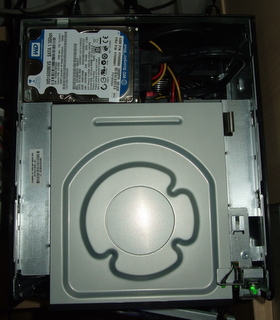
For the time being I just have an old laptop drive in there, but I may transplant an SSD at some stage.
Hibernation
As the whole point of this box is to just provide extra storage for the tablet PC I don’t want it to be always on. It turns out to be fairly easy to enable hibernation – just run an cmd window as admin and invoke ‘powercfg.exe /hibernate on’. I then set the power button to hibernate. It’s also possible for me to put the machine into hibernation from terminal server client by clicking on the task bar and hitting Alt-F4 and selecting hibernate (as hibernate isn’t available in its usual place on the Start menu).
Overall
I was super happy with my first Microserver, and this one’s just as good. I have it doing a slightly different job, but it’s working perfectly. A docked laptop plus a Microserver seems to be a great alternative to a desktop.
[1] The drive is pretty much unbranded, but shows up as an ‘Optiarc AD-5260S’ in device manager. I may regret not splashing the extra £5 for a Samsung SH-222AB – time will tell.
[2] When trying to install ESXi I managed to get an error message along the lines of ‘you only have 1.97GiB. Minimum of 1.97GiB required’ – not very helpful. I ended up playing with VMWare on my old Dell instead.
Filed under: howto, review, technology | Leave a Comment
Tags: 2008R2, codec, divx, hibernate, HP, iSCSI, Media Player, Microserver, transcoding, video, Windows
For many years I ran a desktop PC in my home office, and it was always on in order to provide various services to other machines scattered around the house. The one good thing about this arrangement was that the room was always warm in winter.
After getting my NAS and Microserver I started paying more attention to energy use, and hibernating my desktop machine whenever it wasn’t in use. This had the effect of highlighting just how noisy it was.
Around the same time I noticed that RAM and a docking station for my X201 Tablet had become affordable. I took the plunge and got an Ultrabase off eBay, and ordered 8GB or RAM to match my desktop (in order to have headroom to run some VMs on VirtualBox).
The good
- My office is now much quieter – almost eerily so – it seems I had become used to the noise as a sign that everything’s working as it should.
- My office is also much cooler. This is great given that we’re having a decent summer this year in the UK. Fingers crossed that I can find something to keep me warm when winter comes.
- I’ll be spending less on electricity (though the payback is less clear than it was when replacing the 24×7 energy hogs with the NAS and Microserver).
- If I’m in the middle of something in the office but want to join the family in the living room I can just eject the machine and carry on.
The not so good
- I’ve had a dual screen monitor setup for many years now, and I’ve always driven them with a dual DVI video card for maximum sharpness. The Ultrabase (in common with most other laptop docks[1]) doesn’t support two digital outputs, which means one slightly fuzzy screen on VGA.
- The time may have come for me to change this setup. I have long lusted after a 30″ monitor, which would give me more pixels and screen real estate than my existing dual screens, but they’re really expensive. I could probably live (comfortably) with a 27″ screen at 2560×1440, but they too are pretty expensive, or at least they where. My brother was poking fun at my rig the other day, and pointed out that he’d kitted out the new Boss Alien office with Hazro 27″ screens. I’ve since notices that the superbly specified Dell U2711 is available for less than £500. Temptation beckons (and I could potentially get myself 27″ screens for home and work for around the same as a single 30″) – though Sod’s law probably means the moment I spend my money the bottom will completely drop out of the high end IPS market and these things will be £250 in no time.
- The Ultrabase that I ordered was supposed to come with a DVD/CD-RW but in the end it didn’t. The DVD-RW that I would want to have is still more costly than I’d like, and my USB DVD[2] is fine for occasional use but annoying slow day to day (and doesn’t support burning).
- I’m also used to having lots of local storage in my desktop, and laptop drives still top out at 1TB (and the one I have installed is only 500GB). In the short term I used the old desktop when I needed a fast optical drive and big storage, but since the whole point was to rid myself of the noise and heat I’ve bought another Microserver to take that role – more on that in a later post.
- I found the interaction between sleep mode and the Ultrabase pretty flaky at first. The golden rule seems to be to ensure that the machine is active when ejecting from the docking station or putting it back in. I’ve also had to disable my keyboard and mouse from waking the machine up, as it seems to wake whether you touch them or not (it would kind of bounce awake again whenever I tried to use sleep).
- I also had some frustration with my keyboard at first. I have an ancient PS2 keyboard, but I like it a lot. The Ultrabase doesn’t have PS2 connectors, but I’d previously bought a PS2-USB converter to use with my netbook at work. What I hadn’t realised was that the \ key didn’t work, which is apparently a common problem with UK keyboards and PS2-USB converters. Luckily Belkin make a converter that works properly, and I was able to find one for a few quid on eBay.
Overall
[2] Actually an X-Box360 HD-DVD drive that I once bought at the MS Employee store. Bad choice – they lost the war against Blu-ray and the one HD-DVD in my possession is the ‘King Kong’ that came with it.
Filed under: technology | Leave a Comment
Tags: always on, cool, desktop, docking, dual, energy, green, heat, laptop, Microserver, NAS, PC, quiet, quieter, screen, sleep, tablet, Thunderbolt, Ultrabase
and we’re back
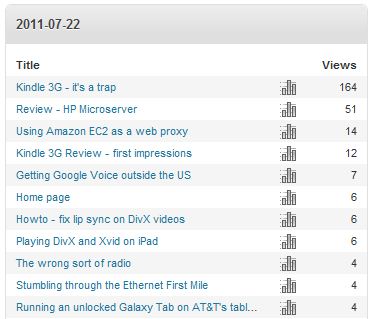
Whatever Google did on 14 Jun to make my Kindle 3G post fall off its search results seems to have been undone on 22 Jul. Despite years of playing Nethack I’m still perplexed by the randomness of it all. Maybe it’s because that long dormant post got some fresh comments?
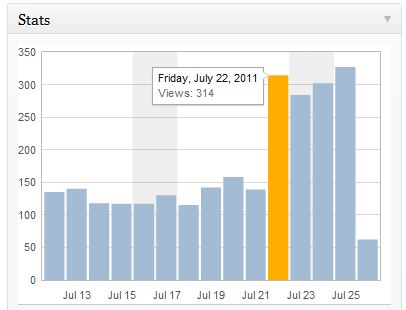 For the sake of comparison I’ll post the same charts stats summaries again..
Before summary:
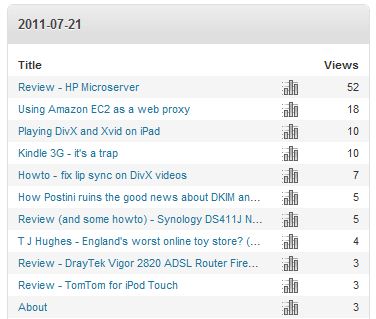 Before search:
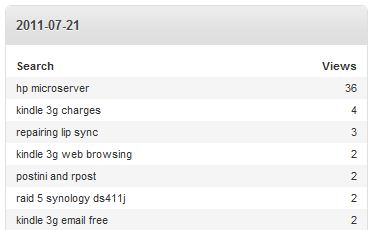 After summary:
 and after search:
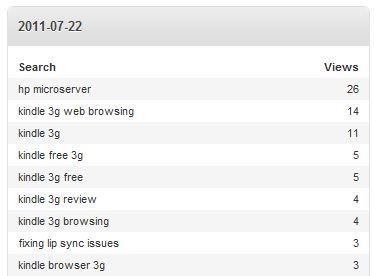 Or maybe I got fresh comments because the post started reappearing in search results? I’m struggling to untangle cause and effect here.
Filed under: blogging, this blog | Leave a Comment
Tags: google, popular, rankings, search, SEO, statistics, stats
No laptop, will travel
I’ve just returned from my third trip without a laptop – the longest so far, with a whole week in the US. Mostly this has worked out very well.
Power to weight ratio
Just like with fast cars/bikes, this is the key to success. I’m finding that the iPad 2 can make it through a whole day of emailing and browsing without needing to be plugged in, which is great if you find yourself at one of those venues where they’ve not taken care of providing power strips. My iPad ran to less than 10% battery for the first time on Wednesday, but that was after a whole day at a conference followed by a long train ride from DC back to NY. I could have plugged it in on the Accela, but didn’t bother as I knew I’d make the hotel before it ran out. It’s liberating going around not having to look for a power outlet all the time.
Travel weight is also a major advantage, and my shoulders and back are thanking me for not having the extra pounds/kilos in the bag for a laptop and its charger.
At the security checkpoint
I’m starting to feel quite smug about saying ‘no’ to ‘do you have a laptop in that bag’. I must look like the kind of guy that usually would have a laptop in their bag. I did hit some trouble on Friday at EWR, where I was told that I must ‘separate my electronics’ in a way that implied that I was expected to know this already. The guy operating the X-ray machine pulled out every device in my bag (except the iPad and bag of chargers) and places them in a tray before sending everything back through again.
Keyboard
I’m getting better at pecking away on my iPad’s on screen keyboard, but I still prefer Swype on my Galaxy Tab, and for serious text input I still need a proper keyboard. I bought a Freedom i-Connex Bluetooth keyboard a little while ago, which serves the purpose [1].

Initially I found the i-Connex a little clumsy, but I must have adjusted as I can now touch type fine on it. I also expected that leaving bluetooth on might drain the battery on my iPad, but it doesn’t.
Laptop users do however have an advantage when there’s no table, as it’s fiddly to use a standalone keyboard and tablet on your lap.
Limitations
I’ve not found anything yet that I can’t do on the iPad, but some things are tougher than they should be. A combination of native apps and remote access to my home machine(s) and work stuff covers most bases, but isn’t always perfect. The most common annoyance is an inability to copy text from areas/apps that would be OK on a desktop/laptop.
The gotcha last week was Eventbrite. I was trying to publish a new event, which involves pasting a bunch of stuff into a text box. This stubbornly refused to work in the browsers of either tablet I had with me, and in the end I did it on a desktop machine at work.
Connectivity
In addition to avoiding the size/weight of a laptop I’ve also been avoiding paid WiFi by using my Galaxy Tab (as a hotspot). I’m surprised that I only used 160MB of data last week (according to AT&T), but it was great to have data whenever and wherever I needed it for $25.
Overall
I’d have to have a very specific reason to take my laptop with me in the future – the pattern of not having it seems to work too well. I’m not alone on this – I was at an event a couple of weeks back where there wasn’t a single laptop around the table. I generally agree that tablets are consumption devices rather than ‘creative’, but having a bluetooth keyboard tips that balance, and Fred Wilson’s 100/10/1 rule of thumb – ‘1% will create content, 10% will engage with it, and 100% will consume it’ should also be borne in mind. I’m happy that I can do the creation I need to when on the road using a tablet (even as I type these words on my laptop – at home).
[1] I wanted an iGo Stowaway keyboard, as recommended by Charles Stross, but these are impossible to get hold of these days. Prices have gone insane on eBay, and I’m left wondering why iGo haven’t released this product afresh to the eager new audience of tablet users.

Filed under: technology, travel | 4 Comments
Tags: bluetooth, Galaxy Tab, iPad, keyboard, laptop, tablet, travel
What happened on Jun 14th?
For quite a while this blog has been getting around 250 readers a day. That suddenly changed on Jun 14th:
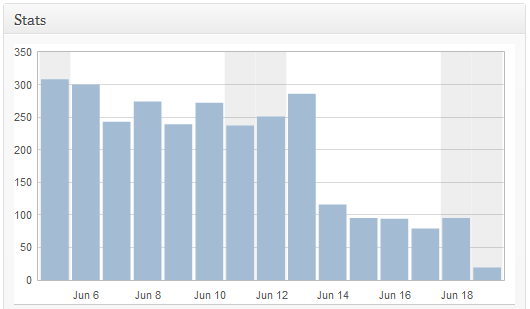 My first thought is that my search rankings have changed, and I read something not so long ago that Google was going to (once again) change how blogs appear in search rankings. I don’t do any special SEO stuff – frankly I’m not that bothered, but I guess I’ve benefited in the past from whatever WordPress.com does out of the box.
Let’s take a quick look at the day before:
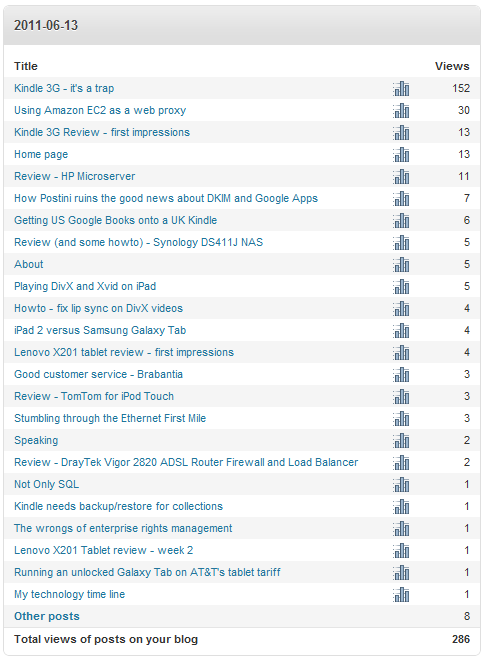 As usual my post on the Kindle 3G, and whether Amazon would continue to offer ‘free’ internet by 3G sits in the top spot. The search engine terms bear this out:
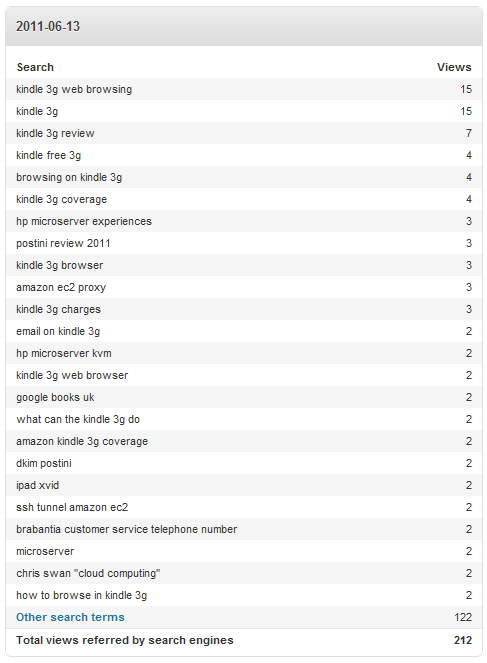 No surprise there, if I Google ‘kindle 3g’ then my post comes just after the Shopping results – the #3 entry. But Google shows me what I want to see, it knows who I am. If I bring up Google in a virgin browser then that post isn’t in the first 10 pages – that’s what my previous visitors (now don’t) see.
The new world looks like this:
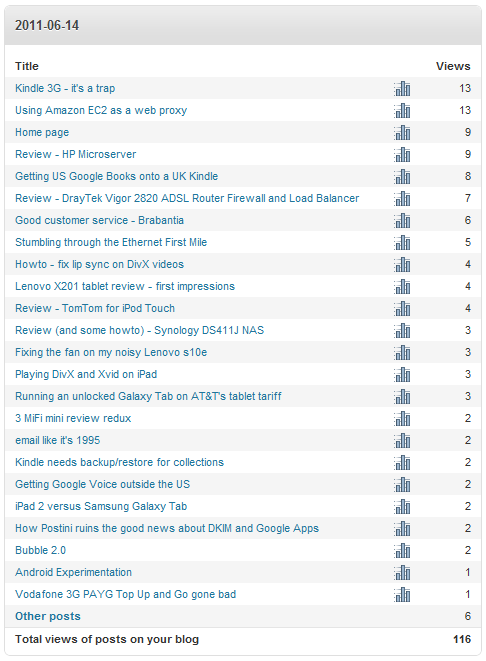 On this particular day the Kindle 3G piece is still on top (though in subsequent days it has dropped).
Looking at the search terms it’s easy to see what happened:
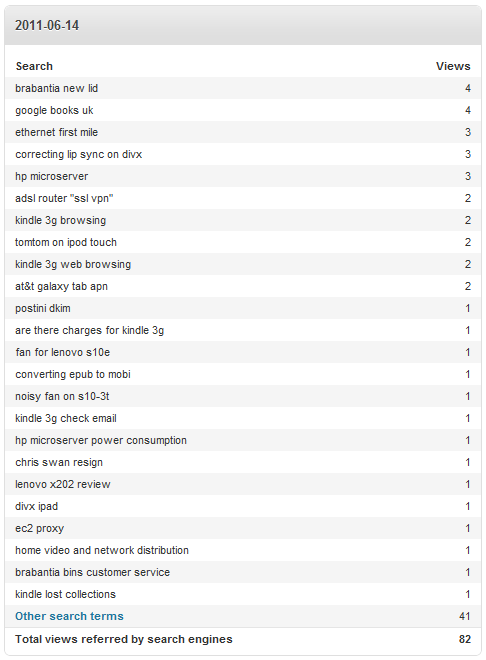 Now it seems that somebody has to search for ‘kindle 3g browsing’ just to get that post in their first page of results. More people came to the blog looking for new lids for their kitchen bins.
So… this blog fell off Google on Jun 14, or at least the most popular post did. I can see what happened, and there where warnings out there, but I’m unclear what really changed behind the scenes (and why). Please comment any ideas you might have.
Filed under: blogging, this blog | 5 Comments
Tags: algorithm, google, Jun 14, popular, rankings, search, SEO, statistics, stats
It’s time for another one of those posts where the purpose is to save me from repeating myself, and also hopefully seed some ideas into the industry.
I take inspiration from my recent purchase of some Vibram Five Fingers, which I hope to review here another day. It boils down to this – I see five separate areas of functionality across the entitlements/provisioning space, and it seems kind of weird to me that nobody is pulling them together.
1. Provisioning
This is probably the opposable thumb rather than a finger, and it’s the core that other pieces build around. At their heart these tools are little more than workflow and a bunch of adaptors; but much value gets embedded into those adaptors when you want to reach in and do stuff to esoteric end points. Taking feeds from key upstream systems (e.g. HR) and pushing down into enterprise directories is the core capability; but most offerings (have to) offer more than that – typically profiles/templates based on ‘role’ so that new joiners can be cookie cut into the systems they need.
2. Self service portal
Provisioning systems tend to come with the assumption that they’re administrator driven, but there’s a trend towards self service. After all the end user usually knows best what they want, and most people would rather use an online tool than call a help desk. There’s a mini industry of next generation identity tools that build on top of provisioning that have appeared in the last five years or so, and they pretty much all bring self service to the table [1].
3. Audit and review
Most firms have requirements to regularly (in most cases annually) review certain types of entitlements. I remember a few years back seeing an application being built to get the process off spreadsheets, and it wasn’t long after that commercial off the shelf offerings came along.
4. Usage based reconciliation and recommendation
‘Use it or lose it’ goes the saying, and it’s a good way of ensuring that the principle of least rights sticks. If somebody has an entitlement that they’re not making use of then it’s reasonable to ask whether they should still have it. It’s not unusual for somebody to accumulate privilege as they move around an organisation, and it often makes sense to keep privileges for an old role for a little while just in case help is needed. But even with a decent review process (and more so without one) entitlements creep can easily happen. This class of tools examines who is using what, and how they got there, which can be useful for spotting inappropriate ACLs (the bad old everyone group) and making recommendations for entitlement removal (that can then go through an appropriate workflow in the same way as a self service request).
5. Break glass, highly privileged and technical account management
This is perhaps the area where I’m most shocked that the functionality hasn’t become mainstream, as every enterprise has needs in this area. Break glass processes, where an entitlement is given on a temporary basis, under strict controls and with a clear audit trail, is a great way to prevent too many people having entitlements they don’t need on a day to day basis. For those that do need routine access to high privilege such as systems administrators and DBAs there should be ways of managing their accounts and entitlements that are separate from what they use for reading email and surfing the web. Finally there are many cases where we need to manage the identity of non humans – the robots that do stuff on our behalf.
Wrapping up
All of these cases have created a healthy niche for certain vendors and solutions; but which enterprise can truly live without all 5, and why hasn’t the industry done a better job of bringing things together? Maybe with some M&A we can get the equivalent of a glove to bring things together?
[1] Sadly this happened too late for one of my previous firms, who ended up building their own, but it was a worthwhile effort that appeared to genuinely improve the lot for end users. It was great to see it move past core identity stuff and into other areas of interaction such as ordering Blackberries. Any sort of user request that involves an approval workflow (and audit trail) is a good target for such tools.
Filed under: identity, security | 1 Comment
Tags: account, audit, break glass, entitlements, idm, portal, provisioning, review, self service, service, system, technical
iPad 2 versus Samsung Galaxy Tab
I ordered an iPad 2 on the day that they were made available in the US (and had it shipped to a friend I was visiting a few weeks later). A few days later I got a note from one of the R&D guys at work saying that a Galaxy Tab was on its way to me. A shoot out was brewing, and this post is based on my experiences using the two devices on my US trip and since.
Firstly, neither is in my mind perfect. Each has its strengths and weaknesses (that I’ll cover in a little more detail shortly), and so I don’t consider there to be an outright winner. On the US trip the one that I wouldn’t leave home without was the Galaxy Tab, but there it had the advantage of 3G connectivity. I’ve subsequently done a trip to Germany where I left the Tab and took the iPad. Things might also have been different if I’d got a 3G ipad, but since the SIM locking situation was unclear I just wasn’t confident enough to order one that might have been stuck on AT&T.
iPad 2

I like:
- The screen size – perfect for watching movies and TV shows on the train.
- The smartcover, and the way it can be used as a stand or a rest.
- Battery life, which seems to live up to the claims of 10hrs watching video and is more than up to the job of a day of meetings without needing a charger.
- That I don’t have to buy all of my apps again (except for the HD and iPad specific versions).
- Being able to do work stuff on it, using Good for email (Android is supported but not yet approved) and Citrix for remote access (would probably work on the Tab, I haven’t even tried).
I don’t like:
- That the smartcover is already looking a bit grubby, and it leaves lines on the screen (where the gaps are between the main pads).
- The soft keyboard – it’s less painful than the tiny iPhone one, but I make way too many mistakes using it.
- That I had to take my laptop with me for the unboxing just so that I could plug it into iTunes.
Galaxy Tab

I like
- The size. In a neat little leather case that I got I found that I could carry it around like a paperback book without feeling too self concious about having a device in my hands. It was great for the DC museums where I could skip the bag check lines, and catch up on Twitter and Google Reader whilst waiting for the kids.
- DivX/Xvid (and MKV) videos just work, and having a MicroSD slot makes it easy to get them on there.
- Swype – it’s just awesome for adding annotations to bookmarks and sending emails.
I don’t like
- Having to re-enter passwords for Google accounts every time I swap SIMs.
- That there’s no decent video conferencing software for a device that’s clearly up to the job.
Conclusion
As I said already there’s no clear winner. On a typical day I put them both in my bag. On the way to work I tend to favour the Tab (and its 3G) for catching up on tweets and RSS feeds, on the way home the bigger screen on the iPad usually wins for watching something (though I quite often find myself using the Tab too at the same time).
What has happened is my personal laptop is rarely leaving home these days. It just doesn’t have enough utility to justify the extra weight. I’m also seriously considering leaving the work laptop behind for future trips; I got by fine without it for 3 days in Germany recently, so it wouldn’t be too much of a stretch to go a whole week.
Filed under: review, technology | 2 Comments
Tags: apple, Galaxy Tab, iPad, IPad 2, review, Samsung, Swype
My Galaxy Tab came from the US, and is AT&T branded. As soon as I got it I installed a stock firmware as I didn’t want to live with the various restrictions AT&T had imposed (and I also wanted to use a UK data plan).
For my holiday in the US I wanted to get the AT&T SIM that came with it going, as $25 for 2GB of data (over 30 days) seemed pretty reasonable to me. I signed up at www.att.com/buyasession setting the start date for when I would arrive in the US[1].
Sadly things didn’t go perfectly to plan, and when I switched on my Tab it didn’t connect to data. The issue turned out to be APNs. There is plenty of guidance out there on the web about using a Tab with the standard AT&T data APNs, but that’s not what I wanted to do.
It turned out that I needed to connect to an APN called BROADBAND (all CAPS), and then everything connected as it should[2].
Once it was working I must say that it worked well. I hear a lot of whining about AT&T’s data network, but my subjective experience was that it was pretty good – usually delivering an HSPA connection.
[1] Maybe I missed the check box first time through, but I had to go back later to ensure that my data plan didn’t auto renew when the 30 days expired.
[2] For more on the various AT&T APNs check out this.
Filed under: howto | 3 Comments
Tags: android, APN, AT&T, broadband, Galaxy Tab, tablet, unlocked
Review – HP Microserver
This might well be the bargain of the decade, and I must say that I’m quite cross that the news took so long to find me. A couple of days after I bought my NAS a friend tweeted:
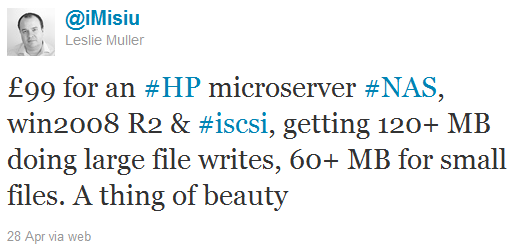 I asked Leslie how it was so cheap. It turns out that the (ex VAT) price was £199 (now officially £209), and that HP was (and still is) doing a £100 cashback deal[1].
Clearly the Microserver would have made a good basis for a dedicated NAS box, perhaps running something like FreeNAS[2]. For me though it was too late for that. Of course I could put the NAS I’d just bought on eBay, and start from scratch, but I didn’t fancy that idea. I ordered one anyway though, with a view to replacing the Dell Precision 490 [3] in my garage that held backups and runs various VMs. I ordered one from box.co.uk, and spent my cashback (well before ever getting it) on a couple of 4GB DIMMS so that I’d have room for a few VMs.

Once the box arrived I popped in the extra RAM and got things going by installing Windows 2008R2 and Hyper-V (I had considered VSphere and ESXi so that I could get some VMWare experience, but I hadn’t arranged media or licenses – so I went with what I had). Once the machine was running I rotated in a number of drives from other machines. The build quality and attention to detail is fantastic – just what I’d expect from a high end server. There were drive screws and a torx key secured inside the front door, and everything popped into the removable bays without trouble. I later put an ICYDock into the optical bay, but it doesn’t seem to hot plug[4], and I’ve not spent the time troubleshooting it yet – there are certainly reports online of people getting a 5th drive going.
The machine runs almost whisper quiet (not that it matters much in the garage). Performance wise the little AMD processor seems adequate – I’m not asking it to do video transcoding, and it seems up to the job of running a handful of general purpose (not too busy) VMs, where I would expect RAM to be the bounding factor. My expectation is that I can probably stick about 6-8 VMs on there before things get too busy. IO performance also seems decent, though I’ve not put any fast spindles (or SSDs) in there. It’s standing up well as my AD DC, DNS server, uTorrent seed box, SSH server, web(DAV) server and a few other things on a handful of VMs (Windows and Linux).
Overall I’m delighted with this little machine. The main advantage is its low power consumption. Now that this is my only always on PC the quiescent power consumption for my house has dropped about 6p/hr, so I reckon that the HP and the NAS will have paid for themselves within a year. Lets hope that HP keeps making these, and making them better.
Update 1 – 30 Jun 2011 – it seems that the cashback deal has finally come to an end :( Fingers crossed for an even better MicroServer and a new cashback deal for that. False alarm, the deal is still on until at least the end of July August September October November December 2011 January February December 2012, and the cashback has now gone up to £110. It looks like it won’t be renewed in 2013 though. So the new N54L based Microserver came along, and initially only had £50 cashback, but that’s now gone up to £100 (so they’re coming out at ~£180 inc VAT and shipping), until at least the end of June 2013.
Update 2 – I ended up buying another Microserver, and writing up some more howto stuff.
Update 3 – Microservers based on the slightly faster N40L CPU are now available. Fingers crossed that there might be a cashback deal for those too. HP are also offering the same cash back on these. Given that the price is much the same, and they have an extra GB of RAM as well as that faster CPU it seems that the deal is better than ever. Get ’em before the HDD shortage caused by the Thai floods pushes the price of everything up.
Update 4 – I got one of the new N40L Microservers. Apart from new labels on the HDD caddies nothing much has changed. I wrote a new post about using it for the Windows 8 Developer Preview, including giving it a decent multi screen graphics capability.
[1] I had a wobbly moment with this. When I ordered mine it was the 29th Apr, and the deal was scheduled to end on the 30th. When I saw that the invoice date was 3 May (due to the holiday weekend in the UK) I thought I’d have a fight on my hands. Luckily the deal had been extended again to the end of May.
[2] I’d considered building my own NAS box along the lines of this guide, but had decided that life’s too short.
[3] The Dell is now doing duty as my main box. It may be a little dated now, but with an OCZ Deneva SSD and 8GB RAM it’s still pretty awesome. I’d love to build an super fast new machine with Sandy Bridge processors, and maybe the Z68 chipset, but its hard to justify the cost. Maybe I’ll drop another Xeon 5140 in there to keep the other one company, as this seems to be a config that lets me hit the CPUs hard.
[4] Reports that the main SATA bays aren’t hot plug turn out to be false. The three extra drives that I added all went in with the machine powered up (what could possibly go wrong?) and it was then just a case of importing the foreign disks in drive manager. I can’t vouch for removal, as I’ve not tried that. Despite the ‘Non-Hot Plug HDD’ labels on the new caddies, hot plug works fine (at least in Windows) if you install the latest AMD drivers, which also has the benefit of supporting higher resolution screen modes on the VGA output.
Filed under: did_do_better, review, technology | 16 Comments
Tags: HP, Microserver, review
Playing DivX and Xvid on iPad
One of the great frustrations for me with my iOS devices (and PSPs before them) has been the need for transcoding of video files before watching. This was always a time (and CPU) consuming and fiddly process, and for some insane reason the files often ended up being larger than the original.
When I got my iPad2 a few weeks ago I hunted around for an app that would play DivX/Xvid natively. There were a few to choose from, but eventually my money went to AVPlayerHD. It’s been absolutely brilliant. So far it’s played every file I’ve thrown at it flawlessly. The interface is perhaps too feature rich, but I’m willing to forgive that, as it’s also generally unobtrusive. I was a little concerned about battery life, having read in some places that official iTunes videos were gentler on the CPU than stuff converted at home, but so far consumption seems in line with Apple’s claims – 10% per hour means that I should just about get 10hrs of video between charges.

Since I bought it I see that it’s shot to the top of the iPad charts – a well deserved position for a great app.
Filed under: media, review, technology | Leave a Comment
Tags: avi, AVPlayerHD, divx, iPad, mkv, Xvid


 Chris Swan's Weblog