How long to provision a VM?
This question came from a colleague, and it’s one of those questions that I’m surprised and saddened that we still have to ask.
My history with this stuff
Some 15 years ago I was a beta tester for Leslie Muller‘s ‘Virtual Developer Environment’ (VDE)[1], which was a web site that let me request a virtual machine (VM). I’d fill in a simple form, and about 8 minutes later I’d get an email with connection details for my VM.
There’s a technical aspect to this
It took 8 minutes to provision a VM because that’s how long it took to copy the bytes from the golden image on a file share to the VM server.
When shadow volume copy technology came along on modern storage systems that copy time went away, and it was possible to get VMs as quickly as they could boot (which is a few seconds for a reasonable machine image on reasonably fast storage).
So technically the time to provision a VM is somewhere between a few seconds and a few minutes; and that’s been true for the whole time we’ve had VM provisioning systems.
And there’s an organisational aspect to this
Provisioning a VM takes resources – CPU, RAM, storage, and resources cost money, and organisations like to control how they spend money.
If an organisation makes an up front decision to spend money on VMs for a certain purpose that can be bound into the provisioning process then there’s no good reason why VMs can’t be provisioned in seconds to minutes per the technical constraints above.
This is why public cloud is fast, because the decision to spend money has already been made. That decision might be implicit, but it nevertheless has been taken. Public clouds have also done some cool stuff behind the scenes to make provisioning fast (e.g. by having a pool of Windows servers pre provisioned waiting for users[2]).
If on the other hand an organisation decides to embed the spending decision as an approval workflow that presents as part of the request process for a VM then it can take a while (days to weeks) because it’s no longer a straight through automated process, but instead something waiting on (multiple) human interactions[3].
There can be further technical hurdles
The CPU, RAM and storage needed for a VM can be contained reasonably elegantly into the virtual server infrastructure (pretty much irrespective of how that’s put together). But the observant will have noticed that network is missing from that list, and VMs need things like IP addresses and DNS names.
Of course that stuff can be completely automated with things like DHCP, but many organisations have rules against that sort of thing (because some time in the mid 90s some nugget managed to exhaust a DHCP table by setting the lease duration too long or similar foolishness).
If IP addresses come from Fred’s IP address spreadsheet, then the provisioning process will bottleneck there. If server names come Tina’s tombolla, then the provisioning process will bottleneck there too.
IP Address Management (IPAM) has emerged as a product category that fits the dark arts of legacy enterprise practices into tool suites, that can then be more or less integrated into automated provisioning, so there are ways of holding on to the policy debt of past approaches whilst still working with more modern needs.
Quotas and leases
It’s worth reflecting how we dealt with the spending approval in the early days of VDE.
Each department bought an allocation of capacity (usually in units of servers), and from that capacity they could hand out quotas to users. The main constraint was (and generally remains to this day[4]) RAM, so the quotas were RAM quotas. Therefore if I had a 4GB quota (an 8th of the 32GB we could pack into an HP DL380) I could choose between 1 4GB VM or 4 1GB VMs or any other combination.
The leasing aspect was there to ensure that capacity was kept in active use. VMs would come with a 1 month lease, which had to be renewed by the requester to show that they still needed the VM. After 3 months that was it – the VM got deprovisioned. This ensured that we didn’t have stuff in a ‘development’ environment that was being treated as essential, and had the side benefit of ensuring that nothing remained unpatched for too long. It also forced people to automate their config management.
The quotas idea still lives on in some implementations, whilst leases never really caught on and got overtaken by the cost transparency of Infrastructure as a Service (IaaS) pricing models, whether that’s on demand, reserved instances, or spot pricing.
Conclusion
VM provisioning can be really fast. Not fraction of a second container fast[5], but fast enough where boot time is still a consideration.
VM provisioning can also be really slow, if the organisation wants it to be slow by throwing spend control and other barriers in the way of speed. That’s a choice (conscious or otherwise), and sometimes that choice needs to be properly surfaced and understood; particularly if one part of the organisation cares about speed whilst other parts have other cares.
Notes
[1] VDE became the Virtual Machine Provisioning System (VMPS), which became DynamicOps, which was acquired by VMware to become vRealize Automation (vRA). Other VM automation systems are available.
[2] See The #AWS EC2 Windows Secret Sauce for a detailed example.
[3] I once came across a bank (not one I worked at) that had built a 24h delay into its otherwise automated provisioning system so that the infrastructure services people could check that people had ‘asked for the right thing’. They felt that the delay provided a ‘cooling off’ period that prevented ill considered short term requests. To me this seemed like an act of open hostility by Ops towards their Dev colleagues.
[4] Workloads tend to get broken down into general purpose and compute intensive. The latter usually went onto dedicated High Performance Compute (HPC) environments, which came with their own provisioning and workload management (the grid). So VMs tended to be general purpose workloads that exhausted RAM before CPU.
[5] There are now systems that essentially merge container tech and VM tech that do break the sub second barrier.
Filed under: cloud | Leave a Comment
Tags: approval, cloud, DHCP, iaas, IPAM, provisioning, spend control, VM
Jessie Frazelle, Bryan Cantrill and Steve Tuck have announced the launch of Oxide Computer Company to deliver ‘hyperscaler infrastructure for the rest of us’. The company aims to tackle the ‘infrastructure privilege’ presently enjoyed by hyperscale operators by developing ‘software to manage a full rack from first principles’, including platform firmware.
Filed under: cloud, InfoQ news | Leave a Comment
Tags: cloud, firmware, hyperscale, open source, Oxide, Rust
Review – Apple AirPods Pro
I’ve never liked the hard plastic headphones that come with iPods and iPhones, so when AirPods were launched I was totally ‘meh’, especially as I though they looked ugly and uncomfortable.
When AirPods Pro launched a few weeks ago I was willing to reconsider, as I’ve got on OK in the past with silicone bud earphones.
Then I read the reviews, which were overwhelmingly gushing. So I’m here to gush a little more.
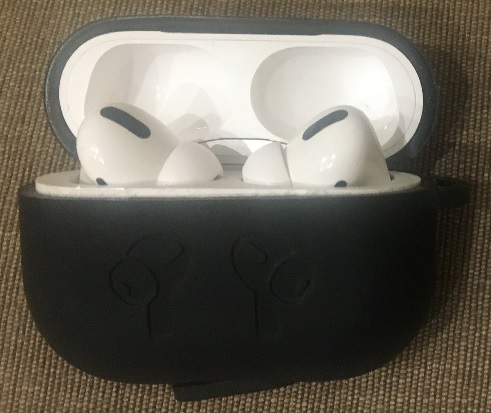
My AirPods Pro in their charging case with silicone cover
Magical
I’ve found that the AirPods Pro ‘just work’ in that magical way we expect from Apple’s commitment to design and user experience (but maybe don’t always get). The last time I was wowed so much was probably my first encounter with the iPod touch.
Device switching between my iPhone and iPad can be a little clunky, but in pretty much every other way they’re encouraging me to use my earphones more than I did with any previous ones because everything is so quick and easy.
Controls
Part of the magic is the single control present on both sides, with short clicks for pause, forward, back and a long click to switch between noise cancelling and transparent.
Noise isolation
This is the key selling point of the Pro version – active noise cancellation.
I used to buy headphones and earphones with active noise cancellation, and then I discovered Koss Sparkplugs, which are basically just memory foam earplugs with a sound pipe and drivers attached. So I’ve been passive for over a decade now.
The culmination of my passive approach to blocking out the noise is a pair of Snugs Flight (now called Snugs Travel), which were ridiculously expensive, but worth every penny because they deliver excellent noise isolation and are comfortable enough for a 12h+ flight.
Comparing the AirPods Pro to the Snugs in an airport lounge last week it was pretty much impossible to tell them apart on noise isolation or audio quality. So the AirPods Pro win there on price[1].
The AirPods Pro also win on having transparent mode, which is much easier than fishing a perfectly fitting earbud out when you want to hear the drinks/meal choices. They also give you the option to keep listening or pause the music[2].
Fit and comfort
The default (medium) buds seem to fit just fine – with a satisfying little pop when they seal. I tried the larger ones, as I’ve often used larger silicone buds in the past, but they’re just too big for my ears.
Comfort has been perfect for the hour or two I’ve worn them at a stretch; but then the batteries only last for about 4h so long term comfort isn’t really a practical concern.
I’ve had one instance of one of them seemingly leaping out of my ear as I turned my head, which makes me a little cautious about wearing them when boarding trains or in other situations where dropped too easily turns into lost forever or destroyed.
Looks
They don’t make you look like you’ve poked candy cigarettes into each ear :/
Conclusion
I love them, and they’re so good that they’ve changed how often I use earphones and how I use earphones. The best new Apple thing in a while.
Note
[1] I’ll still be travelling with the Snugs, because the AirPods Pro won’t last through a long flight, won’t plug in to in flight entertainment and you definitely can’t sleep in them (and I sometimes like to doze off whilst listening to an audio book).
[2] Though I do wonder about the whole being talked to whilst wearing earbuds thing as it will take a while for people to get used to the fact that they can be heard perfectly well by somebody who’s in transparent mode (for which there is no visual indication).
Filed under: review | Leave a Comment
Tags: AirPods, AirPods Pro, apple, earphones, headphones, noise cancelling, noise isolation, Pro, Snugs
Key Takeaways
- Ecstasy is a general purpose, type-safe, modular programming language built for the cloud
- The team building Ecstacy plan to use it as the basis for a highly scalable Platform as a Service (PaaS)
- Ecstasy is still in development and is not yet ready for production use
- The Ecstacy team are looking for contributors that want to be involved with defining the future of our industry
Filed under: cloud, InfoQ news | Leave a Comment
Tags: cloud, Ecstasy, InfoQ, XTC, XTClang
Certification
TL;DR
Knowing how the cloud works is becoming essential knowledge in the IT industry, and getting certification is a reliable way of ensuring that knowledge is consistent and tested.
Background
 Yesterday this excellent cartoon showed up in Forrest Brazeal’s ‘FaaS and Furious‘ strip, it’s very timely as certification has been a hot topic at work lately as we’re building out a cloud professional services capability that will need hundreds of pro certified people.
My own initial journey
I first came across IT certifications as I was leaving the Navy and preparing for life ‘outside’. At the time Microsoft Certified Systems Engineer (MCSE) seemed to be the ticket to a well compensated new role, so along with a bunch of my colleagues I bought the books, built a home lab, and started taking the exams.
After lots of reading, and rebuilding, and re-configuring, and more reading of ‘brain dumps’ I was finally ready for my first exam. I started out with a single (Workstation) exam to get Microsoft Certified Professional (MCP), then a few months later two more (Server), then a few months later the final three (Networking and Web Server) to get MCSE.
At that stage I was a ‘paper’ MCSE with no experience beyond that home lab scraped together out of Y2K surplus PCs, but it was enough for me to be taken seriously and hired into a system admin role, and that quickly brought me real world experience.
Almost 20 years rolled by before I did another certification, not because I didn’t believe in their value (like the character pictured above), but more because I was on a continuous learning journey that was often ahead of mainstream adoption and the certification that comes with that.
More recently
As we were bringing together DXC our CTO Dan Hushon asked his team to ‘get a cloud or DevOps certification’ before the new company launch day.
I ended up booking the last remaining slot in the London test centre a short walk from the office for the AWS Certified Solution Architect – Associate (CSA-A) exam. I’d been using AWS from the beginning[1], but not all of it, because there’s a tremendous volume of services now, so I used the A Cloud Guru course to fill the gaps in my knowledge.
Even more recently
I’ve been involved in DXC’s partnership with Google Cloud Platform (GCP) so I took advantage of the recent certification challenge to check out the training material and then took exams for Associate Cloud Engineer (ACE) and Professional Cloud Architect (PCA).
For detailed accounts of my prep for those exams check out my A Cloud Guru forum posts for ACE and PCA. Generally I’d say I’m not a big fan of watching videos as a means of learning, much preferring interactive training, which I wrote about before in The Future of tech Skills Training.
What’s the point?
I think for all the groups highlighted in the cartoon above it’s to get taken seriously, and to have a shot at getting an initial job in IT.
For those already in IT the point is completely different. The landscape is increasingly defined by the 3 major cloud providers (AWS, Azure and GCP) and an associate level certification shows that you understand how at least one of them works, and that such knowledge isn’t superficial. A pro level cert shows (significantly) greater depth of knowledge, and specially certs, or certs from more than one cloud show a breadth of knowledge.
Note
[1] I signed up for the original Amazon Web Services to use as a test point for some work I was doing. It was a SOAP or XML over HTTP based ‘web service’ that allowed books to be looked up by ISBN and other stuff by ASIN. So when services like EC2 and S3 came along I already had an account.
Filed under: cloud | Leave a Comment
Tags: ACE, amazon, aws, Azure, cert, certification, certs, cloud, CSA, CSA-A, exam, GCP, google, PCA, training
Leaving the Institution
TL;DR
Yesterday the IET shut down their email alias service, which is the only thing I cared about as a member. So come 2020 I expect that I’ll no longer be a member (MIET) or keep the designation of Chartered Engineer (CEng) that goes with that.
Background
I joined the Institution of Electrical Engineers (IEE) as a student associate member during the early days of my electronics degree in 1990. In the summer of 1996 they launched an email forwarding service for members and I became [email protected], which was my primary online identity until 15 months ago when they announced that the service would be shut down.
Email was the only service I cared about
For almost 30 years I kept paying my dues.
In early ’99 I completed the process to become a ‘corporate’ member (MIEE) and a Chartered Engineer (CEng), which was highly encouraged in the Royal Navy (and they did provide an excellent IEE approved training scheme[1]). I had just turned 28[2]. My identity as an engineer was further reinforced, the Internet was exploding into every aspect of daily life, and I was @iee.org.
In ’06 the IEE merged with the Institution of Incorporated Engineers (IIE) to become the Institution of Engineering and Technology (IET). It was not a move I supported or welcomed, and they didn’t even have the domain iet.org – instead having theiet.org. But at least they kept on forwarding @iee.org email.
A few years later new wiring regulations published by The IET meant that their Chartered Engineer members (and fellows) weren’t even allowed to run an extension socket in their own home, causing outcry amongst many old timers. But at least they kept on forwarding @iee.org email.
In ’12 a colleague offered to sponsor my application for Fellow (FIET), which in the end I didn’t do. But at least they kept on forwarding @iee.org email.
Last year my physical membership card broke. They refused to send me a new one without a rigmarole of (insecure) privacy theatre. It became a symbol of our broken relationship:

I knew by then that there was little point in getting a new one.
Letters after my name
When I was a junior naval officer it was usual for more senior officers to have brass name tallies on their door like Lt Cdr Mike Watt RN BEng CEng MIEE.
That isn’t a thing any more. Not in the Navy, or in any other walk of life that I typically encounter. My company (in keeping with modern convention) doesn’t even let me put letters after my name on my business card.
Professional subscriptions
My company also instituted a policy that ‘memberships and subscriptions for individuals is not a reimbursable expense’. If my employer doesn’t care that I’m CEng MIET then why should I?
Join the BCS instead?
Probably not.
I have a few months left to make my mind up on this and possibly transfer my CEng, so I’m still ‘thinking grey‘ about it.
But on the balance of probability I probably won’t bother.
I asked a friend who’s a Fellow of the British Computer Society (FBCS) who didn’t do a great job of persuading me.
And then it was another FBCS who recently told me ‘I’m not technical‘ – hardly inspiring.
Conclusion
The IET and I drifted apart many years ago, but I tolerated the self serving executive and increasing irrelevance to the modern world because their email redirection embodied my identity. But that’s gone now, and I have no reason left to stay (never mind pay £hundreds a year).
Notes
[1] Most of the training was alongside colleagues specialising in marine engineering and aeronautical engineering, so things like workshops had to cater to the IEE, the IMechE and RAeS. Alongside making printed circuit boards and soldering I learned welding, fitting and turning, milling, pattern-making and moulding. It’s a set of practical skills that have served me well through my adult life.
[2] In theory it was possible to make CEng at 27, but delays in my training pipeline meant that I’d just tipped past my 28th birthday when I crossed the line.
Filed under: could_do_better | 3 Comments
Tags: alias, BCS, CEng, email, FBCS, IEE, IET, institution, MIEE, MIET
This is a practice that I’m trying to get traction with at work, but it’s not something I’ve seen or read about other people doing. But then it seems so obvious that other people must be doing it, so I’d love to hear more about that.
It’s pretty typical for a post incident review (aka ‘post-mortem) to include a detailed time line of what was done. But was each action helpful, harmful, or of no consequence (other than maybe wasting time)?
For this I’m suggesting a traffic light system:
- RED – this is the stuff that made a bad situation worse. Next time we’re dealing with something similar we want to make sure to avoid doing that again.
- AMBER – this is stuff that we tried, but it didn’t help. Thankfully it didn’t make things any worse, but it also took time, so best avoided next time around.
- GREEN – this is the helpful stuff that actually drove us towards resolution. If we can just do green next time then we’re on the happy path to a quick resolution.
Filed under: operations | 1 Comment
Tags: amber, green, incident, post mortem, postmortem, red, review, traffic lights
Stateful Serverless
For a little while I’ve been maintaining a FaaS on Kubernetes list to track the many implementations of Functions as a Service running on top of Kubernetes. Today brings CloudState as the first addition in a little while, and it’s quite an interesting one for a variety of reasons.
Knative
I became aware of CloudState via Google’s Mark Chmarny linking to news from my InfoQ colleague Diogo Caeleto in a tweet:
Exciting to see new project building on top of @KnativeProject. We should really start that “built on Knative” page
I’ve spent a little time over the past few weeks trying to get my head around Knative, as I found it pretty bewildering. There was even a suggestion that Knative should itself be added to the FaaSonK8s list, which I finally decided was a no. The journey began with Ian Miell asking:
Anyone interested in how to set up a working knative environment for dev spun up with one script in the cloud for $0.18 per hour?
and me wondering why? Ian’s reply (along with some rumblings from DXC colleagues) got me pulled back in:
Ahhh. Well, I know right? But I get it now, as we belatedly realised recently that we were re-implementing it ourselves at $CORP and that this would save us a lot of sweat…
The point that emerged is that Knative isn’t itself a serverless platform that runs on K8s, but rather a kit of parts for those wanting to build such a thing. Google have already built their own in the shape of Cloud Run (which I touched upon yesterday in ‘Kubernetes and the 3 stage tech maturity model‘). I guess if a bank or similar determined that they couldn’t just use Cloud Run then their platform team could build their own using Knative. But CloudState is interesting for other reasons…
Stateful (and actor based)
Every meaningful IT system manages state, but for the sake of simplicity it’s pretty common for us to push the state management off to another system (the database) and build stateless systems. This lies at the heart of The Twelve-Factor App approach, and many other architectures.
Stateless is simple, but it can also be horribly inefficient. When I worked on grid computing some 15yrs ago most of the apps were stateless, which meant that the grid spent roughly half of its time waiting for data with the CPUs idle. Often the data it was waiting for was exactly the same data that was used for the last set of calculations, so we were effectively throwing away good data, and wasting time loading it up again. Given the cost of running thousands of servers that wasn’t sustainable, and we moved to a model where data was cached by a ‘data grid’.
I’ve been reminded of this in recent L8ist Sh9y podcasts interviewing Simon Crosby about his work at Swim.ai:
- Simon Crosby on Revolutionary Architecture Requirements for Edge
- Simon Crosby on Building Stateful Real-Time Applications at the Edge
What I see in CloudState has a number of commonalities to Swim.ai:
- Stateful
- Actor model
So I’d expect that the powerful arguments Simon makes for these things in the context of his own work also extend to CloudState.
The serverless world has previously dealt with state by putting it into serverless state management services, but this model of keeping it close to the functional code shows promise of hitting the trifecta of better, faster, cheaper.
Filed under: Kubernetes | Leave a Comment
Tags: actor model, CloudState, FaaS, Knative, Kubernetes, serverless, stateful
I’ve seen this emerge a few times:
- I want a thing
- Eek – too many things – I need a thing manager
- I don’t care about things, just do the thing for me
Applying the pattern to Kubernetes:
- I want a Kubernetes
- Eek – too many Kubernetes – I need a Kubernetes manager
- I don’t care about Kubernetes, just run my distributed app for me
If I look at some recent industry announcements:
- VMware’s next generation of vSphere with Project Pacific will have Kubernetes baked in
- VMware’s Tanzu is a ‘Mission Control’ for Kubernetes.
- Google’s Cloud Run is a ‘serverless’ service with Kubernetes underneath, but hiding all the gory details.
I’m not making a value judgement on Google being in some way ahead of VMware here – they’re skating to different pucks being played by different customers; because technology diffusion curves.
Mapping to ‘design for…’
When I talk about DevOps I usually talk about the shift from design for purpose, to design for manufacture, to design for operations. I can see some broad, but imprecise alignment between those three stages and these.
Needs change
Pat Kerpan first brought this to my attention with his observations from Cohesive Networks:
- I need an overlay network (and I must manage it myself, because part of my whole threat model is that I don’t want to entirely trust the underlying cloud service provider)
- Eek – too many networks to manage, give me a manager of managers (Cohesive created ‘Mothership’, now VNS3:ms)
- I don’t want to manage my own networks any more, just run them for me as a service
NB that at stage 3 the control requirement that was present at stage 1 has evaporated.
Pat also observed that shifts from one stage to the next normally coincided with people changes at the customers. The engineers who bought a technical solution at 1 gave way to managers who needed to scale at 2 gave way to new managers who just wanted simplicity at 3.
Filed under: Kubernetes | Leave a Comment
Tags: as a service, evolution, k8s, Kubernetes, management
“I’m not technical”
I hear these words a lot.
They’re a shield for ignorance.
A statement that the details don’t matter (when they really do).
Learning has stopped.
Submission to the people in the conversation who are technical – it’s your problem now, “I wash my hands of it”.
A power play, “I care about the business, you’re just playing with toys”.
It’s not OK.
“Software is eating the world”, and if you’re ‘not technical’ it will eat you too.
Update 7 Sep 2019
My customary tweet sparked off quite some conversation on Twitter, including this thread from Christian Reilly. Forrest Brazeal chimed in with his excellent Faas and Furious cartoon ‘Not Technical‘, which he was kind enough to permit me to copy here.

Filed under: technology | 1 Comment
Tags: learning, technical


 Chris Swan's Weblog