The end of the bus tour
I took the kids for a day out to the Tower of London last week. Despite one of my colleagues suggestions I didn’t leave them there. It was great – particularly the knights tournament and the water balloon catapult in the moat.

On leaving, my wife suggested that we should take a tour bus to kill the hour and a half that we had until our dinner reservation in Picadilly Circus. My gut feel was that this was a bad (expensive) idea, but I went along with it until the bill shock slapped us right in the face – £74 for a two adults and two children. We used our Travelcards to jump on a number 15, which took us right where we were going (lucky) and the London traffic was almost slow enough to make us on time.

This got me thinking – why would anybody (other than an Aberdeen Angus munching tourist uber-idiot) ever pay that much to get carted around London (or any other city) when there’s a perfectly good public transport system [1]. I believe (in due course) there’s an app for that. I know that having a tour guide can be part of the experience, but there’s the language issue for many tourists (who are often left listening to some black box anyway). Why not just use a location based app on a smartphone? As part of the ‘right click universe’ you then get to make your own tour – get on a bus – point at the things that look interesting – get the blurb.
[1] If we’d not already bought Travelcards then the daily limit for Oyster travel on London buses is £3.90, and kids are free. £7.80 or £74 – tough choice.
Filed under: wibble | Leave a Comment
Tags: app, bus, location, London, tour
Call routing
Joe asked me about call routing following my post about office VOIP. It’s not a straightforward subject, so I thought it probably deserves a post of its own rather than just a comment reply.
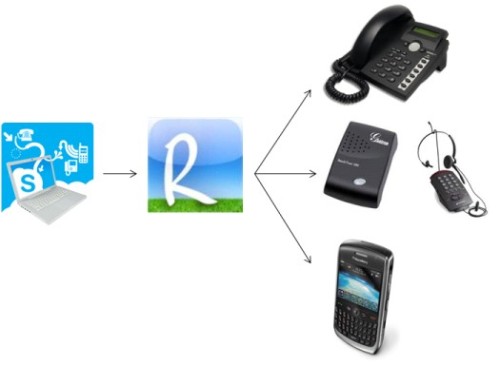 Point of entry – SkypeIn
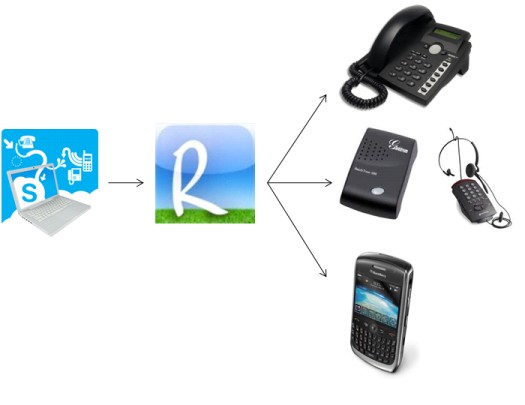
Having used ‘one number’ for a while in my old banking IT job I wanted to continue in the same way when I left for my new role. SkypeIn seemed to be the only show in town (at the time) that would allow me to have a number that I could redirect where I wanted to. I bought a subscription, which gave me a discount on the number, and also allows me to forward to any UK landline number without running up per minute charges.
Fan out – Ribbit Mobile
Ribbit’s ‘find me’ function lets me have a number of phones ring in the hope that I’ll be near one of them.[1]
Office – SNOM 300
This is a decent SIP phone that allows for multiple SIP subscriptions (four) and has reasonable call handling facilities (hold, transfer etc.)
Home office – GrandStream 286 ATA and Plantronics T20
BT were kind enough to lend me that ATA for testing Ribbit’s SIP functionality. If they ever ask for it back I’ll probably buy a Linksys PAP2T (which a number of my colleagues use for their home extensions). I prefer a headset to a regular phone, and I bought a Plantronics T10 ages ago in order to deal with conference calls whilst working at home. With the extra line that the ATA gives me (in addition to the regular home phone line) I got the T20 so that I could deal with both.[2]
Mobile – BlackBerry 8900
An undocumented (and presumably unsupported) feature of Ribbit Mobile that sometimes works and sometimes doesn’t (and that I wish they would formalise) is that when a call hits its service without CLI from my mobile it knows that the caller didn’t already ring the mobile and so it rings the mobile too.[3]
It’s not actually that simple
Ribbit’s great, but there are times that I need to use Voicehost e.g. to call an office extension. To get my single line ATA to use multiple SIP services I employ SIP Sorcery, where I have a simple Ruby dial plan that routes calls via Ribbit unless I prefix them with 0*.
The people problem
It’s very hard to leave a phone to ring. But it’s also impossible for me to be in my office and home office at the same time, and I spend plenty of time in neither location. This means that when people call me there’s going to be a phone ringing in a place where I’m not, but my family and/or colleague might be. What I want to happen here is for nobody but me to pick up – so I rely on my family and colleagues not to be ‘helpful’.
I could of course spend my life fiddling with the web console for Ribbit turning extensions on and off, but that’s not very convenient
Profiles
Much better would be if I could have profiles e.g. ‘office’ – just ring the office phone, ‘home’ just ring the home office phone, ‘other’ just ring my mobile. Switching profiles would have to be possible from a mobile (web) app, as it’s the sort of thing that you’re sure to forget as you’re rushing out of the office for a meeting.
Location based automatic profiles
Better still would be if my profile could be automatically switched as I change location – something that my smartphone should already know. There’s not an app for that – yet. Fingers crossed.
Roaming
Most of my international travel is to the US [4], so I have a US PAYG SIM in an old Nokia 7210 (my last mobile phone that was just a great phone rather than an adequate phone bolted onto a handy little computer).

Most PAYG tariffs (including mine) don’t support conditional call routing, so I don’t get to make use of Ribbit. Here I just use SkypeIn to forward to my US cell number, and upgrade to a global subscription for the duration of my trip so that I don’t get whacked with per minute charges. This means that people can still get me on my ‘UK’ number even when I’m in the US.[5] I also make use of Skype’s excellent ‘To Go‘ service to call home from a US point of presence. I have to top up my PAYG account by $100 each year, and I never in practice use all of that credit, but it’s a lot less than I’d run up in roaming charges if I just used my UK mobile.[6] I also change the call forwarding on my mobile to go to my SkypeIn number, so anybody calling my normal UK mobile gets routed through to my US one.
Wishlist
In addition to the location based routing profiles I’d love it if Ribbit was internationalised so that I could have US ‘purpose’ numbers and route calls to US numbers (as well as UK numbers and SIP end points). It would also be great if I could port numbers between services, which I think is pretty easy in the US, but only seems to work for mobile numbers in the UK.
Endnote
There’s a video demo of Ribbit Mobile routing that begins with @jobsworth destroying his iPhone (when he was supposed to drop a dummy in the jug of water) – instructional and amusing.
[1] This isn’t how Ribbit Mobile is supposed to be used, at least not without the ‘purpose numbers’ that aren’t yet supported in the UK. The intended usage pattern is for the mobile number to be the point of entry and for the Ribbit service to be connected via conditional call routing.
[2] This hasn’t worked out so well. My T20 seems to have a fault on line 1 which makes the volume really low. Since I bought it from Amazon in the US (as they don’t sell them in the UK where there isn’t much of a market for 2 line home phones) it’s not so easy for me to get service or a refund :(
[3] I’d much rather have an Android phone than a BlackBerry, but when I needed a new phone the only Android on the market was the G1 on T-Mobile (and I was happy with neither). I’m counting the days until I can get an upgrade to something like the HTC Desire or whatever replaces it.
[4] In the past I’ve also run Swiss and Spanish PAYG SIMs, but I don’t spend enough time in those places to keep a SIM active.
[5] Which means that I need to be careful to turn the ringer off if I don’t want an early call from somebody without the faintest clue where I am (and that I’m trying to sleep).
[6] I started doing this after one month where I’d spent two weeks in the US running up £300 ($600 at the time) in roaming calls, and I’m not even one of those people who spends their lives with an ear glued to their phone.
Filed under: technology | Leave a Comment
Tags: ata, ribbit, sip, skype, SkypeIn, voip
OK. I very nearly bought a new tablety netbook earlier in the year, and I’d still like an s10-3t (or similar)[1], but I’m in no hurry to buy a new netbook and here’s why.
Netbooks are good enough. They’re good enough for web surfing. They’re good enough for watching SD video (maybe even 720p if you have the right screen and graphics chipset). They’re good enough for casual document and presentation editing. They’re good enough for pretty much everything that I’d like to do with a portable machine – and that’s it. The netbook that I bought more than a year ago is still good enough for all those things. I’ve had the chance to play with the latest Lenovo and HP machines in the last few weeks, and they’re a tiny bit better than what I have already. But not enough better that I’m going to splash another £250 or so on a new machine. I’ll buy a new netbook when the one I have breaks, and that could take a very long time – they’re built to a price, but not flimsy.

The press are starting to run articles along the lines of ‘tablets hit netbook sales’ (e.g. on The Register). This misses a couple of important points for me:
- Tablets (like the iPad) and netbooks share a lot of functionality, but they aren’t interchangable purchases. Somebody who wants a netbook won’t buy a tablet instead.
- Pretty much everybody that does want a netbook got one already, it should be no surprise that sales are slowing up. The market is probably reaching that saturation point that mobiles hit a decade ago (when everybody in the civilised world already had two).
Dave Winer points out that the one thing that has improved in the last year is battery life. Batteries are an important consideration, particularly as they deteriorate over time. Maybe when the battery on my s10e gets to the stage that it’s frustrating I’ll be faced with a tough choice between buying a vastly overpriced replacement, or just getting a new netbook with a new battery?
[1] Lenovo never did get me the s10-3t that was promised, and they don’t seem to have made a reappearance on their UK direct sales web site. Whilst I’m still happy with the X201 Tablet that was sent as a substitute it would be nice to have something a little lighter.
Filed under: technology | 3 Comments
Tags: Asus, HP, iPad, lenovo, netbook, s10-3t, s10e, tablet
Office VOIP
This post has been a long time coming, in part because it took so long to get everything working.
It was almost 6 months ago that I decided to go down the VOIP route when my company moved to a new office. It’s a decision that I’ve questioned many times, though I think it was ultimately the right thing to do.
The background story – why I came to think this was a good idea in the first place
In my old banking job one of my duties was to work with our outsourced network providers (BT and Swisscom) on R&D projects. One of the more interesting outcomes of this was that I got roped into a ‘hot house’ at Adastral Park looking at the knotty subject of converged collaboration and communications. I got dropped into the Osmosoft team, and much fun was had by all mashing up bits of Wikis, IM, VOIP etc. One of the cool tools that I got to keep on using when the whole thing was over was Mojo, which was a consumer web application on top of BT’s (now defunct) 21CN SDK. Mojo let me initiative calls from a cloud service, and seemed to work from any telephone number to any telephone number (it could also send texts). It had its own currency – Mojits – and I would from time to time have to bother the BT guys for more (the system would charge a number of Mojits for call initiation regardless of where the end points were or how long the call was). I knocked up a basic application that let me initiate calls from my BlackBerry, which was very handy when I was roaming (as I could use it in combination with a local mobile for free calls to anywhere).
Mojo was just one of the cool tools. During the course of the Hot House we collectively came up with plans for the future of telephony, where everything would be mobile, location aware, personalised (and cheap). All the pieces of that future were there already, just unevenly distributed (and not very connected)
When BT abandoned 21CN SDK in favour of it’s newly purchased Ribbit Mojo got pushed out to pasture. Luckily JP was kind enough to arrange for me to go on the private beta of Ribbit Mobile, which offered similar capabilities (and more besides).
The original plan – Ribbit everywhere
The basic premise of Ribbit Mobile is that your mobile number is the ‘one number’ that people will get you on [1]. Through the magic of conditional call routing [2] calls to your mobile can be redirected into Ribbit’s telephony cloud. From the cloud calls can then find you elsewhere (using POTS or SIP), or the system can take a message for you, which can then be transcribed into an email/text/IM. The system also integrates with contact data, so when you get a message you can see who it’s from rather than just a telephone number [3]. For a while there was a mobile browser app at m.ribbit.com that allowed call initiation in much the same way as my old BlackBerry app on Mojo, but when the SPAMers and other bad guys started hitting the US public beta that feature got taken away.
It’s worth noting that the main application piece of Ribbit Mobile is a giant blob of Flash, and it’s fair to say that I hate using it. Luckily there’s little need to interact with the app on a frequent basis, as it can be treated as a configuration tool [4].
The piece of Ribbit that interested me for the office was it’s SIP implementation. The idea was that people could use their desk phones as better quality extensions to their mobiles (which many of my colleagues prefer to use anyway). As a backup the ‘shadow number’, which is the number that mobiles forward to in order to use Ribbit could be used as a geographic number.
Mistake #1 – buying Cisco 7940 phones

Ahead of moving to the office I bought 10 Cisco 7940G phones, and a power over ethernet switch to feed them. This turned out to be a huge mistake. If I’d done my research properly I’d have found that whilst those phones are fine with an on premise VOIP server such as Asterix [5] they don’t do a very good job of NAT traversal, which makes them pretty much useless for cloud SIP providers.
I was quite proud of myself when I got all the phones upgraded to the latest SIP firmware [download] using a TFTP server [download] on my netbook. I even managed to get the phone on my desk working (for a while) – it was getting the other 9 to work that was the problem. To cut a long story short there was no way of making these phone work reliably with Ribbit, or any other cloud SIP provider. I reluctantly gave in and bought 10 Snom 300s, which have been much more satisfactory.
The plan meets the enemy – the plan changes
Once I got the phones to work we quickly discovered some limitations of Ribbit, the main one being that we could only call UK and US numbers (a fair restriction given that we aren’t paying a Ribbit bill [yet]). So I needed something that would let us call India, France, The Netherlands and various other places that we do business. After digging around some forums, and shopping on quality rather than price [6] I settled on VoiceHost. Adding another provider also gave me a few features that I couldn’t get from Ribbit:
- Central London 020 7… numbers (OK I admit that I’m still a bit snobby about 020 3… numbers)
- Call groups
- Transfer between extensions
- Fax to email
- Conference calls [7]
I hope that one day there will be a Ribbit SME or Ribbit Office solution that gives me the best of both worlds from one provider (and then I just need to cross my fingers that the numbers will be portable).
Mistake #2 – BT business broadband
I really wanted a fibre connection for the new office, but that was going to cost lots and take ages. I’ve already written about this, but the short version is… I was fooled into thinking that we could get ADSL2, which would have been just about good enough, but in the City you can only get bad old ADSL, with atrocious contention. ADSL in the City isn’t enough to run more than about 1 VOIP call, which isn’t really good enough in an office with 10 desks and 2 meeting rooms. This was eventually resolved by getting an EFM connection.
Steady state
People are used to phones just working, and we’re now at a state where they pretty much do. I can’t say that I’m happy with the cost – when you add up the EFM and the monthly VOIP bill it’s a fair bit more than I’d guess we’d be paying if I’d gone down the traditional POTS/ISDN/PABX route. US centric stories online tell of all you can eat SIP trunk tariffs and cheap good quality broadband, which are things that are hard to come by in the UK – don’t get me started about BT and regulatory capture.
Compensations
I now have a ‘work’ line in my home office that integrates seamlessly into both Ribbit and Voicehost, and after some recent tweaks by the Ribbit guys it’s been rock solid reliable. I’m not the only one – 5 of my colleagues have the same capability. It goes beyond the home office too – a colleague has spent much of August on ‘staycation’ in a cottage that has lousy cell signal but good enough broadband. He’s been able to have an ‘office’ extension there for when he needs it – without crazy costs or engineering bother.
Next…
Computer Telephony Integration (CTI)
I can make my phone dial by logging into its web interface and pasting a number into a form, but I want to be able to just click on numbers in my CRM and contact management systems and have them dial. CTI is a basic capability of this type of setup, but the integration to make it work isn’t easy enough (yet).
Location based dynamic routing
I tend not to fiddle much with the routing of my numbers to my devices, and I expect that this annoys my work colleagues when my phone rings when I’m not there (I had to buy a new phone for the home office with a second line and a distinct ringer to reduce similar annoyance to my wife). This is a solvable problem in principle, as my smartphone knows where I am, and so I should be able to run an app on it that updates my telephone routing in the cloud.
Conclusion
Going VOIP for the office has cost more than expected and has yet to deliver the full breadth of functionality that could be expected of it. For the extra money we have got extra functionality (and a reliable data network) and the promise of more jam tomorrow.
[1] It also has a concept of ‘purpose numbers’, though these aren’t implemented fully in the UK yet, which could be regular geographic telephone numbers.
[2] A magic that’s missing from some PAYG tariffs
[3] Though annoyingly they still haven’t implemented my feature request to set ‘reply to’ headers so that you can send an email back to a voicemail transcription without messing around with the To: field.
[4] Though it does have lots of features like a softphone and the ability to listen to messages and read transcriptions
[5] Or their native Cisco Unified Communications Manager (CallManager)
[6] Shopping on price would have probably taken me to Localphone, and one day I might find the time to set up something that does least cost routing etc.
[7] That people dial into rather than the sort where you dial out to multiple extensions (which Ribbit can do)
Filed under: technology | 6 Comments
Tags: 7940, Cisco, CTI, POTS, ribbit, sip, Snom, Voicehost, voip
SaaS tax trouble
In the last few weeks I’ve had snags with both Skype and Google over billing. I could take this personally – thinking that my bad teclo karma (which must run in the family) is now turning into bad SaaS karma? I suspect though that the problems are much more widespread.

Skype
I’ve had a Skype subscription for a little while, mostly because I use an Online Number (SkypeIn) as my ‘one number’ that then redirects to whatever device I’m using, wherever I am. Normally I just have a UK subscription, but when I travel to the US I switch to a global subscription (so that I can forward the Online Number to my US cell without running up call charges).
I was printing out receipts for my expense claims, and noticed that rather than my own name they were showing A.N.OtherSubscriber. This seemed to have happened following my most recent switch from a global subscription to UK. WTF? I raised a support ticket, which followed the usual arc of ineptitude:
- Skype – ‘To change the name in your account, you will need to change your billing information. Your displayed name is always the actual billing name.’
- Me – ‘My billing name and address are shown correctly in my account (and haven’t changed for years). Yet it’s wrong on the most recent three PDF statements (ever since I changed to a global subscription for a short time then back to a UK subscription) – why is that?’
- Skype – ‘We understand your concern regarding your billing address.’
- Me – ‘There is no issue with address details (which don’t actually show on the PDF invoices anyway). My problem is with some totally random name being shown rather than my own. You have some kind of corruption in your billing database, which it seems that you are unwilling (or incapable) of doing anything about.’
- Skype – it’s your fault… ‘As we can see you have added the following name and billing address when making the orders in question’. They then divulge the full name and address of A.N.OtherSubscriber. ‘As this billing information was added to the orders you will see the same info on your invoice. We technically can not change it.’
- Me – ‘I have no knowledge of that person or address, and certainly made no such changes to my account. You clearly have some kind of system corruption – please correct.’
- Me – ‘I should also point out that you just (inadvertently) disclosed personal identifying information of one of your other customers. This will make interesting fodder for my blog post about your failure to keep accurate records or respond in a timely and reasonable manner to my concerns. I may also raise the matter with the UK Information Commissioner.’
- Skype – ‘Unfortunately, there was a technical issue within our system, and it might have caused the change in your billing name and address.’ At last – they admit that there’s a problem. ‘However, since we cannot change manually your billing informations,all we can do is to suggest you to cancel your current subscription and than sign up for it again, and give the correct billing informations.’
So… no fix. I did end up cancelling my PayPal payment method for the subscription, and there now seems to be no way to reinstate it. I’m left paying for my subscription from Skype credit, which doesn’t create an invoice paper trail (though obviously I can get invoices for top ups to the Skype credit itself)[1]. Nothing was done to fix the three incorrect invoices, so I’m basically expected to submit expenses to my firm/accountant/tax authorities with some other person’s name on them.
My company uses Google Apps (premier edition). We started out with 8 accounts a little over a year ago, and over the course of the year that’s grown to 15. The account was set up to (the default) auto-renew using my Google Checkout account (onto my credit card). When I got the receipt through following the renewal I noticed that in addition to $750 for the 15 users I’d been charged $157.50 in tax (Irish VAT at 21%). This shouldn’t have happened as my company is VAT registered. I raised a support ticket:
- Google – ‘Thank you for your message. I understand that you are in the UK and have a VAT number GBxxx which you applied when you first signed up for Google Apps but you were charged VAT for your order. I’ll be happy to assist you with your case. I’ve been investigating your account and see that there is a VAT number associated to your account for GBxxx.’
- Me – ‘Thanks for confirming that Google does have the correct VAT number for my firm on record. Perhaps you can explain why I was charged VAT when I shouldn’t have been? I have taken a look at the Google Checkout purchase history as you suggest. None of my orders show any VAT information. The original Google Apps Premier Edition order (xxx) and subsequent additional users (xxy, xyx, xyy, yxx, yxy and yyx) were all correctly charged at zero tax. So why was my renewal (zzz) charged $157.50 in tax?’
- Google – ‘Thank you for your response and the detailed information for your previous order and VAT information. I have confirmed your VAT and have been investigating your issue with our billing specialist team. I was able to refund you the $157.50 VAT charge for your Premier renewal order# zzz and you should get a notification from Google Checkout shortly. I suspect that the new billing update to your account might have caused your VAT charge as it no longer saw your VAT number for your account. Currently, it’s not possible to change or re-add the VAT number to your Checkout account unless you manually renew your subscription for Premier Edition or downgrade to Standard and re-upgrade back to Premier to allow you to enter in the new information for your Checkout.’
I didn’t actually want a refund of the VAT, as we can claim that back anyway (and it will just mean fewer BA points from my credit card). I wanted Google to fix the problem, and they basically said that the problem was unfixable – use this manual workaround.
Google and VAT – still ironing out the wrinkles?
I have no insight into what’s going on behind the scenes between Google and the EU tax authorities, but from outside it seems that there have been changes recently. I registered a .org domain (for my kid’s school’s parent teacher association) via Google Apps a week or two before signing up for GApps premier edition for the company. When I paid the renewal on that recently it was $10, no tax. Over the weekend I registered another .org domain and when I cam to checkout it was $12.10 ($10 + 21% Irish VAT) [2]
Conclusion
If two of the giants of online services can’t get billing right then what hope is there for the rest of us? I must say that I was thoroughly unimpressed with Skype’s attitude and support, but it’s a classic case of you get what you pay for (and I’ve paid them very little over the years for what’s been a very useful service). Google’s support was better than I’d feared, and managed to avoid the patronising FAQ pointing – accepting straight away that there just might be a real problem. Ultimately though neither firm were able to fix things for me, and my guess is that I’m not alone.
[1] Update 23 Aug 2010 – after waiting a while (a month since cancelling PayPal?) I’ve been able to reinstate PayPal as a payment method :)
[2] I hate paying ‘Value Added Tax’ on virtual goods, more so when it’s at an elevated rate against UK VAT.
Filed under: cloud, could_do_better | Leave a Comment
Tags: billing, cloud, gapps, google, saas, skype, tax, VAT
I’ve been a keen fan of DivX for many years now (though I must confess that I still mostly use the long deprecated Dr Divx in favour of the newer DivX Converter).
One recurring annoyance is that transcoded files can sometimes have issues with lip sync. Having never found anything useful online about fixing this I thought I’d put together a quick guide.
Finding the error
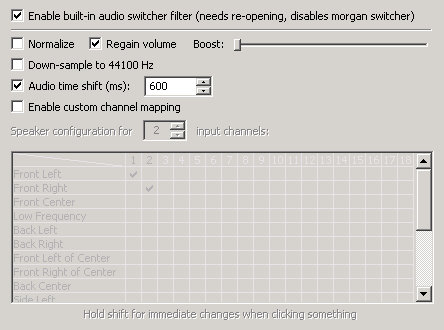
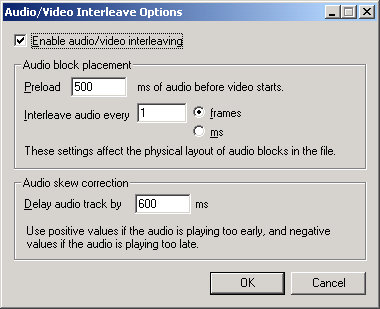
The first thing is to figure out how much the audio track is out by versus the video, which can be done with a bit of trial and error using Media Player Classic [download], which has an option in the play menu to add a delay to the audio (which can be a negative number). I usually take a look at the video without any compensation and firstly try to figure out whether the audio is late or early, then make a guess at what the delay is to within a hundred ms. I’ll then add/subtract 100ms increments until it looks/sounds right (remember at 25 frames per second each frame takes 40ms, so there’s no point in fiddling around with increments less than that).
Correcting the error
For this I use VirtualDub [download], following these steps:
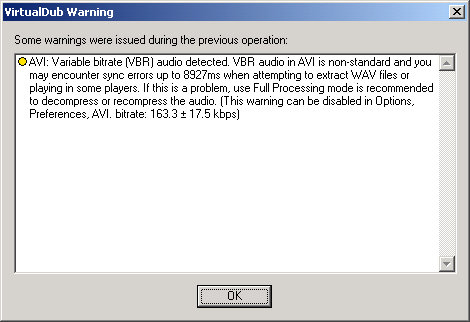
- Open the file with the lip sync issue. If you’ve used variable bit rate audio encoding you might see this warning, which can be safely ignored:
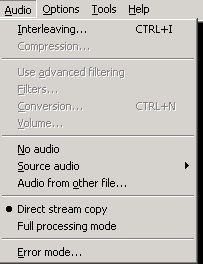
- We’re not going to actually change the audio, just its timing, so first set audio to Direct Stream Copy:
- Now we need to configure the Interleaving to match the delay found using Media Player Classic:
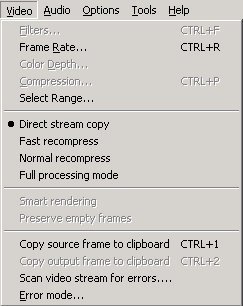
- Video isn’t going to be changed either, so set that to Direct Stream Copy too:
- And that’s pretty much it. All that’s needed now is to File->Save As with a different file name to the original (I append an underscore to keep things simple). The file should process really fast as VirtualDub isn’t doing any hard CODEC work – it’s just unzipping the audio from the video and rezipping it back together in a new file:
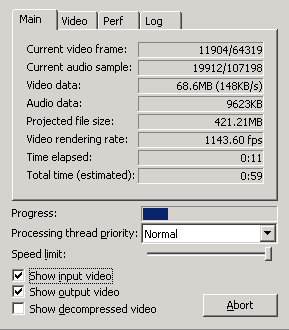
and that’s it – you should now have a file with fixed lip sync. Try it in a regular player like Windows Media Player to double check. If it’s worked to plan you can now delete the original and rename the new version.
This same process probably works for other CODEC’s besides DivX (after all it doesn’t actually do any CODEC stuff), but since I use DivX for pretty much anything I can’t say that I’ve tried.
Filed under: howto | 2 Comments
Tags: audio, avi, codec, divx, howto, lip sync, sync, video, virtualdub
The arrival of my EFM connection meant that I needed to find some way of balancing load (and failing over) between the new EFM and the existing ADSL. Thankfully there’s a healthy market in low end load balancers, and after digging through some reviews I went for the DrayTek Vigor 2820n.

ADSL
The device is basically an ADSL router with additional functionality. Getting it configured to use ADSL was a breeze, and since setting it up it seemed pretty solid (though to be honest it’s hard to tell given how awful our ADSL connection is anyway). Subjectively I’d say that this device trades a bit of top end speed for greater connection reliability, but I’ve no hard data to back that up.
WiFi
Since I was replacing an integrated ADSL/WiFi router I went for the ‘n’ variant that also has WiFi. Coverage from the same corner of the office that the previous 2Wire box inhabited seems better than before – connections in the meeting rooms on the opposite side of the floor are clearly more reliable.
Since this is used entirely for Internet access (and our Internet pipe is the thinnest part of the plumbing) I’ve been unable to discern any difference between 802.11n and 802.11g.
One disappointment is that although this device supports multiple SSIDs is seems almost impossible to do anything useful with them. What I want to do here is create a guest WiFi hotspot with different security credentials to the corporate SSID (it does that) but then I don’t want those guests on our network. I just haven’t figured out how to do anything meaningful with the SSIDs from a local network point of view. In an ideal world I’d like to have three configurations:
- A corporate SSID for staff.
- A guest SSID for visitors that just allows for access to the internet
- A guest+ SSID for visitors that allows for internet access and access to specific devices such as printers
I’m sure that the box contains everything that it needs to support that kind of configuration, it’s just that the software doesn’t present the right controls (or I’m too dumb to use it right).
[update 25 Nov] It turns out that I was too dumb, and that selecting the ‘Member’ option allows for a guest WiFi. Sadly there isn’t much in the way of controls over what can be connected to. The Member option stops connection between machines on different WiFi SSIDs, but anything connected on WiFi can connect to anything connected by a wire; so this remains an area where some better software and config controls could provide more like what I want.
Load balancing
This is the reason I bought it, and it does a competent enough job. The load balancing policy controls feel a bit clumsy to me, but having put some rules in for SIP and SSL (to favour the EFM connection) on WAN2 it seems to do a good enough job. Thankfully I’ve not yet seen any EFM failures that would cause us to fall back to ADSL (though I have pulled the plug to confirm that things do keep going). Whilst the regular documentation seems little more than a list of configuration options, the much better (but well hidden) application notes are pretty helpful at explaining how to do load balancing.
3G
One of the features I like on this device is the ability to fail over to a 3G WWAN connection. Sadly this isn’t an option if you have a fixed line WAN2, so I’ve not done any further investigation. If the dark day comes that our ADSL and EFM both fail at once, and 3G is still working (and I’m in the office to do something about it) then my guess is that we’ll get back up and running quicker on MiFi and laptops with WWAN and Connectify than we would be reconfiguring the router to use a 3G dongle. I expect that trying to run SIP over 3G isn’t likely to work that well anyway – so the phones don’t matter.
VPN
As a no servers company I wasn’t expecting to use the VPN functionality, but it dawned on me that it would be handy to be able to have remote access to printers, SIP phones and the router itself. It supports IPSEC, L2TP and PPTP. My attempts to configure IPSEC and L2TP with Windows 7 failed (the Vista application notes just didn’t get me across the line)[1]. I’m happy to say that I do have PPTP working reliably, and whilst this feels like a lowest common denominator solution it’s perfectly satisfactory for the task in hand.
Firewall
No servers mans no services, which means no need for fancy firewall configuration.
Voice
I didn’t get a 2820 with any SIP capabilities (which are available on the ‘V’ models), but I wish I’d known that such things existed before setting up the office VOIP system [2].
Niggles
DHCP – The previous 2Wire router was pretty good at handing out the same IP to the same MAC. The 2820 seems to pretty much insist on handing about the next IP in the availability stack for each lease request. Yes, I could define static mappings for every device in the office (as I’ve done already for the printers, and may still do for the phones), but this is just annoying.
Web admin – definitely a feel of designed by engineer rather than UI expert. It’s functional, but could be more intuitive.
Conclusion
The 2820n does what I bought it for, and maybe a little more besides, so I’m happy with it. Administration could be made a bit easier, but now that it’s working that shouldn’t really be an issue. I expect it to just sit in the corner and do its job.
[1] One of the issues here is that I didn’t want to specify a fixed end point IP for the remote device. Even though I have static IP at home I wanted the VPN to work from wherever I might be.
[2] Though to be honest the VOIP stuff on the 2820V is pretty limited, and if I wanted SIP trunking etc. I’d have probably waited for the newer 2930 if I had decided to get a device with VOIP support (and that has SSL VPN too).
Filed under: review, technology | 6 Comments
Tags: 2820, 2820n, 2930, adsl, DrayTek, efm, firewall, IPSEC, L2TP, load balancer, network, networking, PPTP, router, sip, Vigor, voip, vpn, wifi
Travelcard travesty
One of the great things about my new office in the City is that I can now do my commute without having to use the Tube. I can jump on a train to London Bridge and either walk from there (~20min) or catch another train to take me over the river to Cannon Street, which shortens the walk to ~5min. It’s not always that simple though. If I need to be in the office by 8 then the best plan is a Gatwick Express to Victoria then the District/Circle line to Mansion House. There are also times when I need to be in other parts of London, so I’m often left torn between getting a weekly travelcard (a ticket that includes unlimited tube journeys at a premium of £9 ) or just a one week train only season ticket (and use an Oyster pay as you go for the occasional tube journeys – the break even is 5 Zone 1 rides).
- Weekly rule – buy a Travelcard unless you’re pretty sure that you’ll make less than 5 tube journeys.

Things get even more complicated if I don’t need to be in London all week. A peak time return from Haywards Heath to London is £32.60, but to get this as a travelcard is £39.20 (that £9 premium for a week turns into a £6.60 premium for a day!)[1]. The issue here is the Gatwick Express. The Gatwick Express used to be very special – an overpriced way of separating tourists from their money and whisking them from Victoria to the Airport in 30m [2]. But these days the Gatwick Express serves commuters too by running all the way to/from Brighton in peak hours. My problem is that I like the Gatwick Express. It tends to be (slightly) less (over)crowded, and tourists (who you’ll probably never see again) are somehow less annoying than grumpy commuters (same faces every day).
- Peak daily rule – buy a regular ticket and use Oyster PAYG for the tube rides.
- If you need to be in town before 10am more than twice in a week then buy a weekly

But that’s not all. There’s even more confusion generated by operator specific and destination specific tariffs. It’s possible to get further discounts by choosing to use a single operator such as First Capital Connect [3] (FCC only) or a single destination such as Victoria (from which you can only get Southern Trains[4]). Things get even more baroque with off peak tickets [5], which range from £20.30 for an unrestricted travelcard to £11.40 for a restricted rail only return.

Overall it’s a very similar situation to airline tickets. There’s a comparatively small base price for a journey [6] and then you’re basically buying options (to travel when you want, to start and end your journey at different stations, to use the trains of different operators, to have Tube bundled in). There are clearly some irregularities in the options pricing model that are there to be gamed by the savvy operator, which may be one of the reasons that the National Rail site doesn’t actually bother to fully explain pricing/restrictions on the tickets it displays.
I’ll finish with a little story. I was on a train to Victoria a few weeks back and the conductor was doing his rounds checking tickets. One of the preceding stations was Cooksbridge, which apparently doesn’t have the infrastructure to sell tickets [7]. An old chap asked for a return to Victoria, and the conductor told him instead to buy a return to Aldershot and a return from Clapham Junction to Victoria. This apparently was what all the smart Cooksbridge travellers were doing, and the numbers show why. A return ticket to Aldershot (where Clapham Junction is a valid route) costs £17 and the return for the short hop from Clapham to Victoria is a mere £4.30 – a total of £21.30 to hold valid tickets for the entire journey[8], which is a saving of £10.10 (33%) against the regular ticket price of £30.40. Clearly the Haywards Heathens that use Southern to Victoria are missing a trick – they could do the same and spend £16.10 + £4.30 (= £20.40) rather than £30.80, though that would mean no option of using the Gatwick Express on the way home. London clearly exerts a strong reality distortion field on train fares (and it’s good to see that the world still has a place for friendly and helpful conductors rather than their evil twin the ‘enforcement officer’).
[1] There’s also a ‘not via Gatwick Express’ daily peak travelcard available for £34.90. So the Gatwick Express premium is £4.30 if you buy travelcards, but only £1.30 if you buy a return ticket and make a couple of Zone 1 trips on Oyster PAYG.
[2] There are plenty of regular trains that run from Victoria and London Bridge to the airport that can cost a lot less for the extra 3 minutes or so that they take
[3] FCC seem to offer the best discounts, presumably because their trains are the least reliable, and most of the carriages seems to have been designed for midgets rather than people with regular length legs. Their service from City Thameslink is however pretty handy for the office, and their evening rush hour trains that avoid London Bridge tend to be not too packed (on the rare occasions that they’re not carrying double passengers because of earlier cancellations) and offer a reasonable timetable (on the rare occasions that they actually run to schedule).
[4] Southern also operates the Gatwick Express brand, but there are some tickets that exclude its use.
[5] Defined by outbound trains that get into London after 10am. There also seems to be a ‘super off peak’ rate which also restricts the return journey to before 1645 or after 1915.
[6] There’s another whole category of ‘Advance fare’ tickets that don’t really apply to commuter routes, but that can have startling price differences if you’re going further afield to say Manchester, York or Newcastle.
[7] Most stations these days have automated ticket machines, even when there’s no (or only a minimal) ticket office. Some though expect the travellers to buy a ‘permit to travel‘ where they pay a nominal sum, to show good faith, which is then discounted from the fair they pay on the train or before exiting the destination station.
[8] Unlike the airlines the train companies don’t have an effective means of ensuring that passengers complete entire journeys that have extraneous legs to them.
Filed under: travel | Leave a Comment
Tags: commute, commuting, confusopoly, FCC, Gatwick, Gatwick Express, Southern, ticket, train, travelcard
My firm moved offices a little while ago, and one of the things I was looking forward to was a much better Internet pipe than we had in our old place (which seemed like a domestic ADSL shared across 100+ people). Part of the plan was a fully VOIP telephone system, something that I’ll return to in a later post, but a disaster when you don’t have a decent connection.
I wrote already about our terrible experiences with ADSL. Upon further reflection I remain convinced that the City in London might be one of the worst places on the planet to use ADSL. Seriously – I got a better connection recently when I was on holiday in the Lake District – in a rental cottage – part way up a mountain. It remains a disgrace that all of the political attention remains focussed on rural areas (and presumably their voters) rather than business centres.
I thought I’d found salvation when I came across Urban Wimax, which uses fixed Wimax terminals to deliver up to 10Mb/s (symmetric). All it needed was installation of an antenna on our roof and we could be up and running in days. Sadly I’d not counted on a belligerent landlord. We weren’t even granted access to the roof for the pre installation survey, so getting something actually installed wasn’t going to happen (having a clause in our sublease that prohibited installation of ‘communications equipment’ – presumably aimed at satellite dishes – didn’t help either).
Reluctantly I went with the only remaining solution that would provide the required bandwidth (and that didn’t break the bank) – Ethernet First Mile (EFM). That was back in mid May, and my nightmare ended in late July when the service was finally put online (substantially later than the 30 [working] days I was originally promised). What follows are the highlights (well mostly lowlights) of what I discovered as I went through the process.
Too many mouths to feed
EFM is considered within my supplier as a ‘complex product’. All of the complexity is in the installation workflow and the balkanised sub organisations that process it. Account managers, installation managers, operations coordinators, offshored schedulers, outsourced router configurers, bearer installation engineers, site commissioning engineers – I’m sure there’s more. To make matters worse there are parts of the whole that are not allowed to talk to each other – they just pass messages (do this:done that). There’s no equivalent of try:catch, as there’s basically no exception processing. If you hit an exception then you’re in trouble, as nobody is empowered to take oversight and fix things. On the same day that the commissioning engineer turned up to switch us on I also met with the product manager. He didn’t actually have a full process map for how the product gets delivered, but was trying to build one (forensically).
The product itself
Bearer
EFM has a lot in common with xDSL, as both use the regular copper pairs between your building and a telephone exchange. The main differences are that EFM doesn’t try to carry an analogue phone signal over the same pairs, and supports having multiple pairs to provide more bandwidth. Our feeble 2Mb/s connection only needed one bearer pair, which I’m told will probably be good for 4Mb/s should we ever need to upgrade. Adding another bearer pair would take the max bandwidth up to 8Mb/s.
Network Terminal Equipment (NTE)
This is a little black box that connects to power, the bearer and ethernet. Nobody seems to call it a modem, but that’s basically what it is.
Router
We got a Cisco 1841 supplied with the service (and managed remotely). This seems like massive overkill (just like the /29 that was provisioned to satisfy our request for one IP address). It’s also a clumsy bit of kit, being 1U high, but not a whole U wide (and lacking any rack mount brackets) – so you can put it into a comms cabinet, but not properly.
 The commissioning engineer got a single IP up and running on the router, and showed me web access on his laptop – I even got him to tell me what the IP was before he left the building (so that I could configure my load balancer that would use the old ADSL as a fallback).
How things could be improved
EFM might use different signalling over the copper, and have different terminal equipment, but fundamentally I don’t see how it’s that different from ADSL. ADSL has provisioning processes that (mostly) work. ADSL also has end user integrated modems/routers that are mass produced at low cost. EFM suppliers needs to clone the ADSL process, and cosy up with the consumer/SME grade equipment suppliers. That’s how EFM will get to be a £100/m for 5Mb/s product that small businesses (and ‘prosumers’) will be willing to pay for on a large scale to escape the limitations of ADSL (and SDSL).
Of course an even better plan would be for telcos to work with landlords so that fibre was already installed an terminated, and each tenant(subscriber) could then just get a virtual circuit with the bandwidth that they need. Ethernet (the regular sort that only goes 100m) will always trump EFM. It would have been great if our building could have co-operated to share a relatively modest fibre connection, but the deck is stacked against this type of arrangement.
There is a happy ending
It may be expensive, and I did have a nightmare getting it installed, but it does work well. Bandwidth seems to be as advertised, and latency is a substantial improvement on ADSL. I also have the small consolation that if I’d ordered fibre I’d probably still be waiting now.
Filed under: technology | 14 Comments
Tags: broadband, efm, ethernet, ethernet first mile, network, telco, wimax
Kindle 3G – it’s a trap
Update 22 Nov 2011 – A whole new range of Kindles have been launched since I wrote this over a year ago. The new Kindle Touch 3G only has free 3G browsing for the Kindle Store and Wikipedia. No changes have been made to the terms and conditions attached to the Kindle I wrote about, now known as the Kindle 3G Keyboard, and ‘experimental’ web browsing over 3G worldwide has remained free. At this stage in the game I’m inclined towards thinking that the trap I wrote about will never spring, and instead my prophecy turns out to only apply to later models of the Kindle reader. Get one of the older ones whilst you still can – not only does the new version not have free 3G browsing for almost all of the web, but right now there’s not even a means to pay for it.
Update 26 Nov 2011 – The Kindle DX, also has worldwide 3G is presently on sale for $259, which seems like quite a bargain to me. It’s got a larger 9.7″ screen – perfect for textbooks, and I don’t yet see a similar model in the new Kindle line up.
Update 24 Jul 2012 – It seems that 3G browsing was notionally limited to 50MB/month, and that Amazon are now clamping down on those who exceed that limit.
Filed under: technology, travel | 38 Comments
Tags: 3G, amazon, browser, ebook, kindle, web, WWAN


 Chris Swan's Weblog
