It’s been a while since the last entry here, because not much has been happening, which is mostly a good thing.
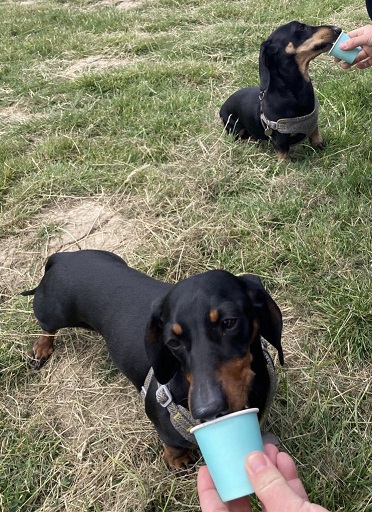
Ileal wall changes
Milo was back at the specialists NDSR at the start of June for the Doxorubicin that marked the end of his third cycle of the CHOP protocol for chemotherapy. He also had a scan to check progress, and that scan identified ‘Ileal wall changes’, which were a new finding and a cause for concern.
So… he was back at NDSR two weeks later for another scan (and the Vincristine to start his forth round of CHOP). That scan didn’t note any changes, so we’ll check again at the end of this round.
At this stage we’d be hoping for no evidence of disease, meaning a complete response (CR) to the chemo; but sadly that’s not where we’re at. He’s had a partial response (PR), and seems happy and healthy on the surface. But palliative chemo can only be expected to hold off the cancer rather than cure it, which means we’re probably looking at months of extra time with Milo rather than years.
Gained weight
At the start of treatment Milo slipped below 5kg and was looking pretty skinny (his normal weight is 5.5kg), and we were having to give him extra meals just to hold onto that.
The extra meal at lunch got discontinued months ago, but he’s still been getting extra kibble with breakfast and dinner. He’s also been finishing off Max’s dental food, which the vet warned might make Max gain weight.
Every recent trip to the vets has been accompanied by ‘has gained weight since last time here’, and suddenly we were at 6kg (from 5.7kg two weeks earlier), and a harness that just fitted. So it was time to cut back the extras, and get him back to a normal weight. A diet of just (his favourite) Butternut Box meals seems to have got things back to where they should be, and maybe some kibble can now be added to keep him stable.
Past parts:
Filed under: MiloCancerDiary | Leave a Comment
Tags: cancer, chemo, chemotherapy, CHOP, diet, food, lymphoma, Milo, protocol, weight
June 2023
Pupdate
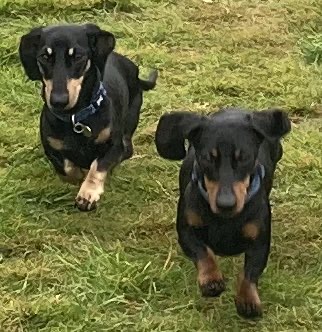
The weather has been so nice that some days we’ve had to keep the boys to shady routes so that they don’t get too hot. But they’ve also been able to enjoy some extra long walks and running about off the lead.
Back to the Big Apple
Speaking at QCon NY gave me the opportunity to return to the city for the first time since (well) before the pandemic. It had been over 5y since my last trip, which seems a little weird given that I used to be there many times a year.
Much had changed, and much has stayed the same. It was cool to use the Subway with contactless payment, but a shame that it doesn’t work on the JFK AirTrain :/ It was also nice to return to old haunts like Barcade, but also check out places I’d not seen before in Brooklyn.
One of the visual highlights was the InfoQ staff dinner after the conference, which was at a rooftop area in the conference hotel.

Flight report: Virgin Upper Class
I used some points to book my flights (though the taxes still hit nearly £1000, eating most of my speaker travel stipend). When I first looked it was possible to get Premium Economy out, and a day flight home, but by the time I was confirmed to speak there were slim pickings left, so I had to splurge extra points for Upper Class both ways.
Out – VS9 I took the train and Elizabeth Line to the airport for the first time, which worked OK (despite some delays). Virgin’s dedicated Upper Class security line was quiet, and I was swiftly in the lounge. Somehow it seemed less hip than before, and the power outlet at my seat didn’t work. The service was great though, and I got a light lunch to tide me over until flight service. The flight itself was on a 787, and I’m afraid to say that the ‘hard product’ is every bit as bad as the reviews say – mostly for being hard. It didn’t matter much on a day flight, but I’ll be avoiding Virgin’s 787s in Upper until they do a refurb[1]. The service from Tom was amazing, and I was really pleased to see English wines on the menu[2]. The really good news was a super early arrival (and actually getting to a gate). I’d hoped to be at the hotel between 7-8, and I was there just after 6 :)
Back – VS138 Given a free choice I’d not have picked the 11pm flight. But it was a chance to try out Virgin’s new A350 Upper Class suite, and I spent the dead time enjoying dinner, a few cocktails, and the final episodes of The Peripheral in the lounge. Things got off to a bad start, with an hour delay caused by a broken Delta flight, which meant we also had to be bussed to the aircraft. Once on board though everything was good. The ergonomics of the new ‘suite'[3] are great – probably the best business class offering I’ve experienced so far. I got a good comfortable night’s sleep, and woke just in time for one of the best breakfasts I’ve had when flying. Sadly the late arrival meant a pitstop in the arrivals lounge to freshen up was off the menu, but it was good to be home.
Solar diary
With the summer solstice June is obviously the best month for solar, but we’ve also been blessed with amazing weather, so it’s been a bumper solar harvest.
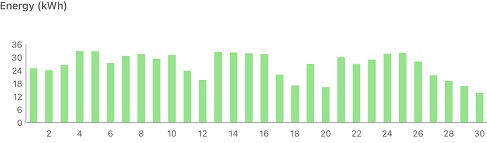
Quite a few days there with 32kWh of generation, and in amongst that I did see a peak of 4.2kW, which is the nominal output of my system.
SEG
EDF have finally got back to confirm that I’m set up for Smart Export Guarantee (SEG), though I won’t see any money until September, as that’s when the next quarterly reading is dues. So it will just about be at the anniversary of my application :/
Part of the issue there seems to be that they can’t get data from my ‘smart’ meter, which sadly is one of the first generation ones. Weirdly though, they seem to have my gas meter readings, which are sent through the electricity meter.
Beating Beat Saber
There’s a Queen music pack :)
I’ve not done all the tracks yet, and I thought I was on for a first time full combo with One Vision – right up until the last four blocks :(
‘Stone Cold Crazy’ was a new one for me, as it doesn’t feature on either of the Greatest Hits compilations, and I’ve never properly explored their back catalogue. It’s a great Beat Saber track though, and does exactly what it says on the tin.
Notes
[1] I’d also note that the economy seats in Virgin’s 787s are awful. A few years back I bought an inflatable cushion for when I found myself in those seats after suffering them on a trip to Seattle. Premium Economy is definitely the pick for these aircraft.
[2] The Hambledon Classic Cuvee sparkling, and a still Bacchus.
[3] It might be a bit of a cheek to call it a ‘suite’ as the door doesn’t close – it moves a few inches, reducing the gap by about a third.
Filed under: monthly_update | Leave a Comment
Tags: Beat Saber, Brooklyn, New York, pupdate, Queen, solar, Upper Class, Virgin
May 2023
Pupdate
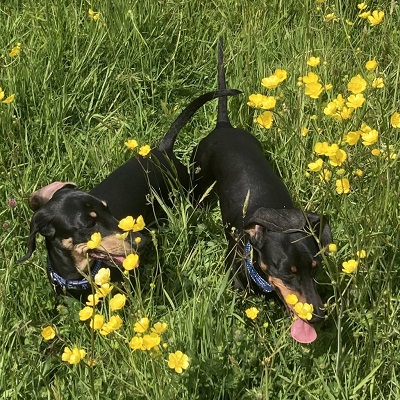
Towards the end of the month it started staying dry enough to start returning to some of the longer ‘summer’ walks.
The end for ‘Trigger’s AirPods’
In a previous post I’d mentioned that I probably should have spent my money on some new AirPods Pro rather than keeping on replacing parts of my old ones. That was borne out by yet another failure, with the right earbud going all crackly. I’ve now got myself some AirPods Pro Gen 2.
RISC-V dev board
I have a talk on Dart/Flutter on RISC-V coming up at Fluttercon in July, so I wanted to get some hardware to play with (rather than just QEMU emulation). After a bit of poking around the StarFive VisionFive 2 seemed like the way to go, and took a couple of weeks to arrive (when ordered from Amazon).
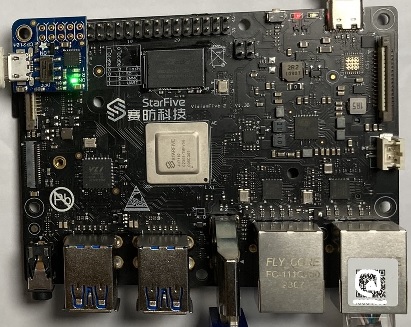
The initial experience with Debian was a little lumpy, but then an Ubuntu image came along, which easily does everything I want – running Dart and Docker.
Solar diary
May brought another substantial jump in solar output, which came just in time for getting the hot tub out for the half term break. So far it looks like it’s running almost entirely on generated electricity rather than imported. That means I’m missing out on Smart Export Guarantee (SEG) income, but that’s pretty measly, so the tub isn’t costing too much to run.
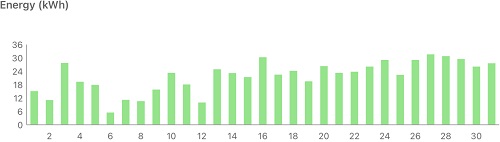
On the topic of SEG, I called EDF to chase up my application, and it was stuck for no reason. I was told that I’d be contacted in a few working days to get the final pieces set up. That was three weeks ago, so I fear another call is needed to chivvy things along. On the positive front they said they’d pay for export from the original meter reading at application all the way back in October.
Beating Beat Saber
I didn’t spend much time on Beat Saber this month, but the short time brought a decent handful of Full Combos on the remaining Lady Gaga levels.
Filed under: monthly_update | Leave a Comment
Tags: AirPods Pro, Beat Saber, pupdate, RISC-V, solar, StarFive, VisionFive 2
One of my favourite features of Dart is its ability to create executables (aka ahead of time [AOT] binaries)[1].
Creating binaries for the platform you’re running on is very straightforward, just dart compile exe but Dart doesn’t presently support cross compilation for command line binaries, unlike Rust and Go, which have also surged in popularity. This is a great shame, as Dart clearly can cross compile when it creates Flutter apps for iOS and Android[2].
For stuff we release at Atsign we often need to create binaries for a wide variety of platforms and architectures. In part that’s because we make things for the Internet of Things (IoT) market, and there’s a wide variety of dev boards etc. out there to suit different needs and (power) budgets. Our SSH No Ports tool is packaged for:
- macOS
- arm64
- x64
- Linux
- arm
- arm64
- riscv64
- x64
There are things where we might also add Windows (x64 and maybe even arm64) to that list.
x64 is easy
Using GitHub Actions it’s relatively easy to build the x64 stuff. All I need is a matrix:
jobs:
  x64_build:
    runs-on: ${{ matrix.os }}

    strategy:
      matrix:
        os: [ubuntu-latest, macOS-latest]
        include:
          - os: ubuntu-latest
            output-name: sshnp-linux-x64
          - os: macOS-latest
            output-name: sshnp-macos-x64
and then I can run through the steps to build something e.g.:
    steps:
      - uses: actions/checkout@8e5e7e5ab8b370d6c329ec480221332ada57f0ab # v3.5.2
      - uses: dart-lang/setup-dart@d6a63dab3335f427404425de0fbfed4686d93c4f # v1.5.0
      - run: mkdir sshnp
      - run: mkdir tarball
      - run: dart pub get
      - run: dart compile exe bin/activate_cli.dart -v -o sshnp/at_activate
      - run: dart compile exe bin/sshnp.dart -v -o sshnp/sshnp
      - run: dart compile exe bin/sshnpd.dart -v -o sshnp/sshnpd
      - run: cp scripts/* sshnp
      - run: tar -cvzf tarball/${{ matrix.output-name }}.tgz sshnp
      - uses: actions/upload-artifact@0b7f8abb1508181956e8e162db84b466c27e18ce # v3.1.2
        with:
          name: x64_binaries
          path: tarball
Everything else needs a bit more effort
At the moment GitHub Actions only supports x64. Arm64 for MacOS is on the roadmap for public beta in Q4-23, but that leaves a bunch of other platform:architecture combinations that can’t be done natively in a hosted Actions runner.
Of course we could use self hosted runners, but that throws up a bunch of other issues:
- They’re not recommended for open source projects, due to security issues.
- We’d be running a bunch of VMs (or even hardware) full time, and hardly using it.
- RISC-V isn’t supported yet.
I also took a look at Actuated, which makes use of ephemeral Firecracker VMs to get around security concerns. It certainly helped with arm64, but wasn’t able to move the needle on armv7 and RISC-V.
For Linux at least Docker Buildx can help
Multi-platform images provide a convenient way to harness QEMU to build Linux images for a variety of architectures, and is obviously the way to go for Docker stuff. But in this case we want a binary rather than a Docker image. It turns out that Buildx can help with this too, as it has a variety of output formats. So I can construct a multi stage build that results in a tarball:
FROM atsigncompany/buildimage:automated@sha256:9abbc3997700117914848e6c3080c4c6ed3b07adbd9a44514ce42129a203a3c5 AS build
# Using atsigncompany/buildimage until official dart image has RISC-V support
WORKDIR /sshnoports
COPY . .
RUN set -eux; \
    case "$(dpkg --print-architecture)" in \
        amd64) \
            ARCH="x64";; \
        armhf) \
            ARCH="arm";; \
        arm64) \
            ARCH="arm64";; \
        riscv64) \
            ARCH="riscv64";; \
    esac; \
    mkdir sshnp; \
    mkdir tarball; \
    dart pub get; \
    dart compile exe bin/activate_cli.dart -v -o sshnp/at_activate; \
    dart compile exe bin/sshnp.dart -v -o sshnp/sshnp; \
    dart compile exe bin/sshnpd.dart -v -o sshnp/sshnpd; \
    cp scripts/* sshnp; \
    tar -cvzf tarball/sshnp-linux-${ARCH}.tgz sshnp

FROM scratch
COPY --from=build /sshnoports/tarball/* /
What I actually get there is a bunch of architecture specific tarballs, inside a tarball, but it’s easy enough to winkle them out with an Actions workflow job:
  other_build:
    runs-on: ubuntu-latest

    steps:
      - uses: actions/checkout@8e5e7e5ab8b370d6c329ec480221332ada57f0ab # v3.5.2
      - uses: docker/setup-qemu-action@e81a89b1732b9c48d79cd809d8d81d79c4647a18 # v2.1.0
      - uses: docker/setup-buildx-action@4b4e9c3e2d4531116a6f8ba8e71fc6e2cb6e6c8c # v2.5.0
      - run: |
          docker buildx build -t atsigncompany/sshnptarball -f Dockerfile.package \
          --platform linux/arm/v7,linux/arm64,linux/riscv64 -o type=tar,dest=bins.tar .
      - run: mkdir tarballs
      - run: tar -xvf bins.tar -C tarballs
      - run: mkdir upload
      - run: cp tarballs/*/*.tgz upload/
      - uses: actions/upload-artifact@0b7f8abb1508181956e8e162db84b466c27e18ce # v3.1.2
        with:
          name: other_binaries
          path: upload
The main problem with this is that emulation makes things super slow. Each AOT binary takes about 10m to compile, leading to a 30m build process for a package with 3 binaries. As this guide illustrates, things would be much faster with a tool chain that supports cross-compilation (like Golang). We work around this by sending a chat notification when the building is done:
  notify_on_completion:
    needs: [x64_build, other_build]
    runs-on: ubuntu-latest
    steps:
      - name: Google Chat Notification
        uses: Co-qn/google-chat-notification@3691ccf4763537d6e544bc6cdcccc1965799d056 # v1
        with:
          name: SSH no ports binaries were built by GitHub Action ${{ github.run_number }}
          url: ${{ secrets.GOOGLE_CHAT_WEBHOOK }}
          status: ${{ job.status }}
If you’ve got this far you might also want to check out Bret Fisher’s guide to multi-platform-docker-build, which opened my eyes to a few things.
Notes
[1] I’ve talked about this (and some of the trade offs) at QCon Plus in my Full Stack Dart presentation, and QCon SF in my (yet to be published) Backends in Dart.
[2] J-P Nurmi has documented how the SDK can be hacked for Cross-compiling Dart apps, but it’s not something I personally want to spend time maintaining.
Filed under: Dart | Leave a Comment
Tags: Actions, architecture, ARM, Arm64, Armv7, binary, Buildx, Dart, Docker, github, Linux, MacOS, matrix, multi, platform, RISC-V, riscv64, tar, tarball, x64
I’ve read just about everything Cory’s written, and ‘Red Team Blues‘ is amongst his best work. It had the two key qualities of a great read:
- I wanted to finish it really quickly.
- The morning after finishing it I was missing my next dose of what was happening with the characters.
I’m now really looking forward to ‘The Bezzle’ and ‘Picks and Shovels’, which promise to continue the adventures of Marty Hench.
I was gripped from the very beginning, perhaps because the subject matter is so close to the stuff I work on (where ‘crypto’ means cryptography not cryptocurrency).
It was a story that seemed to keep ending.
But like Columbo’s ‘Just One More Thing’ there was always a fresh hook for the next part of the adventure.
That kept it fresh all the way through, and although Cory tied up most of the loose ends as the conclusion came into view, it’s easy to imagine Marty getting himself into a bunch more trouble.
Filed under: review | Leave a Comment
Tags: Cory Doctorow, Red Team Blues, review
TL;DR
A £7000 policy isn’t enough to cover a single chemo protocol for lymphoma, especially given the likely costs that will have stacked up before getting to a diagnosis.
My insurer, ManyPets, have been prompt in paying smaller claims, but much slower on the bigger ones. But there’s been no quibbling or hassle, and I’ve found their web based claims system pretty straightforward.
Costs
When the oncologist at North Down Specialist Referrals (NDSR) diagnosed lymphoma he estimated that chemotherapy would cost around £8-10,000, and then said “maybe a bit less, given that he’s a small dog”. Including that consultation we’d already spent a little over £2100 (with the bulk of that being £1000 for a specialist scan and cytology), so clearly the £7000 insurance policy we had wasn’t going to cover it all.
Projecting through the rest of this cycle, and assuming we keep going with the CHOP protocol for the next cycle, it looks like the total cost for diagnosis and treatment will land at around £9000.
Insurance
My sister (who runs a dog walking and pet care company) suggested that I check out ManyPets (previously Bought By Many) when I was shopping around for a policy to cover Milo, and they did indeed have a competitive offering.
My main concern at the time was back trouble, which Dachshunds can be prone to, and the possibility of a surgical bill that might run to £3-4000. Cancer and chemo wasn’t really front of mind.
Early claims, small claims
The first blood test was £182.52, and it was clear that a claim would arise from that, but I let the receipts pile up a couple of weeks longer before making a claim. At that stage we still didn’t know what was wrong with Milo, but we were still optimistic that there would be an easy and inexpensive fix.
Apart from the initial consultation itself those early claims were (mostly) turned around in hours, and paid immediately. I was impressed by how simple the online process was, and how little hassle there was.
Then the big claims, and the big delays
The £1000 scan was the first big claim, and the website advised it would take 6-8 weeks due to the company being ‘unusually busy’. In the end that one was approved 104 days later, along with the initial consultation at 120 days since I’d filed the claim.
Along the way some of the smaller (<£150) invoices had been turned around straight away, but the unpaid claims had nudged towards £5000.
But, with the earlier claims cleared through, things started moving with the later ones. Requests for info were sent to the vets (after nothing happening for 86 days in the earliest cases), and those were turned around a week or so later, with claims being approved.
As I write this, ManyPets is almost caught up, with just one claim for chemo last month outstanding. I’d summarise the experience as slow, but hassle free. Maybe that opinion would be different if I’d been chasing them hard because I desperately needed the money back.
Timing
Milo’s policy runs from mid August, so everything that’s happened has landed within one policy cycle.
I don’t know what will happen on renewal, and I’ll maybe come back then with another post. I also don’t know what would have happened with the treatment had run over a renewal.
Language is important
At one stage ManyPets emailed me with:
Looking at the details of your claim, we can see that the treatment for £LOTS on DATE has been settled under claim number NUMBER.
We have therefore closed this duplicate claim.
This was a completely inaccurate (and distressing) portrayal of what was actually going on. I knew that I hadn’t made a duplicate claim. They’d rolled up a number of claims into a single approval/payment, and all this ‘duplicate’ nonsense was some internal artifact that should never be seen by customers. An explanatory letter did follow, but poor terminology and communication around it caused alarm when none was needed.
User experience niggles
If somebody from ManyPets is reading this, then I think the website is mostly working very well. But there’s always room for improvement.
- Every claim asks me to put in my banking details. I fret that one day I’ll key them in wrong. It would be much better if I could just check a box to say ‘same as last time’.
- Once I’ve submitted a claim I can’t go back and see the details I typed in to (re)check that everything’s correct. I can only see a date and an amount.
Conclusion
For this protocol I’m going to end up around £2000 out of pocket, and there have been times when I’ve spent nearly £5000 on stuff waiting for insurance to reimburse. Seeing Milo running around and enjoying life, or coming for a snooze in my arm or on my lap, it’s all worth it :)
Update
19 May 2023 – I got a note from Jess at ManyPets to say that they’ve read this, and they’re working on speeding up claims and resolving the niggles and language problems mentioned above. As of this morning my claims are all paid, including yesterday’s vet visit. Well done ManyPets, earning themselves a did_do_better entry :)
Past parts:
Filed under: did_do_better, MiloCancerDiary | Leave a Comment
Tags: cancer, chemo, chemotherapy, claim, insurance, lymphoma, ManyPets, Milo, protocol
It’s Milo’s 2nd birthday today, which is a landmark I feared he’d not reach four months ago.
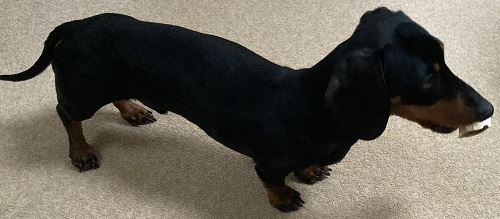
Since his last setback things have been ticking along very much to plan:
- His white cell count and neutrophils were fine for the next dose of Vincristine.
- We delayed a couple of days for his next visit to North Downs Specialist Referrals (NDSR) for the end of round Doxorubicin, and that all went ahead fine.
- The treatment cycle is now every two weeks rather than weekly, which gives time for everything to normalise before blood tests.
The only cloud on the horizon is that his scan at NDSR didn’t show full remission, which the oncologist would normally hope for at that stage. His intestines are back to normal, but some lymph nodes are still enlarged, at 1cm rather than the 0.5cm that might be expected. So… if things haven’t improved at the end of this cycle there might be cause to change the chemo protocol.
Past parts:
Filed under: MiloCancerDiary | Leave a Comment
Tags: blood test, cancer, chemo, chemotherapy, lymphoma, Milo, neutrophils, protocol, white cell count
April 2023
Pupdate
It’s (finally) warm enough for the boys to be walking without their coats again :)

Loss
The month seemed to be marked (and marred) by a number of losses.
Dad
My Dad died on Easter Saturday, and I heard the news from his wife just as I was getting up on Easter Sunday. After posting the eulogy I read at his funeral people have been asking me if it was sudden. It was sudden, but not particularly surprising. Dad had been unwell for a while, and spent his final months in a nursing home. I knew that we could lose him at any time, and that each visit was potentially the last; but also he might have plodded along for a few more years.

My last visit was only a few weeks ago, and he was on good form as we pored over maps of where he’d lived and talked about the history of the area. So I’m glad to have a happy memory of our final time together.
Water damage
A trip to Discovery Cove destroyed my Series 5 Apple watch and my Benq LM100 Waterproof camera. The watch didn’t have any signs of a crack or anything that would let the water in, but it stopped responding to touch input, reset itself, and then wouldn’t restart. I was hopeful that it would come back to life when it started back up on the charger at home, but the crown button wouldn’t work, and it didn’t seem to charge anymore. It was quite discombobulating to be without a watch (and fitness tracking) for a few days, but I now have an SE2 model, which seems very similar.
For the camera it looks like the waterproof seal in the battery compartment stopped doing its job :( It was a decade or so old, so maybe I was expecting too much that it would just work forever.
Bag
I booked flights for our US holiday with American Airlines in an attempt to avoid BA, but we had a BA code share for the final leg home. I may write more about what a mess that was, but the final indignity was one of our bags not showing up.
Days later we were just at the point of thinking about putting together a full inventory of what was lost (to start the various claims processes) when it was ‘found’, and the next day it was back with us.
US Trip
Before the pandemic we used to do a family trip to Florida every other year.Thankfully we’d not planned anything for 2020 due to exams, which is why we also didn’t even try for 2022.
The villa we usually rent in Florida wasn’t available for both weeks of the Easter break, so we decided to make it two trips in one, with most of a week in Chicago (which the family loved from our time there when I worked for Cohesive Networks) and then a week in Florida.
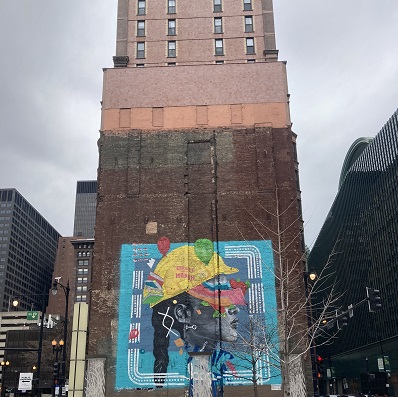
Chicago was mostly about visiting old haunts, and eating at our favorite places: Yolk, Billy Goats Tavern, Lou Malnatis, Blackwood BBQ.
In Florida it felt like we crammed two weeks of activities into a single week, with trips to Busch Gardens, Animal Kingdom, Hollywood Studios, Sea World, Boggy Creek and Discovery Cove; but we still found time to relax, and it was all good fun. I may write up a more comprehensive trip report like the one I did in 2010.
Truphone eSIMs
For past trips to the US we’ve all had Three SIMs with ‘Feel at Home’ roaming, but post Brexit changes have ruined that, so I got Truphone eSIMs for our iPhones. Compared to GigSky, which I used for my last US trip, these were a little disappointing, often showing good signal strength, and an LTE connection, but not actually providing any data.
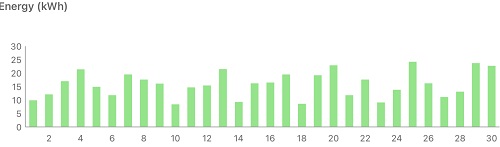
Solar Diary
April was noticeably sunnier, with almost twice the production of March. It was a week after returning from holiday (and a gloomy day) before I noticed that the hot water from the boiler was still off, because until then we’d been getting by with the iBoost.
Beating Beat Saber
I got to Full Combo a few more Lady Gaga levels before turning my attention to the Electronic Mixtape pack. Darude’s Sandstorm, is the most mental level I’ve played. I’ve not yet been able to finish it on Expert, and it’s pretty wild even on Hard.
Filed under: monthly_update, travel | Leave a Comment
Tags: Apple Watch, BA, Beat Saber, camera, Dad, disney, eSIM, Florida, lost bag, pupdate, Sea World, solar, Truphone
RIP Dad
This is (something like) what I’ll read as the eulogy for my Dad at his funeral today.
—
My first memories of Dad were of him tinkering with stuff in his garage. He was always making and mending.
He taught me how to be an engineer.
There seemed to be a constant flow of people to the house (and the back yard) looking for help with their car or motorbike or scooter or DIY job, and he seemed to make a lot of friends by helping people out.
We also got into lots of activities that a boy should do with his Dad.
He taught me how to sail a boat, and catch fish, and tie knots.
And everybody we met doing those activities seemed to be another friend he made along the way.
Dad loved a good meal, and a nice glass of wine.
He taught me to appreciate the finer things in life.
And many of you are here today because you know Dad from a dinner club or wine tasting.
Much of that might not have happened if it wasn’t for Enid, and their shared interests.
He taught me that it’s important to be with the ones you love.
It’s wonderful that Dad and Enid found each other again, and enjoyed many happy decades together.
The day after I heard the tragic news about Dad I read:
“All that matters is that at the end of the day you’re a good man”
Jason Hamm’s grandfather
I think Dad must have been a good man, because that’s why so many of you are here today to say goodbye.
—
His obituary notice has published in the Evening Chronicle Newcastle.
Donations to Alzheimer’s Society can also be given in his memory at the Paul Whitfield Celebration Fund,
Filed under: Uncategorized | Leave a Comment
Tags: Dad, eulogy, Paul Whitfield
March 2023
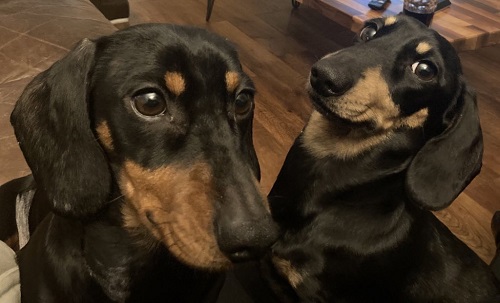
Pupdate
A pretty uneventful month on the chemo front; Milo had another setback, but that was almost expected this time around.
Roachford
Trading Boundaries is an eclectic shop not too far from my home that becomes a music venue in the evening. They get a lot of cover bands, and fragments of bands that were popular a while ago. But when their newsletter included an artist I’d listened to many times over the years my mouse pointer was headed straight to the buy button.
Roachford had some chart hits, but never hit the big time; but I remembered enjoying his Permanent Shade of Blue.

Performing live he was amazing. A brilliant mix of old and new material, with some ‘Roachford it up’ covers for seasoning. He worked the room like a pro, and it was clear that everybody in the packed house was having a great time. If you get the chance, I highly recommend seeing one of his shows. He’s also going to be touring with Mike and the Mechanics.
QCon
After quite a few years away I rejoined the programme committee for QCon London this year, which gave me a busy few days at the end of the month.
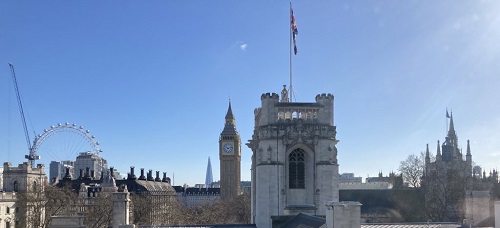
It’s hard to pick out highlights, as it was all so good. I loved all the keynotes. I loved pretty much every track talk I went to. I loved hanging out with my friends and making some new ones. It was great.
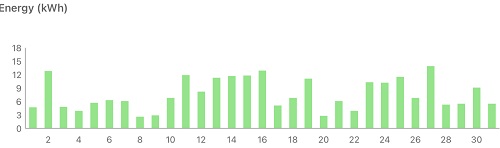
Solar Diary
Despite some subjectively awful weather, March was certainly better for catching some rays. Exporting was down though, due to the iBoost working properly throughout the month.
Beating Beat Saber
I didn’t spend much time in the metaverse this month, but I did manage to rack up a few more Full Combos in the Lady Gaga levels :)
Filed under: monthly_update | Leave a Comment
Tags: Beat Saber, pupdate, QCon, Roachford, solar


