Chromebook sales have been a big deal over the past year. This of course leads to the naysayers asking why they aren’t showing up in web logs everywhere? I think the answer is pretty straightforward… Chromebook users are likely much the same as cheap tablet users – so they’ll be mostly using them for gmail, Facebook and other very mainstream sites (that don’t tend to share their traffic data). Of course there will be a bit of casual off piste surfing , but that’s mostly showing up in the noise of the long tail.
The folk speculating about this should look in the mirror. Not literally. Macs are a tiny proportion of notebook sales, but account for a decent amount of web traffic . Conclusion: Mac users surf more than others. It’s a similarly skewed story for the iPad in the tablet world – it’s share of units sold is diminishing, but it’s share of the web remains very strong.
There are some consequences here – a mass audience that just isn’t showing up in many places, and a niche (more affluent) audience that gets around more. So the Google and Facebook engineers need to think about the Chromebook masses, but not (yet) so much everybody else.
For what it’s worth the Samsung ARM Chromebook I bought a year ago has got incrementally better over the past 12 months. With the SSH and RDP niggles gone it now does pretty much everything that I expected of it. It doesn’t get a ton of use since I picked up my Lenovo X230, but it’s the machine I reach for when I’m still in bed and need something with a keyboard.
Filed under: technology | Leave a Comment
Tags: Chromebook
I spent yesterday at the excellent ThingMonk hack day. Whilst everybody else was playing with Arduinos, Node and Johnny5 I decided to have a play with Node-RED on the BeagleBone Black I’d brought along. The eventual outcome was something that turned an LED on or off every time somebody tweeted ‘Thingmonk’. Our host James Governor tried to tweet a picture of it (which got stuck on his phone).
The flow started with a Twitter parser connected to a MQQT topic running on RabbitMQ running on my next door neighbour’s laptop (thanks Mark). I then had Node-RED subscribed to the topic on Mark’s broker feeding into a function to toggle an LED attached to the P8_13 GPIO pin on the board.
 It all looks pretty simple now, but I had some fun getting going.
Getting online
I’d brought the BeagleBone with me because I could get it up and running with a single USB cable attached to my laptop. In order to get stuff installed on it I had to share my laptop WiFi with the BeagleBone network connection, turn off my firewalls, and make a few incantations on the BeagleBone:
route add default gw 192.168.7.1
echo 'nameserver 8.8.8.8' >> /etc/resolv.conf
It’s also a good idea to make sure that the date and time are correct:
ntpdate pool.ntp.org
Node-RED
The project has specific instructions for the BeagleBone Black, but that’s not the complete story. I had to refer back to the installation guide, because I’d missed the crucial step of:
cd node-red
npm install --production
I also edited settings.js to enable bonescript by commenting out one line and uncommenting another:
    //functionGlobalContext: { }
    functionGlobalContext: { bonescript:require('bonescript') }
     //functionGlobalContext: { arduino:require('duino') }
}
I could then start it up with:
node red.js
Here’s the code that flips the LED when a tweet is received[1]:
var pin = "P8_13"
var b = context.global.bonescript;
context.state = context.state || b.LOW;
b.pinMode(pin, b.OUTPUT);
(context.state == b.LOW) ? context.state = b.HIGH : context.state = b.LOW;
b.digitalWrite(pin, context.state);
return msg;
Mosquitto
Everything was fine with Mark’s MQTT until the power cut. No WiFi meant no connectivity to his laptop. I decided to install my own MQTT broker… Mosquitto is packaged for Debian (and Ubuntu), so if I was running that it would be simple to install, but I was running Angstrom to get bonescript etc. to go with Node-RED. So I had to install Mosquitto from source[2]:
opkg install python-pip tcp-wrappers \
 python-dev python-setuptools coreutils \
 libxslt libxslt-dev packagegroup-core-buildessential
wget http://mosquitto.org/files/source/mosquitto-1.2.3.tar.gz
tar -xvf mosquitto-1.2.3.tar.gz
cd mosquitto-1.2.3
make
make install
cp /etc/mosquitto/mosquitto.conf.example /etc/mosquitto/mosquitto.conf
adduser mosquitto
You’ll probably want to visit the Mosquitto downloads page to make sure you’re getting the latest version (it was 1.2.2 when I did this yesterday).
Notes
[1] Node-RED has a Twitter input element that I could have used, but I couldn’t get authentication to work (and spent no time trying to fix it), and part of the fun of a hack day is joining projects together.
[2] Thanks to Bruce Holmes for pointing me in the right direction here. It looks like pkggroup-core-buildessential became packagegroup-core-buildessential at some stage.
Filed under: BeagleBone | 9 Comments
Tags: Angstrom, BeagleBone Black, Mosquitto, MQTT, Node-RED, node.js
Bitcoin – the Satoshi limit
The smallest presently supported subdivision of a bitcoin is 0.00000001, known as a Satoshi. This unit could also be called 0.01 µBTC or 10 nBTC (if there was such a thing as nano Bitcoin[1]).

The Satoshi limit[2] happens when the smallest unit of Bitcoin equals the smallest unit of currency that we’re happy to use for everyday transactions. This reasonably falls in the range of 1¢ to $1.
So what happens if a Satoshi is worth 5¢ (a log midrange value for the reasonable range)?
A 5¢ Satoshi implies that all 21 million BTC would have a total value of 5¢ * 21000000 / 0.00000001 = $105 Trillion. At that valuation a single BTC would be worth $5m
$105T is in the same order of magnitude as all world total liquid assets, and an order of magnitude more than all of the gold ever mined (which has been used by one analyst already as a model for Bitcoin value).
It looks like whoever designed this ‘weapon which exploits greed and social engineering to astonishing effect‘ got their sums right.
Notes
[1] There’s no reason why the Bitcoin protocol couldn’t be subsequently modified to deal with smaller subdivisions, but the Satoshi is what we have for the time being.
[2] I have my brother to thank for this observation.
Filed under: Bitcoin | Leave a Comment
Tags: Bitcoin, BTC, Satoshi, value
Classes of tablet
A few years ago I found myself saying ‘with the iPad everyone flys first class’. My thinking at the time was that Apple had levelled the playing field by creating a device that delivered the same excellent user experience whether you were the CEO of a global company, a regular user, or a kid who’d sold a kidney to buy one.
At the time there was a great deal of attention being paid to iPad’s in the boardroom and C-suite, but the point was that there was bottom up demand for tablets in the workplace, not just top down. This was brought home to me one day whilst I was waiting to meet some vendors – I was checking emails on my iPad 2, and the tea lady was telling me how she’d queued up to get an iPad 2 from the Oxford Street Apple Store on the UK launch day.
In light of my recent posts about abandoning Apple and what people are doing with cheap tablets I thought it would be worth taking a look at the tablet class system…
First Class – iPads
The iPad is still the first class option, and despite my personal reservations regarding iOS 7 it’s still much loved for the user experience it delivers.
With the top end model still below $1000[1], and an entry level of $299 I think it’s still an egalitarian first class – you’d do well to buy first class flights to anywhere for that sort of money.
Business Class – Nexus etc.
I’d consider most of the top brand Android tablets in amongst this group, though there’s not much out there that meaningfully adds to what’s in the Nexus lineup – perhaps the Galaxy Notes. The Kindle Fire range probably belongs here too, though I haven’t had the hands on time to confirm that to myself. One feature that I would call out here is the option to have 3G/LTE connectivity.
When you fly business class you get all the important things of first class – lie flat beds for a good sleep on those night flights, priority boarding etc. What’s missing are the ephemera of luxury, and the price tag that goes along with that.
Tablets like the Nexus get the job done[2], they’re just not priced or marketed as luxury items.
Premium economy
There is an emergent bunch of tablets that are presently around the £119 price point that lack some of the sophistication of the Nexus etc. (e.g. no 3G/LTE option), but that are still pretty decent for regular day to day use. The Tesco Hudl looks like a good example, and I’m sure there’s similar stuff popping off the lines of a multitude of Far East manufacturers.
Economy
This is the land of the £99 (and below) tablet. They can all ostensibly do the same stuff as any other tablet – run apps, browse the web, play music, read ebooks, watch videos. They just do a terrible job of it because the hardware bill of materials has been pared to the minimum – beyond sensible compromises on user experience versus cost. Poor screens and laggy user interfaces are the cramped legroom of the tablet world. The Argos MyTablet provides a perfect example of everything that’s wrong here.
Updates
12 Nov 2013 – Joe asked ‘iPad mini?’ I replied ‘lumped in with the iPad. Consider screen size to be something like flight distance => iPad mini is 1st class short haul’. I probably should have figure out the screen size to flight distance comparison sooner, but it helps refine the model.
Notes
[1] I briefly got my hands on an iPad Air last week at London Cloudcamp, and it’s everything that I expected it to be, which is mostly pretty good. I can’t say I like the new smart cover – the dimensions just feel wrong having moved from a 4 fold design to 3 folds to adapt to the new narrower body.
[2] I’d argue that my Nexus 7 is better for my day to day workflows than my iPad. My HDMI adapter arrived today from China, which means I now have the ability to watch videos on hotel TVs – and it’s even smaller (and thus more convenient for travel) than the old iPad one.
Filed under: technology | Leave a Comment
Tags: class, iPad, Nexus, tablet
This is Fred Wilson’s question, but I’m repeating it because it’s an interesting one, and because I think I have answers beyond glorified remote controls and recipe books.
Like Fred I was also intrigued by Ben Evan’s post ‘iPads, price and self-selection‘. Also in common with Fred I really like the Nexus 7 – both new and old[1]. I bought a bunch of last year’s model for various family members, and recently got a 2013 LTE one for myself.
Here’s what I see the Nexus 7s that I bought for other people being used for:
- Kindle
- Gmail
- Some very light browsing
- Games when the kids get hold of them
Superficially that looks like a similar list to my own use:
- Feed.ly
- Gmail
- Casual gaming
- Browsing
- Watching videos
- Kindle
Looking at the lists one might argue that the tablets are used for much the same things, but if you were watching over our shoulders things would be very different.
I use my Nexus 7 online for hours every day – it’s a great device for curation [2] – a device for the 10% [3]. The digital footprints that I’m leaving with it will be at least as large as those I previously left with my iPad. I watch videos when I’m travelling, and I read books on Kindle when I’ve exhausted myself of online content, or just want to disconnect for a while.
My wife uses her Nexus 7 mostly for Kindle. Her digital footprints from it are likely very shallow. The other Nexus 7s in the family get used even less, their digital footprints are virtually non existent.
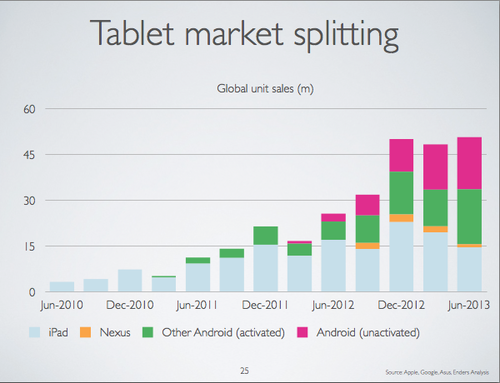
I think this explains the massive disparity between Android tablet sales, and Android’s share of page impressions across the web. People who’ve been buying Android tablets don’t use them online as much as iPad users, even the relatively high end ones like the Nexus 7.

I think cost comes into play a little here – if you’re using a tool a lot then you’ll buy a good tool. I happen to think that a 2013 Nexus 7 LTE is just as good (perhaps even better) for my own use cases than the equivalent iPad mini, so the price delta (which is almost all margin to Apple) isn’t justified for me. So Ben’s right in part – premium buyers self select in (even if the premium may no longer be deserved or necessary [4]).
There is however something else going on here. If the iPad is a device for the 10%, and cheap Android tablets are a device for the 90% then there’s a very skewed distribution of online engagement. The 90% don’t just consume – they consume a lot less than those who curate, and they in turn consume a lot less than those who create.
So the short answer to ‘What Are People Doing On All Those Cheap Tablets?’ feels to me like ‘very little – certainly a lot less than what you’re doing with your iPad’.
Notes:
[1] I’ve heard from some friends that they tried the original Nexus 7 and didn’t get on with it. My own (somewhat superficial) experiences were all good, but I didn’t have my own and work it hard. I’ve since read that there was a problem with the storage early on (since corrected) that caused major performance issues for heavy users. There were also reports of WiFi issues. To those who were put off I’d say try again (after updating to latest firmware etc.) and certainly give the 2013 model a go.
[2] It was Fred that brought my attention to the 90/9/1 rule ‘Out of 100 people, 1% will create the content, 10% will curate the content, and the other 90% will simply consume it.’
[3] I’m writing this post on my laptop rather than a tablet because even with Swype, speech recognition or a bluetooth keyboard tablets are *much* less effective for creative work.
[4] Though the Nexus 7 is still a premium device. The $349 I paid may be less than $629 for an equivalent iPad Mini, but it’s still a whole lot more than the cheap devices that are now knocking around.
Filed under: technology | 2 Comments
Tags: android, demographics, iPad, tablet
Abandoning Apple
I’ve been a happy iPhone and iPad user for a couple of years, but the time has come to move on. It’s not that I dislike Apple stuff, I just don’t think it’s the best for my needs, and certainly isn’t worth the premium. That said, I’m not very convinced by iOS7, or OS X Mavericks for that matter.
Desktop
The new Mac Pro looks awesome – an object of pure techlust the likes of which I’ve hardly seen since the NeXT cube days. But I last bought a new desktop somewhere in the middle of the last decade.
Laptop
If Apple made an MacBook Air that took 16GB of RAM I’d have bought one already. The 8GB limitation pushed me to getting a Lenovo X230, which I’m very happy with (and was about $500 less than the equivalent MBA – and doesn’t make me carry a little bag of video adaptors).
Phone
I ended up choosing the Samsung Galaxy S4 mini over an iPhone 5 – the dual SIM version was just the icing on the cake. Cost wasn’t a significant factor in the decision, but £335 is a whole lot better than £709 for a 64GB 5s.
Tablet
My iPad hasn’t seen much use since I got a Nexus 7 LTE, and I left it at home when I was on holiday last week, and again for a business trip this week. I think cost was more of a factor here – the Nexus 7 LTE is $349 whilst an equivalent iPad mini is $629.
What I’m missing
I bought the TomTom apps for iOS some time ago, and it’s been great to get free upgrades over the years. I’ve yet to buy a new offline GPS app (like TomTom or maybe Sygic) for Android, so I’m still taking my old iPhone4 with me on trips where I need a GPS.
I had the HDMI adaptor for my iPad (that also worked with my iPhone 4), which was useful for watching shows on hotel room and holiday rental TVs (though I’d note that the HDMI adaptor for newer iPads that use the Lightning connector aren’t really adaptors, but rather mini network attached streaming devices – that actually reduce the quality of the output). I’ve yet to get a Slimport adaptor for the Nexus 7, and I probably won’t bother getting the slightly different sort of adaptor the S4 mini needs.
What I’m not missing
A whole bunch of crappy games that my kids downloaded.
A whole bunch more games that I downloaded.
How my world is better
Swype – probably the best 69p I ever spent. It totally baffles me that Apple blocks this kind of awesome UI improvement from its environment.
I don’t have to use iTunes any more (e.g. to get videos onto my tablet before a trip).
I have enough storage on my phone for all of my MP3s and everything else.
I can share links to stuff on pinboard.in without having to jump through hoops (because of an open plugin architecture for such things).
Conclusion
Leaving behind the iOS world for Android has involved little pain, and a good amount of joy. Maybe I’d be just as happy with newer Apple gear, but I’d be somewhat poorer and I’d be missing out on a bunch of stuff.
Lastly, I should answer Fred Wilson’s question ‘What Are People Doing On All Those Cheap Tablets?‘ – for me it’s exactly the same as what I was doing with my expensive tablet – Feed.ly, Twitter, watching videos, Kindle, Facebook and some casual gaming. Perhaps more on that in another post – I think people who do a lot with their tablets are willing to spend more on them, but if a heavy user like me can be happy with a cheaper device then the landscape is changing.
Filed under: technology | 2 Comments
Tags: android, Galaxy, iOS, iPad, iphone, Nexus 7, S4 mini, Samsung, Swype
The compiler will not save you
…at least not in an embedded environment.
There’s a commonly held myth in modern software development that compilers are smarter than people at optimising code for its eventual runtime environment. By extension there’s no point in writing efficient code, because your idea of efficient code might not actually be all that efficient, and any time spent on doing that is wasted because the compiler will know better. This post is about one of those times when that’s not true. Functionally identical code can end up compiling into very different binaries, and that can lead to significant differences in resource usage on the target environment. That might not matter on a PC with a multi core multi GHz CPU and many GB or RAM, but it can make the difference between working and not working in an embedded environment – the kind of environment that the Internet of Things is being built out of.
The back story
A couple of years ago I did a simple project with my kids to make little boards that would flash their names in morse code. It used the cheap ($4.30) and popular TI MSP430 LaunchPad development kit. The code to do the morse bits was fugly but it worked.
Some time later my friend Andy Bennett asked me why I’d coded the project the way I had. The honest answer was that I’d been pretty lazy and cut’n’pasted the whole thing together, but for good measure I threw in a comment that I thought it would be easy for the compiler to digest and turn into an efficient binary for the highly constrained target environment of a low end MSP430 chip.
I’m still not quite sure whether Andy set out to prove me right or wrong, but I’m impressed by the effort and rigour that he put into his subsequent investigations. Some time later he presented his findings at OSHUG #25 (pdf slides).
The (more elegant) alternatives
Andy created three additional versions of the morse code flasher program (I’ve put all four into this Github repo – EmbeddedMorse). I think anybody with the slightest sense of smell around code would argue that all three are better than my original (#2). #1 and #3 make much better use of C data structures, #3 has some clever bit mapping of morse characters, and #4 uses a switch statement instead of many extra functions.
If the myth of compiler omnipotence held true then all four examples would have compiled down into the same binary for the MSP430.
They didn’t – it turns out that the compiler can be led astray.
A quick detour into a limited memory map
The MSP430G2211 device that I used has 2kB of Flash and 128 Bytes of RAM – so anything that’s going to change at runtime (variables) needs to fit into that 128 Bytes and everything else can be accommodated in the more generous 2048 Bytes of Flash. The actual memory map for an MSP430 device (or any other microcontroller for that matter) is a bit more complex, due to memory mapped peripherals etc., but that matters less when it comes to squeezing some code in.
Memory sections of compiled programs
A compiler will generate binary code to fit into various different sections such as .text (machine instructions), .data (static data such as constants) and .bss (space for variables).
For the compiled program to fit onto the device then .bss must go inside 128 Bytes and .text and .data combined can’t exceed 2048 Bytes.
Here’s what the compiler actually produced
| Example | .text | .data | .rodata | .bss |
| 1 | 391 | 832 | 156 | 0 |
| 2 | 1122 | 0 | 0 | 0 |
| 3 | 422 | 26 | 44 | 0 |
| 4 | 844 | 0 | 796 | 0 |
The first notable thing is that they’re all different – the compiler hasn’t spotted that the code is functionally identical, and it’s compiled it into different shaped binaries.
The second notable thing is that they all should work – none of the code uses any .bss, so that tiny 128 Bytes of RAM shouldn’t be an issue.
The only one that does work is #2, and it’s pretty obvious why that is – the entire compiled output is .text, which can go into flash.
It’s less clear why the other three examples don’t work:
#1 – if .data goes into RAM rather than flash then it’s clearly going to break past the 128 Byte limit
#4 – if .rodata goes into RAM rather than flash (which it totally doesn’t need to) then it will also break the 128 Byte limit
#3 – even if the .data and .rodata go into RAM then it’s only 70 Bytes, so there are 58 Bytes left. In theory that should be plenty, but in practice… some further analysis needed to figure out why it breaks.
Conclusion
Compilers aren’t as smart as people make out. Functionally identical source code can lead to very different binaries, and that can matter a lot in a constrained environment.
I didn’t know any of this when I wrote my initial implementation, and it’s just good luck that I picked an approach that worked first time. If it hadn’t then I might have done battle with the compiler for some time, or I might have given up and found an easier platform to get it working on.
Filed under: code, software | 2 Comments
Tags: binary, c, compiler, microcontroller, msp430, optimisation, size
I’ve been a big fan of Koss Spark Plug earbuds for many years. They’re cheap, comfortable and sound great. I got my first set after some very expensive Sony noise cancelling earbuds failed on my (just after the warranty ran out), and it was obvious straight away that a good snug fit was an excellent substitute for active noise cancelling.
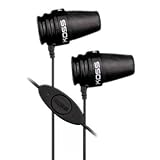
As I find myself using Skype and Google Voice from my laptop (and my new phone) a lot for calls these days I’ve found that the built in microphone picks up too much noise, so I got the iSpark as an alternative. It’s basically the same headphones I’ve come to love with the Spark Plugs, but with the addition of a microphone and push switch. The microphone seems to work very well for calls, and the push switch is handy for pausing shows I’m watching on my iPad.
Although they’re marketed to go with the iPhone these things seem to work with anything that has a 3.5mm jack for combined headphones and microphone. They also come with a handy little carry pouch, so I’m more likely now to just pop them in my pocket rather than having them sat in the bottom of my bag.
Filed under: review, technology | 2 Comments
Tags: android, google voice, headphones, headset, iphone, iSpark, Koss, microphone, skype
Review – Samsung S4 Mini Duos
TL;DR
The S4 mini is a fantastic piece of kit. The size is right, the screen is vibrant, the battery lasts, it works fine as a phone. The *only* thing I might ask for as an improvement would be a higher resolution screen. Dual SIM is very nice too.

Background
2 years is too long for a phone upgrade cycle, and I’d let it go even longer than that with my iPhone 4. It was frankly always a pretty useless phone, but it’s been a very nice pocket computer. I’ve started to need a phone that actually works recently, and ended up switching to my old San Francisco (ZTE Blade) as my primary phone – swapping the data only SIM I had for it over to the iPhone. The Blade was pretty satisfactory, but a three year old low end phone was really only good for emails and voice – I needed something newer for apps. I backed the Ubuntu Edge, but ultimately $32m was too much of an ask for the community – so that’s not happening. I waited for the iPhone 5s and 5c to launch, and decided I wanted neither (or perhaps I just wasn’t prepared to pay *that* much of a premium for an iPod touch with a modem in it).
Goldilocks screen size
I went for an S4 mini rather than the full S4 (or a Nexus 4) because my pockets just aren’t big enough. I generally have a tablet or two within reach if I want more screen real estate, so I want a phone rather than a phablet.
Enough performance
The S4 mini has a dual core 1.7Ghz CPU, which is a lot less than its big brother’s quad core 1.9GHz processor. It doesn’t matter – it’s plenty fast enough for anything I’ve tried to do with it. Everything feels snappy.
Relatively unmolested Android
If there was a Nexus version of the S4 mini Duos then I’d have tried to get it – I’ve yet to see anything that a manufacturer (or worse still an operator) has tried to add to stock Android that’s actually made it better rather than worse. Luckily Samsung don’t seem to have messed with Android too badly (or at least not badly enough to make me want to switch straight away to CyanogenMod).
Dual SIM
The ‘Duos’ naming means that the GT-I9192 can take two (micro) SIM cards. I’m finding this pretty useful for a couple of reasons:
- The most obvious is when travelling. I’m in the US right now, and have my T-Mobile PAYG SIM card in the phone so that I’m paying 10c/min rather than £1/min.
- Back at home I’m running a GiffGaff SIM in the second slot. Pretty much my whole family now use GiffGaff, and it means that they can call and text me for free (whilst I wait for my Vodafone contract to expire[1]).
The software makes it pretty easy to choose which SIM is used. One can be selected as default, but the phone dialer and text messaging app offer two buttons for dial/send so the right SIM can be used.
The one trade off with this model is that it doesn’t have LTE. I’m not that bothered as I don’t use any services that support yet.
Cost
The handset was £295 on eBay. Most of them seem to be coming from Singapore, but I paid a local UK supplier to avoid hassles with shipping and customs. Delivery was advertised as being 10 days, but I had it in my hands 2 days later :)
I’ve ordered a top of the range 64GB microSD card to supplement the 8GB internal memory (and 16GB microSD that I had lying around). It cost £34.99, which seems a whole lot more reasonable than the £160 premium for a 64GB iPhone 5s.
Leaving the iOS ecosystem
I’ve had feet in both camps (iOS and Android) for a few years now, so the new phone has been more of a transition than a switch. The only thing that I’ve left behind is TomTom. I bought the navigation apps for W Europe and USA & Canada a few years ago to use on my iPod Touch, and it was great to keep using them when I got an iPhone (along with a handy windscreen mounting widget from eBay). I may yet get TomTom for Android – I’m just not in a desperate hurry to re-buy £50+ of apps (and I’m also waiting for that 64GB microSD card so I have plenty of space for my music and apps).
Overall
I’m still in the honeymoon period, but so far I’m loving the S4 mini Duos.
Notes
[1] It was a mistake to sign up for another year with Vodafone just to get reasonable roaming rates in Europe. I’d almost certainly have been better off switching sooner to GiffGaff and putting up with whatever their deal is for roaming.
Filed under: review, technology | 3 Comments
Tags: android, dual SIM, Duos, mini, review, s4, Samsung
Now that OpenELEC 3.2 is out the dev team are moving to 3.3 (which will eventually become stable as 3.4).
The dev team have asked me to wait until things are more stable (for around 4 weeks) before doing more builds from the master branch.
The dev team have also made a decision to remove .bz2 compression. Let me know if you’d rather stick with tar.bz2, or go with the flow to straight .tar files (which are about 10MB bigger)?
Filed under: Raspberry Pi | 10 Comments
Tags: build, dev, openelec, Raspberry Pi, RPi


 Chris Swan's Weblog