For a little while I’ve been experiencing lousy service from my credit card providers, and judging by what I hear from others I’m far from alone on this. The level of false positives from card company fraud detection systems has reached a point where it’s creating a bad customer experience, and it often seems that ‘common sense’ has been thrown out the window.
A personal example
I recently went on a family holiday to the US. Within hours of arriving my card was blocked and I found myself having to call the fraud department.
What should have happened
I booked my airline tickets using the card. It shows clearly on my statement that one of the tickets was in my name, and the destination of the flight. It should therefore have been no surprise when I showed up in Tampa on the appointed day and started spending money[1]. The key point here is that the card company had very specific data about my future movements.
What actually happened
I picked up my hire car in Tampa (card transaction for future fuelling fees etc.) and headed off towards my ultimate destination of Kissimmee. On nearing my destination I needed to fill up with fuel [2], so I stopped at a 7-11 to gas up. I tried to pay at the pump [3], but this failed, so I went into the store to pre authorise a tank full of fuel. My card was declined and I had to use another. When I checked my email shortly afterwards there was a fraud alert, and when I switched on my UK mobile it immediately got a text saying the same [4]. I called the fraud line (and got through straight away, as it was early in the UK morning), and explained that the (attempted) transactions were genuine, and that I would remain in the US for another couple of weeks. The card was unblocked and I continued spending… for a while at least.
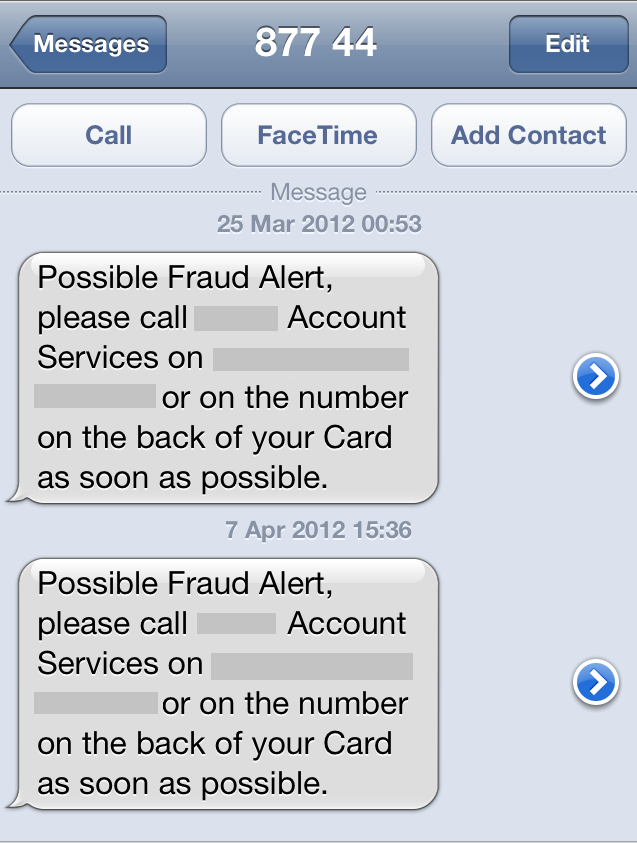
What happened next
Two weeks later, another gas station, another transaction that I had to use another card for, another text asking me to call the fraud department. This time it took almost 9 minutes to get through, as it was Easter Saturday and still the middle of the shopping afternoon back at home. I was pretty angry – at the wait, and because it had happened again within the time that I’d specified I’d be using the card in the US. There were apparently three suspicious transactions, with the last one causing my card to be blocked:
- Buying gas at the same 7-11 that had caused the problems last time.
- Some groceries from Super Target [5].
- Another attempt to buy gas (at a place on the road back to Tampa).
What’s going on here?
I necessarily need to speculate here a little, as the card company can’t/won’t explain how its fraud detection algorithms work[6]. It’s a classic case of ‘computer says no‘. Likely there are a bunch of heuristics about transaction types that are more likely to be fraudulent[7]. My guess would be that convenience stores rank as pretty high risk, and the problem in my case is that it’s almost impossible to buy gas at anywhere that isn’t also a convenience store. Somewhere else somebody has done a cold analysis of the cost of dealing with false positives (which mainly falls on me the customer) versus the costs of fraud. There is no doubt a lot of analysis going on here.
Doing better
So data and analysis are at the heart of this, but is it the right data leading to the right analysis? I think not. As a customer I think the experience is lousy precisely because things that seem obvious to me are being apparently ignored by the card company:
- Location – if I’m buying airline tickets with my card then the card company knows in advance where I should be. These data points should take precedence over heuristics about ‘normal’ spending locations.[8]
- Inference – if I rent a car for 2 weeks then I’m pretty likely to buy some gas to go in it.
- Explicit overrides – if I tell the company where I’m going to be, and what I’m likely to be spending on then the fraud pattern matching should adjust to suit.
Conclusion
[1] In fact the fraud bells should have started ringing if I started making in person transactions somewhere other than Tampa.
[2] Why the car wasn’t supplied full like I’d paid for is another story.
[3] The pumps always ask for a zip code, which is likely where the problems begin for anybody outside of the US. Perhaps the card companies should allow users to register fake ZIP codes for such purposes (I always input the ZIP for an office where I used to work – which is generally OK for buying MTA cards in New York, and a variety of goods that are delivered online).
[4] Luckily for me it seems that I wasn’t charged some extortionate roaming rate for receiving that text.
[5] Why that transation was flagged an the other 4-5 times I bought there weren’t is a total mystery.
[6] Presumably in the belief of security by obscurity – if the bad guys don’t know how the system works then they can’t engineer around it.
[7] Possibly some big data type tools have been used behind the scenes here.
[8] For bonus points the companies should provide an easy way for me to notify travel plans for when I’m buying tickets with another card e.g. my TripIt feed has all of this data. There’s a huge opportunity here for companies to become ‘friends’ in social networks that brings utility beyond just better targeting of ads.
Filed under: could_do_better, grumble, travel | 1 Comment
Tags: algorithm, analytics, big data, card, convenience, customer, customer experience, customer service, data, fraud, gas, social, travel
Three screens
I’ve had a run of bad luck with screens recently..
Laptop
The first casualty was my son’s X121e. He brought it home from school one evening saying ‘the screen on my laptop is broken … I didn’t drop it’. My response was of course ‘why are you telling me you didn’t drop it’, and ‘what caused the mark on this corner’.

The constantly flickering screen, which could be made to change if I wiggled it, seemed like symptoms of a loose connector. Luckily Lenovo provides service manuals for its laptops[1], so I set about stripping it down. After about half an hour I reached the point where I was able to reseat the LCD connector and confirm that it was working as it should. Then it was just a matter of another half an hour to put it back together.
Chris 1 : Murphy 0
Smartphone
A few days later my wife came home one evening saying ‘can you take a look at my phone’. The screen had just vertical lines on it, so my first suspicion was another loose connector. Sadly this time around it wasn’t that simple. After swapping things around with my identical (except for the outer shell colour) ZTE Blade I was able to confirm that a replacement screen would sort things out. I’m keeping an eye on eBay for a phone offered for parts/repair with a good screen.
Chris 1 : Murphy 1
iPad
Angry Birds Space came out whilst I was in Florida on holiday. I think it’s a great way of teaching kids about zero-G physics. Sadly my son managed to test Earth gravity whilst playing it by pushing the iPad out of its SmartCover – over a stone floor. Here’s the result:

My immediate thoughts were of having to buy a new iPad (perhaps the new version), and having to make an insurance claim.
After calming down a bit I found out that 1. the iPad was still working and 2. it was possible to get the touch screen replaced. With some more searching I discovered an entire cottage industry of iPad screen fixers, and identified a reasonably close by one that could do the job for $100. A couple of days later I spent and hour and a half in the company of Ruben at RCMA watching him pick bits of glass out of my iPad. Although I’m a keen maker and fixer it’s definitely one of those jobs you don’t want to do without some help (and the Ifixit guides like this are good, but don’t show the full horror of screen removal – especially when it’s so badly broken. Ruben said mine was the worst he’d ever seen, and there was proof in his bin that he’d seen plenty).
I’m not entirely convinced that the WiFi is all it used to be – maybe the antenna suffered from the drop, but at least I have a whole iPad again.
Chris 2 : Murphy 1
Conclusion
Each of these issues looked pretty terminal at first – rendering an expensive gadget useless. In each case though the problem has proven to be fixable at low to moderate cost in time and parts. Not all modern electronics need to be treated as disposable.
[1] X121e service manual.
Filed under: technology | 1 Comment
Tags: Blade, fixing, iPad, IPad 2, laptop, LCD, lenovo, Orange San Francisco, phone, repair, screen, smartphone, Touch, X121, x121e, ZTE
This should work for any service that only supports POP3S, not just gmail. You’ll need a Linux box/VM (I generally use Ubuntu).
Background
Since the mid 90s I’ve used Ameol to retrieve email. When I started using gmail I forwarded mail on to my ISP’s POP3 service and collected it with Ameol so that I’d have a local copy of my mail. These days I use Ameol pretty infrequently, and sometimes my mailbox fills its quota. This causes gmail to start spewing out retry-timeout messages. Most recently this happened whilst I was on holiday, and I was unable to remotely connect to my PC at home to run Ameol. To clear my email out of the ISP server I configured a Google Apps account to fetch it, expecting to simply switch Ameol to that temporarily when I got home. Unfortunately Ameol is an ancient POP3 client, and doesn’t support SSL connections. I needed some way to convert between regular POP3 on port 110 and POP3S on port 995.
First attempt – perdition
The first POP3 proxy that my searching turned up was perdition. I was able to install this on Ubuntu without trouble, but sadly unable to get it suitable configured. Man pages for documentation are all very well, but it would be great if there were some more obvious examples of how to use the tool for various typical scenarios.
Success – stunnel
Whilst troubleshooting perdition I did a manual connection to gmail’s POP3S service using openssl. This worked fine, and suggested that I needed a very simple proxy application; and that’s what stunnel does.
Installation
I tried just running ‘stunnel’ in case it was already installed. Ubuntu very helpfully said:
The program ‘stunnel’ is currently not installed. You can install it by typing:
apt-get install stunnel4
Configuration
I created the following config file in /etc/stunnel/stunnel.conf:
client = yes
debug = debug
cert = /etc/ssl/certs/stunnel.pem[pop3s]
accept = host_ip:110
connect = pop.gmail.com:995
Don’t forget to substitute your own host_ip above.
I then had to create the certificate reference above:
openssl req -new -out /etc/ssl/certs/stunnel.pem -keyout /etc/ssl/certs/stunnel.pem -nodes -x509 -days 365
Starting
Before starting I had to edit /etc/default/stunnel4 and change the following line:
ENABLED=1
It was then just a case of running:
/etc/init.d/stunnel4 start
A quick ‘netstat -an’ confirmed that stunnel was listening on port 110
Use
Once stunnel was running on my Ubuntu VM I was then able to configure my POP3 client (Ameol) to connect to host_ip using my Gmail username and password. Job done :)
Update 10 Jan 20
Alexander Traud emailed me to note:
With the latest version of stunnel, “client” and “cert” should not be in the nameless (global) section but within the section pop3s.
Finally, I changed all “host_ip” to “::” because of <https://serverfault.com/q/666712>
Filed under: howto | Leave a Comment
Tags: 110, 995, client, email, gmail, perdition, POP3, POP3S, port, proxy, stunnel, Ubuntu
Big Data – a little analysis
This post was inspired by a conversation I had with a VC friend a few weeks back, just as he was about to head out to the Structure conference that would be covering this topic.
Big Data seems to be one of the huge industry buzz phrases at the moment. From the marketing it would seem like any problem can be solved simply by having a bigger pile of data and some tools to do stuff with it. I think that’s manifestly untrue – here’s why…
If we look at data/analysis problems there are essentially three types:

Simple problems
Low data volume, simple algorithm(s)
This is the stuff that people have been using computers for since the advent of the PC era (and in some cases before that). It’s the type of stuff that can be dealt with using a spreadsheet or a small relational database. Nothing new or interesting to see here…
Of course small databases grow into large databases, especially when individual or department scale problems flow into enterprise problems; but that doesn’t change the inherent simplicity. If the stuff that once occupied a desktop spreadsheet or database can be rammed into a giant SQL database then by and large the same algorithms and analysis can be made to work. This is why we have big iron, and when that runs out of steam we have the more recent move to scale out architectures.
Quant problems
Any data volume, complex algorithm(s)
These are the problems where you need somebody that understands algorithms – a quantitative analyst (or quant for short). I spent some time before writing this wondering if there was any distinction between ‘small data’ quant problems and ‘big data’ quant problems, but I’m pretty sure there isn’t. In my experience quants will grab as much data (and as many machines to process it) as they can lay their hands on. The trick in practice is achieving the right balance between computational tractability and time consuming optimisation in order to optimise the systemic costs[1].
Solving quant problems is an expensive business both in computation and brain power, so it tends to be confined to areas where the pay-off justifies the cost. Financial services is an obvious example, but there are others – reservoir simulation in the energy industry, computational fluid dynamics in aerospace, protein folding and DNA sequencing in pharmaceutics and even race strategy optimisation in Formula 1.
Big Data problems
Large data volume, simple algorithm(s)
There are probably two sub types here:
- Inherent big data problems – some activities simply throw off huge quantities of data. A good example is security monitoring where devices like firewalls and intrusion detection sensors create voluminous logs for analysis. Here the analyst has no choice over data volume, and must simply find a means to bring appropriate algorithms to bear.The incursion of IT into more areas of modern life is naturally creating more instances of this sub type. As more things get tagged and scanned and create a data path behind them we get bigger heaps of data that might hold some value.
- Big data rather than complex algorithm. There are cases when the overall performance of a system can be improved by using more data rather than a more complex algorithm. Google are perhaps the masters of this, and their work on machine language translation illustrates the point beautifully.
So where’s the gap between the marketing hype and reality?
If Roger Needham were alive today he might say:
Whoever thinks his problem is solved by big data, doesn’t understand his problem and doesn’t understand big data[2]
The point is that Google’s engineers are able to make an informed decision between a complex algorithm and using more data. They understand the problem, they understand algorithms and they have access to massive quantities of data.
Many businesses are presently being told that all they need to gain stunning insight that will help them whip their competition is a shiny big data tool. But there can be no value without understanding, and a tool on its own doesn’t deliver that (and it would be foolish to believe that a consultancy engagement to implement a tool helps matters much).
What is good about ‘big data’?
This post isn’t intended to be a dig at the big data concept, or the tools used to manage it. I’m simply pointing out that it’s not a panacea. Some problems need big data, and others don’t. Figuring out the nature of them problem is the first step. We might call that analysis, or we might call that ‘data science’ – perhaps the trick is figuring out where the knowledge border lies between the two.
What’s great is that we now have a ton of (mostly open source) tools that can help us manage big data problems when we find them. Hadoop, Hive, HBase, Cassandra are just some examples from the Apache stable, there are plenty more.
What can be bad about big data?
Many organisations now have in place automated systems based on simple algorithms that process vast data sets – credit card fraud detection being one good example. This has consequences for process visibility and ignoring specific data points that can ruin user experience and customer relationships. I’ll take this up further in a subsequent post, but I’m sure we’ve all at some stage been a victim of the ‘computer says no’ problem where nobody can explain why the computer said no, and it’s obviously a bad call given a common sense analysis.
Conclusion
For me big data is about a new generation of tools that allow us to work more effectively with large data sets. This is great for people who have inherent (and obvious) big data problems. For cases when it’s less obvious there’s a need for some analysis work to understand whether analysis of a larger data set might deliver more value versus using more complex algorithms.
[1] I’ve come across many IT people who only look at the costs of machines and the data centres they sit within. Machines in small numbers are cheap, but lots of them become expensive. Quants (even in small numbers) are always expensive, so there are many situations where the economic optimum is achieved by using more machines and fewer quants.
A good recent example of this is the news that Netflix never implemented the winning algorithm for its $1m challenge.
[2] Original `Whoever thinks his problem is solved by encryption, doesn’t understand his problem and doesn’t understand encryption’
Filed under: technology | 2 Comments
Tags: algorithm, analytics, big data, complexity, quant
Firstly let me say that I like Linode a lot. They had a promotion running a little while ago which got me going with my first virtual private server (VPS), and I only moved off to somewhere from lowendbox after the promotion because my needs are small (and I wanted to match my spend accordingly)[1]. This tweet probably sums things up perfectly:

I first heard about the incident via Hacker News, where somebody had posted a blog post from one of the victims. The comments on both sites make for some interesting reading about security and liability. Shortly later Linode posted a statement. The true details of what went down, and whether it was an inside job as some speculate, or ‘hackers’ remains to be seen. Clearly whoever perpetrated the attack knew exactly what they were after and went straight for it – what law enforcement would normally call a ‘professional job’.
So… what can we learn from this? Here are some of my initial thoughts:
Physical access === game over
You have to be able to trust your service provider with your data. If that data has a cash equivalent of thousands of dollars then you have to be able to trust them a lot. There’s a special sort of service provider that we normally use for this – one that’s heavily regulated and where the customer (normally) gets reimbursed if mistakes are made – we call these banks. Of course regular banks haven’t got into servicing novel cryptocurrencies like bitcoin. Ian Grigg does a pretty good job of explaining why (and indeed why Bitcoin will slip into a sewer of criminality where this incident is but one example).
Bottom line – if you can’t trust the people that have physical access, then don’t do it.
Admin access === game over
If a service provider provides out of band management tools that provide the equivalent of physical access then you also need to trust whoever has access to that too. whilst it’s not clear yet who perpetrated the attack, it is pretty clear that it was done by subverting the management tools. This is particularly true when the management tool has direct control over security functionality, such as the ability to reset the root password.
In this case mileage may vary. Some VPS admin tools provide the ability to reset passwords, whilst others don’t.
Bottom line: Management tools might be convenient for service providers and their users, but can present a massive security back door for any measures taken on the machine itself.
Passwords === game over
If I look in the logs of any of my VPSs then I see a constant flood of password guessing attacks. This is why I either turn off passwords altogether with passwd -l account or disable password login in the SSH daemon.
It seems that at least some of the victims had chosen long, hard to guess (or brute force) passwords, which can raise the bar on how long an attack takes. Few people are that disciplined though. Passwords (on their own[2]) are evil, and should be avoided at all costs.
Of course SSH keys aren’t a panacea. Private keys need to be looked after very carefully.
Bottom line: Disable passwords, use SSH keys, look after the private key.
Conclusion
It seems to have become best practice in the IaaS business to build machines that only work with SSH keys, and where the management console (and the API under it) don’t have security features than can be used to subvert anything done to secure the machine[3]. These two steps go a long way towards ensuring that security in a VM/VPS has a sound foundation.
There is nothing that can be done about physical access (at least until homomorphic encryption becomes a reality) – so if you can’t trust your service provider (or at least get contractual recompense for any incident) then think again.
[1] Apart from some experimentation I pretty much never actually do much with any VPS that I run. They’re just used as end points for SSH and OpenVPN tunnels for when I want to swerve around some web filters (or keep my traffic from the prying eyes of those running WiFi).
[2] When I was running a VPS on Linode I took the precaution of adding two factor authentication (2FA) using Google Authenticator.
[3] Most management functions have serious implications for integrity and availability, but if they can’t hurt confidentiality then that’s a good start.
Filed under: security | 4 Comments
Tags: admin, Bitcoin, console, iaas, Linode, management, password, security, SSH, VM, VPS
The suckage of hotel Internet
I’ve been on the road now for a week and a half, which has brought me into contact with some of the slowest, most expensive Internet access I’ve suffered in some time. I’m used to mobile Internet being expensive and slow, but this has been even worse.
My problems started in an airport lounge in Singapore. I’d forgotten to check before leaving home that my replacement iPhone[1] had my audiobooks on it, and it turned out that they’d been missed from my iTunes sync. I have the Audible app, so I needed to download a book segment of around 90M. This would take a few minutes on my home broadband (which isn’t stunningly fast at around 4.5Mb/s). Unfortunately it was much slowed than that, and the connection kept dropping, and when the connection dropped it wouldn’t always continue – more time and bandwidth wasted as I started over. I didn’t get to listen to my audiobook on the flight – that’s OK, I managed to get some sleep.
When I checked into my hotel I thought my troubles would be over, and indeed I was able to download a few audiobooks. I woke early the following morning (a little before 4am) and thought I’d catch up with Google Reader and Twitter. Things were painfully slow so I ran a quick Speedtest:

Wow! I guess a Skype call home would be out of the question then. This is on an Internet service billed at AUD25/day (plus applicable taxes), and at that time in the morning I can hardly believe that other hotel residents were swamping their pipe. I’d also note that matters didn’t improve over the following hours/days. I complained at checkout, and thankfully the Internet charges were dropped from my bill.
For the purpose of comparison I’d note that AUD30 had got me a PAYG SIM that included 500MB of data on an HSPA network (and 500 voice minutes and unlimited SMS)[2]. So… looks like hotels are up to the same game they play with phones, offering a price point that’s even worse than mobile providers.
Another day another hotel. This time the performance isn’t too bad:

Unfortunately there’s a catch… AUD24/day only gets 100MB. After that you can pay AUD0.10/MB (up to a total daily cap of 1000MB) or switch to a throttled service that performs like this[3]:

Wow again! That’s even worse than the first speed test I did.
For a further comparison I tested the WiFi at the meeting I was attending (no charge, no caps):

That looks to me like a decent ADSL2 service. I’m not too familiar with local broadband pricing, but I expect that costs the same for a month as my hotel broadband is costing for a day or two.
It’s not news that hotels ream their customers for extras like this. But the cost, quality and limitations are pretty shocking. AUD104 for a maximum of 1000MB of data looks like it’s explicitly designed to make movie streaming cost prohibitive (to protect an in room movie distribution monopoly?). Of course (as the SOPA/PIPA advocates continuously fail to appreciate) the Internet isn’t just a medium for media distribution. These limits preclude the downloading of larger apps, and get in the way of desktop video conferencing.
I think the hotels can and should do better than this. What’s kind of perverse here is that the high end places seem to be the worst culprits for this kind of behaviour (whilst many cheaper hotels offer free access to fast pipes). The same is probably also true for many airline lounges.
[1] The original developed an ever growing yellow blotch on the screen, so I sent it back.
[2] The Aussie mobile carriers seem to make it super easy for visitors to buy their services. There were a number of providers with shops right at arrivals in SYD. I wish it were the same elsewhere (but I guess roaming tariffs provide perverse incentives where it’s better to keep somebody as another firm’s customer rather than make them your own).
[3] I was told at check in that Internet was complimentary with my room rate, so I’m not expecting to see the AUD24/day charge, but after only a morning of emailing and reading (no serious video or app usage) I’ve already blown past my 100MB quota, and with work to do I’ve selected the faster more expensive option – it’s unclear whether that will be charged.
Filed under: could_do_better, grumble, technology, travel | 1 Comment
Tags: download, hotel, Internet, lounge, mobile, speed, travel
Nanode thermometer

I first heard about Nanode (a low cost board that brings together Arduino and ethernet) via Andy Piper, then a few days later I had the fortune of seeing its creator Ken Boak speak at London’s Open Source Hardware Users Group (OSHUG). The week afterwards Ken was at the excellent Monkigras event, and did a short talk about Nanode; best of all, he had some with him. I picked up a Nanode RF kit for £20 and put it together that evening.

Nanode RF - mine doesn't have the RFM12B transceiver fitted
All did not go exactly according to plan. At first the only instructions I could find were for the older Nanode 5. I got to the point where I had a running system, but programming wasn’t working. A bit more digging around turned up the correct Nanode RF build guide, and I realised that I’d missed out putting in a voltage jumper (step 25). I was then able to get some code onto my Nanode, though more by good luck than good planning – I was still unaware of the vital step of pressing the reset button when a sketch finishes building (but immediately before it starts downloading) – that took some trial and error to discover.
Once I had a working Nanode I could see it connecting to my home network, and then serving basic web pages. The time had come for a basic application. Since we were in a cold snap, and snow was forecast I though a temperature sensor would be fun. I found some code for a thermistor based project, and adapted it to the TMP36 temperature sensor that comes with the Oomlout ARDX kit. I then popped it out in the garage so I could measure the external temperature (but have a handy network connection).

It’s still really cold! Most of the week it’s been around -3C, but it obviously took a plunge last night. I’m now wishing I’d done something more sophisticated so I could log temp over time and draw charts. I feel some tinkering with MQTT coming on.
Filed under: Arduino, code | 2 Comments
Tags: arduino, Nanode, network, sensor, temperature, thermometer, web
In my previous post about Raspberry Pi I noted that it will probably wipe out the existing market for thin client devices. It won’t stop there though. Next up – media players…
Hardware wise the Raspi is very close to existing media players like Apple TV (2nd gen) or something like a WD TV Live – ARM CPU, HDMI, Network and USB connections. All it’s really missing is a box (which is optional anyway if it’s going to be hidden behind a TV) and remote control (or smartphone app). The software side of things has already been sorted out with XBMC, recently demoed on the Raspi (I had originally thought along the lines of VLC media player, but XBMC looks like a more comlete solution). For those that have Apple stuff it looks like AirPlay has also been figured out.

What’s kind of funny here is that most of the popular media players have developed hacking communities around them. How much easier life is going to be once we have hardware (and a software stack) that’s open to tinkering from the get go.
My own aged Kiss DP-600 is sorely in need of replacement, so hopefully the Raspi starts coming off the production line soon. Of course that means I’ll be needing at least two – one for general hacking and another for the living room. Then there’s the upstairs TV, and the kids play room. I can see myself buying LOTS of Raspberry Pis – I think they’re going to need a bigger factory, maybe even a number of bigger factories.
Filed under: media, Raspberry Pi, technology | Leave a Comment
Tags: AirPlay, HDMI, media, player, Raspberry Pi, Raspi, remote, streaming, XBMC
My friend Randy Bias very kindly came in and did a web conference presentation at work this week on his views of cloud computing (which are well summarised in a post he did at the end of last year). Inevitably the topic of security came up, and Randy, drawing on his past experience in the world of infosec, strongly advocated building security in rather than bolting it on. I’m also a fan of this approach, but it raised a couple of questions for me:
- If we’re building security in, then how do we audit the controls?
- Will platform as a service (PaaS) give us a way to build security in such that it can be evaluated independently of the custom code running on it?
The audit paradox – my first encounter
A few years ago I was approached by a team that wanted to build a client facing web service. I explained that they’d need an XML gateway/firewall, and that we’d been looking at various solutions in the marketplace. They asked why such an expensive beast was necessary, so we got into the details of XML attacks and mitigations. I’ll pick on just one thing – schema validation. The XML appliance – a piece of bolt on security – could validate an incoming message to ensure that it conformed to the expected schema.

CC photo by arbyreed
‘No need for that’, they said, ‘we can follow the MSDN guidelines for schema validation’ (they were using .Net) – this was a genuine offer to build security in rather than bolt in on. ‘I think the IT Risk and Security guys will have a problem with that’, was my response, ‘how do they know that you’ve done it right?’.
There lies the issue – bolt on security is easy to audit. There’s a separate thing, with a separate bit of config (administered by a separate bunch of people) that stands alone from the application code.
Code security is hard. We know that from the constant stream of vulnerabilities that get found in the tools we use every day. Auditing that specific controls implemented in code are present and effective is a big problem, and that is why I think we’re still seeing so much bolting on rather than building in.
Can’t bolt on in the cloud
One of the challenges that cloud services present is an inability to bolt on extra functionality, including security, beyond that offered by the service provider. Amazon, Google etc. aren’t going to let me or you show up to their data centre and install an XML gateway, so if I want something like schema validation then I’m obliged to build it in rather than bolt it on, and I must confront the audit issue that goes with that.
PaaS to the rescue?
‘Constraints can be a win’ is one of Randy’s comments that sticks in my head. What if the runtime platform has the security built in rather than my custom code? What if security functionality, such as schema validation, is imposed rather than optional, and it’s the platform that I audit (once for all the applications)? That truly would be a win.

CC photo by WorldSkills
PaaS offers the promise of being able to do this, but frankly we’re not there yet. If we look at the antecedents of PaaS – the language frameworks, then there is cause for cautious optimism in the long term – e.g. Spring Security came along some time after Spring. A change in emphasis is needed though – security frameworks normally have lots of stuff that can be used, but precious little that must be used. If we return to the problem of auditability, the problem that must be solved is clearly providing evidence of a control and its effectiveness. This means that it must be always on, or clearly expressed in some configuration metadata rather than buried in code
Infrastructure as a service shows us that this can be done e.g. the AWS firewall is very straightforward to configure and audit (without needing to reveal any details of how it’s actually implemented). What can we do with PaaS, and how quickly?
Filed under: architecture, cloud, security, software | 6 Comments
Tags: audit, bolt on, build in, cloud, compliance, firewall, gateway, iaas, paas, schema, security, validation, xml
Arduino Simon – a little more
I wanted to add some diagrams to my original post, but didn’t have the right tools at hand.
After some digging around I found a mention from @psd of Fritzing. I’m pretty happy with the results:


I’ve put the Fritzing file up onto github, and also created a project on the Fritzing site.
Filed under: Arduino, making | 1 Comment
Tags: arduino, breadboard, circuit, diagram, Fritzing, layout, Simon


 Chris Swan's Weblog