My Galaxy Tab came from the US, and is AT&T branded. As soon as I got it I installed a stock firmware as I didn’t want to live with the various restrictions AT&T had imposed (and I also wanted to use a UK data plan).

For my holiday in the US I wanted to get the AT&T SIM that came with it going, as $25 for 2GB of data (over 30 days) seemed pretty reasonable to me. I signed up at www.att.com/buyasession setting the start date for when I would arrive in the US[1].
Sadly things didn’t go perfectly to plan, and when I switched on my Tab it didn’t connect to data. The issue turned out to be APNs. There is plenty of guidance out there on the web about using a Tab with the standard AT&T data APNs, but that’s not what I wanted to do.
It turned out that I needed to connect to an APN called BROADBAND (all CAPS), and then everything connected as it should[2].
Once it was working I must say that it worked well. I hear a lot of whining about AT&T’s data network, but my subjective experience was that it was pretty good – usually delivering an HSPA connection.
[1] Maybe I missed the check box first time through, but I had to go back later to ensure that my data plan didn’t auto renew when the 30 days expired.
[2] For more on the various AT&T APNs check out this.
Filed under: howto | 3 Comments
Tags: android, APN, AT&T, broadband, Galaxy Tab, tablet, unlocked
Review – HP Microserver
This might well be the bargain of the decade, and I must say that I’m quite cross that the news took so long to find me. A couple of days after I bought my NAS a friend tweeted:
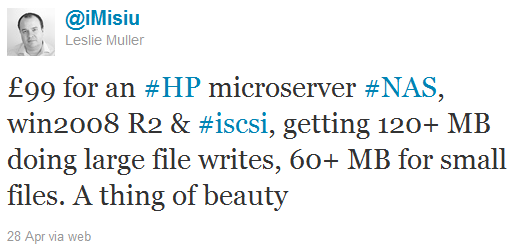 I asked Leslie how it was so cheap. It turns out that the (ex VAT) price was £199 (now officially £209), and that HP was (and still is) doing a £100 cashback deal[1].
Clearly the Microserver would have made a good basis for a dedicated NAS box, perhaps running something like FreeNAS[2]. For me though it was too late for that. Of course I could put the NAS I’d just bought on eBay, and start from scratch, but I didn’t fancy that idea. I ordered one anyway though, with a view to replacing the Dell Precision 490 [3] in my garage that held backups and runs various VMs. I ordered one from box.co.uk, and spent my cashback (well before ever getting it) on a couple of 4GB DIMMS so that I’d have room for a few VMs.

Once the box arrived I popped in the extra RAM and got things going by installing Windows 2008R2 and Hyper-V (I had considered VSphere and ESXi so that I could get some VMWare experience, but I hadn’t arranged media or licenses – so I went with what I had). Once the machine was running I rotated in a number of drives from other machines. The build quality and attention to detail is fantastic – just what I’d expect from a high end server. There were drive screws and a torx key secured inside the front door, and everything popped into the removable bays without trouble. I later put an ICYDock into the optical bay, but it doesn’t seem to hot plug[4], and I’ve not spent the time troubleshooting it yet – there are certainly reports online of people getting a 5th drive going.
The machine runs almost whisper quiet (not that it matters much in the garage). Performance wise the little AMD processor seems adequate – I’m not asking it to do video transcoding, and it seems up to the job of running a handful of general purpose (not too busy) VMs, where I would expect RAM to be the bounding factor. My expectation is that I can probably stick about 6-8 VMs on there before things get too busy. IO performance also seems decent, though I’ve not put any fast spindles (or SSDs) in there. It’s standing up well as my AD DC, DNS server, uTorrent seed box, SSH server, web(DAV) server and a few other things on a handful of VMs (Windows and Linux).
Overall I’m delighted with this little machine. The main advantage is its low power consumption. Now that this is my only always on PC the quiescent power consumption for my house has dropped about 6p/hr, so I reckon that the HP and the NAS will have paid for themselves within a year. Lets hope that HP keeps making these, and making them better.
Update 1 – 30 Jun 2011 – it seems that the cashback deal has finally come to an end :( Fingers crossed for an even better MicroServer and a new cashback deal for that. False alarm, the deal is still on until at least the end of July August September October November December 2011 January February December 2012, and the cashback has now gone up to £110. It looks like it won’t be renewed in 2013 though. So the new N54L based Microserver came along, and initially only had £50 cashback, but that’s now gone up to £100 (so they’re coming out at ~£180 inc VAT and shipping), until at least the end of June 2013.
Update 2 – I ended up buying another Microserver, and writing up some more howto stuff.
Update 3 – Microservers based on the slightly faster N40L CPU are now available. Fingers crossed that there might be a cashback deal for those too. HP are also offering the same cash back on these. Given that the price is much the same, and they have an extra GB of RAM as well as that faster CPU it seems that the deal is better than ever. Get ’em before the HDD shortage caused by the Thai floods pushes the price of everything up.
Update 4 – I got one of the new N40L Microservers. Apart from new labels on the HDD caddies nothing much has changed. I wrote a new post about using it for the Windows 8 Developer Preview, including giving it a decent multi screen graphics capability.
[1] I had a wobbly moment with this. When I ordered mine it was the 29th Apr, and the deal was scheduled to end on the 30th. When I saw that the invoice date was 3 May (due to the holiday weekend in the UK) I thought I’d have a fight on my hands. Luckily the deal had been extended again to the end of May.
[2] I’d considered building my own NAS box along the lines of this guide, but had decided that life’s too short.
[3] The Dell is now doing duty as my main box. It may be a little dated now, but with an OCZ Deneva SSD and 8GB RAM it’s still pretty awesome. I’d love to build an super fast new machine with Sandy Bridge processors, and maybe the Z68 chipset, but its hard to justify the cost. Maybe I’ll drop another Xeon 5140 in there to keep the other one company, as this seems to be a config that lets me hit the CPUs hard.
[4] Reports that the main SATA bays aren’t hot plug turn out to be false. The three extra drives that I added all went in with the machine powered up (what could possibly go wrong?) and it was then just a case of importing the foreign disks in drive manager. I can’t vouch for removal, as I’ve not tried that. Despite the ‘Non-Hot Plug HDD’ labels on the new caddies, hot plug works fine (at least in Windows) if you install the latest AMD drivers, which also has the benefit of supporting higher resolution screen modes on the VGA output.
Filed under: did_do_better, review, technology | 16 Comments
Tags: HP, Microserver, review
Playing DivX and Xvid on iPad
One of the great frustrations for me with my iOS devices (and PSPs before them) has been the need for transcoding of video files before watching. This was always a time (and CPU) consuming and fiddly process, and for some insane reason the files often ended up being larger than the original.
When I got my iPad2 a few weeks ago I hunted around for an app that would play DivX/Xvid natively. There were a few to choose from, but eventually my money went to AVPlayerHD. It’s been absolutely brilliant. So far it’s played every file I’ve thrown at it flawlessly. The interface is perhaps too feature rich, but I’m willing to forgive that, as it’s also generally unobtrusive. I was a little concerned about battery life, having read in some places that official iTunes videos were gentler on the CPU than stuff converted at home, but so far consumption seems in line with Apple’s claims – 10% per hour means that I should just about get 10hrs of video between charges.

Since I bought it I see that it’s shot to the top of the iPad charts – a well deserved position for a great app.
Filed under: media, review, technology | Leave a Comment
Tags: avi, AVPlayerHD, divx, iPad, mkv, Xvid
For quite some time I’ve run my main PC as a hybrid workstation and server. When I built the machine (over 5 years ago) I got a fancy motherboard with onboard RAID5 and popped in 4x300GB drives. It got a mid life upgrade to 4x750GB (which gave a usable 2TB volume), but that was bursting at the seams – time for an upgrade.
I’d looked at NAS appliances a few times over the years, and the economics didn’t seem to stack up. This time things were different, especially once I factored in energy costs. I considered devices from Netgear, Qnap and Thecus as I shopped around, but eventually settled on the Synology as it appeared to be the best performance for the money. With 4x2TB drives and shipping the whole lot came in at just over £500, and once set up as RAID 5 I get 5.34TB of storage, so it breaks the £100/TB barrier.

Setup
Formatting 8TB of disk takes a long time – think an entire day rather than a cup of tea. Once that was done it was another full day of data shifting.
Performance
CIFS write speed seems to be in the region of 30-35MB/s – good, but not great. Read speed is probably somewhat better, but I’ve not made a serious attempt at measuring it. Subjectively it’s slower than the onboard RAID5 on my PC, but not frustratingly slow. Of course I could have spent more to get better speed.
Getting symlinks to work
The NAS creates a bunch of default mount points for media, but these didn’t fit into the naming convention I’ve used over the years, so I wanted to create symlinks to the actual content in the place I’d chosen. Luckily the box allows login via SSH, but it turned out not to be a simple case of ‘ln -s …’. After a bit of digging around it turns out that the trick is to use ‘mount –bind’ instead, so I created an rc.local with:
mount --bind /volume1/media/audio/mp3 /volume1/music
mount --bind /volume1/media/video/divx /volume1/video
mount --bind /volume1/media/images /volume1/photo
After a re-index I could then see stuff via the DNLA media server on the kids XBox360.
NB It wasn’t necessary to restart the box (as I’ve seen in some instructions). I just had to run the rc.local script after creating it (and chmod +x).
Getting it going with my old Kiss DP-600
The DP-600 is nominally a UPnP device, but that’s a standard that’s even looser than DNLA, and it wasn’t seeing the built in media server. Some quick googling revealed that I needed kissdx. This first involved installing the package manager IPKG, and then a simple ‘ipkg install kissdx’. After a bit of config I was finally free of EZLinkNG.
Overall
A day or two after getting the DS411J a friend tweeted:
This made me almost regret buying the DS411J, but not enough for it to end up on eBay. I ended up buying an HP Microserver too, but that’s a story for another day. The bottom line is that it’s a great little appliance – small, quiet, frugal, and fast enough.
Filed under: howto, review, technology | 3 Comments
Tags: DNLA, DP-600, DP600, DS411J, Kiss, mount --bind, NAS, RAID, rc.local, symlink, Synology
Snakes!
It’s been quiet around here, as the new job has been keeping me busy, and I just took a couple weeks off to visit friends in the US. I have some good posts saved up though, which I hope to get out over the next week or two.
On my second to last day in the States we took the kids for a walk in Scotts Run Nature Preserve. The kids had been there a week or so earlier, and had loved splashing around in the stream. As they were repeating the experience my friend Gav noticed this pair:
 A moment later he spotted this one right near to the kids. His 9yr old daughter identified it as a Copperhead, and it seems she was completely right.

Just as I was taking that photo I heard a yell from my wife to join them ahead. When I got there this one was making its way up stream and towards the far bank (in the shallows where there were concrete stepping stones), we think it’s a (Black) Northern Water Snake:
Three different types of snakes in about as many minutes. We found another snake (sadly caught in fishing line) as we make our way along the stream towards its joining with the Potomac:
 All in all a much more interesting walk than I was expecting. Back to my usual rumblings and grumblings about technology in the next few days..
Filed under: travel | 1 Comment
Tags: black water snake, copperhead, northern water snake, racer, snakes
Eyeballs not devices
Too many devices
I seem to accumulated a proliferation of devices recently that want to have SIM cards in them for mobile data:
- Personal laptop (well actually a tablet, but not in the way that people use that label these days)
- Work laptop
- iPhone (not just data)
- Android phone (could be not just data, but I don’t use it for calls)
- Galaxy Tab
- MiFi
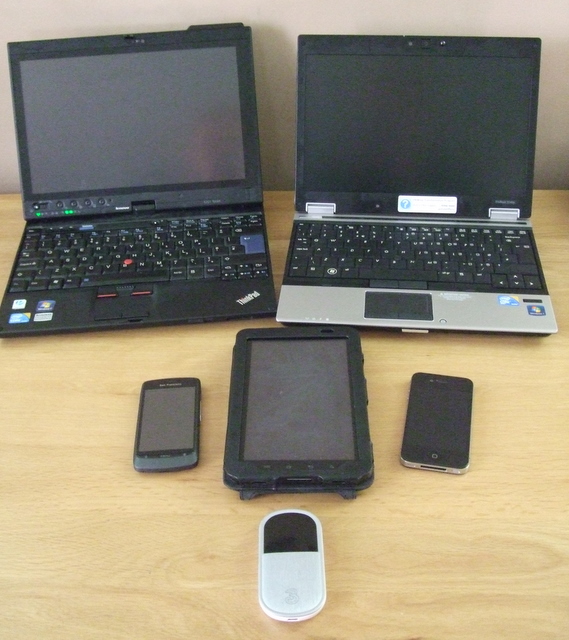
This is one of the reasons I ended up ordering a WiFi only iPad 2 (the others being uncertainty over carrier locking to AT&T for US GSM models, and the lack of HSDPA) – I just couldn’t be doing with another telco contract in my life.
Let’s run through that list again with an eye on the contracts:
- Personal laptop – old style Vodafone PAYG SIM (£15 for 1GB, credit lasts forever provided it’s used every 6 months). Basically there for emergences.
- Work laptop – presently empty
- iPhone – £40/month Vodafone contract with 900 minutes, unlimited texts, 750MB data. I mostly got this for roaming in Europe, where I get 25MB data per day, and calls for up to an hour for 75p.
- Android phone – £5.11/month Three ‘SIM only Internet‘ contract for 2GB data
- Galaxy Tab – £15.50/month Three data plan for 15GB data (I should probably switch this for another SIM only Internet plan)
- MiFi – presently empty
I could ask why Three charge a very reasonable £5.11 for 2GB of data on a plan intended for a smartphone, and lots more for other ways of consuming data from their network, but the confusopoly of telcos and data pricing has been done to death elsewhere. What did make me really angry this week is finding out that I’ve been stung for £5 just trying out the new hotspot feature on the iPhone (I used 95Kb of data, but got charged for a 500MB allowance)[1].
What I really really want
Is a data plan where I just pay for a data allowance – say about 15GB/month – and I can get as many SIMs as I need. After all I can’t use all of those devices at once, I only have one pair of eyeballs connected to one brain. Sure if I have a few of them switched on at a time then there’s a certain amount of quiescent data use, but nothing like when I’m actively surfing (and the only thing that uses serious data is big downloads and video).
Of course the devices above marked presently empty are probably seen by the telcos as an opportunity to sell me more contracts rather than use more data or make my life more convenient. The other issue is that each telco will only let me have so many contracts. Do they expect me to swap SIMs around (Android behaves quite badly when you do that)? Or am I expected to buy PAYG packages when I exhaust my ability to get more contracts?
and it’s not just data plans – apps (and content) too
One of the things that I quite like about the Apple ecosystem is that I can buy apps once and then use them on multiple devices. This is fine for the single user use case, and also fine if one person is happy to take pecuniary responsibility for a household of devices. I however have already anticipated trouble ahead as my kids grow up, and if/when tablets become multi user (as I think they should) then it creates some very tricky situations for app billing.
I’ve already hit issues with a device limit on Audible when I tried to install it on my Galaxy Tab (something that wouldn’t happen without silly DRM). I wonder how many other nasty surprises are out there waiting for me?
[1] if you have ACCINT on your bill for £4.17 ex VAT then you might be in the same boat.
Filed under: technology | 3 Comments
Tags: 3, android, app, apps, Audible, contract, data, Galaxy Tab, iPad, mifi, mobile, payg, tariff, telco, Three, vodafone
More Android
This post will likely be trollbait for that special flavour of Apple fanbois and their anti equivalent…
Weekend away
I spent a most enjoyable weekend away at Maker Faire in Newcastle, and I took my iPhone 4 and the San Francisco (ZTE Blade) with me (along with my old Lenovo s10e netbook). The Blade made an excellent MiFi for the trip there and back. Subjectively it was better than the Huawei MiFi that I’ve used before and the Gobi modem in my X201 tablet.
When I was out and about I found that I was mostly reaching for the Blade in preference to the iPhone. Gmail, Twitter, Google Reader, Google Maps (and Streetview) all just seemed better on the Android device – more intuitive, faster, easier. The iPhone was relegated to camera duties, and of course served its purpose as a device for corporate email. One feature on the Blade that I must call out is the predictive text when typing emails – it just works so much better than anything else I’ve experienced before (and makes the smaller touch screen work better than the larger one on the iPhone). On balance I couldn’t disagree more with some that say the Android user experience sucks.
Galaxy Tab
I got back from the weekend away to find a Samsung Galaxy Tab waiting for me at the office (a present from my US colleagues). Sadly it was an AT&T one, so it was once again time for some rooting, unlocking and firmware flashing. Things didn’t go entirely smoothly, so I needed a little patch to make things better.
Over the past week or so I’ve tried to use the Galaxy Tab in place of my laptop (mostly as I have a new corporate build laptop, which is pretty locked down – so no Twitter, personal email or videos). It’s mostly worked out pretty well. I sometimes miss multi tasking (watching videos whilst reading Twitter or Google Reader), though with small and medium sized Android devices at hand I can get along.
Speed is a feature
One of the reasons I’ve found my usual apps (Gmail, Google Reader and Twitter) so much better on the Android devices is the HSDPA support in the hardware – they just make better use of brief periods of occasional connectivity. Android also seems to do a better job of caching stuff – so Google Reader works when my train is in a tunnel in ways it didn’t before (even on my laptop). I guess the flip side is that it uses a fair bit more data, but when I can get 2Gb from Three for £5.11 it’s not bothering me too much. One of the ironies here is that my Android phone makes my iPhone better (when I use it as a hotspot and connect the iPhone by WiFi). It seems crazy that Apple don’t put proper modems in their phones (and I must say I haven’t seen bad battery life on the Blade).
Back in Apple land
The novelty has definitely worn off with my iPhone. Cut the rope – done, Angry birds – done, upgrade to iOS 4.3 – done, ripped off £5 by Vodafone just for trying out the new hotspot feature – done, sick of calls being cut off, and no data coverage – done. Only 21 months to go until I can upgrade to something else…
A few days before I got the Galaxy Tab I ordered an iPad 2, which is now waiting for me at a friend’s in the US. I got the white one (in a vain attempt to make it obvious that it’s the new model). This may have been a mistake – white borders are supposed to be bad for movies (though maybe better for ebooks?). I already wondering if I should have got a WiFi only Xoom (and the new bigger screen Galaxy Tabs look lovely).
Multitasking —> multiuser?
As more tablets and similar devices start to appear in the household I’m increasingly convinced that they should have multi user capabilities. A smartphone may be a personal device, but a tablet is a more social, shareable sort of thing. I want to be able to give these things to my wife and kids, but I don’t necessarily want them using my accounts for stuff (and they will of course want to sign into their own accounts). Of course the manufacturers want to sell more devices (one per person) but is this realistic? My bet is that Google will get this right ahead of Apple, and that it just might be the move that makes them win.
Windows all over again?
The flip side of Android is that it seems to be developing the same security issues as Windows (back in the bad old days). I’ve already had colleagues asking me why the ‘security guy’ favours Android? Part of the answer to that is I know what I’m doing, but I can see a mess developing, and I’d rather not be running a bolt on security suite on my phone/tablet. Google need to partner with (or buy) Veracode or similar to keep bad stuff out of the marketplace.
Filed under: technology | 6 Comments
Tags: android, apple, firmware, Galaxy Tab, google, HSDPA, iPad, iphone, multiuser, root, tablet, Three, unlock, vodafone, ZTE Blade
Android Experimentation
When I started my new job I had two choices for mobile device – a company owned BlackBerry or buy my own iPhone and get company email using Good. I didn’t want to go back to having two phones in my pocket, which would have been necessary if I’d gone down the BlackBerry route (as I wouldn’t be able to install apps or get my personal email on it). I was also pretty sick of the BlackBerry 8900 Curve I’d had for almost two years, so I went down the iPhone route. I’d really quite fancied getting a Nexus S, but with only 16GB on board (and no Micro-SD) it didn’t have the storage I knew I’d need (and although Good runs on Android my new employer has so far only sanctioned the iOS variant).
I still wanted to scratch the Android itch though, and a colleague had suggested getting an Android phone with a data only SIM as an alternative to a MiFi. I already had some suitable SIMs, so all I needed was a handset. For that I wasn’t even tempted by shiny and new; cheap and cheerful was the way to go, and I ordered myself an Orange San Francisco (aka ZTE Blade) – £99.99 new on eBay.

Unlocking
This could not have been easier. I put my IMEI into an online unlock code generator, and followed the remaining instructions that I found here. The Orange SIM that came with it need never have been cracked out of its carrier.
Rooting
I didn’t want the Orange bloatware in my way, and I wanted a newer Android version that supported tethering/hotspot – time to take possession of my phone for some warranty voiding hackery. The first step was to install the Universal Androot app, which also meant downloading Astro File Manager from the Android Market.
When I first ran Universal Androot it said that I already had root, but when I tried to put Recovery Manager on things didn’t go well. When I went back and told Universal Androot to do its thing everything started to work properly.
Recovery Manager and Clockwork
These are the bits that are needed to install new firmware.
First up – recovery manager. I downloaded v0.29 and followed these instructions, though I used it to install Clockwork 3.0.0.6.
With that done I booted the phone into Clockwork by powering on with the volume down button held. I then used Clockwork to wipe the phone and install Android 2.2 (Froyo)
Froyo
There are LOTS of different firmware options out there for the ZTE Blade. When Cynogen Mod (a version of Android 2.3 ‘Gingerbread’) becomes stable on the ZTE Blade I’ll probably move to that, but some research suggested that 2.2 would suit my needs. I went for the FLB-Froyo G2 (version r10b). This involved installing the firmware, an update and then the extras using Clockwork, then rebooting into my shiny new phone OS.
If I was doing it all again…
Which I will be, as I’ve just ordered one for my wife (in White). Then I’d make sure I had all the files that I needed on the Micro-SD before starting. I’d be surprised if it takes me more than a few minutes next time around.
In use
I’m very impressed with the experience. The gmail/calendar/contacts integration is fantastic, and there are certainly features where I think it has the edge over the iPhone 4.
Most importantly it seems to work very well as a 3G-Wifi bridge. I’ll see over the next few days whether it’s any better/worse than the embedded 3G in my laptop that I’m used to using on a daily basis.
Filed under: technology | 4 Comments
Tags: 3G, android, Androot, clockwork, cyanogen, Froyo, hotspot, mifi, Orange, recovery manager, root, San Francisco, unlock, wifi, ZTE Blade
Every hotel room should have one
Last week I was very impressed to find this at my desk in the Westin Jersey City:

and yesterday I found this in the Crowne Plaza Zurich:
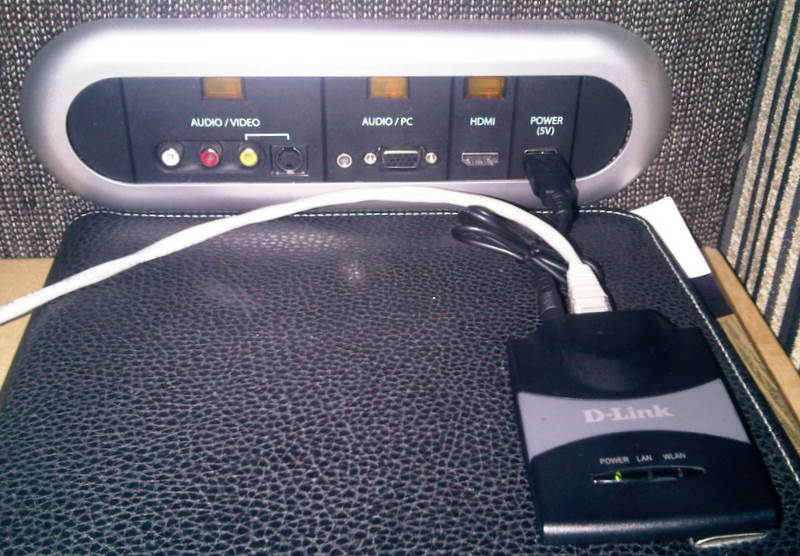 NB The D-Link pocket WiFi router being powered by the media bar USB. For some odd reason this hotel doesn’t have WiFi (but thankfully it does have free wired Internet) – so having my own WiFi is handy for my iPod, Blackberry etc. (and surfing away from the desk).
In the past I’ve often struggled with putting video from my laptop onto a hotel room screen (with connectors either inaccessible or impossible to get at). It’s great to see that hotels are finally getting a clue and making life easy.
Now I must remember to add a VGA cable to my usual travel kit (though I would hope that reception would have some loaners).
Filed under: did_do_better, technology, travel | Leave a Comment
Tags: audio, HDMI, hotel, screen, tv, USB, VGA, video
The return of Mr Nice Guy
As this post hits the wires I’ll be starting induction training for my new job at the other big Swiss bank. Their blogging policy is slightly more liberal than before, but in general it’s back to being nice about every company and individual on the planet because they all could be customers.
I intend to keep writing about techie stuff, and hopefully that still includes gadget reviews and the occasional how to hack around dumb restrictions that get put onto the stuff we buy these days.
Filed under: blogging | 3 Comments


 Chris Swan's Weblog