Which Java?
Or should that be:
which java
TL;DR
Practices for installing and maintaining Java have evolved over time, which can lead to tension between teams who are set in a particular way, and other teams who see that as backward.
The present state of the art is not to have Java on hosts at all, and to containerise apps that use Java, but for when it is needed on hosts a Software Development Kit (SDK) manager such as SDKMAN provides a sensible way to take care of things.
Background
A colleague reached out to me asking whether Java should be installed from the OS package manager, or standalone? This raised a number of concerns:
- Whose JDK – Oracle, OpenJDK, IBM, (Zing, Zulu, Corretto[1])?
- Which major version?
- If minor versions and patches aren’t updated by the OS manager then who/what is doing that?
- Side by side installation for multiple app servers?
- Are any system tools dependent on Java?
- Does it matter is java is on the PATH?
- How is CLASSPATH set?
- How is the app/app server launched, and what does the script do to PATH and CLASSPATH?
I noted that:
Pretty much all of those questions stop mattering if using containers.
Evolution
I’d observe that practice has developed over time. In the early days of Enterprise Java I was pretty close to the action, but since then I’ve been a more distant observer:
- 2000 Install Sun Java from tarball into /opt/java
- 2005 Install IBM Java or jRockit from rpm/deb into wherever they went
- 2010 Install Oracle Java from rpm/deb (because the distros couldn’t package it)
- 2015 Install OpenJDK from yum/apt
- 2020 Put Java stuff into containers
As I was feeling out of touch a little I asked Twitter, though the results were far from conclusive:
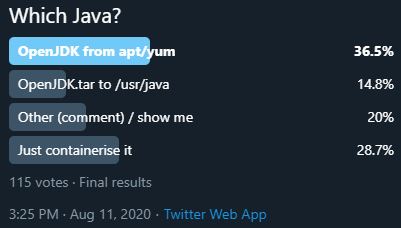 Early voting had containerisation well ahead, but things later swung back to more established approaches.
What was new to me, which was the whole point of asking, was people pointing out that they used SDKMAN to solve this problem, and I think that’s probably the best answer for when Java is needed on hosts.
Safety and security
I recall the glorious days when the Java Virtual Machine (JVM) was considered a safe sandbox. Those days are long behind use, and the JVM looks more like a giant pile of Common Vulnerabilities and Exposures (CVEs) that need their own sandbox.
Then there’s the issue of dependency management (aka DLL Hell), where once clear and orderly installations can become a mess of intertwined dependencies that need the finest IT archaeologists to figure out what’s broken and how things ever worked.
For both of those reasons, I generally try to run Java apps in containers (along with anything using Node.js or Ruby).
Conclusion
Containerisation is the way to go for Java apps wherever possible, but for when Java does need to be installed on hosts SDKMAN seems to provide the best of both worlds between standalone Java installation and OS package managers.
Note
[1] Thanks to Mike Moate for reminding me about Amazon’s Corretto, which is their distribution of OpenJDK that comes with “long-term support that will include performance enhancements and security fixes”.
Filed under: Docker, technology | Leave a Comment
Tags: APT, conatiners, containerisation, deb, dependencies, Docker, installation, java, OpenJDK, patching, rpm, SDKMAN, yum
5 6 7 Rs of Cloud Migration
5 Rs
- Rehost
- Refactor
- Revise
- Rebuild
- Replace
6 Rs
Then AWS decided it was 6 Strategies for Migrating Applications to the Cloud:
- Rehosting
- Replatforming (~= revise but may also have pieces of rebuild)
- Repurchasing (~= replace)
- Refactoring/rearchitecting (kind of brings refactor and rebuild together)
- Retire
- Retain (do nothing option, should be periodically ‘revisit’)
7 Rs
Don’t mix cross-ply and radial on the same axle
Things start skidding out of control[2] when people start mixing the Gartner 5 Rs with AWS’s 6/7 Rs. There’s some parity, but also significant differences that make it possible to come up with a list of Rs that’s got lots of overlap:
- Rehost
- Refactor
- Revise
- Replatform
- Rearchitect
Or that’s missing some key treatments
- Replace
- Rebuild
- Repurchasing
- Retire
- Retain
The second set there is more contrived than the first. But this is a classic case of where a consistent taxonomy is helpful. For that reason I’ve been encouraging people to standardise on the AWS definitions.
Update 4 Aug 2020
Richard Watson commented on LinkedIn that the original framework he presented with Chris Haddad only had 4 Rs:

I guess Recode got split into Refactor and Revise.
Update 8 Sep 2020
Somebody sent me an HP deck from 2011 with their Rs (or Re-s):
- Re-learn
- Re-factor
- Re-host
- Re-architect
- Re-interface
- Replace
- Retire
So I guess that’s yet another source of confusion for my former HP(E) colleagues.
Re-learn was our process of helping clients understand what applications they actually had, the infra they ran on, the resources they consumed, the technologies, the quality, etc. We would use that result in Apps rationalization to figure out the best future for each app. We used tooling to help with that as well.
Re-interface was all about interconnectivity between systems. It was enabling applications to share data to open up and consolidate business processes.
The HP Rs trace their root back to Electronic Data Systems (EDS) when cloud was nascent, and weren’t at all focused on cloud migration, but rather the broader topic of application portfolio management (including migration off mainframes).
Update 30 Sep 2020
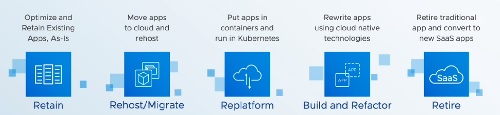
Watching VMworld 2020 I see that VMware has the following:
- Retain
- Rehost/Migrate
- Replatform
- Build and Refactor
- Retire
So that’s pretty much 5 of the 6 AWS ones, but notably not including Relocate, which is there specifically for VMware stuff :/
Retire also looks like it’s being used to do the same work as repurchase ‘retire traditional app and convert to new SaaS apps’.
Notes
[1] Maybe not so original. Although Gartner folk can trace their Rs back to about 2010 there are people from EDS who recall them from 2005/6 (when cloud was just becoming a thing).
[2] As if Charley Says wasn’t terrifying enough growing up in the 70s, another reason to avoid stranger’s cars was in case they might spin out of control because of the wrong tyre mix.
Filed under: cloud | Leave a Comment
Tags: cloud, migration, Rs
July 2020
Another month has rolled by. These were the highlights.
Hot tub

We’ve always enjoyed a hot tub in rented holiday places, which led to some discussion on whether to get one at home. I’ve not been keen due to cost, hassle and environment concerns; but on a sweltering hot day $wife came home and ordered an inflatable tub – an Mspa Alpine D-AL4, because that type was available without too much delay.
It’s been lovely to jump in the tub for 20-30m at the end of a day. I must also say that I’m impressed with the engineering and comfort of the design.
In terms of running costs I think it’s costing something like £50/month in power, chemicals, test strips etc, which isn’t so bad when I think that’s what I pay per week for hot tub heat when holidaying in Florida. I also bought the inflatable cover pictured above, which seems to help a lot with keeping heat in (before it was in place rainwater that collected on the cover would get warm, but that doesn’t happen any more).
Zoom Comedy
The highlight of the last few summers has been taking the family to Edinburgh for the Fringe, and we’re all huge standup comedy fans. To get our fix of funnies during the pandemic we’d been working our way through Prime and Netflix standup shows, but they’re not the same as going to live events in small venues.

And then we came across the Rachel and Marcus Tuesday Night Club, which led us to other shows at Always Be Comedy, which led us to The Weekly Standup; and it’s almost like Fringe from the comfort of home. We’ve been able to see some top artists trying material that would never go onto TV, and it’s been great. I also like Always Be Comedy’s innovation of The Front Row where artists can get live feedback from some of the audience.
We’re all streamers now
I talked a little about the shift in conferences last month, but it feels like the theme for July has been that we’re all streamers now, and those who are used to presenting to live audiences have a lot to learn from the YouTubers who’ve been doing this stuff for years.
My colleague Olivier Jacques first introduced me to Open Broadcast Software (OBS) Studio a while ago as a way to do presentations with a talking head overlay, but he’s recently been taking stuff to new levels with green screen effects and more. I’m hoping that he’ll do a write up of how he put together a ‘sizzle reel‘ for one of our partners recently, as it was an amazing piece of work. Meanwhile I’m collecting streaming related tips on a Pinboard tag.
Whisky tasting
For many years I’ve enjoyed joining friends at the Scotch Malt Whisky Society (SMWS), but that’s yet another thing that’s had to go virtual due to the pandemic. I finally joined the society myself following a tasting for a friend’s birthday, and bought the July and August selections for online tastings.

The July box was excellent – I even enjoyed the peaty one (which isn’t usually my preferred style), and it’s been fun to join friends on Zoom for the streamed tastings.
BBQ
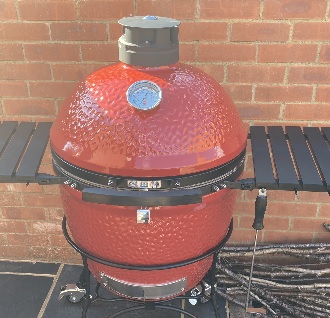
Knowing that I like low and slow cooking Bob Harris has been egging me on to buy a Big Green Egg for a while, but when I asked him which accessories he considered essential he suggested checking out other brands of Kamado BBQ. That led me to Kamado Joe, which I saw described as ‘if the Big Green Egg is the Blackberry of BBQs then the Kamado Joe is the iPhone’. This video comparison was the clincher for me, and I found a decent for the Classic II package at BBQs2U. I’ll be firing it up for the first time this evening.
Pi Stuff
After getting my Pi4 to boot from a USB3 attached SSD I was chuffed to find out that it’s using the UAS driver mentioned in this post as being substantially faster
iPad as PC monitor
I bought Duet a little while ago so that in a pinch I could use my iPad as a second screen when on the road. But that won’t be happening again for a while. With lots of presentations to do I’ve found myself short on screen space, so I’m now using my iPad with Duet as a 3rd screen – mostly for my Pi powered MotionEye CCTV, and chat windows.
Apple TV+
As Apple have been giving away year long subscriptions with new devices (like my iPhone SE) I took the plunge – mostly to check out Trying, which was really good. Since then I’ve also enjoyed Greyhound and The Morning Show. I’m not sure yet whether there’s enough value there for me to continue once I need to pay, but I’ve got most of a year to figure that out.
HDMI USB Android HD monitor
Last month I mentioned the HDMI USB adaptor I’d bought, so I was intrigued to see one being used to turn an Android phone into a monitor.
Filed under: monthly_update, Raspberry Pi, technology | 2 Comments
Tags: Alpine, Apple TV+, BBQ, comedy, Duet, hot tub, iPad, Kamado, Kamado Joe, Mspa, OBS, Raspberry Pi, SMWS, streaming, whisky, Zoom
TL;DR
We need to make space between online activities if we want to remember and appreciate them.
Background – are virtual meetings just running together?
One of my Leading Edge Forum (LEF) colleagues sent me this Washington Post article ‘All these Zoom birthdays and weddings are fine, but will we actually savor the memories?‘, which basically seems to boil down to saying that online meetings run together in a way that it’s hard to tell one from another. I think one of the issues here might be a lack of liminal space:
The word liminal comes from the Latin word ‘limen’, meaning threshold – any point or place of entering or beginning. A liminal space is the time between the ‘what was’ and the ‘next.’ It is a place of transition, a season of waiting, and not knowing.
In essence, if you’re sat in front of the same laptop, in the same room, then don’t be surprised if all your online meetings run together into some amorphous glob.
Some contrasting personal experiences
Reflecting on some contrasting personal experience of the last few months (and I realise that I’m fortunate to live in a large(ish) house with a variety of rooms on offer):
- Drinks and games with friends – we’ve done a few sessions where we’ve joined friends on Google Meet and played Jackbox party games. The setup I used for that had the friends or the game on my larger living room TV screen rather than just using my laptop standalone.
- Similarly, live comedy shows (mentioned in my last post on The Front Row) have been watched on the TV, but also with surround sound switched on (this is an area where I think the platform providers can help my allowing show producers to stream different audio sources [performers/audience] into different channels [centre/left/right/rear]).
- For drinks with a particular group of friends I’ve been using my iPad in the kids’ games room – so again a different device and place from ‘work’.
- I’ve done a couple of whisky tastings recently where the tasting was on a Facebook or YouTube stream, with a parallel tasting party on Zoom. I used my ‘work’ setup for that (as the multiple screens are handy), but I think in that case the different tastes and smells of the whisky make for a distinct experience.
My sense here is that part of what makes events memorable are the liminal spaces around them. It’s not just that I go to a restaurant or comedy club, but also the journey there and back. Mostly being at home during lockdown means there are fewer opportunities to pass through liminal spaces, but there are still ways that we can create different spaces for and around virtual events to make them more memorable.
A connection to learning?
Related… (I think), following Jez Humble’s endorsement I’ve been reading ‘Learning How to Learn‘ with the family. The book talks about focus time and diffuse time. If we’re going to focus on things in virtual events, then we need diffuse time between them (by transiting through a liminal space).
Conclusion
If we want to get value out of online work events, and enjoyment from online social events, then I think we need to create liminal space between them. At a minimum, that probably means putting down the laptop and walking away a few times throughout the day.
Filed under: culture | Leave a Comment
Tags: events, learning, liminal, space, virtual, whisky
The Front Row
This seems important enough not to just be a note in my July 2020 post when it comes.
I’ve seen a new interaction model emerge for virtual events, which I think maps into Fred Wilson’s 100/10/1[1] “rule of thumb” with social services:
- 1% will create content
- 10% will engage with it
- 100% will consume it
What we seem to have been missing at virtual events is the means for the 10% to engage, which is where The Front Row comes in…
The Front Row
Last week (and again last night) I joined a live comedy stream featuring a couple of my favourite comedians, Rachel Parris and Marcus Brigstocke hosted by Always Be Comedy. It was a little weird at first because I joined a Zoom call as a viewer to find a dozen connections from strangers chatting to each other. Those people weren’t just there to watch the comedy, they were ‘The Front Row'[2] at the ‘venue’, they were there to be part of it. When Rachel and Marcus started their show they (and we) could still hear The Front Row (and they could also see comments on chat from the whole audience).
This is a good thing for the presenters, who would otherwise be getting no feedback from their audience, and it’s also (mostly) a good thing for the broader audience, as the laughs coming from elsewhere make the whole experience more like an in real life event.
So what?
You may be thinking, ‘That’s great Chris, but I’m not into live comedy, and I’m definitely not into live comedy on another web conference when I’ve spent all day staring at a screen’; but I bring this up because I think The Front Row is just an early example of how audiences are going to be empowered to engage with online events.
Some other things I’ve been seeing
At the recent Virtual DevOps Enterprise Summit the presenters were available in Slack for Q&A whilst the recordings of their talks/demos or whatever were playing, and this resulted in some really good interactive discussions about the topics at hand.
I watched the opening keynote for Google’s Cloud Next event on DatacenterDude’s Watch Party[3], which brought people together from Nick’s online communities on Discord and YouTube to chat about the event (a bit like a group of friends/colleagues sitting together at a conference and sharing some thoughts).
What next?
I don’t know. We’re all learning about this stuff at the moment. The Front Row is just one experiment in engagement that’s showing some promise. I hope that event producers try more stuff out, and I hope platforms introduce more features to help with engagement. We also have a ton to learn from YouTube and Twitch streamers (and similar) who’ve been engaging with (often huge) remote audiences for many years before the pandemic.
I’m adding useful things I find about streaming to my Pinboard tag on the topic.
Dick Morrell also pointed me at Jono Bacon’s People Powered as a book to help understand (online) communities, but I’ve not had the chance to start reading it yet.
Update 9 Sep 2020
BBC News is covering the use of the front row in online comedy gigs with its (video) piece Lockdown comedy: How coronavirus changed stand-up.
Also Jono Bacon is starting up a book club for People Powered.
Notes
[1] I find myself often referring to this as the ‘rule of 9s’ – 90% consumer, 9% curator, 0.9% creator (and I know that leaves a stray 0.1%).
[2] Live comedy regulars will know that you don’t sit in the front row of a venue unless you want to run the risk of becoming part of the show. It’s a bit like the splash zone for shows at dolphin parks – don’t sit there unless you want to get wet. There are some comedy fans who will always choose the front row, most not so much – it’s a good reason to show up to an act on time, because you don’t want to be forced into the splash zone if you don’t want to take part.
[3] I saw some analyst commentary that Next was poorly attended, which I think fails to take account of the facts that a) analysts were given early access to the streams, so they were seeing them at a time when only press and analysts had access, and b) anybody joining a watch party wouldn’t be counted for the origin stream (though this is something that YouTube/Google should be able to get straight in terms of fan out).
Filed under: marketing, presentation, technology | Leave a Comment
Tags: audience, comedy, engagement
June 2020
As another month comes to an end, a quick digest of things that June brought…
Black Lives Matter
June seems to have been another one of those months full of “there are weeks where decades happen”. As a family we spent one of those weeks educating ourselves a little. Starting out with the BBC’s ‘Sitting In Limbo‘ about the Windrush scandal we went on to 12 Years a Slave, 13th (thanks for the pointer Bryan), Desiree Burch’s Tar Baby and The Hate U Give. We almost didn’t get past the trauma of 12 Years a Slave, and clearly if that stuff is traumatic to watch in a movie it’s even more traumatic to have it as part of a cultural heritage.
Windows upgrades
I upgraded my desktop and laptop to Windows 10 version 20.04, which brings with it the Windows Subsystem for Linux version 2 (WSL2), which has some noteworthy improvements over the earlier WSL.
I also upgraded to the new Chromium based Edge browser, as it’s been my habit to run my work O365 subscription in Edge so that it’s partitioned from personal stuff, and hopefully something like the Microsoft Employee experience.
And there’s the new Terminal application. I’m still a little sad that it doesn’t include an X-Server, but it’s come on a long way since I first looked at it. It’s taken up residence in my pinned applications, and I find myself jumping in there if I need to really quickly try something on a Linux command line.
Pi stuff
David Hunt’s post on using a Pi Zero with Pi Camera as USB Webcam inspired me to try that out. Unfortunately the cheap Pi Zero camera I bought didn’t have the low light performance to work at my desk. But that got pressed into service as a replacement for my Pi A MotionEyeOS when its USB WiFi dongle stopped working. I’ve subsequently bought the new Pi HD camera, and that certainly does have the right performance to be a better webcam.
Along with the new camera I got another Pi 4 with this gorgeous milled aluminium heatsink case from Pimoroni:

Jo (@congreted0g) put me onto cheap HDMI-USB adaptors now available on eBay. I managed to snag one for £8.79. It’s great to be able to see a Pi boot on Open Broadcast Studio (OBS) on my desktop rather than messing around with monitor inputs (especially since my ‘lab’ monitor has found a new home as part of my wife’s teaching from home rig).
Conferences
There are a whole bunch of conferences I should have been at over the past few months, but they’ve been delayed and refactored as virtual due to Covid-19. June brought the first batch events that kept to their original schedule whilst switching from in person to online – CogX, and DevOps Enterprise Summit (DOES).
DOES definitely managed to be more polished in terms of presentation. Organiser Gene Kim has obviously been thinking about things a lot, as laid out in his Love Letter to Conferences; and he was also able to enlist the help of Patrick Dubois, who’d already learned a lot from a previous event. Benedict Evans also has some good thoughts in Solving online events, because it’s going to be a while before we rush back to planes and hotels and buffets (and it might just be a good thing to have much larger communities engaging online).
It was also good to see AWS Summit going fully online. I’ve attended the London summit since it started, but for the past few years I’ve decided not to endure a visit to the ExCeL. So it was good to be able to join the breakout sessions as well as the keynotes without schlepping out to the Docklands for a performance of security theatre.
YouTube music and videos
There are times when I want to listen to or watch stuff from YouTube offline, and it turns out that ClipGrab is the tool I needed for that.
AirPods Pro
My right AirPods Pro developed an annoying rattle, and it seems that sadly this isn’t uncommon. Thankfully Apple Support were pretty swift in sending me a replacement.
Air Conditioning
The UK isn’t a place where it’s normal to have air conditioning, but the last few years have repeatedly brought days stretching to weeks when I wished I had it. Of course when the heat wave comes, the A/C units sell out in a flash. So this year I got ahead of the game by ordering a Burfam unit.
I took a bit of trouble to connect the exhaust through to a roof vent:
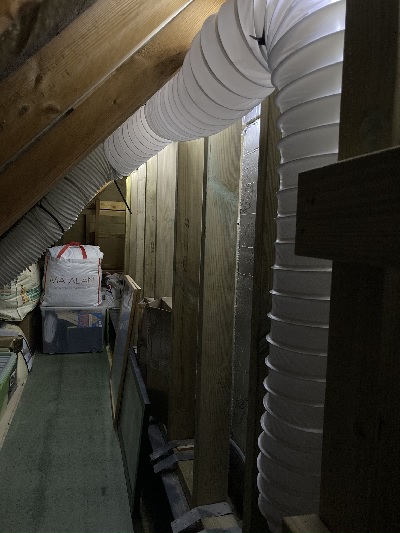
Which included making a plenum chamber adaptor, fashioned from an old fabric conditioner bottle:
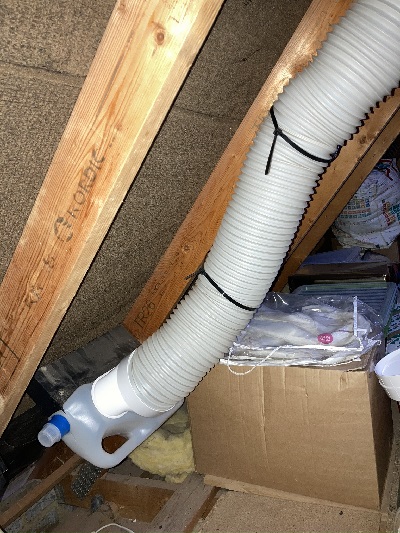
It worked great for my trial run, but sadly seems to have stopped working now that the mercury is passing 30C :( Let’s see how Burfam support deal with it…
Filed under: monthly_update, Raspberry Pi, technology | Leave a Comment
Tags: Air Conditioning, AirPods, CogX, DevOps, DOES, Linux, MotionEye, Windows, Windows 10, WSL2
May 2020
Inspired by Ken Corless’s #kfcblog I’m trying out monthly roundup posts for stuff that didn’t deserve a whole post of their own
Retro
I wanted to try out RomWBW, but didn’t fancy going down the route of making more RC2014 modules, so I got myself an SC131 kit from Stephen Cousins. It’s wonderfully cute and compact, was a pleasure to put together, and worked on first boot :) Though spot what I messed up in the final stages of construction :/ Anyway, I now have something else to play Zork on.
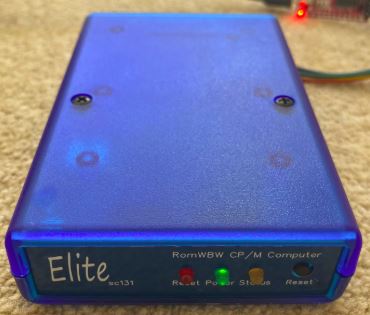
It was also cool to see my colleague Eric Moore featured on Boing Boing for his SEL 810A restoration (and also on Hackaday).
Fitness
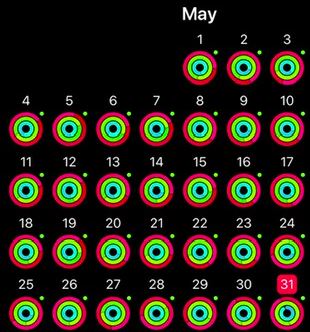
Since mid March I’ve been doing workouts on the garage cross trainer on work days, and Oculus Quest Beat Sabre on other days. I only recently discovered that my Apple watch can track ‘Fitness Gaming’ as a workout, which means May became my first perfect month for workouts (after April being my first perfect month for closing rings).
Food
Since getting an Ooni 3 last summer pizza night has become a regular weekly feature, but we’ve been mixing things up with some Chicago style deep pan pizzas. I’ve been taking inspiration from this recipe. It’s not quite Malnati’s, but better than anything I’ve had in the UK.
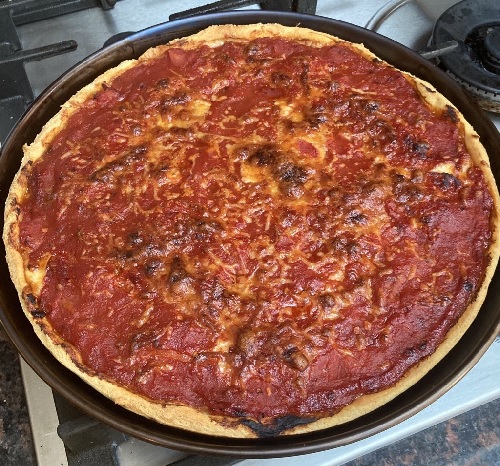
Bodil’s ‘trick to making instant ramyun into gourmet food‘ has become a firm favourite for something quick and tasty on a Sunday evening.
After spending some weeks scraping together the ingredients we were finally able to try this home KFC recipe. I don’t think it really tasted like the general article, but was still a big hit with the kids.
No new restaurant recommendations this month; I miss sushi :/
Culture
The shows must go on has continued to serve up some treats, and #JaysVirtualPubQuiz has become a weekly favourite. Normal People was very binge worthy, and Star Wars The Clone Wars came to a strong finish.
Work
We finally got the open source version of DevOps Dojo out the door, and I spent some time with one of the engineers behind it on a walk through demo.
Raspberry Pi
It’s now possible to boot a Pi 4 from USB, which means you can use an SSD adaptor. I’ve set mine up so that my daughter can run Mathematica on it from her Macbook, as it’s free on the Raspberry Pi (versus £hundreds for even the student edition on PC/Mac).
Filed under: monthly_update, Raspberry Pi, RC2014, retro | 1 Comment
Tags: fitness, food, Mathematica, Raspberry Pi, retro
April 2020 marks 55 years since Intel co-founder Gordon Moore published ‘Cramming more components onto integrated circuits (pdf)‘, the paper that subsequently became known as the origin for his eponymous law. For over 50 of those years Intel and its competitors kept making Moore’s law come true, but more recently efforts to push down integrated circuit feature size have been hitting trouble with limitations in economics and physics that force us to consider what happens in a post Moore’s law world.

Plot by Karl Rupp from his microprocessor trend data (CC BY 4.0 license)
Filed under: InfoQ news | Leave a Comment
Tags: ARM, hardware, Moore's law, performance, x86
Synology DS420j mini review
TL;DR
The DS420j is one of my more boring tech purchases. It does exactly the same stuff as my old DS411j from nine years ago. But has enough CPU and memory to do it with ease rather than being stretched to the limit.
Background
I bought a Synology DS411j Network Attached Storage (NAS) box in late Apr 2011, and at the time remarked that it was ‘a great little appliance – small, quiet, frugal, and fast enough’.
Over time fast enough became not quite fast enough, though the issue was more with the limited 128MB of memory rather than the Marvell Kirkwood 88F6281 ARM system on chip (SOC). As successive upgrades to DiskStation Manager (DSM) came along I found myself firstly pairing back unnecessary packages, and then just putting up with lacklustre performance due to high CPU load (due to too little free RAM).
Having everybody at home for lockdown over the past few weeks hasn’t been easy on the NAS, with all of us hitting it at once for different stuff, so it was definitely creaking under the load. I bought a DS420j from Box for £273.99 (+ £4.95 P&P because I wanted it before the weekend rather than waiting for free delivery)[1].
The new box
Is black, and has the LEDs in different places. This is of no consequence to me whatsoever, as the NAS lives on a shelf in my coat cupboard where I never see it.

It uses the same drive caddies as before, the same power supply, and has the same network and USB connectivity.
The differences come with the new 4 core SOC, a Realtek RTD1296, which provides more than 4x the previous CPU performance, and 1GB DDR4 RAM, which is 8x more, and a bit faster.
Upgrading
Moving 12TB of storage, including everything that the family has accumulated in over 20 years is not for the faint-hearted. Thankfully Synology makes it really easy, and has a well documented process.
I’d already taken a config backup and ensured I was on latest DSM before the new NAS arrived, so when I was ready to switch it was simply a matter of:
- Powering down and unplugging the DS411j.
- Switching the disk caddies to the DS420j (they’re the same, so fitted perfectly).
- Plugging in the DS420j and powering up.
- Selecting the migration option and clicking through to DSM upgrade.
- Waiting for the system to come back up and restoring the config.
- Another restart.
- Altering the DHCP assignment in my router so that the new NAS would have the IP of the old NAS, then switching between manual IP and auto IP in DSM so that the new IP is picked up.
- Upgrading the installed packages (for new binaries?).
- Re-installling Entware opkg (so that I can use tools like GNU Screen).
The entire process took a few minutes, and then everything was back online.
Afterwards
Using the new NAS is noticeably snappier than before, and when I run top the load averages I’m seeing are more like 0.11 and 11.0.
Everything else is the same as before, but I couldn’t really expect more, as I was already running the latest DSM. I don’t ask much of my NAS – share files over CIFS and NFS, back stuff up to S3, run some scripts to SCP stuff from my VPSs, that’s it.
I think I have a few more options now for upgrading the disks as I run out of space, but I have a TB or so to go before I worry too much about that.
Conclusion
This is probably one of the most boring tech purchases I’ve made in ages. But storage isn’t supposed to be exciting, and I’m glad Synology make it so easy to upgrade from their older kit.
Here’s hoping that this one lasts 9 years (or longer). It’s just a shame that the cost of storage TB/£ has remained stubbornly flat since 2011. The next spindles upgrade is going to be $EXPENSIVE.
Note
[1] and I now see it for £261.99 so my timing was bad :/
Filed under: review, technology | 7 Comments
Tags: DS411J, DS420j, NAS, Synology
Quarantine cooking
Things are not normal, so I’ve been trying to mix things up a bit with cooking at home to make up for the lack of going out.
Also one of the people I met at OSHcamp last summer retweeted this, which led to me ordering a bunch of meat from Llais Aderyn

When the box came it had:
2 packs of mince
2 packs of diced stewing steak
1 pack of braising steak
1 pork loin joint
1 lamb joint
It got to me frozen, but not cold enough to go back into the freezer, so I had lots of cooking to do over the next few days. The meat went into making:
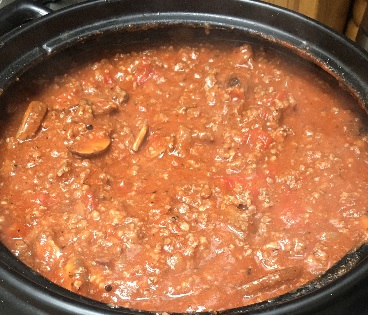
A giant slow cooked Bolognese sauce (nine portions), which used the mince and one pack of stewing steak (as I like chunky sauces).
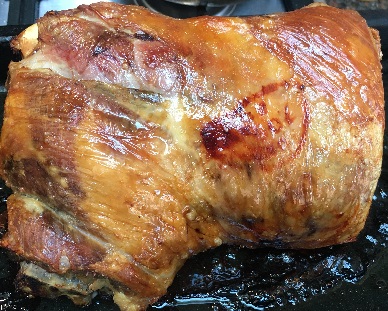
Slow roast pork and fries (four portions)
didn’t last long enough for a photo
Slow roast lamb (with the usual trimmings – four portions)
Shepherd’s pie (four portions) from the leftover lamb

Slow cooked casserole (six portions), which used the remaining stewing/braising steak

and that was the end of that box of meat. It’s a shame that Ben now seems to be mostly sold out, as all the meat was really tasty.
Tonight will be kimchi jjigae, inspired by @bodil’s recipe

Taking it slow
The observant amongst you will have noticed a theme. Everything was slow cooked, either in my Crock-Pot SC7500[1] or simply in a fan oven overnight at 75C. As I wrote before in The Boiling Conspiracy there is really no need for high temperatures.
My Bolognese recipe
Here’s what went into the Bolognese pictured above:
2 medium brown onions and 1 red onion, lightly sauteed before adding
2 packs mince and 1 pack stewing steak (each ~950g) which were browned off
2 tbsp plain flour
2 cans chopped tomatoes
~250g passata (left over from pizza making)
~3/4 tube of double stength tomato puree
handful of mixed herbs
ground black pepper
a glug of red wine
1 tbsp gravy granules
4 chopped mushrooms
and then left bubbling away in the slow cooker all afternoon (about 6hrs)
Note
[1] The SC7500 is great because the cooking vessel can be used on direct heat like a gas ring, and then transferred into the slow cooker base to bubble away for hours – so less fuss, and less washing up.
Filed under: cooking | Leave a Comment
Tags: Bolognese, casserole, cooking, jjigae, kimchi, lamb, meat, pie, prok, recipe, roast, slow


 Chris Swan's Weblog