TL;DR
Supply-chain Levels for Software Artifacts (SLSA) attestations are a great way to show that you care about security, and they’re fairly trivial to add to delivery pipelines that produce a single binary or container image. But things get tricky with matrix jobs that build lots of things in parallel, as you then need to marshal all the metadata into the attestation stage, and there isn’t a straightforward way to do that. It can however be done by generating JSON artifacts alongside images, then munging those into a single document that feeds the attestation process.
Background
Some of the Continuous Delivery (CD) pipelines that I work on at Atsign have got complex. Multiple binaries, from multiple sources, for multiple architectures.
Since Arm runners became available I’ve refactored a bunch or workflows so that the Arm builds run on Arm runners, as they’re much faster than cross compiling with QEMU[1]. But that then means stitching multi-arch images together – more complexity.
I recently spent some time adding Cosign signatures to our images, and that prodded me to get SLSA in place everywhere too. But that meant taking on some complex workflows.
Digest Marshalling
The issue boils down to funnelling the correct image names and corresponding digests into the slsa-github-generator action. There are some good pointers in the documentation, but not quite a complete example for what I needed to do.
Can AI help?
A bit… Gemini got me pointed in the right direction (as it had likely been trained on the generator documentation, and perhaps also some code implementing it). What it didn’t give me was working code. It was trying to write to the same artifact from a matrix job, which works for the first one to finish, and then causes the rest to fail.
We need the image digests for signing anyway
So I can get my digest for cosign and for SLSA in the same step within my docker_combine job:
- name: Save digest to file and sign combined manifests
  id: save_digest
  run: |
    IMAGE="atsigncompany/${{ matrix.name }}:${{ env.TAG1 }}"
    IMAGE_DIGEST=$(docker buildx imagetools inspect ${IMAGE} \
      --format "{{json .Manifest}}" | jq -r .digest)
    # Create a JSON object for the image and digest
    echo "{\"name\": \"${IMAGE}\", \"digest\": \"${IMAGE_DIGEST}\"}" \
      > ${{ matrix.name }}_digest.json
    IMAGES="${IMAGE}@${IMAGE_DIGEST}"
    IMAGES+=" atsigncompany/${{ matrix.name }}:${{ env.TAG2 }}@${IMAGE_DIGEST}"
    cosign sign --yes ${IMAGES}
Then upload them as (uniquely named) artifacts
- name: Upload image digest file
  uses: actions/upload-artifact@330a01c490aca151604b8cf639adc76d48f6c5d4 # v5.0.0
  with:
    name: digests-${{ matrix.name }}
    path: ./${{ matrix.name }}_digest.json
Then aggregate the digests into a JSON document
This is slightly fiddly, as if I send the JSON straight to $GITHUB_OUTPUT the first line break will be treated as the end, and the rest of the JSON will be lost, so I need to follow the process for multiline strings.
aggregate_digests:
  runs-on: ubuntu-latest
  needs: [docker_combine]
  outputs:
    slsa_matrix: ${{ steps.create_matrix.outputs.matrix_json }}
  steps:
    - name: Download all-image-digests artifact
      uses: actions/download-artifact@018cc2cf5baa6db3ef3c5f8a56943fffe632ef53 # v6.0.0
      with:
        pattern: digests-*
        path: ./digests
        merge-multiple: true
    - name: Combine digests into a single JSON array
      id: create_matrix
      run: |
        MATRIX_JSON=$(jq -s '.' ./digests/*_digest.json)
        {
          echo "matrix_json<<EOF"
          echo "${MATRIX_JSON}"
          echo "EOF"
        } >> "$GITHUB_OUTPUT"
        echo "::notice::Generated SLSA Matrix JSON: ${MATRIX_JSON}"
In better news Gemini did come up with the right jq expression :)
And finally pass the JSON into the slsa-github-generator
The crucial bit here is creating a matrix ‘image_data’ from the JSON and then using the ‘name’ and ‘digest’ elements.
slsa_provenance:
  needs: [aggregate_digests]
  permissions:
    actions: read # for detecting the Github Actions environment.
    id-token: write # for creating OIDC tokens for signing.
    packages: write # for uploading attestations.
  strategy:
    matrix:
      image_data: ${{ fromJson(needs.aggregate_digests.outputs.slsa_matrix) }}
  uses: slsa-framework/slsa-github-generator/.github/workflows/[email protected]
  with:
    image: ${{ matrix.image_data.name }}
    digest: ${{ matrix.image_data.digest }}
Have I missed a trick here?
Could this be done directly with step outputs from the matrix into the SLSA generator (and without squirting JSON into artifacts etc.)? If you have the wizardly incantations to do that I’d love to hear about them.
Note
1. Most of the stuff I’m working with is Dart based, and usually the slow bit (especially in QEMU) is ‘dart compile’. Since Dart can now do cross compilation it’s possible that I could refactor things once more, but I haven’t got around to that yet.
Filed under: Dart, Docker, Gemini, howto | Leave a Comment
Tags: AI, ARM, artifact, attestation, CD, container, Cosign, Dart, DevOps, Docker, Gemini, GitHub Actions, image, json, matrix, security, signing, slsa
September 2025
Pupdate
Autumn is upon us, and it was a wet start to the month, but that hasn’t stopped the boys from being enthusiastic about their walks.

Clear scan
Milo had another scan at the start of the month, and once again it was clear :) That means we’re now on the longest stretch of remission since he got ill.
Octopus
We fell for a social media Dachshund group promotion (scam?) and ordered a toy on what I thought was Etsy, but was actually ‘Esty Express’ (spot the difference). It was £20.24 inc shipping. If I’d looked on Ali Express I’d have found the same thing for £2.94.

Milo ‘Destroyer of Toys’ didn’t have the squeaker out in under a minute. But once he got started, it was less than an hour before it had to be binned :(

South Lodge
We’d planned to spend our anniversary at Trading Boundaries for a T’Pau gig, but that got pushed back a few weeks. Plan B was a night at South Lodge along with dinner at The Pass.

It was a beautiful place to spend a night, and the food (and wine) was tremendous. It’s definitely a place we’d both like to return to.

Torres tasting
I’ve always loved the selection on offer at Grape & Grain, and it’s become a regular haunt since they started doing cafe style service where you can enjoy some amazing food and wine[1]. So when I got an email for a ‘Meet the Winemaker’ with Torres Chile head winemaker Eduardo Jordon I didn’t hesitate in booking tickets.

It’s maybe the best such event I’ve ever attended. A great selection of wines, generous samples, and of course some amazing commentary from Eduardo. There was also just a really fun vibe to the place :)
Marcus Brigstocke
I wanted to see Marcus’s ‘Vitruvian Mango‘ show at Edinburgh Fringe last month, but (because we booked so late) tickets were already sold out. Luckily he’s touring around the country, and I was able to grab some tickets at The Old Market in Hove. That meant we were able to take $son0 along (who’s also a big Marcus fan), and we probably got twice as much material as he did 50m either side of the interval.
T’Pau
A few weeks later than originally planned, but still a great evening out, and they played a good selection of old hits and some newer material.

RC2014 Assembly
I’ve been a fan of Spencer Owen’s RC2014 kits since first meeting him at an OSHcamp workshop so when he announced a community get together at The National Museum of Computing (TNMOC) of course I was going to go.

I did a lightning talk on my TMS9995 project, which led to some great conversations with other attendees. It was also great to hear from RomWBW creator Wayne Warthen.
In the past I’ve driven to Bletchley Park, which has always been a slog, as the M23/M25/M1 combo is never fun. This time I took the train, which was much better[2] :)
Solar Diary
A sunnier September than last year, but not as good as previous years :/

Clay Hunt VR
No ‘Beating Beat Saber’ this month, though with darker days coming I’m sure I’ll be back to VR workouts soon.
I gave Clay Hunt VR a quick try, and it’s very compelling (and a lot of fun). I’m sure enough that it will help my real world shooting that I’ve ordered a Real Stock Pro for more realistic practice, which should hopefully arrive in the next week or so.
Notes
[1] Especially since I discovered that their whole wine selection is available with fixed corkage, which means we’ve been enjoying some top notch English sparkling for the same price per glass as Prosecco in other places.
[2] I’ve normally not travelled alone in the past, which has skewed the economics. But I also fell victim to silly ticket pricing in the comparison. A (railcard discounted) ticket from Haywards Heath to Bletchley is £36.25, but it turns out separate tickets to St Pancras and then on from Euston are £26.85 :0
Filed under: monthly_update | Leave a Comment
Tags: Bletchley Park, comedy, dachshund, Marcus Brigstocke, music, octopus, pupdate, RC2014, scan, solar, South Lodge, T'Pau, TNMOC, Torres, vr, wine
RISC-V Production Ready
TL;DR
RISE did it’s job, and in the past couple of years RISC-V support has found its way into stable releases of key infrastructure software like Debian. So from a software perspective, it’s arguable that RISC-V is now ready for production. Progress has been a little slower on the hardware front, but hardware is… hard; and there was always going to be something of a chicken and egg problem between hardware and software.
Background
It’s been a couple of years since my “What to expect from Dart & Flutter on RISC-V” talk at Droidcon Berlin. My review slide said “Some big chunks of infrastructure aren’t ready yet”, “Looks like >2y but <5y work from here”.
On the software side my most optimistic forecast has played out. On the hardware side, not so much.
Linux is ready
RISC-V made it into the Debian 13 “Trixie” release, which became stable last month. That now means that the huge range of Docker images that start “FROM debian” can now add RISC-V to their build matrix without depending on stuff that’s still considered beta.
Ubuntu 24.04 “Noble”, which is a Long Term Support (LTS) release beat Debian to it by 16 months, and we used it for the Atsign Dart buildimage over that period.
Alpine, which is the basis for lots of ‘slim’ container images, also got RISC-V support back in its 3.20 release in May 2024, and that’s found its way into Dockerhub base images.
Dart is ready
Dart for RISC-V made it into the stable channel with the 3.3 release back in Feb 2024, meaning that for a short while there was no stable Linux release to run it on; but that wasn’t a long wait.
Android seems stalled
In Apr 2024 RISC-V support was dropped from the Android Common Kernel, leading to headlines like “RISC-V support in Android just got a big setback“.
The Google explanation was, “Due to the rapid rate of iteration, we are not ready to provide a single supported image for all vendors”. That implies that behind the scenes Google is working with a bunch of vendors. But that work isn’t visible in public repos.
Which brings us on to…
No RISC-V Android handset (or tablet) yet
Hardware is hard, and the economics of production lean against doing small runs of ‘beta’ things[1].
Some of the (Chinese) manufacturers might be on the cusp of releasing stuff, but until they do it will only be those inside the NDA’d ring of trust who know anything about it.
SoCs seem stalled
The dev boards I’m using today are the ones I already had in 2023. The StarFive VisionFive 2[2] (running a JH7110) and the BeagleV-Ahead (which uses a T-Head TH1520).
Talking to an ex Arm and SiFive exec a little while ago the penny dropped for me that there have been a lot a vapourwear RISC-V SoC announcements, presumably so that orgs could squeeze a better licensing deal from Arm by showing that there could be some competition. That said… I still expected the Chinese manufacturers to go harder in on RISC-V, though recenly it feels like all eyes are on GPUs rather than CPUs.
GhostWrite casts its shadow
In Aug 2024 news broke of a vulnerability named ‘GhostWrite’ in the T-Head C910 and C920 cores (and some other problems with C906 and C908). Those cores were in many popular dev boards, and also the pioneering RISC-V cloud Elastic Metal RV1 instances from Scaleway.
GhostWrite will likely have dented confidence in RISC-V (though I think the methods that found it will make the ecosystem stronger in the longer term). The mitigation for it will also have have impacted performance for those wanting to test on RISC-V. Performance was never great, but with a mitigation overhead it will have gone from poor to very poor.
The arrival of newer SoCs, and dev boards, and cloud instances based on them could have shown that GhostWrite was just a hiccup. But that simply hasn’t happened yet.
Clouds
Scaleway is still out there on its own, repeating the story that played out previously with Arm. It means that there’s a way of turning cash into RISC-V testing capacity. But there’s no glimpse yet of services from the mainstream hyperscalers; not even the sort of thing they did with Arm early on.
Chicken and Egg
There was always going to be the problem that hardware people wait for software support, and software people wait for easily available software. I think we now have the software chicken (or is it the egg?), and that’s largely down to the success of the RISE initiative. But it will probably be a few more years before the hardware is competitive with Arm, and of course that’s a moving target.
Meanwhile if you’re content with dev boards that have roughly Raspberry Pi 3 levels of performance RISC-V is ready for production.
Notes
[1] Apple sort of get away with this with (relatively) low volume (and higher price) initial versions of things like the iPad and Vision Pro, which (if successful) get followed by a better and cheaper v2. But they’re able to do that because they can command a premium price from early adopters for the v1.
[2] As I write there’s a Kickstarter running for the VisionFive 2 Lite, but that’s essentially the same dev board shrunk to a Raspberry Pi form factor.
Updates
5 Sep 2025 – David Chisnall just posted something about CHERI which reminded me that I’d meant to put a section on CHERI into this post (and then forgot – doh!). I was going to say that the RISC-V Android profile is maybe our best hope of CHERI becoming a widespread thing, but so far as I can tell that’s an opportunity that’s slipping away, which is bad and sad, as we all deserve better memory safety, and those 6.5 billion lines of C (and another 2.25 billion lines of C++) aren’t going to magically rewrite themselves into Rust. If you’re wondering why you should care then this excellent EMFcamp presentation from Peter Sewell should explain – “CHERI and Arm Morello: mitigating the terrible legacy of memory-safety security issues, in practice at scale“.
5 Sep 2025 – LivingLinux on Bluesky pointed out that there is a RISC-V tablet from Pine64 (the PINETAB-V). It looks like a VisionFive 2 dev board plus a screen (and keyboard), and ships with Debian rather than Android.
They also took pains to highlight that GhostWrite was just T-HEAD cores, and there’s “a SpacemiT K1/M1 RISC-V chip with vectors without the GhostWrite issue”.
Lastly, “Google was waiting for RVA23, and RVA23 hardware will arrive in a couple of months”. So hopefully more updates to follow…
Filed under: technology | Leave a Comment
Tags: Alpine, android, cloud, Dart, Debian, GhostWrite, Linux, RISC-V, riscv64, Scaleway, SOC, Trixie, Ubuntu
August 2025
Pupdate
It’s been warm and dry[1], so the boys have enjoyed some nice long walks.

Fringe
Edinburgh Fringe was a regular feature of the twenty-teens for us, but then Covid happened. This year was our first time back, and it was great. We saw:
- Bec Hill
- Bobby Davro
- Comedy Allstars
- Mhairi Black
- Olaf Falafel
- Simon Evans
- Geoff Norcott
- Best of the Fest
- Abigail Rolling
They were all fantastic, and I’m not going to pick favourites. I do however hope that Mhairi Black gets some kind of TV deal. I’d love to see her travelling around Scotland in a show like Frankie Boyle’s or Kevin Bridges’.
It was all organised a bit last minute, rather than months in advance like previous trips, so many of the acts we wanted to see were sold out already. That now means we’ll be seeing a bunch of them in their post Fringe tours as they swing by London or Brighton.
One novelty was taking the train rather than flying, as it worked out cheaper this time, and it’s certainly a more relaxed way to travel. Another was that Edinburgh was warm and sunny :)
TPMS
$daughter0’s Mini needed a pair of new tyres. As I got to the confirmation page for booking them there was a note about Tyre Pressure Monitoring System (TPMS) not being included.
Was this something that I needed to do something about?
I did some research online, and frankly there’s no clear guidance. It seems that received wisdom is “wait until they fail, but then you have to fix them otherwise it’s an MoT fail”, which didn’t seem very wise to me.
After a chat with the good folk at Munich Legends (where the Mini is serviced) I decided on getting new sensors fitted whilst the tyres were being changed. The car is 10y old now, and the sensor batteries are expected to last 5-10y[2]. Pattern sensors from Amazon (affiliate link) are only £11.49, versus something like 10x that for official BMW/Mini ones :0 I left them in the cup holder along with the locking wheel nut, and the tyre place obligingly fitted them with no extra charge.
Solar Diary
The best August haul of photons so far.

It’s now a little over 3y since the panels were installed, and they’ve generated over 12.5 MWh of electricity since then :)
Notes
1. Summer 2025 confirmed as the UK’s hottest on record
2. Here’s hoping that the sensors in the other tyres hold out a year or two longer…
Filed under: monthly_update | Leave a Comment
Tags: comedy, dachshund, Edinburgh, Fringe, mini, Miniature Dachshund, pupdate, sensor, solar, TPMS
July 2025
Pupdate
The boys had some fantastic long walks on our trip to the Lakes (more on that in a moment).

I did a separate post about Milo’s extended remission, but it’s great that he’s been able to enjoy the summer without vet visits for chemo.
Lake District
We returned to Graythwaite’s Dove Cottage and this time around $daughter0 joined us for most of the stay.
West Windermere Way
We used a little section of the West Windermere Way last year, and this year we walked all the way to Lakeside and back; a 15km round trip.
I was a little sceptical about the walking route veering off to a dogleg through Finsthwaite, which adds a little distance and elevation. But it was absolutely beautiful, and we really enjoyed that section of the route. Particularly when we were able to stop for a bite to eat at a park bench just as we entered some of the forestry land between Finsthwaite and Lakeside.

Blencathra
On our climbs of Helvellyn via Striding Edge and Scafell Pike $daughter0 really enjoyed the scrambles. That led to the ‘Best Grade 1 Scrambles in the Lake District‘ listicle, and Blencathra via Sharp Edge seemed the obvious choice for our next climb.

The climb was a lot of fun, and the views from the summit were outstanding.
We descended via Halls Fell Ridge, which is billed as another scramble but wasn’t anything like Sharp Edge. Though greater challenges lay ahead on a surprisingly tricky crevasse on the otherwise very pedestrian path running parallel to the A66.
CoMaps
I’ve used the Ordinance Survey Maps app for the last few years, but it seems to keep getting worse. This year I switched to CoMaps, which is based on OpenStreetMap, and it was excellent :) Easy to read, works offline, simple to get distance to a point, and lots more. Given that it’s free, and strong on privacy it gets a big thumbs up from me :)
LARQ bottle
GitHub kindly gave me a LARQ PureVis Bottle a few years ago and I really wish I’d had it with me on the Scafell climb as I ended up needing to top up from a stream. The ‘adventure mode’ UV purification would have given me extra confidence to drink that water.
This time around I didn’t need to get any stream water. But it was nice to know that I could make it safe(r) if I needed to; and in every other respect the LARQ bottle was excellent in terms of form factor (fits in the car cup holders and the pockets on my rucksack) and capacity (740ml is more than my other bottles).
RNEC Reunion
The parts of my Navy training that I most fondly remember happened at the Royal Navy Engineering College (RNEC) at Manadon just outside of Plymouth. Sadly it was shut down 30y ago, but that was an excuse for getting folk back together. It was great to see some old shipmates, and hopefully it’s going to become a regular thing going forward.
Doppelganger
At a local Humanists meeting about conspiracy theories I asked “who’s writing good stuff about this (apart from Renee DiResta and Cory Doctorow)” and Prof Tarik Kochi suggested Naomi Klein’s ‘Doppelganger‘. I listened to the audiobook, and it’s a really good exploration of the current (mis)information landscape, and touched a lot on what I call ‘Filter Failure at the Outrage Factory‘.
Urs Hölzle
I’ve know of Urs and his work for many years so I leapt at the chance to join him when I was invited to an ‘exclusive Developer Breakfast & Fireside Chat’. Of course ‘exclusive’ isn’t the same as ‘intimate’ so I didn’t actually get to meet or chat with Urs, but at least I had a spot near to him.

It was really refreshing to hear his pragmatism around AI adoption, and I loved his advice along the lines of “if you’re overwhelmed trying to keep track of stuff day to day then give it three weeks and see what’s still around”.
Solar Diary
Another sunnier July than the year before :)

I don’t know what happened on the 15th, as I was up in the Lakes, but something weird as the data logger seemed to only record up to 0900.
Filed under: monthly_update | 1 Comment
Tags: Blencathra, CoMaps, dachshund, Doppelganger, ffof, Lake District, LARQ, Manadon, pupdate, reunion, RNEC, scramble, Sharp Edge, solar, Urs Hölzle, West Windermere Way
Last week my former colleague Doug Todd asked a question about recording decisions on BlueSky:

Of course I replied suggesting Architecture Decision Records (ADRs), with a pointer to the at_protocol GitHub repo where we use them.
A few days back Doug demoed how he’s using ADRs with his coding assistant (Claude and Claude Code), and I feel like this is going to transform the uptake of the approach. It’s such an obviously good way to provide context to a coding assistant – enough structure to ensure key points are addressed, but in natural language, which is perfect for things based on Large Language Models (LLMs).
ADRs right now might be an ‘elite’ team thing (in DORA speak), but I can see them becoming part of a boilerplate approach to working with AI coding assistants. That probably becomes more important as we shift to agent swarm approaches[1], where you’re effectively managing a team, which (back in the human world) is exactly the sort of environment that ADRs were created for.
Note
[1] It feels like my LinkedIn feed these days is 10% stuff from rUv where friends are commenting on his adventures with agent swarms using ‘claude-flow‘. I’ve been intruiged by Adrian Cockcroft’s comments that working with swarms is more like managing a team (than being an individual contributor), and that the code produced might be as important as the bytecode or machine language that we get compilers (e.g. something that we approximately never actually need to look at).
Filed under: architecture, code, software, technology | 1 Comment
Tags: ADR, ADRs, AI, architecture, Claude, coding assistant, decision, LLM
Milo was back at North Downs Specialist Referrals today for his second scan since finishing his third (modified) ‘CHOP’ chemotherapy protocol. Amazingly he’s still looking clear, which means this is now the longest period of remission since he started treatment :)
Our fingers will be crossed for the next scan in a couple of months time, but meanwhile he gets to enjoy the summer without any vet visits.
Past parts:
Filed under: MiloCancerDiary | 2 Comments
Tags: chemo, chemotherapy, CHOP, lymphoma, remission, scan
June 2025
Pupdate
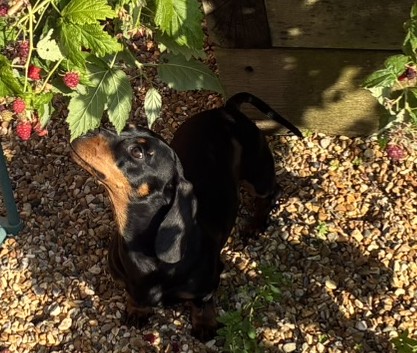
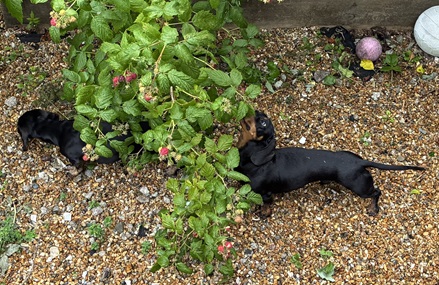
There’s been a bumper crop of raspberries this year, which has kept the boys entertained..
Berlin
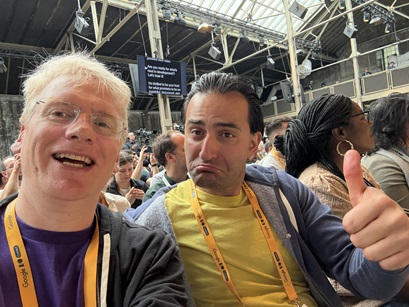
Google’s I/O Connect event was in Berlin once again, which provided a good chance to catch up with various communities and some of the product folk.
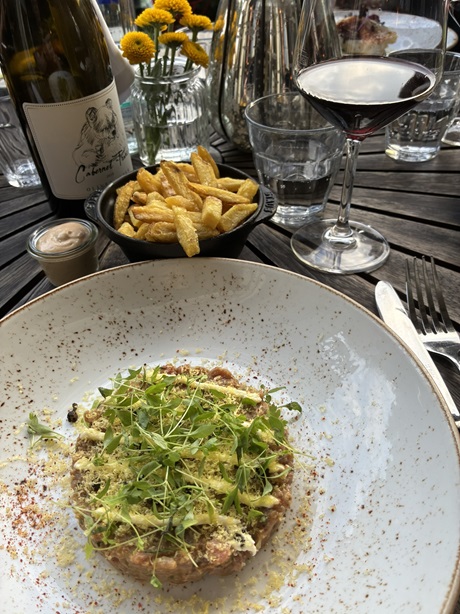
I also took the chance to grab dinner with some local ex-pat friends. The food, drink, weather and company were all great :)
Computer sheds
The retro meetup group returned to Jim Austin’s Computer Sheds, this time for an extended visit, as Jim let us start at 11am. Even with the extra hours it still felt like we barely scratched the surface of the place.
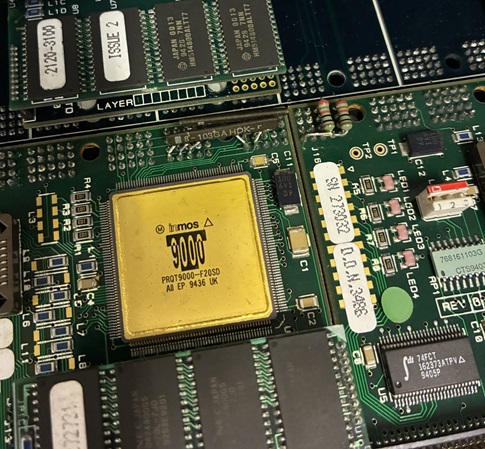
I was very happy to find some T9000 Transputers.
Beacon Down
We ended up with something of a wine lake after hosting a party at a local restaurant, all picked by co-owner Alicia Sandeman. Every bottle has been great, but my favourite was Beacon Down‘s Blanc de Blancs 2017. So I planned on visiting the vineyard once tours were running again.

That time came around on midsummer’s day, and it was perfect day for seeing the vines (and beautiful surrounding countryside).

Co-owner Paul put on an amazing tour. Whenever I do these things it’s always great to meet people who are passionate and expert about their product. Paul takes it to another level. I don’t think I’ve met a geekier wine geek, and it also made clear why their wine tastes so good. The preparation and attention to detail come through in the glass.
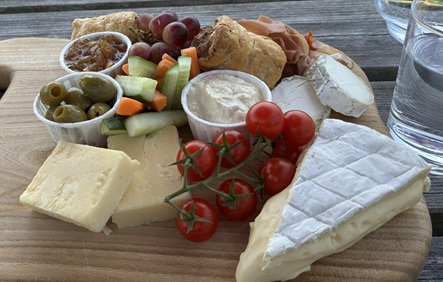
The picnic was also excellent, and all the better for a glass of Riesling to wash it down.
BLE caberQU
When I first heard about the BLE caberQU USB-C cable tester I was gutted I’d missed the original Kickstarter campaign, but glad I was able to order one. I’ve accumulated a bunch of USB-C cables, and it’s hard to keep track of which is supposed to be able to do what.
Unfortunately when the tester arrived it was telling me that almost every cable I had was USB2 data and 15W for charging. Even the cables I regularly use for laptop charging, and others from reputable brands that claim to be 60W.
No E-Markers
It turned out that all except for two ‘fancy’ cables I have don’t have E-Markers, so the rest represent the minimal configuration of USB2 data (480Mbps) and 3A power delivery (60W). The caberQU can’t reliably measure the difference between (say) a 20W cable and a 60W cable, so the device errs on caution by stating 15W.
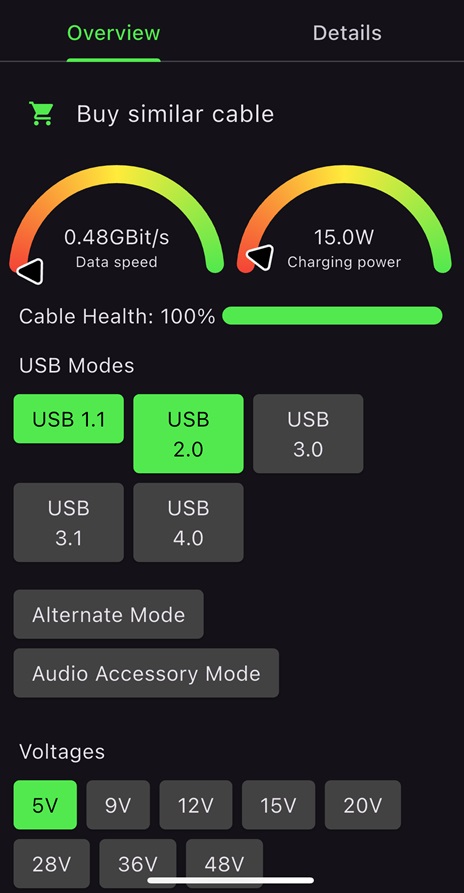
I reached out to the support email and creator Peter Traunmüller got back to me saying:
The 15W (5V@3A) rating means that there is no eMarker in the cable, but the cable has a good resistance and the necessary pins are connected. The standard calls for 60W (20V@3A), but there is no proper way to verify this without the eMarker confirming this and we’re airing on the side of safety.
After trying a debug firmware on my unit Peter also kindly sent me another tester.
Treedix tester
Meanwhile I read Terence Eden’s review of the Treedix USB Cable tester, and got one of those too. It has a wider selection of ports than the caberQU, but is otherwise less impressive. Anyway… it gave me the same results as before, for both the regular cables and my couple of fancy ones.
FlexiFone
I’m constantly frustrated by poor cell coverage. When walking to the station, or in town. On train rides to London, but also in many parts of London. Over the years I’ve tried all the networks (or at least MVNOs running on them); but what about all the networks at once? That’s what FlexiFone does.
It’s positioned as a backup solution, but I don’t use huge amounts of data, so I’ve been running their eSIM as my primary data plan with their 5GB for £8/mo tier.
It’s definitely a bit better on the train to London, but everywhere else it shows that the problem is terrible coverage from all the operators, and not just any one that I might be signed up to :(
There’s also the issue that their egress IPs don’t geolocate correctly, which can make some apps think you’re in foreign parts (and refuse to let you confirm an order – looking at you KFC :( ).
After a month I think I’m prepared to call this experiment a failure. But I’ll see how I get on in the Lake District next month, where data for mapping apps can be super important.
Solar diary
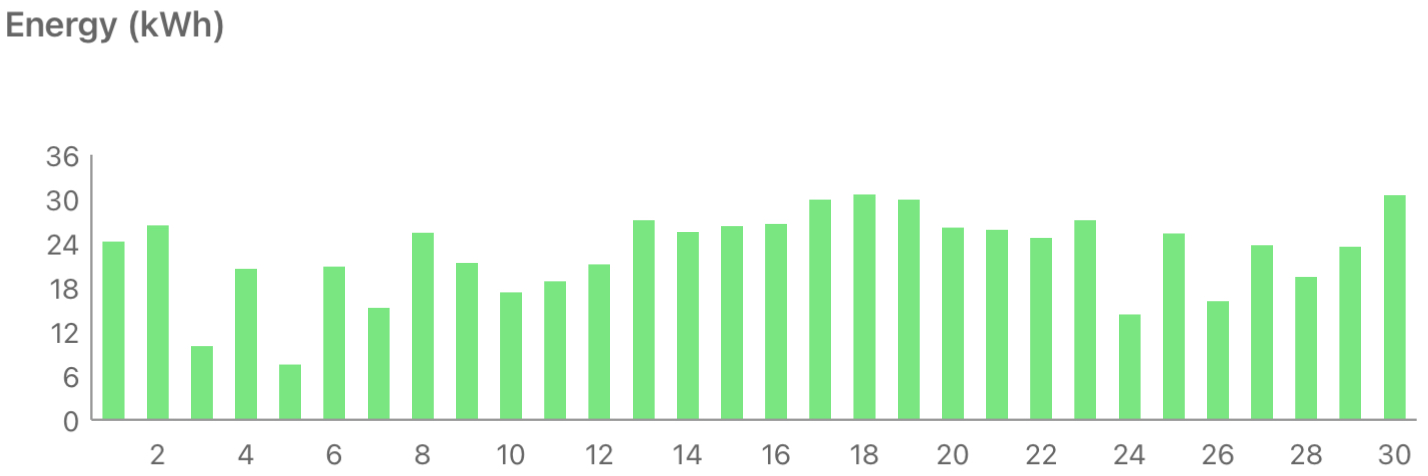
It’s been warm and generally dry, but not always sunny, so not the best June for Solar.
Filed under: monthly_update | Leave a Comment
Tags: Beacon Down, Berlin, BLE caberQU, caberQU, dachshund, E-Marker, eSIM, FlexiFone, pupdate, retro, solar, tester, transputer, Treedix, USB-C, vineyard, wine
Dart binaries in Python packages
TL;DR
PyPI provides a neat way of distributing binaries from other languages, and Python venvs make it easy to run different versions side by side. This post takes a look at how to do that with Dart, and the next steps necessary to do a proper job of it.
Background
A few days ago I wrote about Using a Python venv to run different versions of CMake, which works because the CMake binaries are poured into a Python package that’s hosted on the Python Package Index (PyPI)[1].
CMake isn’t the only thing that’s distributed that way. Zizmor is a Rust tool for analysing GitHub Actions that offers PyPI as an installation option (perhaps because its author William Woodruff had a big hand in creating the trusted publisher mechanism for PyPI). Pull the thread on Zizmor, and it leads to Maturin, a tool specifically for putting Rust stuff into Python packages, with a whole bunch of projects using it.
CMake can also be used to build Python packages with py-build-cmake.
There’s more… Simon Willison wrote “Bundling binary tools in Python wheels” when he discovered he could get Zig from PyPI.
Why?
- The Dart (and Flutter) package manager pub.dev is source code only, and doesn’t deal with binaries[3].
- Python venvs provide a nice way to run different versions of the same binaries side by side.
- I’m hopeful that Python packaging provides a stepping stone to apt packages on Kali (and maybe Ubuntu, Debian etc.) as there’s a mature process and tooling for Python stuff, but I’ve not yet fully unpicked whether binaries are (re)created from source or downloaded from PyPI.
Example repo
After some experimentation I threw together a test repo: cpswan/dart_echo_py. The key pieces are:
build.sh
A simple script that compiles the Dart source in the src directory and creates binaries in bin. Then runs python -m build to create packages in the dist directory.
pyproject.toml
This provides all the project metadata that’s used by python -m build to construct a package.
Most importantly the [project.scripts] section provides the entry points to the binaries so that they’re presented on the path for whatever (virtual) environment the package is installed into.
__init.py__
This provides a wrapper around the binaries so that command line arguments are passed into the correct binary in the place where it’s been installed.
Todo
So far I’ve got the bare bones working, but there are a few more things I need to get straightened out before I start putting packages onto proper PyPI rather than TestPyPI:
Multi-arch
The simple build script creates binaries on whatever platform it runs on (Linux x64 in my case) and packages them up into a wheel named dart_echo_py-0.1.5-py3-none-any.whl. That py3-none-any suffix is incorrect, as the binary is very definitely not platform independent. The correct suffix is (something like) manylinux_2_12_x86_64.manylinux2010_x86_64, but I should probably also be building binaries for the other Dart AOT platforms. Arm64 is now easy given that Dart 3.8 does cross compilation, but armv7 and riscv64 are also in reach (if I do builds in Docker).
It should also be possible to target musl based environments (like Alpine) using dart-musl.
Source without binary pollution
When I look at the source tarball created by python -m build it also includes the binaries :(
Automation
A simple build script works for a single architecture build, but to support multi architectures it’s going to make sense to use some automation, which naturally takes me to GitHub actions.
And once the build process is automated that opens the door to build attestations for SLSA etc. so that the resulting packages have some provenance.
It should also be possible to ditch Twine in favour of trusted publishing to PyPI.
Notes
[1] Pronounced ‘pie pee eye’ by those in the know. PyPy ‘pie pie’ is another Python thing altogether.
[2] I could have used that with Dart, but I didn’t want to add to the complexity and confusion by bringing in another tool.
[3] This makes perfect sense in the context of Dart mostly being used for Flutter, and Flutter apps mostly ending up in the Apple App Store and Google Play.
Filed under: Dart | Leave a Comment
Tags: binary, Dart, musl, package, PyPI, python, wheel


 Chris Swan's Weblog