This is the first post in what will be (at least) a three part series. I’m also planning to look at the Quick2Wire board(s) and Gertboard.
The ladder board (sold by Tandy for the bargain price of £5.99) is designed for Gordon at Drogon’s ladder game[1], but can be used for various other purposes – basically anything you can think of that employs 10 LEDs and 4 switches.
 It took each of my kids around half an hour to turn the kit into a working board, and it’s all very straightforward through pin components.
In use
Gordon supplies a test program for the board, which provides an easy way to confirm that everything is working as expected. With both of the boards I’ve tested I’d note that the switch test didn’t work exactly as expected – the green LEDs would stay on rather than only coming on when the corresponding button was pressed.
Once the board is proven to work OK there are various apps that can then be used to do stuff with it:
- Ladder game – a C programme (that must be run using sudo) where the player has to time button presses to complete a complete set of flashing LEDs. My son and I had originally built this using a homemade Pi Cobbler and breadboard, but it’s much better to have a proper board.
- Simon – a BASIC version of the classic sequence memory game
- Anything you can imagine – with C, Python, BASIC or whatever. I don’t know whether anything has been done yet to bind it to Scratch (like the demos I saw of PiFace at a Raspberry Jam event last week), but I’m sure that will come.
I2C issue
I’d also note that this board doesn’t play nicely with I2C (which I’d enabled for work with the Quick2Wire boards), so I had to go back and disable I2C support. It’s hard to blame the board for this, as the underlying issue is the reuse of various general purpose input/output (GPIO) pins as part of the Raspberry Pi design. This is probably one of those cases where it’s useful to be able to boot the Raspberry Pi from different SD cards (though I can also understand that many people will want to have a single card with all of their stuff on).
Conclusion
The ladder board is cheap, easy to use and a lot of fun. It would definitely be my recommendation for a first project board on the Raspberry Pi – particularly for younger or less experienced makers.
Notes
1. Gordon really has been one of the heroes of the early days of Raspberry Pi. His Wiring Pi library provides a great way to work with GPIO, and he’s done a ton of inspirational projects and guides.
Filed under: Raspberry Pi | 3 Comments
Tags: board, GPIO, Ladder, LED, makers, project, Raspberry Pi, Raspi, review, RPi, switch
OpenELEC 3.0 RC1
The first release candidate for OpenELEC 3.0 (featuring XBMC 12 ‘Frodo’) is now available (official announcement).
If you’d like to download an SD card image to install on a Raspberry Pi then it’s available from the official_images section of the Pi Chimney resources site. RC1 is 2.99.1, and later builds will be available from the same link.
To install the image first unzip it and then use Win32DiskImager (if on Windows) or dd (if on Linux or Mac) to write the image file to your SD card (which needs to be 1GB or larger).
If you’re already running OpenELEC on your Raspberry Pi then just get the release bundle from the OpenELEC.tv download page, extract the files (using 7zip or WinRAR or similar) and follow the Manually Updating OpenELEC guide.
Filed under: howto, Raspberry Pi | Leave a Comment
Tags: 3.0, file, Frodo, howto, image, openelec, Raspberry Pi, Raspi, RC1, release, RPi, SD card, update, upgrade, XBMC
ARM Chromebook – one week on
I got my Chromebook a week ago, so it’s time to reflect on my experiences so far (beyond my initial first impressions).

CC some rights reserved by Cajie
The good parts
Blogging – it’s pretty much a perfect blogging tool, and I’ve managed to get a lot of posts done in the past week. The holiday may have had something to do with that too, but I’ve been able to get more done than during previous weeks that were also holiday.
Battery – the battery life has stood up to expectations, and much like my iPad I don’t find myself worrying too much about where the power cord is.
Flexibility – apart from a session of micro controller hacking, where I needed an Eclipse C/C++ install and a bunch of other PC tools[1], I’ve been able to handle pretty much every task. I was worried for a moment about screen grabs and snips (as I find the Windows 7 snipping tool so handy), but the Chromebook handled itself very well in that area. For many of the things that do need a PC I’ve been using the remote desktop app to one of my Microservers.
The not so good parts
Remote desktop – I’ve had to set the native resolution of the machine I’m connecting to at 1280×720 (it was at 1600×1200, but it’s in my garage so it only gets used at the console when something bad has gone wrong). This results in black bars around it in full screen mode, but a Chromebook native 1366×768 wasn’t on offer. Another slight issue is when logging in dislodges an RDP session from another device, where it connects to log in, disconnects, and has to be connected again (after a little wait) – roll on the day when Chrome RDP works on ARM.
SSH – I’ve still not figured out an easy way to launch multiple SSH sessions from scratch rather than duplicating the first connection.
If I hold it by the left corner then the body flexes so much that the trackpad doesn’t work reliably.
The really annoying thing
It drives me mad when I go back to a browser tab and it refreshes rather than just coming back to where I was.
My iPad does this too (and it’s clearly a big annoyance for many others).
On the iPad I get cross when I’ve clicked on a Hacker News link from Google Reader, and when I go back to Reader it refreshes – so I then can’t see the article I was on because it was marked as read, so it’s a real bother to upvote what I was just reading.
On the Chromebook the issue has been WordPress refreshing[2] after I’ve gone somewhere else to get links to paste in, and then the formatting getting all messed up (e.g. paragraph breaks disappearing). Worse still I’ve had times when content has been lost.
This also seems to be a well documented problem. I’m now starting to keep a close eye on chrome://discards, and like others I suspect a memory leak somewhere as my 2G of RAM seems to get swallowed up with alarming speed whilst not doing much in particular to provoke it. The bottom line here is that if I was just running Chrome on a Windows netbook with 2GB of RAM (which I pretty much did for years) then this wouldn’t happen.
My fingers are crossed that R25 fixes the memory leak as well as bringing me Chrome RDP on ARM, but given how long this issue seems to have been around I’m not holding my breath.
Conclusion
The honeymoon period isn’t over yet, and I’m mostly pretty happy with my Chromebook, but there are some issues to be ironed out.
So far I’ve kept things stock, but after yesterday’s Ubuntu mobile announcement I’m more tempted than ever to try Chrubuntu (as I think the Samsung 303C hardware would make an excellent Ubuntu platform). A 32GB Class 10 card is on its way to me now (as the 16GB one I had spare got pressed into duty for Raspberry Jam and some other Pi stuff).
Notes
[1] Since I was playing with an ARM based STM32F3 dev board it will be interesting to see if/when the day comes where I tinker with it without using a cross compiler.
[2] To be fair it was everything that was refreshing (including gmail, which was loading from scratch – that doesn’t happen on my iPad) not just WordPress, but it’s been WordPress that I was trying to use.
Filed under: review, technology | 3 Comments
Tags: 303C, ARM, Chrome, Chromebook, Chrubuntu, discards, iPad, memory leak, RDP, refresh, remote desktop, Samsung, SSH, tabs, Ubuntu
The perils of modern lego
Update 26 Nov 2014 – I’m very pleased that this post has been referenced by Justin Parkinson’s piece on the BBC News site ‘Has the imagination disappeared from Lego?‘, but I fear he may have misunderstood (or misrepresented) what I say about instructions.
The blogger Chris Swan argues that instructions marked the start of a decline.[1]
Read on for the full skinny…
TL;DR – instructions aren’t the problem, they’re a good and necessary part of all sets beyond basic boxes of bricks, the problem is sets that only make one thing (like a dragon or something licensed from a movie).
Back to the original post…
I must have got my first Lego when I was about 3 or 4. It was pretty basic stuff – mostly 4×2 blocks and a handful of 2×2 blocks. I remember building a house out of it, and being shown by my mum to overlap the bricks to make a strong wall rather than building straight towers that would easily fall.

My Lego house didn’t look this slick. CC licensed by Atsushi Tadokoro
I’ve remained a Lego fan all of my life, buying some of the earliest ‘Technical Lego’ (now Technic) sets, and getting the first Mindstorms set shortly after launch. Even though the Technical sets came with detailed instructions to make various cars and other vehicles the real joy was always in modifying things and creating new stuff from scratch. Bringing multiple sets together meant more variety and bigger projects[2], and when Mindstorms came along I gave myself the challenge of making stuff that could be controlled over the web, blending physical construction with software engineering.
More like Airfix
I also loved making scale models (mostly of planes and warships) when I was a kid. At one stage there was a promotion run by Tudor Crisps (which I think was a local brand in the North East of England) to collect vouchers to send in for Airfix kits – my dad bought them by the box load at the local cash and carry so we could collect all of the sets. Modern Lego is I think more like Airfix for two reasons:
- Each set only makes one thing – whether that’s a spaceship or monster or whatever.
- You don’t break it. I wasn’t the kind of kid who’d destroy their Airfix creations with pellet guns. The finished models were cherished, and I’d get very cross if anybody (usually my brother) damaged them. Some of my models still grace various nooks and crannies of my grandma’s house.
I’ve read criticism elsewhere relating to the single outcome issue – that it harms creativity because kids have to colour in between the lines rather than making their own lines.
I’m just starting to see the damage of the second issue. I passed on my Technical Lego and Mindstorms sets to my son, and also bought an extension kit for the Mindstorms to make fairground rides (which seemed like a good mix of the old and new approaches). The first ride was a big hit with both of my kids, and they enjoyed reprogramming it to spin at different speeds etc. But it hasn’t been taken apart to make one of the other rides. I think it’s now clear to me why nothing much emerged from the Technical sets (the instructions are still intact, but hidden away in the boxes, and all of the parts got mixed up years ago and sorted by size/colour rather than which set they came from).
Why did this happen?
It’s pretty clear that Lego needed to do something about the impending expiry of its key patent around the bricks, and the licensing arrangements for hot properties like Star Wars give it a lot of stickiness with fans young and old. They’ve also had some (mixed) success with their own new brands.
Single purpose sets also drive a lot more purchases than sets that get rebuilt into different configurations. I considered myself quite a Lego fan, but only had one giant box of regular Lego, and three Technical sets. My own kids must have been bought at least an order of magnitude more.
What can be done?
I was chuffed to see some photos of Lego towers built out of some Duplo I got for my Nephew last year, and I think part of the answer is to start out with generic sets so that creativity can develop alongside of construction.
I’m not sure whether this means that generic sets should be preferred over single model sets, but I certainly think time should be dedicated to creative construction (and destruction).
I also suspect that Technic is somewhat overlooked these days, but with sets suitable for 8 year olds it’s probably good to have some alongside the other (sub)brands.
Conclusion
Lego for me was always about creativity, remaking and improving on existing designs. Those things don’t happen with sets that are designed to build a model of a single thing. But that’s not the only problem – Lego taught me the art of creative destruction – the need to break something in order to make something better. Single outcome sets encourage preservation rather than destruction, and sadly that makes them less useful, less educational (and in my opinion less fun). Good old generic Lego (and the more sophisticated Technic sets), with endless possibilities on offer, haven’t gone away, they’ve just been drowned in a sea of marketing for other brands.
Notes
[1] The original text called me a ‘design blogger’.
[2] The same could also be said for Mechano, though that too seems to have gone down the same path of single purpose sets.
Filed under: grumble | 20 Comments
Tags: construction, creativity, design, Lego, Mindstorms, model, Technic, technical
Netbook mort?
Over the past few days I’ve seen a few articles about netbooks. One was declaring that 2012 was the year the Netbook Died, another saying the netbook isn’t dead — it’s just resting (with perhaps an even more interesting Hacker News comments thread). So what’s really going on?
A couple of years ago I wrote that I wouldn’t buy another netbook. This is still pretty much true. The netbooks that are available today aren’t really any better than they were a couple of years ago (which is fine given that they were good enough), but their main crime is that they’re also not any cheaper. Stuff is supposed to get better/faster/cheaper (or at least two of those things) over time, but netbooks just haven’t kept up.
The death of my wife’s netbook (which now lives on as a media player) meant that there was space for a new machine in the household. I wanted a netbook successor, an evolved netbook, a netbook++.
The machine that I wanted to buy (but that doesn’t exist)

I was very impressed with my son’s Lenovo X121e. When it arrived it was the fastest machine in the house (by Windows Experience Index), and the subsequent addition of an SSD just made it more awesome. For much the same money (around £350) I’d expect a machine with similar physical dimensions and screen, an Ivy Bridge Core i3 (with HD4000 graphics) and a small (128GB) SSD or a larger capacity hybrid arrangement. Unfortunately such a machine doesn’t exist. The Intel based X131e is only fractionally faster than the older X121e and substantially more expensive.
The action has moved on to bigger screens
When I got the X121e I thought it was a good substitute for a MacBook Air at a much lower cost. Since then Intel’s Ultrabook marketing brand has tried to position small/light/fast machines against the MBA. It seems like netbook++ machines (like the X131e) that aren’t Ultrabooks have been positioned so that they don’t cannibalise the Ultrabook segment (by being too good/cheap). What we get instead is lots of decent spec machines that are just a bit too big. There seems to have been a recent explosion of activity in the 14″+ (mostly 15,6″) form factor with enough CPU (Core i3/i5), enough RAM (4GB) and reasonable graphics (HD4000). Most of these machines don’t come with SSD, but that’s pretty easy and cheap to fix.
So… my first culprit for the netbook not evolving into the machine I want is Intel – trying a little too hard to preserve margins via the Ultrabook branding.
Microsoft’s part
The original netbook (Asus’s Eee 700 Series) cut a lot of corners to hit its price point. Its screen and keyboard were too small, and it had hardly any storage (and had to run Linux as there wasn’t room for Windows). All that quickly changed, and it wasn’t long before netbooks came along with good enough screens, keyboards and storage. In some cases Linux was still an option (and one that would save around £30), but the mass market wanted Windows, and the manufacturers delivered. This gave Microsoft a couple of problems:
- Margin compression – MS had to sell Windows much cheaper to get it onto netbooks and still keep the overall price where it needed to be.
- The end of the hardware driven upgrade cycle – every version of Windows until 7 had demanded better hardware, but Windows 7 changed that. Vista wouldn’t run on a netbook, and so for a while netbooks provided a channel for XP (whilst more grown up machines would run Vista). But netbooks were perfectly capable of running Windows 7, and arguably the overall user experience was better than with XP.
I ran Windows 7 Ultimate on my own netbook, but nobody was going to spend the same on their OS as they did on the hardware. Enter Windows 7 Starter edition – a crippled version of Windows just for netbooks. The trouble was that it wasn’t just Windows that was crippled, MS would only license it for a crippled hardware spec (e.g. RAM limited to 2GB).
So the second culprit for the netbook not growing up is Microsoft.
What about Windows 8?
I’ve not tried Windows 8 on a netbook, but I think it would run OK if it wasn’t for the resolution requirements that might make 1024×600 screens an issue. Windows 8 would certainly run fine on a netbook++ like the X121e or similar with its 1366×768 screen.
The margin compression issue seems to have dealt with itself – in that margins for Windows have dropped across the board (which is why its finding its way onto those larger £299 machines).
I did briefly try out an Atom based machine with a touch screen[1], which could be viewed as a spiritual successor to the netbook. This class of machine seems to work well with Windows 8 (as Metro really needs touch), but I can’t help feeling that the price isn’t right yet – the premium being demanded for touch is simply too much for the added utility.
The Chromebook
Some argue that the Chromebook is the successor to the netbook, and from a technical point of view there’s a lot in common between my Samsung Series 3 Chromebook and the original Asus Eee:
- Linux based
- Small SSD rather than a larger regular hard disk
Of course time has brought a few improvements:
- Better keyboard
- Larger screen
And some limitations live on:
- No Windows apps
- and an overall limited choice of what can be run
When all’s said and done I’m finding my Chromebook good enough. It’s perfect for blogging, and I spent a day doing stuff with one of my Raspberry Pi’s using the Chromebook alongside for SSH access and reading reference material/guides.
So why would I still want an evolved netbook?
If I could have bought that mythical £350 machine described above (rather than a £229 Chromebook) then it would be so that I could:
- Run VMs, using VirtualBox or Hyper-V on Windows 8 (netbooks lacked the memory and hardware virtualisation features, like VT-x, needed for this)
- Run a development environment for embedded device tinkering (netbooks might be fine for productivity workloads, but 2GB RAM is a bit tight for a decent development environment)
I’d have probably have ended up sacrificing a few hours of battery life for that functionality (as well as the extra money) but that would be a fair trade off.
Conclusion
Whilst I wouldn’t have bought another netbook I was ready and willing to buy what the netbook should have evolved into. Sadly the market isn’t delivering that type of machine at the right price[2], which is why I bought my ARM Chromebook. It looks like Intel and Microsoft’s attempts to steer the market in their direction aren’t being entirely successful – they’ve succeeded in killing the netbook (and stopping the emergence of a successor netbook++ category), but weren’t successful in getting my money.
Notes
[1] These machines don’t seem to have hit the shops yet, and the closest I can find is the Asus S200E Vivobook
[2] There are machines at almost the right price such as the AMD based Lenovo X131e and HP DM1, but the CPU performance on those AMD APUs looked just a bit too poor to tempt me.
Filed under: technology | Leave a Comment
Tags: AMD, ARM, Chromebook, Intel, Microsoft, netbook, ssd
3TB
When I have to move resources.pichimney.com (and its older predecessor openelec.thestateofme.com) to a new VPS I was using a little over 1TB of bandwidth per month. I found a plan with 3TB to give me a little head room. Christmas has obviously been busy with people getting new Pis and playing with OpenELEC – this is a screen grab from my VPS management console taken a moment ago: 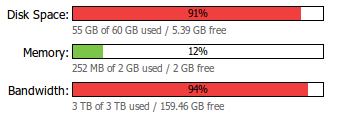 We might just squeeze through December without blowing the bandwidth limit, but it’s going to be tight. If the site goes down on New Years Eve then this will be why. It looks like I need to clear up some older stuff to free up some disk space too. I’ll start by getting rid of the r11xxx builds.
Update 1 (30 Dec 2012) – The other VPS that I use as part of the image building process has 1TB of bandwidth, so I’ve cut openelec.thestateofme.com over that that (as that URL still seems to get most of the traffic). If the main VPS gets really close to the limit then I’ll cut over resources.pichimney.com. I should also point out that it’s gratifying to note that I estimate there has been over 32,000 downloads of OpenELEC from my site over the past month.
Filed under: Raspberry Pi | 2 Comments
Tags: bandwidth, download, openelec, Raspberry Pi, Raspi, RPi, VPS
I’ve been without a laptop for a few weeks[1], and whilst tablets are fine for consumption and the occasional comment I’ve missed having a keyboard for proper creative work. I’ve been tempted by Lenovo’s Black Friday sale for the X230[2], various Ultrabooks and Netbooks[3], but by the time I’d got an SSD[4] I’d be looking at £400-£500. As soon as I heard about the new Samsung ARM based Chromebook at £229 I liked the idea[5]. Once I had the chance to play with one in a shop then I was totally convinced[6].

Since Santa didn’t bring me a Chromebook for Christmas I ordered one from John Lewis for delivery to my local Waitrose, and picked it up on the way home from a family outing this afternoon.
Things I like
The screen and keyboard are great – loads better than a 10″ Netbook, and subjectively better than the 11″ X121e. The trackpad is also nice in use, and I don’t find myself missing a trackpoint too much. The two fingers touch for right click takes a small amount of getting used to, but isn’t a big deal.
If battery life really is 8hrs then I’ll be impressed.
Size and weight is great – my daughter thought it was an 11″ Macbook Air (having briefly used one at a friend’s Christmas Eve party).
Performance seems good, with impressive boot time, and using Chrome and Google Apps feels much the same as a decent spec PC (with an SSD).
Multi user support was a breeze to set up.
Niggles
I’m using the SSH app. When I installed this on Chrome on my PC I could launch additional sessions by opening a new tab and clicking on the app, but the app doesn’t appear when I open a new tab. If I click on the app in the launcher then it just takes me back to the existing session. To get other sessions open I need to right click on the SSH tab and duplicate it.
I also tried out an RDP app on my PC before buying the Chromebook, but didn’t see the note that ‘Chromebook ARM does not currently support native client extensions but will in ChromeOS R25 expected to be released sometime in January’.
I miss some keys… like Del, and Home, and F5. I also think the resize key should go into full screen mode.
There’s OpenVPN support, but it seems to be almost impossible for a mortal to configure.
Overall
So far it’s living up to expectations, and it feels like a great little machine for not very much money. I’ll follow up with more once I’ve put some miles on the clock (and if I find resolutions to some of the specific issues).
I’m pleased to confirm that it’s great for writing blog posts on.
Notes
[1] Technically I still have a laptop, but since I started using my Lenovo X200 Tablet as my main PC in a docking station it’s become somewhat stranded there.
[2] Which is inexplicably *loads* cheaper in the US than the UK.
[3] Apparently Netbooks are dead. It’s a real shame that nobody seems to be making Intel i3 powered ones (preferably with HD4000 GPU) at a reasonable price any more, as it seems the AMD APUs that are popular now aren’t really powerful enough – I’d happily buy another X121e at the same price.
[4] If you’re not using an SSD then you’re literally waiting your life away.
[5] More so once I read that it can run Ubuntu, though that’s still a work in progress.
[6] Though the mix up of labels for ARM powered and Core i5 Chromebooks initially gave me some false expectations. Suffice to say that the i5 version has some nice features like Ethernet and Displayport, but I don’t think it’s worth the extra money.
Filed under: could_do_better, review, technology | 2 Comments
Tags: apps, ARM, Chromebook, google, RDP, Samsung, SSH, VNC
STM32F3 no dice (yet)
The STM32F3 is the latest in the lineup of Discovery boards from STMicroelectronics. There’s a smaller/cheaper board – the STM32F0 and a more expensive board with a higher spec CPU – the STM32F4. The F3 would be pretty boring on its own, so it’s been spiced up with some interesting onboard peripherals:
- A compass
- 3 axis accelerometer
- 3 axis gyroscope
- An 8 LED circle that’s ideal for direction indication
So it’s perfect for applications that you want to shake, twist or turn. It comes with a demo app that flashes the LED ring, indicates board tilt, and points North.
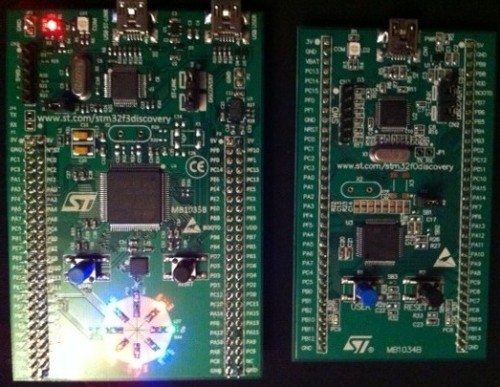
STM32F3 with its little brother the STM32F0
I was going to knock up a quick dice app that would use shake to roll, but the frst challenge was to get a development environment up and running.
IDE agony
The geting started guide has instructions for using four different integrated development environments (IDEs). Unfortunately the world of embedded software still has commercial (closed source) development tools, like enterprise development did a decade ago. I’ve been a little spoiled by TI bundling their own Eclipse based tools for the MSP430 and Stellaris dev boards. STMicro have instructions for four commercial IDEs:
- IAR Embedded workbench (30day time limit or 32k size limit)
- Keil MDK-ARM (32k size limit)
- Altium Tasking VX-Toolkit (details of trial version hidden behind a registration wall)
- Atollic TrueSTUDIO (30day time limit or 32k size limit)
That 32k size limit is probably fine for a dice app, but seems silly given the capabilities of the device. I looked around for open alternatives:
- Andrei has instructions for STM32F3 Discovery + Eclipse + OpenOCD, but I didn’t want to wade into figuring out how to port stuff from Ubuntu to Windows (perhaps I should just run an Ubuntu desktop VM).
- I also took a look at Yet Another GNU ARM Toolchain (YAGARTO), but that seems to be targetted to J-Link hardware (rather than ST-Link)
- There are instructions for using Eclipse with Code Sourcery Lite, but these seem targetted at the STM32F0 board. Maybe some F3 support will come along later.
Conclusion
So instead of getting going with my STM32F3 I spent the afternoon reviewing tools and their various limitations, which is a poor show compared to getting started with Arduino, MSP430 and Stellaris. I’l probably bite the bullet and download one of the size limited IDEs, but the dice will have to wait for another day.
Filed under: technology | 3 Comments
Tags: ARM, IDE, STM32F3
Fulfilment is hard
Fulfilment (noun):
- The achievement of something desired, promised, or predicted:
(satisfaction or happiness as a result of fully developing one’s potential) - The meeting of a requirement, condition, or need:
(the performance of a duty or role as required, pledged, or expected)
I’m not fulfilled, because Google failed to fulfil.
Short version
I ordered a couple of Nexus 7s for family members for Christmas (as the ones I’d brought back from the US were well received). Google shipped them, but they never arrived. Google blames TNT (the courier they use), for some unspecified failure, and TNT blames Google for not providing them with a complete delivery address. Whoever is to blame, the tablets went back to Google rather than to where they were supposed to go, and they’re now out of stock, so even if I was willing to have another try I’m not able to reorder.
What Google did wrong first
The email that they sent me confirming shipment looks like this:

and this
 The tracking link is the same in both cases:
http://www.tnt.com/webtracker/uktracker.do?navigation=1&cons=7054888899
Give it a go for yourself. Not very helpful.
If I go into my Google Play order history then I get a different link for tracking:
http://cgi.tnt.co.uk/trackntrace/trackntrace.asp?QUERY=7054888899
The issue here is that TNT have two tracking identifiers – consignment and reference. Google have provided a tracking reference number, but have presented it as a consignment number (or at least the TNT site defaults to using a consignment number)[1].
What Google got wrong next
When the package hadn’t shown up on time I tried (and failed) to track it using the links provided. I then raised an enquiry with Google Support. Two days later I got this reply:

It’s not clear why they’d need to escalate to a specialist for a simple shipment tracking enquiry, but regardless, I’ve never heard from anybody else on the matter.
Google’s final flurry of fail
After not hearing anything more about my untrackable package I did a search to see if this was a common problem, which turned up this piece – ‘Google messes up UK Nexus 7 deliveries‘. I was clearly not alone in having trouble, and issues from months ago hadn’t been fixed. It seemed that calling TNT might get me somewhere, so I did. TNT asked me for a consignment number, but couldn’t do anything useful with the number Google had given me (as it was a reference number not a consignment number).
I then gave in and called the Google Play helpline, expecting a long wait. Thankfully I got straight through to Elizabeth who was able to translate my reference number into a consignment number, which showed a tracking status of ‘Please Call’.
Armed with my consignment number I called TNT, who told me that Google hadn’t given them a complete address, and hadn’t responded to their query, so they’d sent the parcel back.
It beggars belief that the company who’s mission is ‘to organize the world’s information and make it universally accessible and useful’ can’t get an address right[2]; but then they’d already proven that they couldn’t tell the difference between a consignment number and a reference number. This metadata stuff must be hard.
I called Google again and spoke to Chris. He told me that I’d be refunded in full for the returned order, and that I could reorder. I pointed out that the 16GB Nexus 7 was now out of stock, and that I couldn’t reorder. Chris said that he was powerless to do anything else and handed me over to Austin in shipping.
Austin in shipping wasn’t any more helpful. As far as he was concerned it was all TNTs fault, but he was unable to elucidate why that was. He was also unable to whisk up another pair of Nexus 7s to send out to me. When I suggested that I should just buy a couple of Kindle Fire HDs instead he said ‘it’s up to you’ in that tone of voice that says ‘I don’t give a fsck’. Perhaps the right thing to do here would have been for Austin to send me a couple of 32GB Nexus 7s (which were still in stock). But I get the sense that Google in general (and Austin in particular) had no interest in cultivating my good will.
Why this matters
Google might have a great and desirable product in the Nexus 7, but it’s hardly unique. Something like the Kindle Fire HD is pretty much the same thing for pretty much the same price. I very rarely have fulfilment issues with Amazon, but when I do they’re great at sorting things out. At the other end of the scale there’s eBay; who don’t do fulfilment – they run a system that gets lots of individuals and small companies to do fulfilment, and it generally works very well.
This episode is right up there alongside Lenovo and Digital River for blinding ineptitude and poor customer service. Reputations are build out of more than just great product.
Conclusion
Google might blame TNT for this, but I entirely blame Google – they’re who I paid, they’re who I hold accountable, they’re the ones that don’t seem to be able to manage (meta)data, and they chose TNT as their parter for success[3].
Fulfilment might look easy because Amazon and eBay make it seem that way; but they’ve set a high bar for everybody else. If Google want to compete with Amazon then they’d better start clearing that bar[4].
Notes
[1] I don’t know if there’s a way that Google could have provided a link that just worked with reference numbers, but if not then some simple instructions would help a lot.
[2] It was right on the email they sent me confirming shipment.
[3] I’d also say that whilst the general quality of couriers is pretty terrible I’ve never had any trouble with TNT before. It would be different if it was Parcel Farce. If I was able to choose couriers I’d go with DPD every time as they’re great at keeping customers informed, and flexible about redelivery when things go wrong.
[4] Of course the world would be a better place if I could just get my Nexus 7 from Amazon, but these days it seems you can’t be an industry heavyweight without having a childish turf war with those around you. It would also be great if I could just buy the 16GB Nexus 7 on the high street (like I did in the US).
Filed under: could_do_better, grumble | 3 Comments
Tags: address, amazon, consignment, customer service, data, ebay, fulfillment, fulfilment, google, helpdesk, metadata, Nexus, Nexus 7, number, reference, shipping, TNT, tracking
Styles of IT Governance
I had the pleasure of being invited along to one of Simon Wardley’s Leading Edge Forum dinners last week. Kate Craig-Wood did a great job of summing it up so I don’t have to:

I hope to return to the questions of corporate irrationality in another post.
The dinner was under Chatham House Rules, so I won’t say who got me started on the subject of IT Governance. I was however provoked into a realisation – that IT Governance is just a type of regulation, and that much can be learned by looking at what regulators do and how that works out for stakeholders.
The three types of regulation
I’ve worked in financial services for over 12 years now, and in that time I’ve observed 3 types of regulation:
- Rules – prescriptive regulation that says exactly what you can and can’t do. The best archetype for this that I can think of is the Monetary Authority of Singapore (MAS), but there are plenty of others.
- Principles – the regulator documents a number of principles that they expect participants to adhere to, but does not go into implementation detail. The US Securities and Exchange Commission (SEC) and UK Financial Services Authority (FSA) are typical examples that spring to mind.
- Comparative – the regulator expects participants to model their behaviour on each other (with some nudging towards that being a high water mark rather than lowest common denominator). This is how things work in Switzerland under the Eidgenössischen Bankenkommission (EBK).
Of course there are interactions between the models, so quite often practices that emerge from a comparative regime get encoded into a rules based regime.
How this relates to IT
Large enterprise IT shops spend billions of dollars on staff, equipment, software and services each year. Like a government they need to show that there are rules, and that the rules are being abided by. This is where IT governance comes in.
In most cases I would observe that IT governance is essentially a rules based approach. This ends up casting people who have ‘architect’ in their title into two roles:
- Drafters of legislation – much like the armies of lawyers working behind the scenes in parliaments, congresses and assemblies the world over.
- Counsel – for those that need to understand the legislation and how to abide by it (or push through new laws).
I don’t think it’s always been like that, and if I go back to my early career in enterprise IT it seemed that we were exiting a period of principle based governance, where the principles were baked into an organisation’s culture.
The opportunity
Creating, managing and supervising a large (and ever expanding) body of law rules isn’t particularly productive, so it’s worthwhile looking at where situations arise for alternative styles of governance (and whether styles can be commingled as they are in global financial services).
A particularly strong argument for the comparative approach should exist for organisations that feel they’re behind industry norms. The analogy I use here is cavity wall insulation. If I live on a street where all of my neighbours have had cavity wall insulation installed then I don’t need to make myself a discounted cash flow spreadsheet for an investment appraisal for cavity wall insulation. I should instead be asking my neighbours which contractors were good and/or cheap. If I’m cheeky then I could even ask how quickly they expect their investment to pay back (and hence benefit from their analysis). A similar argument might then extend to building a private cloud, creating a data dictionary or whatever.
Principle based approaches also have a lot to offer, as they are lighter touch (from a manpower and weight of documentation perspective), and easier to achieve buy in around.
In each case, a crucial factor should be balancing the cost to the organisation of running a given governance approach versus the expected benefit (in stopping bad things from happening).
Conclusion
Just as there are a number of different approaches to regulation, so should there be parallel approaches to IT governance in the enterprise. So much of the output of rules based approaches is one size fits all, even when it clearly doesn’t; so there are lessons to be learned, and alternatives to be tried, in finding a holistic and balanced approach. The purpose of IT governance is to ensure that the organisation is doing the right thing, and this process should start with the means of governance.
Filed under: architecture | 1 Comment
Tags: architecture, comparative, enterprise, governance, IT, law, principles, regulation, rules, strategy


 Chris Swan's Weblog