BYOD
I’ve spent a good part of the last year working on mobile strategy, so I get asked a lot about Bring Your Own Device (BYOD[1]). This is going to be one of those roll up posts, so that I can stop repeating myself (so much).
It’s not about cost (of the device)
A friend last week sent me a link to this article ‘2013 Prediction: BYOD on the Decline?‘. My reply was this:
News at 11, an unheard of research firm gets some press for taking a contrarian position. They ruined it for themselves by trying to align BYO with cost savings. Same schoolboy error as cloud pundits who think that trend is about cost savings.
Cloud isn’t about cost. It’s about agility.
BYOD also isn’t about cost. It’s about giving people what they want (which approximately equals agility).
In fact cloud and BYOD are just two different aspects of a more general trend of the commoditisation of IT; cloud deals with the data center aspects, and BYOD with the end user devices that connect to services in the data center[2].
The enterprise is no longer in the driving seat
When I was growing up the military had the best computers, which is a big part of why I joined the Navy. Computers got cheaper, and became an essential tool for business. For a time the enterprise had the best computers, which is why I left the Navy and found work fixing enterprise IT problems. Now consumers have the best computers – in their pockets; time for another career change.
There are a number of companies out there trying to sell their device/platform or whatever based on it have ‘enterprise security’ features. This is a route to market that has failed (just take a look at the RIM Playbook) and will continue to fail because the Enterprise doesn’t choose devices any more.
- Consumers choose devices
- Employees take their consumer devices to work
- Devices that come to work need applications to make them more useful
Even when the Enterprise is buying devices, because the trade off between liability and control is worth it, they’ve buying the same devices that employees would choose for themselves.
MAM is where the action is, MDM is a niche
For a consumer device to be useful in a work setting it needs access to corporate data, and in most cases there is a need/desire to place controls around how that corporate data is used. There are essentially two approaches to doing this:
- Mobile Application Management (MAM) – where corporate data is secured in the context of a single application or a group of connected applications (that may share policy, authentication tokens and key management). With this approach the corporate data (and apps that manage it) can live alongside personal apps and data.
- Mobile Device Management (MDM) – where corporate data is secured by taking control (via some policy) over the entire device. This is how enterprises have been dealing with end user environments for a long time, but that was usually a corporate owned device (where this approach may still be appropriate) rather than BYO. Most users are bringing their own device to work to escape from the clutches of enterprise IT (and what the lawyers make them do), so MDM is a bad bargain for the employee. It’s also a minefield for the enterprise – what happens if employee data (e.g. precious photos) are wiped off a device? Could personal data (maybe something as simple as a list of apps installed) be accessed by admins and used inappropriately?
There is a 3rd way – virtual machine based segregation – but that approach is mostly limited to Android devices at the moment, and anything that ignores the iOS elephant in the room isn’t inclusive (and thus can’t be that strategic).
MAM isn’t without its issues, as it is essentially a castle in the air – an island of trust in a sea of untrustworthiness. This will eventually be sorted out by hardware trust anchors; but for the time being there must be some reliance on ecosystem purity (can Apple etc. keep bad stuff out) and tamper (jailbreak) detection[3].
Application Frameworks
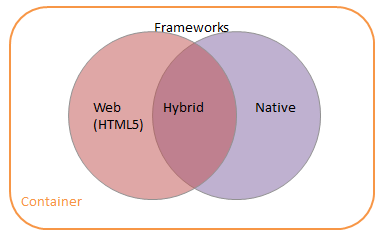
The containment of corporate data is one issue, but regardless of whether that’s done at the app level with MAM or the device level with MDM enterprises also need to figure out how to get that data into an application. There are essentially three approaches:
- Thin Client – rather than make a new app for mobile, just project out an existing application and access it via the tablet/smartphone or whatever. This can be pretty awful from a user experience point of view as the approach depends on good network connectivity, and often does a bad job at presenting apps designed for keyboard and mouse to a device that offers touch and gestures. It is however a quick and relatively easy way of preserving an existing investment in line of business applications. The connectivity issues can be dealt with by using protocols that are better optimised for mobile networks (such as Framehawk), and it’s also possible to use UI middleware to refactor desktops apps for the BYO user experience.
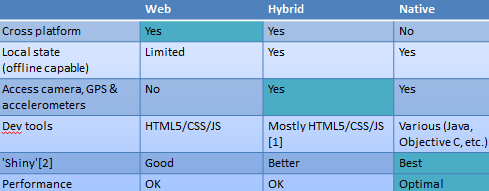
- Mobile Web – take an existing web site and provide a mobile version of it, reusing as much of the existing content management and UI componentry as possible. This is usually a great approach for cross platform support, but doesn’t give the shiniest native experience (and performance can be poor).
- Native App – build something specific for a given target platform for the best user experience and performance. This can be perceived as an expensive approach, though getting mobile apps (which are after all just the UI piece of what’s usually a much larger app ecosystem) developed can be small change compared to other enterprise projects.
It’s also possible to hybridise 2&3, though this involves trade offs on performance and flexibility that need to be carefully considered. Hybrid should not be a default choice just because it looks like it covers all the bases (just look at Facebook backing out of their hybrid approach).
Conclusion
BYOD may presently look like a trend, but it isn’t some temporary fad. It’s an artefact of consumer technology transforming the role of IT in the enterprise. That transformation places demands on IT that broadly fall into two areas: containment (of sensitive data) and frameworks (to develop apps that use/present that data). MAM is the most appropriate approach to containment for BYOD, and frameworks should be evaluated against specific selection criteria to determine the right approach on a case by case basis.
Notes
[1] It’s remarkable how quickly the conversation moved on from Bring Your Own Computer (BYOC) to Bring Your Own Device (BYOD) – normally meaning a tablet, but usually expanded to include smartphones that support similar environments to tablets.
[2] At some stage in the (not that distant) future the cloud will invert, and be materially present at the edge, on the devices that we presently consider to be mere access points.
[3] For the time being things are much easier in the iOS ecosystem, which is going to get problematic when all of those shiny new Android tablets that people get for Christmas show up in the New Year.
Filed under: technology | Leave a Comment
Tags: android, architecture, BYO, BYOC, BYOD, iOS, iPad, iphone, mobile, smartphone, strategy, tablet
Raspberry Pi Satellite TV
My kids got quite into a few of the FreeSat channels whilst on a recent holiday, so I thought that after all the fun I had getting DVB-T to work on my Raspberry Pi I’d have a go at DVB-S.
Another cheap receiver off eBay
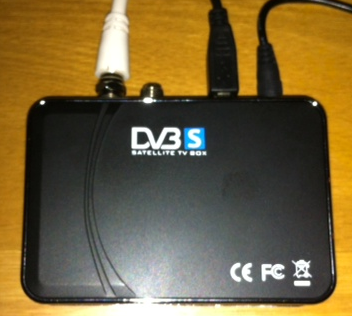
A quick search of ‘USB DVB-S’ led me to this receiver for the bargain price of £15.86, and the Linux TV Wiki seemed to confirm that it was supported. Sadly I was about to find out the difference between ‘supported’ and working out of the box; though not straight away, as it took many weeks for the receiver to get to me from Hong Kong.
Driver drama
After plugging it into my Raspberry Pi running a recent build of OpenELEC nothing happened. This wasn’t a total surprise, as I’ve recently been doing a fair bit of digging around in the driver mechanism getting DVB-T cards working for various devices.
When I took a look in ~/OpenELEC.tv/projects/RPi/linux/linux.arm.conf I found:
# CONFIG_DVB_USB_LME2510 is not set
I changed this as follows, cleared out the build directory and kicked off a rebuild:
CONFIG_DVB_USB_LME2510=m
Whilst OpenELEC was building I hooked the receiver up to my Windows 8 Microserver to prove to myself that it was working. I had issues there with drivers too, as the ones supplied aren’t signed, meaning that I had to restart Windows and allow the installation of unsigned drivers (thankfully the Arduino folks have a useful HowTo guide for this).
I got Satellite TV working using the supplied Blaze software, but the Pop Girl channel that my daughter likes was missing. It turned out that the Blaze setup for Astra at 28.2E didn’t include the multiplex, and I had to add it manually using details from KingOfSat. For good measure I also tried out Windows Media Center (having got a free license key from the recent Microsoft Promotion). The setup process gave me some confidence that I’d end up with a sensible EPG/channel list, but in reality there was loads missing. I’m now glad that I didn’t pay for Media Center.
With Windows play over I went back to the RPi with my lme2510 build, and things were looking promising (dmesg | grep 2510):
[ 8.644049] LME2510(C): Firmware Status: 6 (44)
[ 13.482794] LME2510(C): FRM Loading dvb-usb-lme2510c-rs2000.fw file
[ 13.482828] LME2510(C): FRM Starting Firmware Download
Sadly the adaptor wasn’t showing up in TV HeadEnd.
Firmware frustration
A quick look in /lib/firmware on my RPi showed that there wasn’t any dvb-usb-lme2510c-rs2000.fw file to be downloaded. The Linux TV Wiki and TvBoxSpy[1] had instructions for creating the firmware file, but it wasn’t obvious to me that I needed to start out with the Windows driver.
My attempt with the US2B0D_x64.sys that had installed on my Windows 8 box failed, so I installed onto an old XP netbook and pulled USB2B0D.sys off there. That didn’t work either, probably because it was a newer file. In the end I found the right version of the driver file in a forum post. All this fuss because the manufacturers don’t support Linux, and exert copyright on their Windows drivers (and parts thereof) is a real pain – it’s hardly like the driver firmware is of any use without the hardware.
Having found and spliced the right Windows driver file into a Linux firmware file I then had to drop it into OpenELEC, which meant mounting up the SYSTEM file with squashfs, copying everything out, adding the firmware to /lib/firmware and then using mksquashfs to build a new SYSTEM file (and md5sum to create a new SYSTEM.md5).
With new SYSTEM files in hand I combined them with unchanged KERNEL files and put them (with checksums) into the upgrade folder on my OpenELEC RPi. One more reboot and I finally had a system that would register the DVB device:
[ 7.797065] LME2510(C): Firmware Status: 6 (44)
[ 13.044104] LME2510(C): FRM Loading dvb-usb-lme2510c-rs2000.fw file
[ 13.044131] LME2510(C): FRM Starting Firmware Download
[ 15.492746] LME2510(C): FRM Firmware Download Completed – Resetting Device
[ 15.493023] usbcore: registered new interface driver LME2510C_DVB-S
[ 16.980020] LME2510(C): Firmware Status: 6 (47)
[ 16.980055] dvb-usb: found a ‘DM04_LME2510C_DVB-S RS2000’ in warm state.
[ 16.981327] DVB: registering new adapter (DM04_LME2510C_DVB-S RS2000)
[ 17.059523] LME2510(C): FE Found M88RS2000
[ 17.059573] DVB: registering adapter 0 frontend 0 (DM04_LME2510C_DVB-S RS2000 RS2000)…
[ 17.059993] LME2510(C): TUN Found RS2000 tuner
[ 17.060059] LME2510(C): INT Interrupt Service Started
[ 17.182799] Registered IR keymap rc-lme2510
[ 17.186119] dvb-usb: DM04_LME2510C_DVB-S RS2000 successfully initialized and connected.
[ 17.186160] LME2510(C): DEV registering device driver
Final furlong
The last bit of config was in TV HeadEnd. At last I could see the DVB-S receiver in the Configuration->TV Adaptors drop down menu. Next I manually added the mux I wanted (thank you again KingOfSat), and after some trial, error and a few restarts I had services found and channels mapped.
When I browsed to tv -> BSkyB and pressed play on Pop Girl I got a frozen screen, but a little more playing around resulted in a watchable ‘Sabrina the Teenage Witch’ (even if it was squashed up from an aspect ratio perspective). Sadly it wasn’t too long before the system lost lock, and needed a cold boot and a bit more playing around to get working again.
ToDo
I’m not on the latest version of TV Headend, so an upgrade might cure the aspect ratio issue and may even help with stability.
Conclusion
I was able to get Satellite TV playing on my Raspberry Pi. The (un)reliability means that that I’d qualify this as a science project rather than a dependable piece of consumer electronics. Maybe that will improve over time, or maybe I just spent almost £16 and a day of my time learning the hard way about DVB-S on Linux.
Notes
[1] Enormous thanks are due to Malcolm Priestly as creator of the LME2510 driver that’s in the Linux kernel. He has also answered a number of forum posts that got me pointed in the right direction.
Filed under: howto, media, Raspberry Pi, technology | 13 Comments
Tags: 22f0, 2510, 28.2E, 3344, Astra, dm04, driver, dvb, DVB-S, Eutelsat, frimware, LFE2510, M88RS2000, openelec, Pop Girl, Raspberry Pi, Raspi, RPi, satellite, tv, TVHeadEnd, XBMC
There have been some important changes recently to OpenELEC, which are covered well on their blog. It was only a couple of months ago when OpenELEC 2.0 was released, and that version didn’t have Raspberry Pi support. Now OpenELEC 3.0 is in beta (see beta 1 and beta 2 announcements), and the good news for Raspberry Pi users is that it’s now part of this mainstream release.
Downloads
Raspberry Pi builds can be downloaded from openelec.tv/get-openelec, and I’m now running OpenELEC 3.0 Beta 2 build 2.95.2 on my own media player.
Image files
The easiest way to get started with OpenELEC on the Raspberry Pi is to download an SD card image file and burn it onto a card. That’s how I got started, and to help out the community I’ve been creating and hosting development builds and corresponding image files for some time.
Since the entire purpose of image files is to help people get started I’m planning to stop doing image files for development builds once OpenELEC 3.0 goes stable. Until then the resources site for PiChimney.com will have image files for dev releases and image files for the official (beta) releases. My rationale here is that people getting started should probably be using a stable build, and anybody with the wherewithal to tinker with dev builds can probably handle upgrading from a stable build (or even making their own SD card or image file).
Build server blues
For some time I was able to host everything on a single server at BigV, but when their free beta came to an end I needed to find a new home (otherwise my bandwidth bill was going to be a bit on the large side). I moved things to a virtual private server at BuyVM, as they include decent amounts of bandwidth in their packages. Unfortunately I bought an OpenVZ VPS without realising that block device loopback (and essential part of the SD card image making process) is disabled for security reasons. I’ve been making up the shortfall by using a KVM based VPS for the imaging process, but this has introduced complexity and fragility to the overall process (with interlocking scripts running across remote machines).
Summary
I’ll continue to host image files for dev and beta builds until OpenELEC 3.0 goes stable, and once it does go stable I’ll host images for the stable build and continue to run the automated build server for dev releases (but there will then be no more image files for dev).
Filed under: Raspberry Pi | 2 Comments
Tags: beta, build, image, openelec, Raspberry Pi, Raspi, release, RPi, SD card, stable, XBMC
Geeks and Guinea Pigs
Anybody who’s talked to me in recent months might be surprised to hear that I recently splashed out for a copy Windows 8, as I’ve not been a great fan of it – particularly the new Metro interface[1]. The £25 upgrade from the release preview I was running seemed like a bargain though, particularly as the Microserver I’m using it on didn’t come with any OS.
TL,DR version
Microsoft were supposed to be getting off their feature release followed by fixing it approach with Windows 8, but the Metro desktop throws a spanner into the works. If they keep Metro then I can’t see Windows 8 being deployed by many enterprises – it will be yet another ‘geeks and guinea pigs’ release – maybe not even that. If on the other hand Microsoft can backtrack a little, and allow people (consumer and enterprise users) to use the familiar desktop, then it’s a much more incremental upgrade to Windows 7, and will be more easy to adopt – and thus more popular (and successful). It’s possible that Steven Sinofsky’s departure will allow Microsoft to do this. Whatever happens though, it looks like the Windows cash cow is a lot less healthy – MS simply aren’t extracting as much money for their product any more.
Background, and the original promise
Intel has it’s ‘tick-tock‘ roadmap where it upgrades the features of its CPUs and then shrinks the fabrication process to make the CPUs smaller, cheaper to make and more power efficient. Microsoft has for many years followed a similar pattern – feature releases every other time; the difference is that the builds between feature releases can’t be shrinks as there’s no physical process – they are instead fixes, as there have usually been issues with the feature releases that have stood in the way of mass adoption:
| Feature release | Fixed Release |
| NT3.x | NT4 |
| 2000 | XP |
| Vista | 7 |
| 8 | ? |
The geeks and guinea pigs title for this post refers to the users that get the feature releases – people in IT who like trying out cutting edge stuff, and maybe a pilot group in ‘the business’.
When I first heard about Windows 8 it was when I was part of a Customer Advisory Council (and Windows 7 wasn’t even out of the door). We were told that having fixed the issues in Vista with Windows 7 there would be no more major changes, just incremental updates. No more tick tock, no more feature – fix it, just a nice gradual roll out of of improved functionality.
And then some genius decided to throw a spanner into the works, and have a consistent UI metaphor across smartphone, tablet, games console and desktop – Metro – the UI originally featured on the Zune. Once again we have a release that’s defined by a new feature – a feature that doesn’t seem to be well received outside of Redmond.
Why Metro is a disaster on the desktop
The Metro interface works great on smaller devices where the screen is used for one application at the time, and it’s clearly designed for touch screens. On the desktop though it doesn’t fit well with the keyboard and mouse. The whole point of the windows in Windows was to be able to have multiple applications open on a larger screen (or screens).
In over a year of using it myself I’ve always gone straight to the old desktop, and pinned all of the apps I use frequently so that I don’t miss the start menu. On the consumer and release previews I’ve found myself lost pretty much every time I’ve had to use the new interface, though it looks like the final release has at least sorted out the Control Panel (by going back to how it was).
Metro is right up there with the Office ribbon and Mr Paperclip in the competition for worst user experience, and it’s no surprise that the most popular app for Windows 8 is Start8 – an app to bring back the start menu.
The Enterprise angle
The general aim of Enterprise IT is to keep things going as cheaply as possible, and that means change is bad. Many organisations are still using Windows XP, and are only now upgrading to Windows 7 (as Microsoft has a gun to their head with support ending for XP). There is hence almost zero appetite for doing any more change to the environment (particularly as Windows 7 has involved costly hardware refreshes and application compatibility testing).
If Windows 8 had been the incremental update that was promised (more like Windows 7.1 perhaps) then it would have been relatively simple for organisations to move straight to it. Things might be different if MS had provided an option to avoid Metro in the Enterprise Edition; but the way things are Windows 8 is definitely one for the geeks and guinea pigs.
A word on editions
Windows 7 came with a bunch of different editions – Starter, Home Basic, Home Premium, Professional, Enterprise and Ultimate. I quite liked the Ultimate edition[2], but MS made it too expensive and too hard to get, so I expect that approximately nobody who didn’t work for MS or have an MSDN subscription ever saw it – even the most deep pocketed PC fan would only get Pro from their OEM.
Windows 8 has far fewer editions – vanilla, Pro and Enterprise. So for the consumer the choice is pretty simple. Pricing makes it even more simple. With the Pro upgrades available for £25/$40, and no option to upgrade to basic Windows 8, it seems that pretty much everybody that buys Windows 8 will buy Pro.
The cash cow stops milking
The £25/$40 upgrade pricing to Pro is supposedly time limited, and it seems to have had the desired effect in driving early adoption with 40m licenses sold so far, but there are a couple of important things going on here:
- The gap between ‘upgrade’ and ‘full’ has disappeared, as MS has allowed upgrades from the preview releases (that it hadn’t charged for).
- The price expectation for a Windows license has been set, and set low.
Even if Windows 8 doesn’t damage the PC market (and I think it will[3]) then MS is going to make less money per unit that it was before.
Conclusion
Windows 8 wasn’t supposed to be a geeks and guinea pigs release, but that’s what it is. MS are going to struggle in the consumer space because of Metro, and it will likely stop them getting anywhere in the Enterprise. Meanwhile the price point they can charge has moved against them.
I did put some money in Microsoft’s pocket for Windows 8, but only so that I could continue to have a working license for a particular machine. I have no plans to upgrade any of my Windows 7 machines – even at £25 – it simply isn’t worth the trouble, never mind the money.
It’s not too late for MS. They could easily roll the features of Start8 into a patch on Windows Update and give users (particularly corporate ones) what they want – a nice incremental upgrade rather than a feature release. It’s too soon to call that Windows 9.
Notes
[1] Which isn’t even called Metro any more due to a legal dispute, though everybody seems to still call it Metro anyway.
[2] I was able to get this via an MSDN subscription.
[3] The data I’m waiting for is how many Windows 8 PCs and laptops bought over the Black Friday weekend go back to the shop because people don’t like it. I’m told that many PC purchases happen simply because existing PCs get into poor shape (often due to malware) and it’s easier to buy a new one than to sort out the old one. MS have unfortunately moved the pivot point in a way that’s not in its favour – the pain of getting on with Metro will now balance against the pain of sorting out an old PC.
Filed under: technology | Leave a Comment
Tags: editions, upgrade, windows 7, Windows 8
The wrong sort of radio, redux
Almost a couple of years ago (shortly before taking a role that put me back under the yolk of corporate web filtering) I wrote the wrong sort of radio to describe how ridiculous and counter-productive such things are. It simply doesn’t make much sense to cut off the Internet at the desktop when everybody has it in their pocket anyway. I was reminded of this by a tweet from Sean Park over the weekend:
 TL;DR version
For the last year or so I worked around the corporate web filters by having a PC on my desk connected to the real world via a VPN – an immobile version of bring your own device (BYOD). The VPN moves the point of origination for my web traffic (and the liability that goes with it) from my employer to me, so this was a compromise that everybody could be comfortable with. It was however technically challenging to set up, and performance/reliability was often poor. With a few simple tweaks the whole setup could have been made much more accessible for others, and that would be a good thing.
The Law
SEC Rules 17a-3 and 17a-4 oblige brokers and dealers to keep archives of electronic communication for trading staff, and similar rules have been enacted in most jurisdictions. It’s fairly easy for organisations to keep a regulatory archive of their own email using various bolt on solutions to their mail servers. Private (web)mail was however seen as a way to circumvent archiving[1], and hence had to be blocked. At the same time private webmail was being blamed for malware finding its way onto corporate desktops, so it seemed to make sense to block webmail for everybody, not just trading users (and anyway it seemed like it was too hard to keep track of who should be archived/blocked and who shouldn’t – so much easier to just cast the net over everybody[2]).
The law didn’t tell Wall St. to shut down webmail, but that’s what happened.
The Lore
Once webmail had been blocked on corporate networks it then became part of security and risk management culture that anything that allowed an employee to access webmail (or social networks with similar communications capabilities) must be banned. It was by this perverse logic that when guest and employee wifi were introduced (to allow people to work as effectively as they might in a local coffee shop) those services were then subjected to the same filters as the corporate network.
I used to have this written at the top of the whiteboard behind my desk:
The Lore != The Law
It was there to remind me that pretty much everything evil done in Enterprise IT is done at the behest of ‘compliance’, and it’s part of our job to push back as hard as possible to get a good experience for the users.
The liability argument
Corporate liability was a frequently touched upon issue in discussions about filtering networks. The argument runs something like this:
If we’re providing a service (like employee or guest WiFi) then we’re liable for what’s done with it
It’s a fair point, and the best answer is to get out of the business of providing the service. Get a telco to do it instead. The whole point of ‘wrong sort of radio’ is that telcos aren’t expected to be liable for traffic across their networks in the same way.
In many other cases the liability issue is dealt with using an acceptable use policy, and we pretty much all click through such agreements when accessing the Internet from a hotel, coffee shop, airport, train or whatever. That doesn’t work for Wall St. though. Wall St. has (internal) auditors to ensure that things are done properly. It isn’t good enough to have policy (ask nicely for people to do the right thing). There must be technical measures – make sure that people do the right thing – by actively stopping them from doing the wrong thing.
This is when The Lore kicks in badly. Employee WiFi must have the same filters as the corporate network, otherwise employees will use it to dodge controls; and guest WiFi must have the same filters too, because employees will cheat and create guest access codes for their own use. All that filtering means that traffic can’t just escape out onto the Internet, it needs to be routed through to the filtering place, meaning more hops, more expense and less performance.
VPNs to the rescue?
Virtual Private Networks (VPNs) move the point of egress to the Internet (and hence the perceived point of liability) from the WiFi service provider to the VPN provider. VPNs therefore provide a strong technical argument to the issues around liability; guests and employees should be allowed to use VPNs, because what they do on the Internet tracks back to them, not the company providing WiFi.
If only it was that easy.
The trouble is that the filters can only work on a narrow stream of traffic, and the expectation is that people are just surfing the web; so things get locked down to port 80 (HTTP) and port 443 (HTTPS). Whilst it is possible to run SSH and OpenVPN over port 443 it’s a none standard configuration; and web filters range from actively hostile to simply not designed to work well for such a setup.
VPNs therefore can be useful for moving the point of liability, but things only work well if the network is configured to allow VPNs (rather than VPNs being a workaround).
The gory technical details
The PC on my desk (and the iPad in my bag) were able to connect to virtual private servers I had using SSH and OpenVPN. Most SSH clients (including iSSH on iOS) can work as a SOCKS proxy, though of course this means that the SSH session must be established before surfing begins (which is a nuisance on the desktop and a downright pain on a SmartPhone or Tablet). Not everything gracefully pays attention to proxy rules, which is where OpenVPN can be helpful, but you can’t run SSH and OpenVPN on port 443 at the same time – so I needed two VPS boxes[3].
Call to action
Firms that are making widespread use of web filters[4] for guest and employee WiFi should actively support the use of VPNs by opening the appropriate ports and advertising the VPN capability (maybe even suggesting some services that people can use if they don’t have a VPN already).
Conclusion
Web filters at work get in the way of doing business in a (socially) networked society. I found ways to deal with these that worked for me, but they only worked for me because I was able to deploy resources and expertise that aren’t at everybody’s disposal. Virtual Private Networks provide a sensible workaround for the perceived liability issues, and should be technically facilitated and encouraged.
Notes
[1] Solutions at the time weren’t sophisticated enough. That has changed, but the approach pretty much everybody takes hasn’t.
[2] This is the same logic that gets us full disk encryption.
[3] Though I could have got by with a single VPS and an extra IP address.
[4] It would be remiss of me to finish without mentioning that the rule management for those filters is a nightmare. The default filer rules are normally created for oppressive regimes in the Middle East, and commercial users then need an exception process for stuff they don’t want to filter (because filtering harms their business). Exceptions are normally granted on a firm wide or individual basis. Exceptions are normally only managed for the corporate network (not guest or employee WiFi), leading to much fun getting exceptional exceptions for new services.
Filed under: technology | 1 Comment
Tags: BYOD, censorship, filter, vpn, web
The best conference bag
I get to go along to a lot of industry conferences, and goody bags are pretty standard fair. I expect that most of them quickly find their way to landfill, which is always a shame. A couple of years ago I was visiting somebody who I’d met at a conference, and I had one of my old bags with me and he commented ‘oh yeah – that one was a keeper’. I’m travelling again, and like a faithful companion it’s with me once more. So what makes a good conference bag?
- Light weight. Most people will have come with their own bag anyway, so they don’t want to carry much extra stuff back with them. This applies doubly so if people have travelled by air and face the ever more stingy check in and carry on allowances.
- Pack flat. If the bag can be put on top of other stuff in some carry on then it’s more likely to make it home. This means no padding.
- Large capacity. A useful bag should be able to hold a laptop, chargers, a couple of tablets, a bottle of water, an umbrella, sundries like boxes of tea and a coat (i.e. the minimum viable leave the hotel for the day kit).
- Robust. It’s no good if it falls apart.
- Shoulder and hand straps.
- Business card holder (so that it can find its way home if lost).
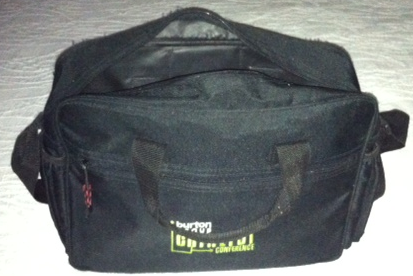
My old faithful was made by Leeds and given away by Burton Group at their 2004 Catalyst Europe conference – I think the sponsors on the other side have got more than their money’s worth by (somebody) choosing a good quality product. I’ve managed to break one of end pouches, which turned out to be not quite strong enough to hold a 500ml bottle of water, but it’s otherwise held up well to years of travel, and often gets thrown into my carry on empty (so I can bring home some extra stuff) or with the gadgets I want on a flight (so I don’t have to mess around with my luggage too much). I’ve also held onto a few 24esque ‘Jack pack‘ bags I got from QCon as they’re great for holding shotgun cartridges and other shooting paraphernalia.
Filed under: did_do_better, travel, wibble | Leave a Comment
Tags: bag, conference, travel
Tablets for Christmas
I remember a Christmas in the late 90s where it seemed like everybody got a mobile phone. This year it’s looking like we’re going to see the tablet equivalent, so I thought I’d do a quick round up of what I’m expecting to see.
The home front
If I include my in-laws then there will be at least three Nexus 7 devices coming for (or before) Christmas. My wife was quite taken by the advertising for the Kindle Fire HD, but when my brother showed her his Nexus 7 she was sold on the Google alternative[1]. I was personally something of a Nexus 7 sceptic when it launched, feeling that the lack of memory and 3G options made it weaker than my existing (original) Galaxy Tab, but both of those issues have now been fixed[2].

For the kids
I got an email from a friend this morning saying he was getting iPad minis for his two daughters (and asking if that made him an Android traitor[3]). This makes sense to me, as iOS still has the lead on games, which is one of the main things that kids use these devices for. I’ve got my own daughter one of the new iPod Touches for exactly the same reason.

Differentiation and market sizing
The iPad has had a good run as the main attraction in the tablet marketplace, but I see this coming to an end. I expect the iOS ecosystem to continue differentiation in two ways:
- As a premium product, in the same way that Macs were during the PC era. It’s clear that Apple is still going for a marketing based approach to the devices themselves, with a line up that starts with the iPod Touch, and goes up in size via the iPad Mini to the full size iPad. There’s still big margin in each of these. Google and Amazon on the other hand are going with very thin margins on the devices, so any price differentiation in the line up comes pretty much straight from the bill of materials. This will likely be the area where Apple will continue to differentiate in the long term.
- As the preferred gaming platform. Developers in general will go where the numbers are, and whilst iOS has had the lead on sales it’s also been the develop for first platform for games. This is less of an issue for many (older or first time) tablet users who just want to surf the web and read emails and ebooks, but remains a big deal for people that want games, particularly if they’ve already bought a bunch of stuff in the AppStore.
The contrast between the Apple approach and Google/Amazon is on device premium. Apple (at least for now) get to make money on the device and on the rent payer they get in the AppStore, whilst Google and Amazon are clearly willing to give up the device premium to attract rent to their ecosystems. This almost certainly plays out as Android having a major growth spurt into 2013, and it’s then only a matter of time before the balance tilts for gaming etc.
What about Microsoft?
The Surface looks like (yet another) brave try, but the reviews I’m reading suggest that it’s too expensive and the software’s too flaky to justify the price tag. If this really is MS showing their OEMs how it’s supposed to be done then I’m not expecting too much from the rest of the field.

The wider tablet with keyboard category[4] looks to me like a well intentioned attempt to close the gap between tablets and laptops from a functional perspective, but it’s important to look at how people spend their time. If 90% is consumption of content and 9% is curation of content then that leaves the creation gap at 1%, and 1% does not a healthy market segment make.
Conclusion
This Christmas is going to be the turning point for Android based tablets, and the gaming and enterprise markets will need to react accordingly in the New Year. Apple is going to have a great Christmas too, as they get to double dip by making money on devices as well as content. I fear a bad New Year hangover for MS and anybody getting a product from their stable over the holiday season.
Notes
[1] I had previously suggested that the Nexus 7 might be a better choice than the Kindle Fire HD, but holding one in your hand can make all the difference. In practice the differentiation is less about the devices and more about whether you want a shopping cart from Jeff Bezos or Larry Page parked in front of you.
[2] I use my Galaxy Tab a lot on the train when in the UK, and it’s often my main source of connectivity when I’m in the US (courtesy of the AT&T SIM that came with it) so 3G connectivity is pretty important to me. If I was buying something for myself this Christmas then it would be a 3G version of the Nexus 7. I’m not buying because although the Nexus 7 is all three of better/faster/cheaper the original Galaxy Tab is still perfectly adequate for my needs. There might be some important inferences here for tablet upgrade cycles.
[3] He has been an Android smartphone user since the early days, and more recently got himself an ePad Transformer tablet.
[4] Intel seem to have labelled this ‘Ultrabook Convertible’, though it’s not clear to me that there’s a rigorous base specification for this like there is with the Ultrabook branding. I’ve seen at least 6 different physical approaches illustrated, which suggests to me that nobody has yet figured out what customers actually want.
Filed under: technology | 3 Comments
Tags: amazon, android, Christmas, convertible, Fire, google, HD, iPad, kindle, Microsoft, Nexus 7, Surface, tablet, ultrabook
When I first created an automated build system for OpenELEC I had two reasons:
- Official releases from the OpenELEC team were infrequent
- There were no official SD card images (just .bz2 release bundles)
Looking now at sources.openelec.tv I don’t think point 1 is true any more. I’m going to keep my own system going for the time being, but in parallel I’ll try to provide images based on the official builds. I will also continue to provide release bundles with media_build for those using DVB receivers that aren’t properly supported with existing drivers.
Filed under: Raspberry Pi | 14 Comments
Tags: build, card, image, media_build, official, openelec, Raspberry Pi, Raspi, release, RPi, SD
Broken netbook media player
The screen on my wife’s Lenovo s10e gave up the ghost last week. I thought it might be just a loose connector and that I could fix it, and an initial attempt at strip down and rebuild seemed to work. Sadly my fix didn’t hold.
I’ve been using my own s10e mostly to play videos on a bedroom TV[1], so I switched over the hard drives. This got my wife working again, and also gave me the opportunity for a project that I’ve had in mind for some time (in anticipation of this eventuality).
With the broken screen removed from the netbook I mounted it, its power supply and the TV power supply onto the back of the TV with velco pads:
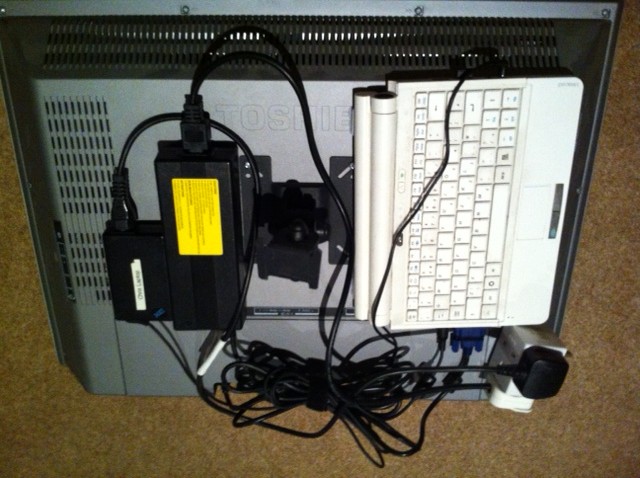 This got the netbook and tangle of wires out of the way, but left the challenge of how to control it. I dealt with that by getting a Kogan Wireless Keyboard and Trackpad. It’s about the size of a regular TV remote, but is surprisingly easy to use.
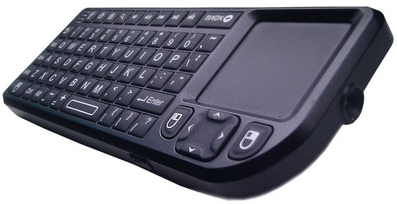
So now I have a very tidy setup that I can control from bed.
Notes:
[1] Sadly the bedroom TV I bought a little while ago didn’t come with HDMI, so I can’t just use a Raspberry Pi with OpenELEC.
Filed under: making | 2 Comments
Tags: keyboard, Kogan, netbook, remote, trackpad, tv, wireless
OpenELEC with media_build
Update (13 Nov 2012): Since OpenELEC is now on a recent kernel there’s no point to media_build any more, and I won’t be doing any further builds. Some DVB drivers aren’t enabled, but this is easy to rectify (it didn’t take very long to get CE6230 support mentioned below sorted out).
Update (10 Nov 2012): Since newer kernels were included in OpenELEC at the end of October I’ve not been able to create new releases with media_build. The good news is that it913x DVB adaptors (like mine) now work just fine with regular OpenELEC. The bad news is that various other DVB adaptors (e.g. CE6230) are missing from regular OpenELEC. If I figure out some other way of including missing drivers I’ll create some new builds – but don’t hold your breath.
A lot of people have been having issues with driver support for digital TV devices that can be fixed with the media_build drivers. I’m pleased to announce that I’m now publishing release bundles that include media_build using the same automated mechanism that I put together for regular release bundles and SD card images (NB I have no plans to do SD card images for media_build as it’s relatively trivial to copy a release bundle onto an SD card).
Filed under: Raspberry Pi | 10 Comments
Tags: build, ce6230, driver, dvb, image, it913x, media, media_build, openelec, PiChimney, PVR, Raspberry Pi, Raspi, RPi, SD


 Chris Swan's Weblog