Azure account disabled
After just 2.5 days of my 90 day trial my Azure account has been disabled:
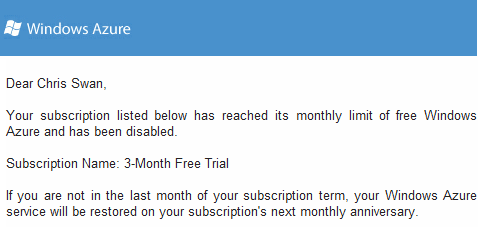
I *think* this has happened because I’ve exhausted the (paltry[1]) 20GB bandwidth allocation that comes with the trial, and that this happened because people were downloading OpenELEC builds/images from the web server I stood up in part 2 of my howto. I have no way of knowing for sure, as this is what I see when I log in to my account:
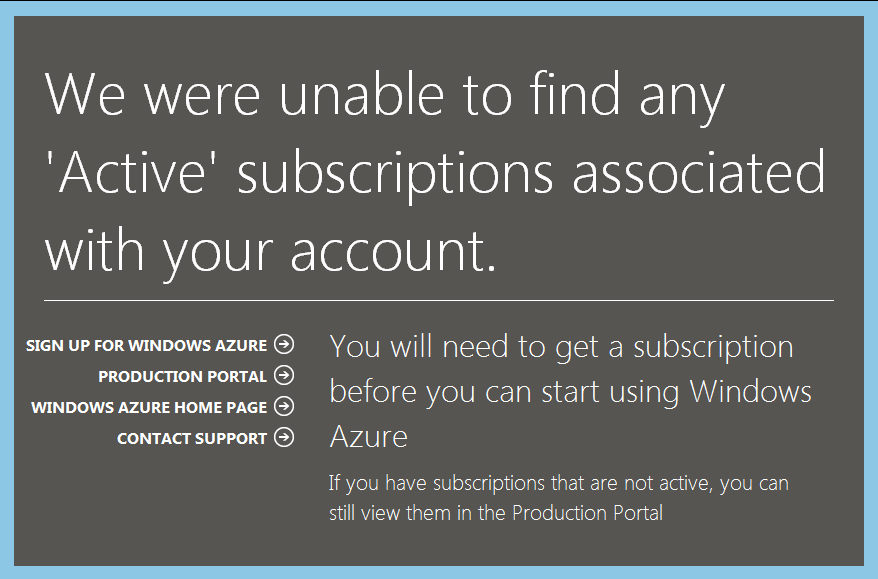
I was hoping that the portal would let me see some summary of the resources I’d consumed, but instead I’m completely locked out.
Lesson for me
I knew that there was a risk of people downloading stuff from the web server. I should have put up a redirect page to the VPS where I have been hosting builds and images.
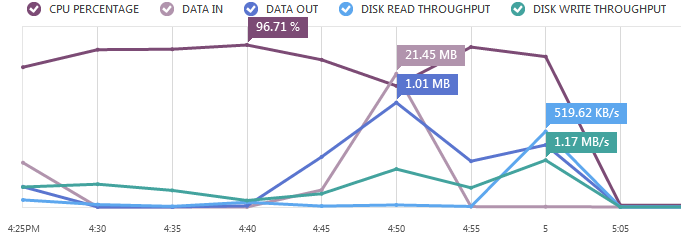
Update (22 Jun 2012) – Thanks to Nils for pointing out that usage metrics are in fact available in the portal. After a bit of poking around I was able to see this:
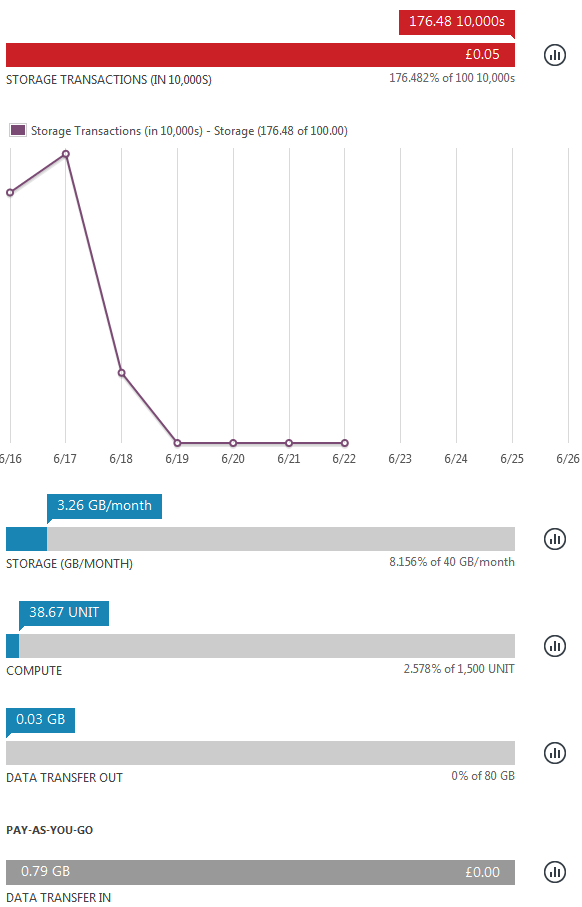
This is worse than I thought, as it shows that I hit an I/O limitation rather than a bandwidth cap, which means that anybody following my howto will be caught in the same trap. My only conclusion here is that the Azure trial (and possibly the IaaS offering as a whole) is useless for anybody doing I/O intensive work (like compiling something). I’d also point out that most other IaaS offerings don’t have similar limits/charges for I/O.
The I/O allowance in the free trial bundle also seems excessively mean. The pricing for a month of a small Linux instance is $57.60, and the pricing for 1M I/Os is 10c – MS should probably be offering a better balance here. If the allowance was 10M (or $1.00 worth) then I reckon I’d have got at least halfway through the month before hitting it.
Lessons for MS
- Make it easier for people see what resources they’ve used.
- Have soft limits and warn people when they’re approaching them (e.g. if I used all my bandwidth in 2.5 days then it would have been nice to be told after 1.25 days that I’d already burned 50%, and again when I hit 80% etc.)
- Be clear about pricing for usage outside of the trial allowance. I don’t know right now if I could get back up by paying for a little bandwidth, or if I’d have to pick up the tab for the VM and its storage too?
Notes
[1] A typical small VPS (e.g. Linode) comes with 200GB of transfer per month, so it seems MS is being particularly stingy here.
Filed under: cloud, could_do_better | 5 Comments
Tags: alerts, Azure, bandwidth, disabled, limits, Microsoft, monitoring, MS, trial
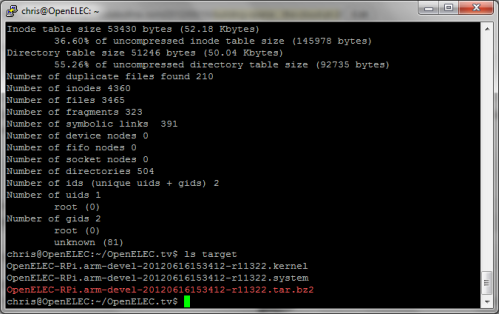
In the first part of this howto I went through signing up for a cloud service, provisioning a VM, installing the build tools and kicking off a build. All being well you should end up with something like this:
Azure can also give you a pretty chart of how busy the VM was during the build process:
Unpacking the release
First create a directory:
mkdir releases
and then unpack the build:
cd releases
tar -xvf ../target/OpenELEC-RPi.arm-devel-timestamp-release.tar.bz2
Important note: above I’ve used OpenELEC-RPi.arm-devel-timestamp-release as a generic label for something like OpenELEC-RPi.arm-devel-20120616153412-r11322. Please substitute accordingly for the timestamp and release that you’re working with.
Creating an image file
First we need an additional disk to pretend to be the SD card. Hit the attach button in the Azure portal and add a 1GB disk:
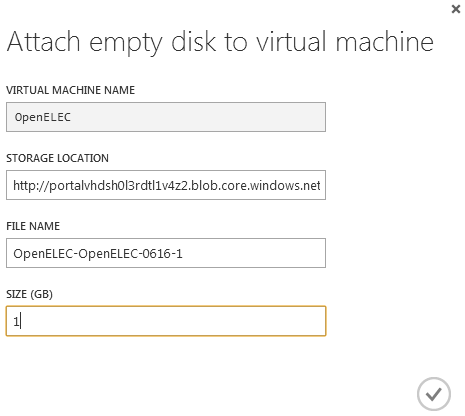
The new disk will take a while to provision, and once that’s done a reboot is needed to allow the OS to see it.
sudo reboot now
Wait a minute or two and reconnect via SSH. Then ensure that the newly created disk is clean:
sudo dd if=/dev/zero of=/dev/sdc bs=1M
Next up we need to modify the create_sdcard script. First create a copy of it (we will use this later for automated builds):
cd ~/OpenELEC.tv/releases/
cp OpenELEC-RPi.arm-devel-timestamp-release/create_sdcard .
Now we need to edit the script to create partitions that are smaller than the fake SD card:
vi create_sdcard
Now hit /16 -2 to find the right line then hit A to append to that line, add a 0 on the end, hit Esc to exit insert mode then :wq and Enter to write the updated file and quit out of the editor[1].

Next we create the image:
cd OpenELEC-RPi.arm-devel-timestamp-release
sudo ../create_sdcard /dev/sdc
sudo dd if=/dev/sdc of=../release.img bs=1M count=910
The raw image file is too large to move around, so zip it up and delete the original:
cd ..
zip release.img.zip release.img
sudo rm release.img
Web serving
To serve up the build releases and images requires a web server. This isn’t part of the standard Ubuntu build on Azure so install it with:
sudo apt-get install apache2
Next it’s necessary to open up the firewall on Azure, which is done via the ENDPOINTS configuration:
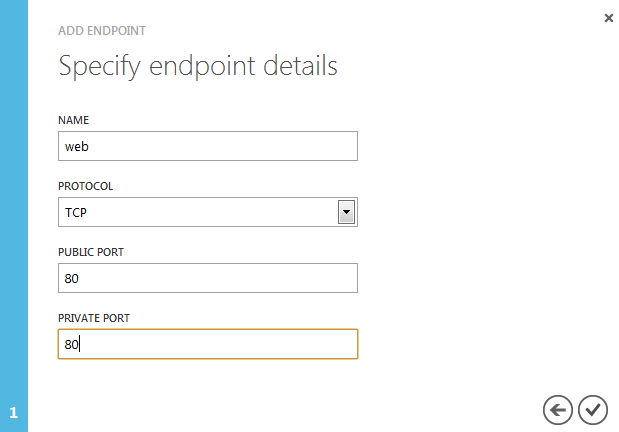
Once that’s done it should be possible to access the web server over the Internet:
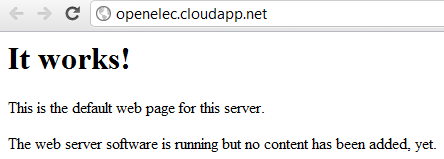
With that done, it’s just a matter of removing the default index.html page, and copying over the files to be served:
sudo rm /var/www/index.html
sudo cp ~/OpenELEC.tv/target/OpenELEC-RPi.arm-devel-timestamp-release.tar.bz2 /var/www
sudo cp ~/OpenELEC.tv/releases/release.img.zip /var/www
The files will now be available over the web: 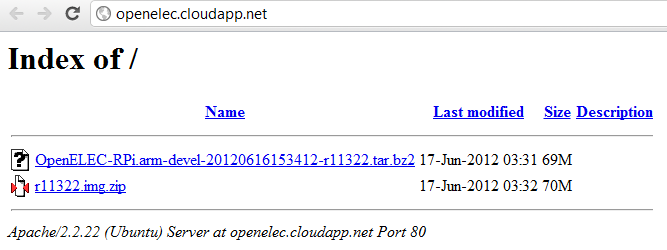
Automating it all
If you’ve got this far then I hope you’ve had fun. You could push out new releases every few hours by following the same steps, but it’s a bit labour intensive. Much better to create a script to run through the steps for you:
cd ~/OpenELEC.tv
vi doit.sh
Hit A and paste in the following script (in PuTTY paste can be done by hitting both mouse buttons; don’t try to select the code below as that will copy over extraneous line numbers – just hover near the top right and a handy copy button will emerge):
#!/bin/bash
# Outer loop for build and image
while :
do
 # Inner loop for git pull
 while :
 do
 GIT=$(git pull)
 echo $GIT
 if [ "$GIT" = 'Already up-to-date.' ]
 then
 echo 'Waiting half an hour for another pull at Git'
 sleep 1800
 else
 echo 'Kicking off the build and post build processes'
 break
 fi
 done
 # Delete old build
 rm -rf build.OpenELEC-RPi.arm-devel
 # Make release
 PROJECT=RPi ARCH=arm make release
 # Set env vars for release package name
 TARBALL=$(ls -t ~/OpenELEC.tv/target | head -1)
 BUILD=$(echo $TARBALL | sed 's/.tar.bz2//')
 RELEASE=$(echo $BUILD | sed 's/.*-r/r/')
 # Copy release build to web server
 sudo cp ~/OpenELEC.tv/target/$TARBALL /var/www
 cp ~/OpenELEC.tv/target/$TARBALL /mnt/box/OpenELEC
 # Unpack release
 cd ~/OpenELEC.tv/releases
 tar -xvf ~/OpenELEC.tv/target/$TARBALL
 # Wipe virtual SD
 sudo dd if=/dev/zero of=/dev/sdc bs=1M
 # Move into release working directory
 cd ~/OpenELEC.tv/releases/$BUILD
 #Run script to create SD card
 sudo ../create_sdcard /dev/sdc
 # Make an image file
 sudo dd if=/dev/sdc of=../$RELEASE.img bs=1M count=910
 # Compress release file
 zip ../$RELEASE.img.zip ../$RELEASE.img
 # Remove image file
 sudo rm ../$RELEASE.img
 # Copy zipped image to web server
 sudo cp ../$RELEASE.img.zip /var/www
 cp ../$RELEASE.img.zip /mnt/box/OpenELEC
 # Go back to OpenELEC directory
 cd ~/OpenELEC.tv
# Loop back to start of script
done
Once that’s done save the file by hitting Esc :wq Enter. Then make the script executable and start it (don’t forget to be running inside of a screen session first so that it doesn’t matter if the SSH session is killed):
chmod +x doit.sh
./doit.sh
OpenELEC will now build each time there’s an update and the release package and image will be automatically server up over the web.
Conclusion
In this two part howto I’ve run through all the steps needed to automatically build OpenELEC for the Raspberry Pi in the cloud:
- Signing up to a cloud service
- Installing dependencies
- Making the build
- Creating images from the build
- Serving images up on the web
- Automating the process
Updates
Update 1 (17 Jun 2012) – The script will pause and wait for a password when it bits that need sudo (after the build is done). This can be fixed by setting up sudo to not need a password for your account:
sudo visudo
Add a line ‘username (ALL) NOPASSWD:ALL’ like this:
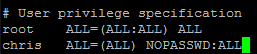
Then hit Ctrl-X Y Enter to save and exit
I’ve also noticed that I left the lines in that copy the files to a folder on box.net in addition to the web server. This will fail (without causing any issues) unless you have box.net account mounted at /mnt/box and a folder called OpenELEC within it. This howto describes how to mount box.net using WebDAV.
Update 2 (19 Jun 2012) – My Azure account has been disabled, so none of the URLs in this howto will work.
Notes
[1] If editing goes horribly wrong then hit Esc q! Enter and say Y to saving without changes. This will simply quit out of the editor.
Filed under: cloud, howto, Raspberry Pi | 4 Comments
Tags: Apache, Azure, build, cloud, openelec, Raspberry Pi, Raspi, virtual machine, VM, VPS, XBMC
Building OpenELEC in the cloud
When I got my Raspberry Pi pretty much the first thing I did with it was to put on OpenELEC, and excellent shrink wrapped package for XBMC. Initially I started compiling it myself on a local virtual machine (VM), but impatience got the better of me and I downloaded an image provided by somebody else. Later I did some builds for myself, and as others seemed to want up to date build packages and images I moved my build process to a virtual private server (VPS) to save the time taken uploading large files over home broadband. In this howto I’ll run through getting your own server in the cloud, configuring it to build OpenELEC and serving up images.
If you came here just looking for OpenELEC builds/images for the Raspberry Pi then what you’re looking for is here.
Picking a cloud
The VPS that I’m using at the moment comes from BigV. I was lucky enough to get onto their beta programme, which means that I’m not presently worrying about server or bandwidth charges.
The most popular cloud is Amazon’s Elastic Computer Cloud (EC2). I’ve had an AWS account since before they launched EC2, so I’m a long time fan of the platform. This does however mean that I’ve not been able to benefit from the free usage tier for new users. As a consequence I only use EC2 for temporary things as leaving the lights on runs up a bill.
For cheap VPS machines it’s always worth checking out low end box, but for a build box be careful that you have sufficient resources – I’d suggest at least 1GB RAM and 25GB disk.
Last week Microsoft announced support for Linux on their Azure cloud, and there’s a 90 day free trial, so for the purpose of this howto I’m going to use that.
Signing up to Azure
First hit the Try it Free button on the free trial page. You’ll need a Microsoft Live account (aka Hotmail account). I’m guessing many people have these already, but if you don’t then you’ll need to sign up[1]. Once logged in there’s a 3 step sign up process:
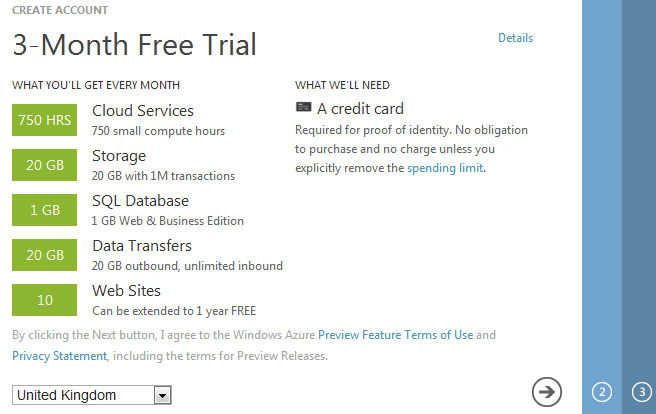
I chose not to screen shot my credit card details ;-) There’s also no need to give MS your real mobile phone number for the sign up. I used a Google Voice number (see this past post for how to sign up for GV if you’re outside the US).
Once sign up is done it takes a little while for the subscription to be activated, so you’ll probably see something like this:
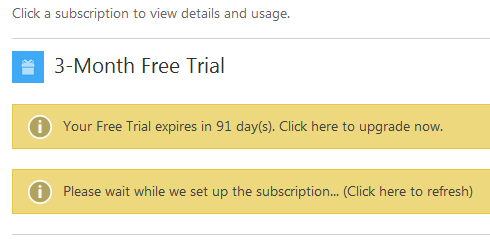
Once that’s complete it’s time to get started for real.
Creating a virtual machine
I got taken to the ‘new’ Azure portal and had to click through a brief tutorial. Once that was done I was faced with:

I hit ‘create an item’ then ‘virtual machine’ then ‘from a gallery’ :
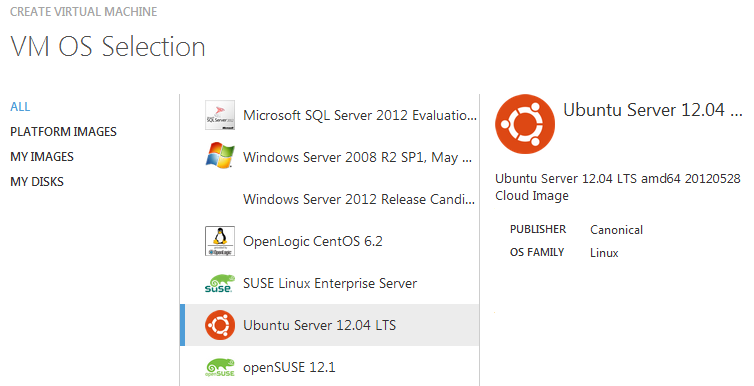
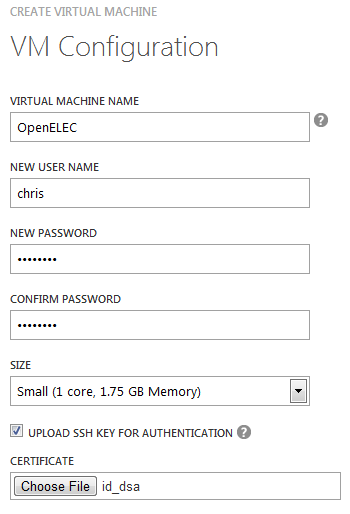
On the next page I filled out the configuration. The SSH piece looks optional, but it’s a good idea to use a key for security, so if you know how to do that then it’s worth using[2]:
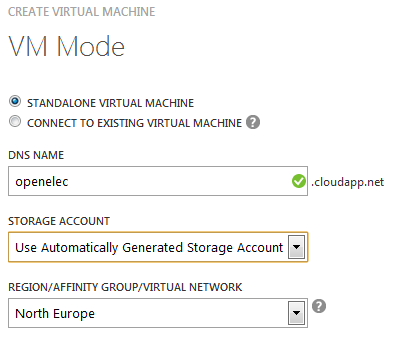
The next page lets you name the machine and choose where it will be hosted. I took the name ‘openelec’, so you’ll have to pick something else – sorry:
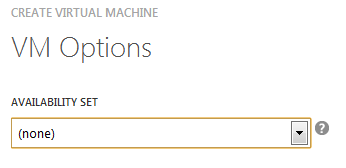
I didn’t do anything around availability sets before hitting the tick:
Once all that’s done it will take a little while to provision the machine and start it:

Configuring the VM
First connect to the VM. I’m using PuTTY:
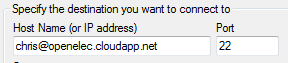
This isn’t a good start:

So run the update tools:
sudo apt-get update
sudo apt-get upgrade
Next install the dependencies for building OpenELEC from source:
sudo apt-get install git build-essential gawk texinfo gperf \
cvs xsltproc libncurses5-dev libxml-parser-perl
Compiling for the first time
First pull down the source code from github:
git clone https://github.com/OpenELEC/OpenELEC.tv.git
Then start the build process:
cd OpenELEC.tv
screen
PROJECT=RPi ARCH=arm make release
The first time around you’ll need to interact with the build process a little to tell it to download additional dependencies. I’ve added in the screen command there so that you can safely cut the SSH connection whilst the build is taking place. If you need to get back to it later then ‘screen -r’ is what’s needed. Screen really is a great tool for anybody using a remote machine, and it’s worth getting to know it in more detail.
That’s it for now
The first compile will take a few hours. In part 2 I’ll cover automating the build process, and setting up a web server to host the release packages and images.
Updates
Update 1 (22 Jun 2012) – My Azure account was disabled after a couple of days, which turns out to be because the trial only bundles 1M I/Os to storage (or 10c worth per month). On that basis it seems that Azure isn’t a suitable cloud for this purpose. It was a fun experiment, but a trial that only works meaningfully for around 7-8 days out of 90 isn’t much use. When I get time I’ll do another guide on using Amazon (or some other IaaS that offers a free trial without silly I/O limits).
Notes
[1] I realize that open source purists are probably recoiling in horror at this stage. Please go back to twiddling with Emacs. I’m an open source pragmatist (and I’d hope that ESR wouldn’t see much harm from closed source here).
[2] I plan to do another howto on using the Raspberry Pi to access a home network where I’ll go into a lot more detail on SSH and keys. Azure seems very fussy about the format of keys, so it’s worth checking out this howto.
Filed under: cloud, howto, Raspberry Pi | 2 Comments
Tags: Azure, build, cloud, openelec, Raspberry Pi, Raspi, virtual machine, VM, VPS, XBMC
Password dump checking
Leaks of (badly secured) password files seem to be big news at the moment. In many cases people set up sites to allow you to see if your password was in the leak – but who knows whether these sites are trustworthy. That’s not a risk I’m happy to take.
Python provides a reasonably simple way to test:
>>> import hashlib
>>> h = hashlib.new(‘sha1’)
>>> h.update(‘password‘)
>>> h.hexdigest()
‘5baa61e4c9b93f3f0682250b6cf8331b7ee68fd8’
Once you have the hash of your password then just search for it in a copy of the leaked dump (normally these spread pretty quickly and can be found easily online).
You can also use this approach to identify passwords that aren’t in such dumps (and thus likely more secure against dictionary attacks where the dictionaries are updated as a result of leaks).
NB I initially tried to use the sha1sum command on Ubuntu to do this, but it wasn’t returning correct hashes (probably due to trailing CRs and/or LFs).
Filed under: howto, security | 2 Comments
Tags: check, checker, leak, password, python, SHA1
If you just want to download images rather than make them then I’d suggest downloading an image of the latest official build. For the adventerous I’m still doing frequest dev builds and associated images[1], but these may be unstable. Read on if you’re interested in how this stuff is done…
The Raspberry Pi build of OpenELEC now contains a handy script to partition and write to an SD card. The script gets included if you make a release:
PROJECT=RPi ARCH=arm make release
This will create a bzip2 archive, which can be extracted thus[2]:
mkdir ~/OpenELEC.tv/releases
cd ~/OpenELEC.tv/releases
tar -xvf ../target/OpenELEC-RPi.arm-devel-date-release.tar.bz2
cd /OpenELEC-RPi.arm-devel-date-release.tar.bz2
sudo dd if=/dev/zero of=/dev/sdb bs=1M
sudo ./create_sdcard /dev/sdb
The script assumes that an SD card is mounted as /dev/sdb, but there’s a quicker and easier way to do things if you want an image. If you’re using VirtualBox (or some other virtualisation system) then simply add a second hard disk. Make it small (e.g. 900MB) so that the image will fit onto an SD card later on[3].
Once the (fake) SD card has been created then an image file can be made:
sudo dd if=/dev/sdb of=./release.img
This will create a file the size of the (fake) card, so use gzip to compress it:
gzip release.img
Updates
The OpenELEC team accepted a change that I made to the create_sdcard script so that it can now be used with loop devices. This allows a simple file to be used to directly create an image:
sudo dd if=/dev/zero of=./release.img bs=1M count=910
sudo ./create_sdcard /dev/loop0 ./release.img
Notes
[1] I had been using a public folder on Box.net, but it seems that these files are too popular, and my monthly bandwidth allowance was blown in a couple of days.
[2] Assuming that OpenELEC was cloned into your home directory. Where I use date–release it will look something like 20120603004827-r11206 on a real file. I’ve included a line here to wipe the target disk so that the resulting image can be compressed properly.
[3] Once created the image file can be written to SD using the same means as for other Raspberry Pi images (e.g. Win32DiskImager if you’re using Windows). An SD card can be mounted directly within VirtualBox by using the USB settings. In my case it appears like this:
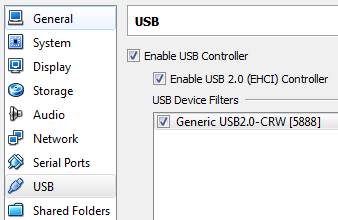
If a real SD card is used alongside of a fake one then it will likely appear as /dev/sdc. Copying the image over is a simple case of doing:
sudo dd if=/dev/sdb of=/dev/sdc bs=1M
Filed under: howto, Raspberry Pi | 79 Comments
Tags: image, openelec, Raspberry Pi, Raspi, RPi, SD, VirtualBox, XBMC
I spent time figuring this out due to needing SD cards for my Raspberry Pi, but the instructions apply to pretty much anything on SD.
DD on Windows
Windows sadly lacks the DD utility that’s ubiquitous on Unix/Linux systems. Luckily there is a dd for Windows utility. Get the latest version here (release at time of writing is 0.63beta).
Which disk
Before using DD it’s important to figure out which disk number is allocated to the SD card. This can be seen in Computer Management tool (click on the Start button then Right Click on Computer and select Manage). Go to Storage -> Disk Management:
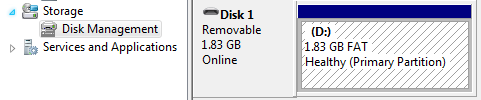
Here the SD card is Disk 1.
Making the image
First start a Windows command line as Administrator (hit the start button, type cmd then right click on the cmd.exe that appears and select Run as Administrator). Next change directory to wherever you unzipped the DD tool.
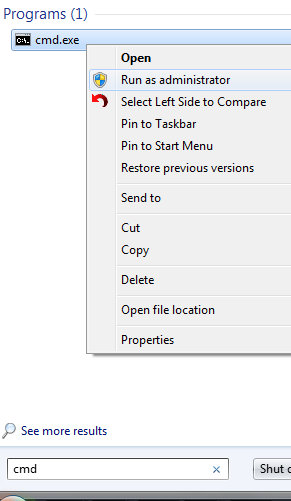
To copy the SD card to an image file (in this case c:\temp\myimage.img) use the following command line:
dd if=\\?\Device\Harddisk1\Partition0 of=c:\temp\myimage.img bs=1M
In this case we’re using DD with 3 simple arguments:
- Input file (if) is the SD card device
- Output file (of) is the image file we’re creating
- Block size (bs) is 1 megabyte
Writing the image back to a clean SD card
The first step is to ensure that the SD is complete clean. Most cards come preformatted for use with Windows machines, cameras etc. The diskpart tool can be used to remove that. Go back to your cmd running as administrator (and be very careful if you have multiple disks that you use the right number):
diskpart
select disk 1
select partition 1
delete
exit
You’re now ready to copy the image back to the SD (simply by swapping the earlier input file and output file arguments):
dd of=\\?\Device\Harddisk1\Partition0 if=c:\temp\myimage.img bs=1M
Filed under: howto, Raspberry Pi | 9 Comments
Tags: DD, howto, image, Raspberry Pi, Raspi, RPi, SD
KVM mort
This isn’t a post about the KVM Hypervisor, which I believe is alive, well and rather good.
This is a post about keyboard, video and mouse switches.

‘KVM Switch Needed’
CC photo by Emily OS
At both home and work I have multiple machines, and monitors with multiple inputs, so all I need is a KM switch to share my keyboard and mouse rather than a KVM switch. Video switching was fine back in the days of VGA to analogue monitors, but these days it’s anachronistic (I want a digital input and though digital switches are available they’re expensive) and unnecessary (as any decent monitor has multiple [digital] inputs).
A better monitor
I could say that I want just a KM switch[1], but that might be asking for faster rewind for video tape in the age of DVD. What I really want is an integrated KM switch. Monitors already often have USB hubs that could reasonable be used for keyboard and mouse – it would be a small step (and very little silicon) to make that switchable to multiple USB outs[2].
Next up I want a means to switch between inputs that doesn’t involve pressing too many buttons. I don’t quite get why I have to go through a navigation exercise to switch inputs but it’s the same problem on my monitor at home, my monitor at work even the TV I have in my bedroom. Rather than a single button to cycle between (live) inputs I have to press something like input (or source) then go up/down a list then select an input – far too many button pushes. Of course if the monitor had a KM switch in then the monitor maker could take a hint from the KVM people and have hot keys (on the keyboard) to switch between inputs[3].
Conclusion
As I’m not in the market for a new monitor a cheap and functional KM switch would be ideal, but this stuff really should be built into the monitor to improve upon USB hub functionality already there[4].
[1] Yes, I know that I can use a KVM switch and just not use the video bit – this is in fact what I have at my work desk. The trouble is that some of them try to be too clever by doing things like not switching to an input with no video signal present. Anyway, the engineer in me weeps at the wasted components.
[2] There are probably cases where it would make sense to switch other USB peripherals that might normally be connected to a monitor based hub, and I expect there may be others when this wouldn’t be desirable. I expect it would be best to keep things limited to just keyboard and mouse.
[3] Double tapping ‘scroll lock’ to switch between my work laptop and microserver is a lot quicker than the Source->DVI/Displayport->Source dance I have to do to change inputs on my monitor.
[4] I am left wondering what monitor makers expect us to do with those multiple inputs, particularly when there are many of the same type (e.g. my monitor at home has 2 x DL-DVI so the multitude of inputs isn’t just to cater for a variety of different types of source – you’re expected to have many computers attached to the same screen)? Do they think we just have loads of keyboards on the same desk – perhaps stacked on stands like an 80s synth band?
Filed under: could_do_better, technology | 2 Comments
Tags: digital, displayport, DVI, HDMI, keyboard, KVM, monitor, mouse, switch, USB, VGA, video
Raspberry Pi on iPad
My second Raspberry Pi came at the end of last week[1], so now I have one to tinker with in addition to the first that I’m using as a media player.
It turns out that it’s not just SD cards that the raspi is fussy about, I had a real struggle getting either of my spare monitors to work with it. In the end I somehow found the combination of HDMI-DVI adaptor and cable that had worked last week and things sprung to life.
SSH
Getting a monitor to work wouldn’t be necessary if SSH was enabled by default, which sadly it isn’t.
You can start SSH from the command line with:
sudo /etc/init.d/ssh start
Alternatively you can set it to autostart by renaming one of the files in the boot partition:
sudo mv /boot/boot_enable_ssh.rc /boot/boot.rc
Once SSH is sorted out you can use your favourite client (mine is PuTTY) to connect to the raspi. I also configured key based login, but that’s a different howto[2].
VNC
The purist in me was going to just use an X server (probably Cygwin) to connect to the raspi, but VNC is easier to get going.
To install the VNC server on the raspi:
sudo apt-get install tightvncserver
Once that’s installed start it with:
vncserver :1 -geometry 1024x768 -depth 16 -pixelformat rgb565
I’ve set the resolution here to be the same as the iPad.
At this stage it might make sense to test things with a VNC client from a Windows (or Mac or Linux) box. I used the client from TightVNC .
The iPad bit
There are probably a bunch of VNC clients for the iPad, but I regularly use iSSH for a variety of things, and although at £6.99 it’s one of the most expensive apps I have on my iPad I generally think it’s worth it.
iSSH can connect to VNC servers directly or through an SSH tunnel:
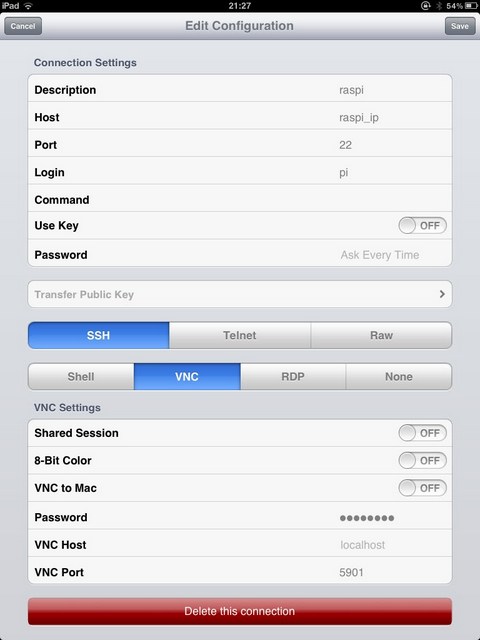
Hit save and then hit the raspi entry to connect, and I get something like this:
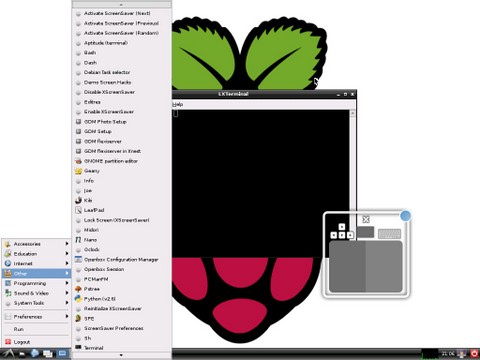
At this point things are probably easier if you have a bluetooth keyboard (and mouse).
Conclusion
With two protocols (SSH and VNC) configured it’s possible to do useful stuff with the Raspberry Pi remotely, and the iPad with iSSH makes a fine piece of glass to use it through.
Acknowledgement
With thanks to the My Raspberry Pi Experience blog for the VNC howto I adapted here. If you want more of a detailed walk through with loads of screen shots then take a look there.
[1] I ordered from both suppliers in the first couple of days as it was utterly unclear which was going to get their act together.
[2] If you do use PuTTY then it may make more sense to generate keys using PuTTYgen rather than ssh-keygen (another howto).
Filed under: howto, Raspberry Pi | 8 Comments
Tags: howto, iPad, iSSH, Putty, Raspberry Pi, Raspi, RPi, SSH, vnd
Bolting in security
This is a long overdue reply to Chris Hoff’s (@Beaker) ‘Building/Bolting Security In/On – A Pox On the Audit Paradox!‘, which was his response to my ‘Building security in – the audit paradox‘.
Hopefully the ding dong between Chris and I will continue, as it’s making me think harder, and hence it’s sharpening up my view on this stuff. If you want to see some live action then I’ll be on a panel with Chris at ODCA Forecast on 12 Jun in NYC[1].

CC photo by England
I suggested in my original post that platform as a service (PaaS) might give us a means to achieve effective, and auditable, security controls around an application. When I wrote that I assumed that the control framework would be an inherent part of the platform, but it doesn’t have to be. Perhaps we can have the best of both worlds by bolting security in.
Bolting
By this I mean optional – a control that doesn’t have to be there. Of course we can expect a PaaS to have a rich selection of basic security controls, but it would be silly to expect there to be something to suit every need. It would however be great if there was a marketplace for additional controls that can be selected and implemented as needed.
As Chris points out this has already happened in the infrastructure as a service (IaaS) world with things like introspection APIs giving rise to third party security tools. Many of these look and smell like the traditional bolt on tools for a traditional (non service delivered) environment, but how they work under the hood can be much more efficient.
In
By this I meant in the code/execution path – a control that becomes an integral part of an application rather than an adjunct. Bolt on solutions have traditionally been implemented in the network, and often have some work on their hands just to figure out the context of a fragment of data in a packet. Built in solutions are embedded in the code and data (and thus don’t struggle for context) but can be hard to isolate and audit. Bolt in solutions perhaps give us the best of both worlds – isolation for an auditability perspective and integration with the run time.
The old problems don’t go away
When asked ‘why do we still use firewalls’ a former colleague of mine answered ‘to keep the lumps out'[2]. It’s all very well having sophisticated application security controls, but it’s still necessary to deal with more traditional attacks. I’d skirted over this on my original post, but Chris did a good job of highlighting some of the mechanisms out there (which I’ll repeat here to save bouncing between articles):
- Introspection APIs – I already referred to these above. They’ve primarily been used as a way to do anti virus (which is often a necessary evil for checkbox compliance/audit reasons), but there’s lot of other cools stuff that can be achieved when looking into the runtime state of a machine.
- Security as a service – if a security based service (like content filtering or load balancing) isn’t implemented in one part of the cloud then get it from another.
- Auditing frameworks – these potentially fit three needs; checkbox style evaluation of controls before choosing a service, runtime monitoring of a service and it’s controls, and an integration point for newly introduced controls to report on their status (after all a control that’s not adequately monitored might as well not exist).
- Virtual network overlays and virtual appliances – the former provides a substrate for network based controls and the later a variety of implementations.
- Software defined networking – because if reconfiguration involves people touching hardware then it’s probably not ‘cloud’.
Conclusion
Moving apps to the cloud doesn’t eliminate the need for ‘bolt on’ security controls, and brings some new options for how that’s done. ‘Building in’ security remains hard to do and even harder to prove effective to auditors (hence the ‘audit paradox’). ‘Bolting in’ security via (optional modules in) a PaaS might just let us have our cake and eat it.
[1] I have some free tickets for this event available to those who make interesting comments.
[2] I’ve got an odd feeling that Chris Hoff was in the room when this was said.
Filed under: cloud, security | Leave a Comment
Tags: @beaker, audit, bolt, bolt on, build in, Chris Hoff, cloud, control, Forecast, iaas, in, ODCA, paas, security
I’ve continued tinkering with my OpenELEC media player, and there’s too much stuff to do as just updates or comments to the original post.
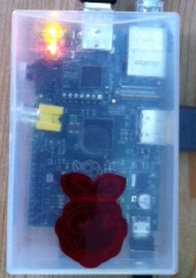
Somebody gave me a nice laser cut Rasberry Pi logo at the last OSHUG meeting
Build
I started out with a canned build[1], but discussion on the OpenELEC thread on the Raspberry Pi Forums suggested that I was missing out on some features and fixes. I therefore did another build (in the OpenELEC directory):
git pull
PROJECT=RPi ARCH=arm make
I’m presently running r10979, which seems to be behaving OK. I’ve uploaded some later builds to github, but not had the time to test them out myself. To get some of the later builds to compile properly I needed to delete the builds directory:
rm -rf build.OpenELEC-RPi.arm-devel/
To use these binaries simply copy the OpenELEC-RPi.arm-devel-datestamp-release.kernel file over kernel.img and OpenELEC-RPi.arm-devel-datestamp-release.system over system on a pre built SD card. As these files sit on the FAT partition this can easily be done on a Windows machine (even though it can’t see the ext4 Storage partition). The files can’t be copied in place on the Rasberry Pi because of locks.
Config.txt
This is the file that’s used to set up the Raspberry Pi as it boots. The canned build that I’m using didn’t have one, so I created my own:
mount /flash -o remount,rw
touch /flash/config.txt
I’ve set mine to to start at 720p 50Hz:
echo 'hdmi_mode=19' >> /flash/config.txt
There are loads of other options that can be explored such as overclocking the CPU.
Remotes
The cheap MCE clone that I bought still isn’t working entirely to my satisfaction, but I’m less bothered about that as there are other good options. I already raved a little about XBMC Commander for the iPad in an update to my original post (it also works on the iPhone, and presumably recent iPod Touch). I’ve also tried out the Official XBMC Remote for Android, which is a little less shiny but pretty much as functional; best of all it’s free.
NFS
When I first set up CIFS to my Synology NAS I meant to try out NFS as well. At the time I didn’t as things weren’t working properly on my NAS, which turned out to be down to a full root partition stopping any writes to config changes. Having sorted that out I’m now using .config/autostart.sh to mount using NFS thus:
#! /bin/sh
(sleep 30; \
mount -t nfs nas_ip:/volume1/video /storage/videos -r; \
mount -t nfs nas_ip:/volume1/music /storage/music -r; \
mount -t nfs nas_ip:/volume1/photo /storage/pictures -r \
) &
Conclusion
That’s it for now. The dev build I’m on seems stable enough and functional enough for everyday use, so I’ll probably stick with that rather than annoying the kids with constant interruptions to their viewing. Hopefully I won’t have to wait too long for an official stable release.
Notes
[1] The original canned build is now ancient history, so I’m now linking to the latest official_images.
Updates
Update 1 (4 Jun 2012) – r11211 release bundle and image (900MB when unzipped so should fit onto 1GB and larger SD cards).
Update 2 (4 Jun 2012) I’ve put r11211 and will put subsequent bundles and images that I make into this Box.net folder.
Update 3 (5 Jun 2012) my Box.net bandwidth allowance went pretty quickly, so I’ve now put up the latest release bundles and image files on a VPS.
Update 4 (26 Jan 2013) release candidates should be used rather than dev builds in most cases, so links modified to point to those.
Filed under: howto, media, Raspberry Pi | 30 Comments
Tags: 720p, mce, Media Player, mount, nfs, openelec, Raspberry Pi, Raspi, remote, resolution, Synology, XBMC


 Chris Swan's Weblog