I first drew this chart back around 2004 for my friend Alexis Richardson. At the time I referred to it in the context of a proprietary research methodology, but I don’t want trademark lawyers chasing me – hence the thesaurised title for this post.
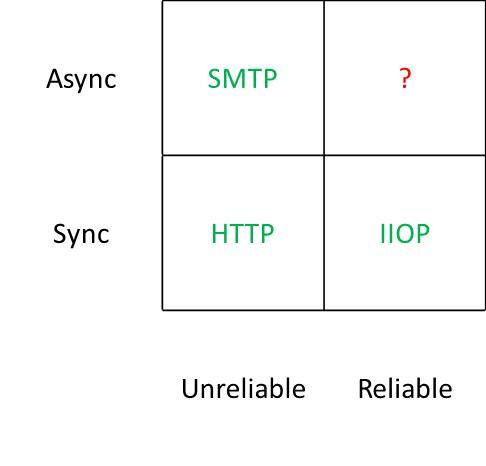 The point was very simple – we had standards based protocols for everything except the most useful case – asynchronous and reliable. There were of course protocols that occupied that corner, but they were proprietary – fine if you’re doing something within an organisation and willing to pay for it, but not so good if you’re trying to get services to work across organisational boundaries.
At the time many people were trying to bend HTTP out of shape so that it could be asynchronous and reliable with efforts like WS-RM, but I felt that what the world really needed was a simple standards based protocol for message oriented middleware (MOM).
Of course my prayers were answered not soon after, with the announcement by my friend John Davies at the Web Services on Wall Street conference[1] of the impending release of AMQP, and Alexis went on to found the hugely popular and successful RabbitMQ. The brave new world was going to look like this:
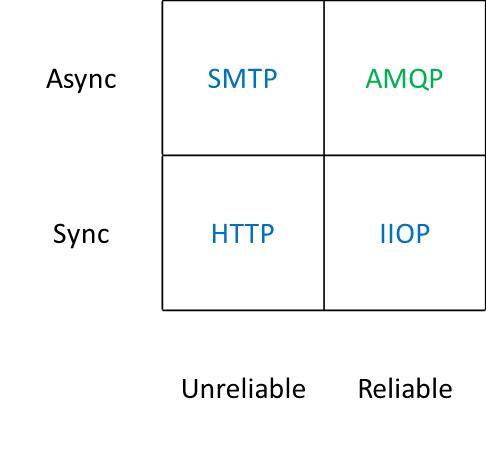 So why am I writing about this 7 years after first scribbling on a whiteboard? Well… it seems that some people still don’t get the joke. I found myself drawing the same chart again just this week whilst in the midst of a discussion with a SaaS provider on notification mechanisms. The unpleasant surprise was that people found it useful and informative (rather than obvious and patronising).
I’m going along to PubSub Huddle later this week, where I’m sure I’ll find loads of people doing cool stuff with AMQP. I just hope that I don’t have to wait too much longer for this all to become mainstream. For some time I’ve shared the vision of John O’Hara, and others in the working group, of AMQP becoming the ubiquitous interconnect[2]. Hopefully the time for that vision to become reality is upon us now that AMQP 1.0 is out the door.
[1] I recall that John didn’t have approval to talk in public about what was at the time time an internal project, but he went ahead anyway.
[2] John did a great piece in ACM ‘s Queue magazine on this (warning PDF and some scrolling required).
Filed under: architecture, software, technology | 6 Comments
Tags: AMQP, architecture, middleware, MOM, protocol, RabbitMQ, saas, SOA, web services
Review – EVGA G210 Graphics Card
After getting my 27″ monitor I needed a graphics card with Dual Link DVI that could do 2560×1440. I didn’t want to spend a load, and I wanted something without a fan (and associated noise) – the EVGA G210 was the cheapest I could find – £23.05 from Scan.co.uk (with free delivery courtesy of the AVForums offer).
 Installation
Pulling the old card and plugging in the new one was the usual PCI-E faff, but not too traumatic. When Windows 7 started up again it treated it as a ‘Standard VGA’ rather than going straight to Windows Update for new drivers, which I had to kick off manually. Pulling down and installing the drivers took an age – it’s a huge package, doubtless stuffed with cruft that I’ll never need or want. Once installed I was able to turn the resolution right up and enjoy my screen at its best.
Performance
I was replacing an old ATi Radeon X800, which was fairly mid range at the time I bought it (and ran cool enough to be passively cooled – at least after adding an enormous after-market heat sink). I was therefore expecting a substantial jump in performance given over 5 years of GPU evolution, and thought that even a low end card would smash my old one. My expectations were however ruined – whilst 3D performance (measured using Windows Experience Index) had picked up nicely (3.3 -> 5.9) the Desktop Aero performance has cratered (5.1 -> 2.9). If I’d bothered to look at more detailed specs perhaps I’d have picked up on pathetic memory bandwidth (and if I’d cared enough to splash a bit more money then maybe an AMD 6450 might have been more in order).
Conclusion
In normal use I haven’t noticed the drop in 2D performance, so maybe it doesn’t really matter that much. I do however get a pin sharp and huge desktop, which was the whole point, so overall I’m happy with it. Maybe I should have spent the extra £10 or so on the AMD card, but it’s not something I’m going to lose any sleep over.
PS I think I was right about the old X800 card not doing DVI digital output during startup. The new G210 certainly does let me see what’s going on every step of the way.
Filed under: review, technology | Leave a Comment
Tags: 210, EVGA, G210, GeForce, NVidia, review, WEI
After some hassles getting it, the X121e has been in the household for a few days now – so it’s time for first impressions review.
Design and build
The machine looks and feels more like an IdeaPad than the ThinkPad’s I’m used to. This is no surprise given the price. The chassis seems pretty robust, but the screen feels more flimsy, and doesn’t have a latch. It’s also lacking any visual indicators for hard disk activity, network etc.

One of the first things I did after unpacking was pop in another DIMM to take the memory up to 4GB. This was simplicity itself, as rather than having lots of separate covers on the base there’s just one giant one that gives access to RAM, HDD and the micro PCI-e slots for WiFi and 3G. This machine is seriously easy to upgrade.
I ordered the larger capacity 6 cell battery, and had to check the part number when it arrived as it seemed smaller and lighter than I expected. It doesn’t protrude at all from the regular dimensions of the case – so I can see how the 3 cell battery would make any sense at all. Claimed life is 9hrs, and I’ve not done any testing, but I’d expect 5hrs under normal use.
The screen is noticeably larger and higher resolution than a netbook screen, and fine to work with straight on. It’s matt, which I personally prefer, and whilst the viewing angle isn’t great that probably doesn’t matter for most laptop use cases.
The keyboard is a chiclet affair – something I’ve come to expect of a ThinkPad Edge. It is however rather good, and easy to type fast on. Like any proper ThinkPad it has a trackpoint, which is great. The trackpad isn’t too shabby either – though its textured finish might be a bit abrasive if used for a long time. The whole front edge of the trackpad can be pressed in for left and right mouse buttons.
Performance
Subjective performance is very good. I’m guessing that a 2nd generation Core i3 beats a 1st generation Core i7. The X121e has managed to clock up the best Windows Experience Index in the house (at 4.9). This is mostly down to the HD3000 integrated graphics turning in a decent performance (the earlier HD Graphics in my X201 definitely lets things down compared to the other components).
I had a go at hooking it up to my 27″ screen via HDMI to see if it could manage the full resolution of 2560×1440. Sadly all it could manage is 1920×1080 (1080p).
Software
I got the basic model with Windows 7 Home Premium (64bit). After configuring Windows it launched an installer for Office 2010 (and I’m guessing some other pre installed stuff). This was easy to exit, and the other pre installed stuff that I’d rather ignore has kept out of the way.
Overall
The X121e delivers the performance of last year’s high end machine at little more than a netbook price, which makes it quite a bargain. I’m glad that Lenovo managed to get me one in the end.
If you’re looking for more then there’s a thread at the OverClockers forum that includes some more detailed benchmarks and discussion of SSD upgrades amongst other things.
Filed under: review, technology | 11 Comments
Tags: lenovo, review, x121e
Review – Dell U2711 Monitor
I’ve lusted after a 30″ monitor for a while now, and got to use one some time ago (an Apple Cinema display) . The price of those beasts is headed in the right direction, but still – ouch.

27″ seems to be a different matter. A few weeks ago my brother was being disparaging about my ancient dual 17″ LCD setup, and remarked that he’d kitted out the office for Boss Alien with Hazro 27″ screens that had come in at less than £400 a pop. He said they were great apart from the lack of a height adjustable stand.
I took a look at the Hazros, but the stand was going to be an issue, and so was the fact that they only had a single Dual Link DVI input. I wanted something with a range of inputs for the machines in my home office, and here the Dell U2711 fitted the bill perfectly. The only trouble was that it was still expensive (around £650).
Then I saw that Overclockers were doing the Dell with a reduced warranty for £499 for pre-orders. I was tempted. Then they sent me a 5% off voucher. I was more tempted. Then they did a one day only special at £479.99 inc delivery (and my voucher was still valid) – I caved.
I expect the price of 27″ IPS screens will now plummet to something like £250. If that happens I will try not to care, as the U2711 is absolutely gorgeous – a real pleasure to use.
Text is about the same size as it was on my old dual screen setup, but there’s simply more acreage, and more flexibility to use it. I like the way that Windows 7 can snap stuff into the left or right half of the screen – so I can have things similarly arranged to when they where maximised on each of my dual screens. There are however times when you just want to go large with something – and not have a couple of bezels in the way is a game changer.
As with all complex tech there are some niggles. My ThinkPad Ultrabase can drive it quite happily at the full resolution of 2560×1440 using the included Displayport cable – so that’s my main machine sorted. Sadly there’s only one Displayport input, so I’ll need a DP-DL-DVI converter if I want to hook up my work laptop, which means another £30 on eBay. And the ancient X800 card in my workstation doesn’t have dual link support, so I will need a new card for that, which will likely be another £25 (for a low end passively cooled nVidia).
I shouldn’t however let my cabling concerns detract from the pleasure of using this thing – at least it’s capable of being hooked up to 5 PCs at once.
Update 1 – 1 Sep – I noticed that my desktop machine, connected via DVI, wasn’t showing anything during POST. The monitor would go into power saving mode until the Windows login screen was showing. I hooked it up via the VGA port (using a DVI-VGA adaptor) and all was well. I think this may be down to the graphics card outputting analogue signal for the lower resolutions during POST and boot. I needed a new card anyway to do 2560×1440 over DL DVI, so this issue has forced my hand.
Filed under: review, technology | 2 Comments
Tags: 2560x1440, 27", Dell, monitor, review, U2711
This isn’t a post about the nym wars. I understand why people are upset about the real names policy, but I’m pretty ambivalent about it myself. I certainly don’t have anything to add to the great stuff that’s been said already by IdentityWoman, ESR, Kevin Marks and Charlie Stross.
My concern is more mundane – Google+ (and I’m starting to think Google generally) doesn’t get persona.
This problem manifests in two ways:
- G+ asks me to invite the same person (or put them into circles) multiple times.

- If somebody sends me a G+ connection request to my work email (or I guess any email besides my gmail) then I have to forward that email back to home and follow the link from there (G+, like gmail and various other Google services is blocked by the web filters at work).
Filed under: could_do_better, identity | 2 Comments
Tags: contacts, email, G+, google, home, identity, persona, profile, work
Lenovo fail me again
OK – before I even start on this, I should know better – this sort of thing has happened before.
Let me begin by saying that I love Lenovo gear. I like the build quality and durability. I prefer trackpoint over touchpad. I’ve had 4 Thinkpads over the last decade and they’ve all been brilliant. I have two Lenovo netbooks in the house, I’ve bought more for family members, and recommended them to friends. At my last company I bought Thinkpads and a ThinkCentre for the team. I just wish that they could deliver what I order from them without a run around, and that almost never happens.
My son has been complaining about his computer being too slow[1], and he could do with having a laptop for school. The deal is that if he can reach 20 words per sec typing, then he gets a new machine. In the expectation that he would hit his target I did some shopping around and the newly released Lenovo X121e stood out as being a great value machine – not the cheapest that I could get, but a great price/performance package, and something that I expected to last (and sustain the rigours of life in a school backpack).

I ordered an X121e on the 3 Aug – a base spec Intel Core i3 model with the 6 cell battery and a sleeve cover. Quoted delivery was 1-2 weeks. Things got off to a bad start; after completing the order process the items were still in my basket online, but I hadn’t got any kind of confirmation. After a little while I called the sales line and was told that confirmation emails can take up to 24hrs to be sent out. It didn’t take 24hrs, but it was around 3hrs before my confirmation came through.
The following day – excitement – a shipping confirmation email. Then disillusion – it was only for the sleeve cover. The cover came 4 days later (and I’m pleased to say that shipping tracking links sent in emails now work). The wait for the laptop continued – a shame, as I was hoping to have it in the office for a few weeks and maybe doing a review here – I had even taken an extra stick or RAM and an HDMI-DVI cable to work so I could tinker whilst waiting for the typing target to be hit.
Today marked the expiry of the 2 week estimated shipping bracket, I thought about calling to check on status. After all the online order status is a bit cryptic – just what is ‘Boxed Shipment’ supposed to mean?
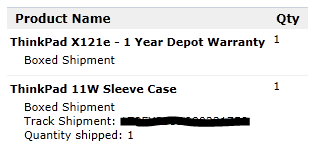 I left it alone though. I’d read online reviews from people who’d got these machines, and they where still on sale on the web site. What could possibly go wrong?
I got this email on the way home this evening:
Dear Customer,

We are sorry to inform you that the following product of
your order is end of life and it will be cancelled from
your order.

Product:BOM_3045CTO
SKU:3045CTO

Please note that your credit card has not been charged for
this item.

As a small compensation we would like to offer you 10% of
your next order. To redeem this discount please call us at:

UK: 0203 0140095
ROI: 0165 35568

We apologize for any inconvenience caused.

Sincerely,
Ana Carolina Cunha
Lenovo Online Store
Customer Service
How does a product become ‘end of life’ weeks after being released, and why is it still on sale on the Lenovo web site? Here’s a screen shot taking a minute ago – note the same part number as the ‘end of life’ laptop cancelled from my order:
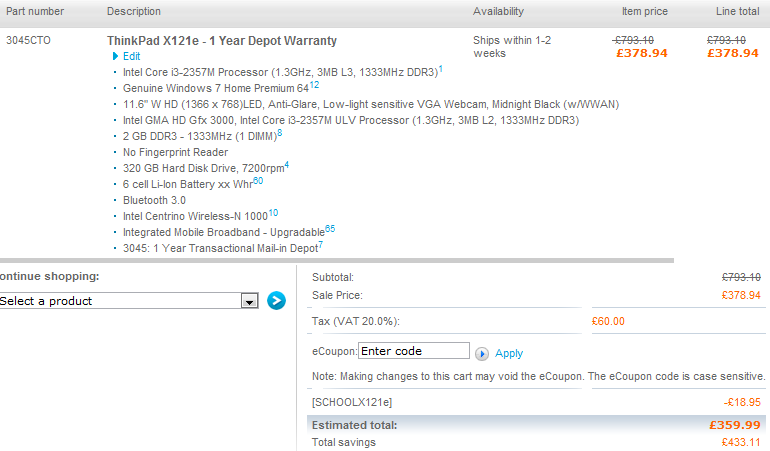 Anybody want an 11″ sleeve cover? I seem to have one without a laptop to go in it. Sadly my card has been charged for that item.
Update 1 – 19 Aug – I called Lenovo customer services and spoke to a chap called Amis. He told me that the order had been cancelled due to parts shortage, but was unable to say which part they where short of or explain why the exact same spec laptop was still on sale on the web site. Amis accepted that there was basically no connection between what was on sale on the web site, and what the factory was able to deliver. He even suggested that I should order again, but could not explain why a second order would succeed when my first had failed. He is going to arrange an RMA for the sleeve cover, and I should get a full refund for that – though it’s extra hassle for me, and I’d expect that the shipping and admin costs are more than the value of the item. Maybe I should just order an AMD version of the X121e, as these seem to be in plentiful supply, and are a little cheaper than the Intel ones (and come with more RAM, though sadly a slower HDD).
Update 2 – 19 Aug – just for lulz I thought I’d try ordering the same machine again, taking advantage of the 10% discount offered. I spoke to Amis once again, and he took the order by phone rather than giving me a discount code to use online. The discount applied to the order, the shipping costs and tax beared no resemblance to my own calculations, but seemed to be in my favour so I’m letting things run their course. I now await the confirmation email to see if something got mangled along the way.
Update 3 – 19 Aug – the order confirmation has come through and all looks good other than the shipping address is my home rather than work. As I have little expectation that the machine will actually ship I’m not going to lose any sleep over that.
Update 4 – 22 Aug – the laptop has shipped. Fingers crossed that there’s somebody home when it gets here.
Update 5 – 23 Aug – the laptop from my second order left Kazakhstan a little while ago. Meanwhile Lenovo have written to me again about the first order. The general message is the same, but the specific text is different – it seems to address the issues around accessories being shipped separately (and requiring RMA) and sets out limitations on the 10% discount being offered:
Thank you for contacting the Lenovo Online Store.

We are contacting you in relation to your recently placed
order on the Lenovo Online Store. Unfortunately, the
following product you ordered is no longer available and
as a result has been cancelled:

X121E - 3045CTO

We regret any inconvenience this may cause.

Please note you have not been charged for this product in
your order.

Please contact our Customer Service Team to inform us on
how you wish to proceed with your order. If we do not hear
from you within the next 7 working days your complete order
will be canceled.

If you have already received part(s) of your order and you
wish to return, then please contact our Customer Service
Team.

As a gesture of goodwill we would like to offer you a 10%
discount on your next purchase on the Lenovo Online Store
for this inconvenience. To avail of this offer please
contact our Customer Service Team on:

Email: [email protected]
Phone: +44 2030140095

Please note this 10% discount that is on offer with Lenovo
will only work  once ordering over the phone, any current
offers that are advertised on the onstore  will not be
added to this discount.

We apologize for any inconvenience this may have caused.
Please note, you will receive an automated email to
confirm the cancellation of your order.

Sincerely,
Sara
Lenovo Online Store
Customer Service
Update 6 – 25 Aug – after spending a day hanging around in Cologne my second order got to the UK this morning and was delivered a little while ago. I look forward to some tinkering later, and I will follow up with a review. Meanwhile Lenovo have send me a third email about my first order:
Thank you for ordering from the Lenovo Online Store. At your request or at the request of the fulfiller and/or manufacturer, the following was cancelled from your order :
Product Name Qty Ordered Reason for cancellation
BOM_3045CTO 1 Fulfillment Error
Update 7 – 26 Aug – a happy ending. Not only was the machine waiting for me when I got home, but my son had also cracked 20WPM so it is now set up in the kids’ play room. Some proper setting up and a first impressions review to follow later.
[1] His younger sister recently benefited from getting my cast off desktop machine to replace an ancient Compaq iPaq. This makes the ‘sawn off laptop'[2] seem a bit lame – something that was highlighted this week when he got a PC game that was released in 2008 that demanded a better hardware spec.
[2] My father in law managed to break the screen on his HP DV1000. I wasn’t able to fix it, and he’d got a new laptop anyway, so it was donated to the cause and has been in the kids’ playroom (minus the LCD screen and connected to an external monitor) ever since. After some pimpage, and with a bit of driver hacking it’s running Windows 7 quite sweetly.
Filed under: could_do_better, grumble, technology | 7 Comments
Tags: cancelled, end of life, fail, lenovo, x121e
I’ve been a fan of powerline adapters for some time. Ever since moving into my house I’ve had a PC in the garage, but sadly my attempts to run an ethernet cable there failed (despite the presence of trunking for the power cable). Initially I had a WiFi link out there, but it was always slow and never reliable. Homeplug fixed that for me.
A little while ago I saw a review for new 500Mbps adapters, which got me wondering how much I could speed things up? On launch though the kits seemed a little too expensive. That’s now changed – I picked up the Netgear kit on sale from Maplin for £82.99, and they presently have a similar kit from Netricity for £69.99.
The kit worked straight out the box, and I saw an improvement in throughput from 40Mbps to a little over 100Mbps – not bad. The line quality indicator was however showing amber, indicating that I could improve things by moving the plugs. I moved the plug in the garage from the snakes wedding of adaptors and power strips near the PC to the main socket where power comes into the garage. This meant I had to run an ethernet cable around the rafters, but speed picked up to better than 200Mbs.
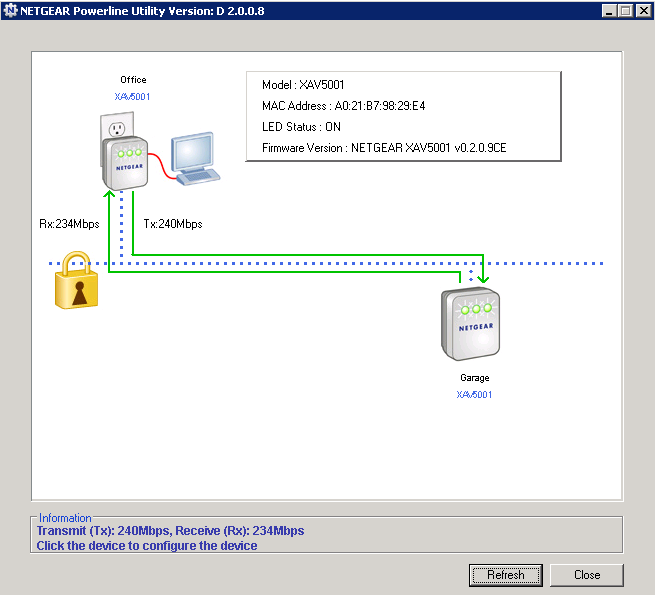 I didn’t really expect any better than this, so I’m happy with the new setup. The only shame is that I couldn’t get a triple pack of adapters (and singles seem to be hard to come by and comparatively expensive) – so for the time being the kids’ playroom is hanging off a WiFi link. They don’t seem to have noticed.
Filed under: review, technology | 2 Comments
Tags: 500, AV, ethernet, HomePlug, Netgear, powerline, XAV5001
Another Microserver
After switching to using my tablet PC as my main machine I was missing the local storage and optical drive from my desktop. The solution was to get another HP Microserver to be a sort of sidecar when I want the extra drives. As the HP cashback deal is still on this is a surprisingly cost effective approach, with the Microserver and a Sony[1] DVD-RW coming in at less than £140. As I had a 1GB stick of RAM left over from upgrading my other Microserver, and a bunch of largish hard drives from my old desktop getting it properly up to spec was achievable with no further expense.
ESXi – not this time
I had planned on putting ESXi onto this box just so that I could try it out, but I was thwarted. 2GB of RAM is supposedly the minimum, so maybe I was pushing my luck, but with the integrated video card taking 32MB it seems I was just short[2]. I abandoned VMWare in favour of a bare metal install of Windows 2008R2 (again), though this time without Hyper-V.
Video transcoding
Although the processor on the Microserver is pretty weedy I thought I’d give it a try at video transcoding with DivX Plus Converter. It worked out better than I expected, with files converting in about 1.25x real time (= 0.625 real time for 2 passes), though it was a bit of a journey getting there. At first DivX+ was saying that it couldn’t read the input files, which looked like a CODEC issue. Since I had already installed the right CODEC I suspected some of the underlying plumbing might be missing as a result of Windows Media Player not being there in Server 2008R2. Installing the Windows Server Desktop Feature fixed this.
iSCSI
The original tweet that had brought my attention to the Microserver had been about iSCSI performance, so I thought I’d give this a go. At first I couldn’t find how to set it up as a target, but eventually I found this guide, which set me on the right track. There doesn’t seem to be any way to use raw disks as targets, but using VHDs allows for some nice extra features, and doesn’t seem to harm the performance, which appears to be a clear step up from using CIFS. Once the target was set up connecting to it from the Windows 7 iSCSI initiator on my tablet was pretty easy.
Using the eSATA connector for a 6th internal drive
I had read elsewhere about people using the eSATA connector for another (2.5″) internal drive. If I’d been paying more attention I’d have noticed the warnings not to buy cheap eSATA-SATA cables from eBay, but instead to get decent quality ones. As the optical drive I got is fairly short there’s plenty of room in the case for a laptop drive. Luckily I had some spare SATA power connectors from the old desktop:
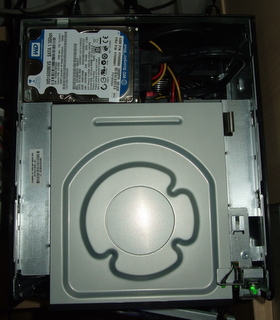
For the time being I just have an old laptop drive in there, but I may transplant an SSD at some stage.
Hibernation
As the whole point of this box is to just provide extra storage for the tablet PC I don’t want it to be always on. It turns out to be fairly easy to enable hibernation – just run an cmd window as admin and invoke ‘powercfg.exe /hibernate on’. I then set the power button to hibernate. It’s also possible for me to put the machine into hibernation from terminal server client by clicking on the task bar and hitting Alt-F4 and selecting hibernate (as hibernate isn’t available in its usual place on the Start menu).
Overall
I was super happy with my first Microserver, and this one’s just as good. I have it doing a slightly different job, but it’s working perfectly. A docked laptop plus a Microserver seems to be a great alternative to a desktop.
[1] The drive is pretty much unbranded, but shows up as an ‘Optiarc AD-5260S’ in device manager. I may regret not splashing the extra £5 for a Samsung SH-222AB – time will tell.
[2] When trying to install ESXi I managed to get an error message along the lines of ‘you only have 1.97GiB. Minimum of 1.97GiB required’ – not very helpful. I ended up playing with VMWare on my old Dell instead.
Filed under: howto, review, technology | Leave a Comment
Tags: 2008R2, codec, divx, hibernate, HP, iSCSI, Media Player, Microserver, transcoding, video, Windows
For many years I ran a desktop PC in my home office, and it was always on in order to provide various services to other machines scattered around the house. The one good thing about this arrangement was that the room was always warm in winter.
After getting my NAS and Microserver I started paying more attention to energy use, and hibernating my desktop machine whenever it wasn’t in use. This had the effect of highlighting just how noisy it was.
Around the same time I noticed that RAM and a docking station for my X201 Tablet had become affordable. I took the plunge and got an Ultrabase off eBay, and ordered 8GB or RAM to match my desktop (in order to have headroom to run some VMs on VirtualBox).
The good
- My office is now much quieter – almost eerily so – it seems I had become used to the noise as a sign that everything’s working as it should.
- My office is also much cooler. This is great given that we’re having a decent summer this year in the UK. Fingers crossed that I can find something to keep me warm when winter comes.
- I’ll be spending less on electricity (though the payback is less clear than it was when replacing the 24×7 energy hogs with the NAS and Microserver).
- If I’m in the middle of something in the office but want to join the family in the living room I can just eject the machine and carry on.
The not so good
- I’ve had a dual screen monitor setup for many years now, and I’ve always driven them with a dual DVI video card for maximum sharpness. The Ultrabase (in common with most other laptop docks[1]) doesn’t support two digital outputs, which means one slightly fuzzy screen on VGA.
- The time may have come for me to change this setup. I have long lusted after a 30″ monitor, which would give me more pixels and screen real estate than my existing dual screens, but they’re really expensive. I could probably live (comfortably) with a 27″ screen at 2560×1440, but they too are pretty expensive, or at least they where. My brother was poking fun at my rig the other day, and pointed out that he’d kitted out the new Boss Alien office with Hazro 27″ screens. I’ve since notices that the superbly specified Dell U2711 is available for less than £500. Temptation beckons (and I could potentially get myself 27″ screens for home and work for around the same as a single 30″) – though Sod’s law probably means the moment I spend my money the bottom will completely drop out of the high end IPS market and these things will be £250 in no time.
- The Ultrabase that I ordered was supposed to come with a DVD/CD-RW but in the end it didn’t. The DVD-RW that I would want to have is still more costly than I’d like, and my USB DVD[2] is fine for occasional use but annoying slow day to day (and doesn’t support burning).
- I’m also used to having lots of local storage in my desktop, and laptop drives still top out at 1TB (and the one I have installed is only 500GB). In the short term I used the old desktop when I needed a fast optical drive and big storage, but since the whole point was to rid myself of the noise and heat I’ve bought another Microserver to take that role – more on that in a later post.
- I found the interaction between sleep mode and the Ultrabase pretty flaky at first. The golden rule seems to be to ensure that the machine is active when ejecting from the docking station or putting it back in. I’ve also had to disable my keyboard and mouse from waking the machine up, as it seems to wake whether you touch them or not (it would kind of bounce awake again whenever I tried to use sleep).
- I also had some frustration with my keyboard at first. I have an ancient PS2 keyboard, but I like it a lot. The Ultrabase doesn’t have PS2 connectors, but I’d previously bought a PS2-USB converter to use with my netbook at work. What I hadn’t realised was that the \ key didn’t work, which is apparently a common problem with UK keyboards and PS2-USB converters. Luckily Belkin make a converter that works properly, and I was able to find one for a few quid on eBay.
Overall
[2] Actually an X-Box360 HD-DVD drive that I once bought at the MS Employee store. Bad choice – they lost the war against Blu-ray and the one HD-DVD in my possession is the ‘King Kong’ that came with it.
Filed under: technology | Leave a Comment
Tags: always on, cool, desktop, docking, dual, energy, green, heat, laptop, Microserver, NAS, PC, quiet, quieter, screen, sleep, tablet, Thunderbolt, Ultrabase
and we’re back
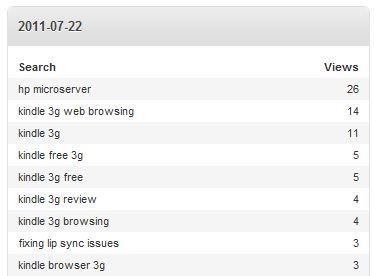
Whatever Google did on 14 Jun to make my Kindle 3G post fall off its search results seems to have been undone on 22 Jul. Despite years of playing Nethack I’m still perplexed by the randomness of it all. Maybe it’s because that long dormant post got some fresh comments?
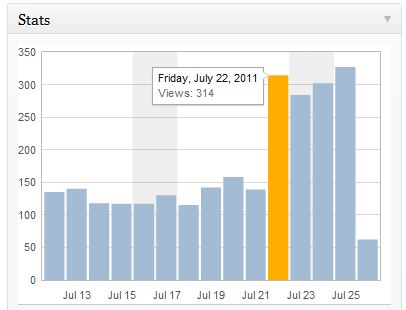 For the sake of comparison I’ll post the same charts stats summaries again..
Before summary:
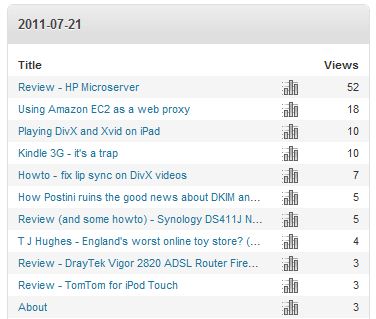 Before search:
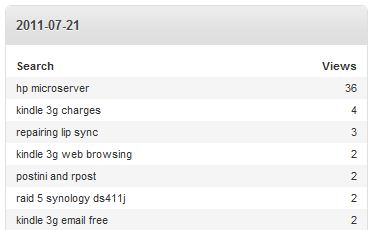 After summary:
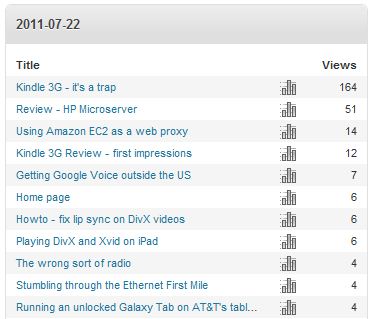 and after search:
 Or maybe I got fresh comments because the post started reappearing in search results? I’m struggling to untangle cause and effect here.
Filed under: blogging, this blog | Leave a Comment
Tags: google, popular, rankings, search, SEO, statistics, stats


 Chris Swan's Weblog