Facebook and Internet Alchemy
This is one of those started as a comment, but really deserves a full post type things…
My comment was in response to JP’s The new new telco where he posits that Facebook could be a very valuable business due to its telco like properties on a global scale. Here’s my original comment:
This is a great counterpoint piece to what I wrote yesterday about why I think Facebook is overvalued.
The thing that’s missing here is something that I call ‘Internet Alchemy’ – the process of turning somebody else’s pile of gold into your pile of nickles. In this case we see two piles of gold – one for the old telcos and another for the new telcos. My conjecture is that Facebook doesn’t get to grab these piles of gold. Internet alchemy will turn them into a pile of nickels, and so there is a lot less cash on the table. The canonical example here is Craigslist. It’s a phenomenally successful firm by any conventional metric, making $100m/yr with around 30 employees, and it has utterly destroyed a print classified business worth orders of magnitude more – Internet alchemy at work.
Of course Facebook is special, and it may yet find a way of making money that none of us have anticipated. But is it really 3.5x more special than Google? I don’t think so. People are calling this bubble 2.0 or whatever because we’re once again seeing a disconnect between cash flows and valuation with no substantive means of support.
Somehow this seemed to set the tone for much of the rest of the discussion there (which is well worth reading) as various people speculated about the size of piles of gold.
Internet alchemy

Definition (for an Internet based startup) – the process of turning somebody else’s pile of gold into your pile of nickles

I’ve been meaning to write about Internet alchemy for over a year. I made a start, but got lost along the way trying to explain why it was something more than just disintermediation.
The Facebook valuation debate has got me thinking about this again, and I think there are a number of other factors (besides disintermediation) that come to bear here, though none of them are new, and I offer no fresh insights:
- Free – people like free stuff. The Internet is full of free stuff. Some say that there’s an expectation that stuff on the Internet is free (at least at the point of consumption[1]). Books have been written on the topic. It’s hard(er) to make money out of a given user population on the Internet when the expected price is free (but you get to reach a much larger population for tiny marginal cost).
- The long tail – the Internet reaches people and places that were previously inaccessible. As the Internet gets to parts of the globe that weren’t previously connected it’s expanding into what bankers call ’emerging markets’, and what the rest of us might call ‘poor people’. There are lots of nickles and dimes to be collected from the long tail, but its very nature is that there aren’t huge piles of cash.
If we look at how the Internet is disrupting traditional businesses and markets then I think we can find examples of Internet Alchemy all over the place. It’s probably also a factor in the ‘jobless recovery‘ – new businesses are emerging that destroy old businesses, but the economic value changes dramatically in the transition.
Why does this matter for Facebook?
Any traditional business with around 600m customers would be making an infeasibly large amount of money, and clearly the $50Bn (or larger) valuation being placed on facebook suggests an expectation from their (more recent) investors that the monetisation plan will come along in due course to turn those customers into cash. My conjecture is that Facebook will be a victim of Internet alchemy, that there are no pots of gold associated with those users, only a pile of nickles. I expect that the Facebook team already know this, but at this stage they’re along for the ride as other people try to get rich off their work.
If you can see some piles of gold that Facebook might grab that you think I’ve overlooked then please let me know?
Notes
[1] Though I love the statement that ‘if you’re not paying for it; you are the product‘
Filed under: wibble | Leave a Comment
Tags: alchemy, business model, disintermediation, Facebook, free, Internet, long tail
There’s a passage on governance in Clay Shirky’s Cognitive Surplus that I really like:
‘Groups tolerate governance, which is by definition a set of restrictions, only after enough value has accumulated to make the burden worthwhile. Since that value builds up only over time, the burden of the rules has to follow, not lead.‘
It explains better than I ever could myself why we were on a path to disaster with SOA governance for enterprise IT circa 2004. The governance cart was being put before the SOA horse.
I tried to find this passage in my Google Books copy of Cognitive Surplus by searching for governance. Surprisingly it returned ‘No results found for governance‘. I then grabbed my Kindle (where I had put a note against this passage) and found a nearby word to search for – I chose ‘Strunk’. Again I got ‘No results found for strunk‘. Yet when I found the passage (the hard way) I see ‘Strunk’ highlighted on the page:
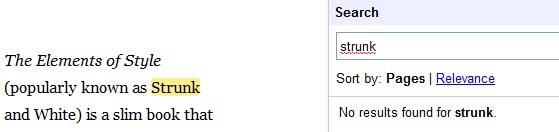
Anybody know what’s going wrong here?
Filed under: could_do_better | Leave a Comment
Tags: books, ebook, fail, google, governance, search, SOA
The wrong sort of radio
This post is about the madness of corporate web filters in the age of ubiquitous consumer devices with Internet connectivity.
I typically see three types of connectivity in any given corporate setting:
- The company network. Usually wired, but sometimes with a wireless adjunct, this network offers the same liberty as an oppressive Middle East regimes[1]. This is a network where you can’t use social networks, check your webmail or see pictures (or business charts) uploaded by others. This network has been locked down for your own protection, and for the protection of the company.
- Guest WiFi. When coffee shops started becoming a better place for business than company meeting rooms something had to be done, and guest WiFi was that something. Sadly in many cases it’s locked down with many of the same measures and policies as the corporate network[2,3] – the only real change is that ‘foreign’ devices are allowed to connect.
- Mobile networks. Increasingly these come by default with some degree of nannyistic filtering, but in my experience it’s pretty benign – you can go to the places and ports that you want to and use the services that live there.
Trying to control where radio waves go
In 1 and 2 the legal and compliance department seeks to control what happens over the radio waves, in 3 they cannot – hence the title of this post.
I was recently at an event run by a large security software and solutions vendor where they said that ‘they too were having trouble with this stuff’ (referring to executives using iPads) so they’d had to ‘turn off some of the WiFi’. So what – the executives couldn’t afford the 3G iPad?
The nonsense of inconveniencing your own people
This whole thing is nonsense. Companies can’t control what employees access on the Internet, because nobody wants to become like a top secret military installation and take everybody’s phone away from them at the gate. The reality is that employees will have iPhones and iPads and other smartphones and other tablets and netbooks with 3G cards and MiFis and Kindle 3Gs and all manner of other stuff that can get to a (mostly) unfiltered web. For sure you can make life less convenient for your own people by making too many of them share a limited pool of bandwidth[4], but if you’re worried about people wasting time on social networking or personal email then do you really want to make it slower?
Concerns
At this point it’s probably worth unpacking some of the concerns:
Security

For a very long time we’ve had corporate networks that follow a confectionery design pattern – hard on the outside, soft in the middle. The whole point of hard on the inside is to stop damage to soft in the middle. Despite the best efforts of the Jericho Forum very few organisations have done deperimiterisation (or even my preferred ‘reperimiterisation’), which leaves them stuck with a model where you can only allow approved devices, software etc. An associated concern is that browsing the seedier parts of the Internet brings with it infections that may not be spotted by anti virus software and similar defences.
Security is probably a valid reason for the behaviour we see on company networks, but doesn’t justify controls on guest/employee WiFi, and of course the security guys don’t really have any say on what happens on mobile networks.
Not Safe For Work (NSFW)

One of the initial reasons for introducing web filters was a desire by HR to block porn[5]. I don’t ever recall the epidemic of people surfing XXX rated material (and upsetting their co workers by doing so), but clearly enough people thought this was a problem and were willing to spend money on it[6].
What’s curious is that the arrival of broad(ish)band connected mobile consumer Internet devices with no filters hasn’t caused some catastrophic outbreak of inappropriate material being poked in the faces of inappropriate people. It looks like people are able to behave like mature adults after all.
Of course filters don’t always work, and I’ve seen an instance or two of objectionable spam make their way through. Somehow this is more of a problem when using Outlook (which renders images by default) rather than Gmail (which doesn’t).
The NSFW argument doesn’t hold up in my view, and HR were probably suckered into playing the paternalist in order to justify buying a bunch of kit that some IT folk wanted for other purposes.
Time is money

This is the one where employees shouldn’t be spending their valuable (company paid for) time checking their personal email and chatting to their friends on Facebook/Twitter/AIM or whatever the next flavour of the month is.
Firstly this expresses a very Victorian work ethic towards time management (that my US cousins still seem all too attached to). As we move from the industrial age to the information age we’re slowly seeing a shift from clocking in/out towards flexibility and ‘work/life balance’, but whilst we still have people around that we pay by the day (or even hour) then we will continue to fool ourselves that time is valuable rather than outcome.
I guess the quid pro quo here is that my wife hates me using my Blackberry at home just as much as most companies would hate me using Facebook at work (even if I’m using the Blackberry to check Facebook).
The information age is changing the nature of work and how it interacts with time. The productivity of ‘Knowledge workers’ can vary dramatically, with short bursts of great output set in a broader context of information gathering (and many seemingly aimless conference calls).
Secondly there’s the assumption that social interaction is somehow utterly unrelated to work. That people shouldn’t be able to ask their ‘friends’ for help.
Once again we see that employees are using this stuff anyway (at work) on their own devices, and the time that’s being ‘wasted’ isn’t hurting.
The common sense approach
What I think companies should be doing here is protecting their corporate networks where that is still necessary (and moving towards reperimiterisation around the data centre core) and offering their employees, partners, clients and other parties an otherwise unfettered path to the Internet (via unfiltered WiFi). This should simply be a question of cost and convenience where for very good infrastructure reasons mobile data costs more (and is often less convenient) than WiFi built on a wired bearer.
Why is this so hard?
Notes
[1] Hardly surprising as the companies that sell lists of stuff to be blocked have these countries as their primary customers, and business users just tag along for the ride.
[2] To stop employees from sidestepping the policies on the corporate network, and doing the stuff that they want to do on the Internet.
[3] I’ve come across some cases where companies have invited in telcos to provide WiFi. I think this is a win-win – guests (and employees) get the connectivity that they want (and more reliably than a mobile connection), the telco gets paid for an hour/day/longer subscription, and the legal and compliance people get to sleep at night knowing that they’ve passed a potential liability on to a third party. I’ve also come across some legal and compliance people (mostly in the US) who take the view that this can’t be done because liability for what happens (on the Internet) within the boundary of a company’s premises can’t be passed on. Don’t ask me what happens if you have an on site Starbucks in a leased building.
[4] Canary Wharf is an awful place for mobile devices given the poor ratio of infrastructure to people based there.
[5] I recall a frustrated network engineer one day recounting how he’d presented a business case to the executive board and they come back at him with ‘you want us to spend $5m on a better porn filter?’ – clearly there was some kind of communication issue and somebody was missing the point.
[6] One of the insane arguments here is that people surfing Internet porn at work were costing the company money (by using the precious resource of their Internet connection) and therefore it was worth spending even more on web filters to stop this from happening.
Filed under: security, technology | 5 Comments
Tags: 3G, data, filter, filtering, HR, mobile, policy, security, social, time, web, wifi
I was very pleased to see Google’s announcement yesterday about Email authentication using DKIM now available to all Google Apps domains[1,2]. DKIM is an important weapon in the war on spam, and may well be crucial to stopping email from slipping into irrelevance. Of course this may just make the spammers go after our Google Apps credentials, but we have two factor authentication (at least for GAPE/GABE) as a means to fight back.
Sadly there’s a fly in the ointment, and once again it’s with Postini:

At this point I’m pretty much ready to give up on Postini. It’s anti spam features don’t seem to me to be that much better than native Gmail/GApps. It’s confusing for my users to get a daily quarantine message from Postini and stuff in their spam folders on GApps (usually it’s bacn in both – I see very little real spam in either). The only thing that we use it for that adds any value is adding a compliance footer, but now that stops us from having DKIM.
Of course one might expect a high end product like Postini to have DKIM support in its own right. Sadly this is where Postini is too ‘enterprisey'[3].
So… compliance footers with a link to some legal boilerplate that nobody bothers to read[4], or DKIM so that our email stands a better chance of actually reaching its intended recipient? Not such a hard choice really – seems like I have some GApps domain admin work to do.
PS Google – it would be great if you could make the labs feature ‘Authentication icon for verified senders’ work for all DKIM authenticated email and not just PayPal and eBay.
[1] DKIM has been available in regular Gmail for some time.
[2] Though I’m disappointed to see that it’s not yet available for thestateofme.com (whilst I have been able to set it up for some other domains where I use Google Apps).
update 8 Jan – it turned out that I needed to turn on ‘Next Generation’ for the Control Panel in Domain Settings – General for the DKIM options to show up.
[3] Don Box – So Long, 2006 ‘The blogosphere embraced the term “enterprisey” to describe the lack of quality that previously had no name’.
[4] I know from the web logs.
Filed under: could_do_better, technology | 5 Comments
Tags: DKIM, GABE, GAPE, gapps, google, Google Apps, Postini, spam
Bubble 2.0
I had the misfortune of missing most of the first Internet bubble. Although I’d got into the Internet before there was a World Wide Web I’d signed my life away to the Royal Navy (in exchange for a great education and generous financial package). Thus I got to spend the two years it took between resigning from the Navy and escaping to the outside watching everybody else do lots of cool things (and in some cases getting rich whilst doing those cool things).
I caught the tail end of the whole thing by joining a .com consultancy firm in early 2000. I remember now clearly the moment that I realised that the Internet had become an investment bubble rather than an economic miracle. It was in the wake of the AOL Time Warner merger, and I was in the pub next door to the office discussing with my colleagues the merits of ‘clicks and mortar’ versus ‘bricks and mortar’. I’d known the web since its birth, and none of this made any sense to me.
I had a similar epiphany the other day when it was reported that Goldman Sachs is investing $450m at a $50Bn valuation. Madness.
Dion Hinchcliffe sums things up perfectly:
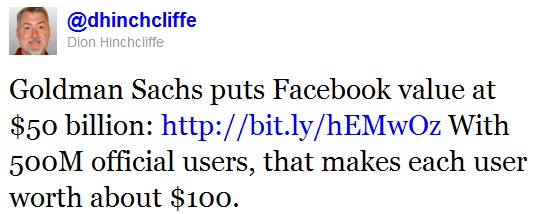
There are clearly two things wrong with this picture:
- User based valuations are relics of the web1.0 bubble, and were contrived for situations when companies weren’t actually making any money by any normal measures[1].
- How can the average Facebook user possibly have a net present value of $100 to the company?
To be fair it wasn’t really an epiphany. I’ve been short on Facebook and its ecosystem (particularly Zynga[2]) for some time now.
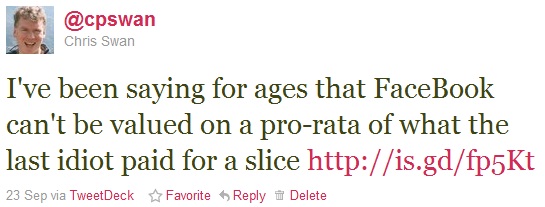
To be fair on Goldman Sachs I don’t think they’re idiots – far from it – though I do think it’s likely that they’ll flip their investment (sooner, whilst the company is still private, or later, after the long awaited IPO[3]).
The main point here is that I use these services. I know people who use these services. I even spend money on these services – just not enough to get into the same order of magnitude as $100.
The other key thing is that I like Facebook less now than I did before. For a while it felt like the school playground – a few rough edges, but fun. Now it feels like a shopping mall – all shiny, superficial and nothing that really captures my interest. Of course my friends are still there, and I can chat to them, but we could do that on Twitter or Gmail or Skype.
‘But what about advertising?’ I hear you cry. Facebook makes its money from advertising just like Google. Google is an (almost) $200Bn company, with revenues of around $28Bn. Facebook has even surpassed Google for page impressions, which is where we find the heart of the problem – Facebook is working a lot harder than Google to make a lot less money. That doesn’t make it worthless, just worth less – somewhere around $14Bn if we think Google is a reliable comparison.
The other thing to worry about is growth. Google is going through that painful transition from being a growth company to a cash cow. From a corporate structure perspective I think life will be easier at Facebook, but for the balance sheet things are less rosy. When you already have most of the world population that could use your service already using your service then that’s not a growth story. Of course the internet will continue to expand its reach, but those new users will be $1 users not $100 users.
So when will the bubble burst? I’d give it 2-3 years if the company stays private, less if an IPO happens in the next year – there’s nothing like having Wall St analysts picking over something to bring on a sudden dose of reality. Do I think an IPO would be a disaster – only for those buying the shares.
[1] Facebook is making real money- revenue of approximately $2 billion, with roughly $400 million in profit. That means it has real value. The problem is simply a disconnect between present cash flows and views on future cash flows.
[2] Who haven’t had a hit since Farmville, and where the miracle of ‘social gaming’ seems to have turned to an advertising symbiosis (deadly embrace?).
[3] One way that many of Facebook’s users could be worth substantially more than $100 each is if they can be persuaded to buy stock ;-)
Filed under: technology, wibble | 14 Comments
Tags: bubble, Facebook, google, investment, IPO, social networking, valuation, Zynga
Salt – I want my DVD player back
Seems like Sony are at it again with crazy DRM ruining their customer experience.

Here’s what happens when I put Salt into my Kiss DP-600 DVD player:
Disc spins up
Starts to play
Player crashes and switches off
When I switch the player back on:
Disc spins up
Starts to play
Player crashes and switches off
Rinse and repeat.

It took me about 15m to get the player to eject the disc by having perfect timing on pressing the eject button. During that time I did wonder if it would be easier to take it apart and physically remove the disc that way.
Luckily I have another DVD player that doesn’t switch itself off when trying to play this disc.
Filed under: grumble | 8 Comments
Tags: crash, DRM, DVD, fail, player, Salt, Sony

A week ago I ordered a Push N Go Thomas for my nephew from T J Hughes (Amazon only had the Percy version).

The site showed that they had it in stock (unlike some of the other sellers that I’d found on Google Shopping), and I was even willing to bear the somewhat steep P&P to get it in time for Christmas.
I went through the usual check out process, and received an email with an order number. Had I been more paying attention then this might have bothered me:
What happens next?
The details of your order will now be processed and a further email confirming acceptance of your order will be sent to you, usually within 3 working days.
Yesterday – 6 days after placing that order I get another email:
We regret to inform you that we are temporarily out of stock of your requested item
As we are currently unable to confirm when we are likely to receive a further replenishment of this item(s), we are therefore sadly unable to accept your order at this time.
How can it possibly take an entire working week to figure out that you don’t have something?
If T J Hughes had a functioning stock control system and web site then I’d have never bothered.
Thanks for nothing guys – a total waste of time.
I’m also not impressed with Google here. They’re showing 4 stars based on 44 seller ratings. I took the trouble to put all of the ratings into a spreadsheet and work out my own average, which turned out to be exactly 3. So what’s juicing the ranking up to 4?
Update 22 Dec – I just had a call from the customer services manager at TJ Hughes. He told me that they have managed to find a Push N Go Thomas, and that he’s getting it sent out to me. Given the state of the postal system after all the snow we’ve had neither of us expects delivery before Christmas, but still it’s a nice gesture.
Update 17 Jan – the Push N Go Thomas that was supposed to be sent to me before Christmas never arrived. After waiting for the mail to return to normal following Christmas and all the snow it became clear that there was a problem, so I contacted TJ Hughes again. Another package was sent out last week, and it was just delivered. Since I was never after a freebie I’ve donated £18.50 to Help for Heroes (which when tax is taken into account is roughly what I was expecting to pay for the toy when I ordered it).
Filed under: could_do_better, grumble | 1 Comment
Tags: cancelled, customer service, Froogle, google, online, order, product search, ranking, shopping, T J Hughes
I moved into my house over 8 years ago. The day after that move I bought a Brabantia kitchen bin – a nice big shiny stainless steel one. As I got to know more of the neighbours it soon became something of a running joke that everybody had bought the same bin.

Some years later the hinge on the lid broke. I called up customer services and they sent me a new one (of an obviously better design).
Over time that lid also broke. The catch wouldn’t work reliably, and the plastic by where it fits around the handles got cracked (by people not putting the lid back properly). Eventually I could tolerate it no more, and I looked into getting a new lid (or maybe even an entire new bin).
As luck would have it Brabantia sell their products with a 10 year guarantee. I ordered a new lid online.
Somewhat annoyingly I received an email the next day asking me to send the old lid back, but it came with detailed packing and (free)post instructions – so no major drama. I went about fashioning a temporary lid out of some cardboard that was otherwise on its way to recycling.
A little over a week later I got another email saying that the new lid was on the way. It took some extra days to arrive because of heavy snow, but my bin now looks good as new (and the lid works better than ever).
Brabantia’s product may not be the cheapest, but their stuff is well made, and when that’s backed up by a great guarantee it makes for a happy customer.
Filed under: did_do_better | 1 Comment
Tags: Brabantia, customer service, guarantee, Touch bin
I live in the UK, and I feel like I’ve been waiting for Google Voice for way too long. I also travel frequently to the US, so I could get some use out of the service as it stands and it’s been frustrating that I couldn’t sign up.

Disclaimers
Google only offers it’s Voice service within the US, and using it elsewhere probably constitutes a violation of their terms of service.[1]
When Google does get around to launching services outside of the US it’s likely that you won’t be able to use them (with a given account) if you’re already using a US number.
Signing up
You will need:
- A proxy in the US
- A US telephone number that you’re able to answer
Like so many geographically limited services Google Voice uses IP geolocation to determine whether you’re allowed to play or not. When I browsed to voice.google.com from the UK I’d see the message shown above. Using EC2 as a proxy to give me a US IP got around that problem, and I was able to start the sign up process.
To complete the sign up you need to register at least one US phone number, and verify it by entering a code. To get a (free) US number I used IPkall. Luckily I already had a VOIP/SIP service that I could point IPkall at. Initially I had some trouble – the number IPkall gave me had already been used by multiple Google Voice subscribers, but after cancelling that number I got another that did work.
There are probably other ways to do this now. Skype has just refined their SkypeToGo service so that it can connect directly to a remote extension via the Skype network (rather than using an IVR menu as before), which means it’s possible to avoid SIP and VOIP entirely and just virtually wire up existing telephones [2].
Refinements
Once I had the basic service working I spent some time integrating Google Voice with my SIP Sorcery account. There’s a great guide for this. Along the way I also got myself a SIPgate number in the US. This involved some more proxy based hoop jumping (and a friend with a US mobile), but gives me confidence that I have a backup to IPkall if it becomes flaky.
I also configured SIP Sorcery so that incoming calls from Google Voice would be routed to my mobile and desk phones (by making use of Ribbit).
Next steps
I still need to get my US mobile registered, and since my PAYG T-Mobile doesn’t offer international roaming I’m going to have to wait until my next trip to get that sorted.
Numbers
After going through this process I now have a ridiculous quantity of telephone numbers – 11 in total. The good news is that I only need to give two out to people that want to contact me – my UK number (which is attached to Skype, and normally forwards into my Ribbit UK service) and my Google Voice US number (which through SIP Sorcery meshes into my existing handsets, desk phones and services).
Conclusion
Whilst I hope that Google Voice will soon launch in the UK and other countries there’s definitely some use that can be had out of it now for people that do business in the US and/or travel there frequently. It would be brilliant if Google Voice could replace the rats nest of Skype, SIP sorcery, IPkall, SIPgate and Ribbit that I’m presently using and let me have the entry points (numbers) that I need flexibly routed to the end points (handsets) that I have, but I won’t hold my breath on that – especially where multiple countries and billing/regulatory structures are involved.
Notes
[1] Though I should point out here that people who sign up for the service in the US aren’t prevented from using it when they travel, so to that extent the service is as global as the Internet it runs on.
[2] To use this method you just need to enter your Google Voice number as a registered phone. It’s also necessary to set Caller ID (incoming) to ‘Display my Google Voice number’ otherwise Skype won’t be able to authenticate the call origin.
Filed under: howto, technology | 1 Comment
Tags: google, google voice, IPkall, sip, SIP sorcery, SIPgate, skype, SkypeIn, SkypeToGo, UK, US, Voice, voip
Shortly before digging into the copy of Cognitive Surplus I bought on Google ebooks the other day I read this piece comparing the relative merits of Google, Amazon and Apple’s offerings. One of the areas of the store/reading experience it didn’t touch on was gifting. Since getting my Kindle I don’t really want any more dead tree books, so I converted all of my Amazon wish list items over to Kindle format where available (as there wasn’t any proper DRM free option). Sadly gifting isn’t yet available on Amazon.co.uk, so I see this:
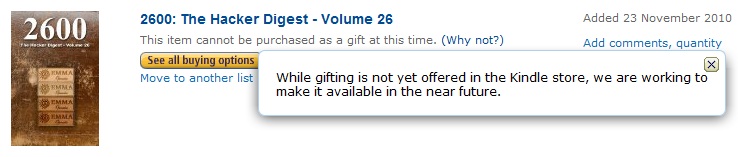
Notice how the ‘why not’ explanation doesn’t really provide any further information?
I’m hopeful that it will be fixed soon (though looks like not in time for Christmas), as gifting is now available in the US:

Whilst I would expect that Google will quickly catch up with this, I have my doubts. It seems that publishers are still trying to maintain a geographic sales model that doesn’t shape up well on a global internet[1]. One of the hurdles being put in the way of buyers is the need to pay from the same geography as the sale. That hurdle works fine when somebody is buying for themselves, but gets smashed when you allow people to buy stuff for each other (even indirectly through gift cards or similar).
Google has been very slow in this area. Google Voice is still stuck in the US, a situation that’s sure to be in part due to tax and payments issues. There’s also no gift card mechanism for Google Checkout (besides the fact that they accept gift cards from the payments card companies). Perhaps until now the gift of Google wasn’t that alluring – who would want a Google Apps subscription for their birthday? The Android marketplace, Chrome marketplace and Google Books surely change that though. The trouble for Google will be how do they keep upstream relationships with the ‘content’ industry in good shape whilst providing what customers want?
[1] Charles Stross has already done an excellent job of explaining Territories, Translations, and Foreign Rights in his Common Misconceptions About Publishing series, so I don’t have to.
Filed under: could_do_better, technology, wibble | Leave a Comment
Tags: amazon, apple, content, DRM, ebook, geography, gift card, gifting, google, Google checkout, iBook, payments, publishing


 Chris Swan's Weblog