Social Documents
Document management sucks! There – I said it. I challenge you to prove me wrong.
I haven’t yet found a document management system (DMS) that’s fit for purpose, and I think I know why.
It’s not about the technology. Documentum might hark from the client server era, and Alfresco trumps that with its SOA, but these are implementation details that matter not to the user.
Paper is two dimensional
It’s about the metaphor. Specifically the dimensionality of the metaphor. Pieces of paper are 2D, and so are document management systems. This makes sense in the physical world. I can only put my piece of paper in one place, which I might call a file or a folder or whatever. Computer file systems copy this metaphor, and document management systems copy it again – they just call a folder a workspace to make it sound more collaborative.

The real world is multidimensional
And we have IT abstractions that can be too. When I write an engagement letter to a client I shouldn’t be forced to ‘file’ it in a ‘folder’ called ‘engagement letter’ or ‘clientX’. I should be able to give it multiple attributes (tags), and virtual ‘folders’ can be assembled from those attributes. Thus if I want to see a library of engagement letters I select that tag, if I want to see all of the stuff relating to clientX I choose their tag.

‘Oh’, I hear you cry, ‘tagging takes effort, and people will forget’. That’s a real problem, but I think it’s solvable. We stopped trying to categorise everything into some massive (2D) taxonomy a long time ago, and decided that search would fill the gap. Search is good when it works, but it can be disorderly – hence the glib one liner ‘why are you searching when you should be finding’. The right way to do this is to make search part of the process at the front end rather than the back end. Clippy returns – ‘it looks like you’re saving an engagement letter to clientX – shall I tag that “engagement letter” and “clientX” for you?’.
The Social Aspect
We’ve seen great usage of tags already in social bookmarking sites like del.icio.us, so why not bolt on that functionality to document management (after all a ‘web page’ and a ‘document’ are essentially variations of the same thing). This raises the question of whose tags – my tag, your tag, the company tag. But who cares – this is what educated suggestions can help with, particularly when search can identify similarities with other documents. As JP wrote earlier in the week, Social Objects are important, sadly I fear that document management systems are anti-social. A DMS may provide a ‘shared space’ for a document as a social object, but it fails to provide rich support for the other activities that should be taking place. Yes, there’s metadata in a DMS, but not typically the sort of open and collaborative metadata that JP is referring to. This is where I can get excited some more about initiatives like Open Bookmarks (which is best described here). Not only does this potentially solve the state synchronisation issues I was concerned about last month, but it provides the perfect platform for social interactions around documents – a means to provide curation.
Security
This is an area that can’t be ignored. As soon as you get into a conversation about accessing documents you’re quickly into a conversation about preventing access to documents. I think this isn’t as hard a problem as people make out. Identity Management practices can be applied equally to people and the documents they interact with. People have attributes (like ‘Director’ and ‘works in HR’ and ‘based in ‘Switzerland’) and these can be synthesised into abstract roles (like ‘Swiss HR Directors’). Documents also have attributes (tags) that can be used to provide not just logical views as discussed above, but logical groupings for the purpose of security policies (for example all documents relating to ClientX can only be seen by the ClientX project team, except NDAs and engagement letters, which are also visible by legal). The policy here provides a mapping between document views and people roles, and should be fairly self explanatory (and easy to audit).
Now can somebody please build this for me?
PS This is yet another reason why we shouldn’t have software patents. Firstly this whole thing is obvious (at least to me), and secondly Xerox have this, but in their usual style appear to have done precious little with it. All that’s achieved here is blocking a startup from implementing (or robbing them blind later for ‘infringement’).
Filed under: e2.0, security | 4 Comments
Tags: annotation, attribute, bookmark, dms, document, document management system, DRM, e2.0, enterprise 2.0, file, folder, role, search, security, social, social object, tag, tagging, tags
I often find myself having to rename a bunch of media files. This would be easy if it was just a matter of finding ‘foo’ and replacing ‘bar’. Sadly though I regularly have a list of numbered ‘foo’s that I want to be a different numbered ‘bar’s (e.g. foo_04 -> bar_01, foo_05 -> bar_02).
Normally I just suck this up and deal with the problem by hand, but as I’ve been trying to learn Python I thought I’d dust off my text editor and knock up a little script.
Here’s the result – incdec.py:
"""
Author: Chris Swan
Date:   5 Oct 2010
Updated with suggestions from Tim Swan: 6 Oct 2010

with thanks to Matt Weber (http://www.mattweber.org/2007/03/04/python-script-renamepy/)

Increment or decrement file names
"""

import os
import sys
from optparse import OptionParser

def ProcessFiles(options):

    # Set the offset to increment or decrement
    if options.inc:
        offset=options.offset
    else:
        offset=0-options.offset

    # Get directory to work on
    if options.directory:
        path = options.directory[0]
    else:
        path = os.getcwd()

    # Create a list of files in the directory
    fileList = os.listdir(path)

    # Reverse the list so that we don't get file name collisions
    if offset > 0:
        fileList.reverse()

    # Iterate across the list of files
    for file in fileList:

        # Get filename and the extension
        name, ext = os.path.splitext(file)
        oldname = os.path.join( path, name+ext )

        # Replace - first step
        if options.replace:
            for vals in options.replace:
                name = name.replace(vals[0], "*")
                replace = vals[1]

        # Extract digits from filename
        ndigits = ''.join([letter for letter in name if letter.isdigit()])
        # and the residual letters
        nletters = ''.join([letter for letter in name if not letter.isdigit()])

        # Process the inc/dec
        if ndigits != '':
            #Decrement the digits
            newdigits = str(int(ndigits)+offset)
            # and replace any zeros that may have been stripped by the int operation
            zeropad=len(ndigits)-len(newdigits)
            while zeropad>0:
                newdigits = "0"+newdigits
                zeropad=zeropad-1
        else:
            newdigits=""

        # Replace - second step
        if options.replace:
            nletters = nletters.replace("*", replace)

        # Create the new name
        newname = os.path.join( path , nletters + newdigits + ext )
        try:
            # Check for verbose output
            if options.verbose:
                print(oldname + " -> " + newname)
            # Rename the file
            os.rename(oldname, newname)
        except (OSError):
            print >>sys.stderr, ("Error renaming "+file+" to "+newname)

if __name__ == "__main__":
    """
    Parses command line and renames the files passed in
    """
    # Create the options we want to parse
    usage = "usage: %prog [options]"
    optParser = OptionParser(usage=usage)
    optParser.add_option("-v", "--verbose", action="store_true", dest="verbose", default=False, help="Use verbose output")
    optParser.add_option("-i", "--inc", action="store_true", dest="inc", default=False, help="Increment")
    optParser.add_option("-o", "--offset", type="int", dest="offset", default="1", help="Offset number")
    optParser.add_option("-d", "--dir", action="append", type="string", nargs=1, dest="directory", help="Directory to work on if not PWD")
    optParser.add_option("-r", "--replace", action="append", type="string", nargs=2, dest="replace", help="Replaces OLDVAL with NEWVAL in the filename", metavar="OLDVAL NEWVAL")
    (options, args) = optParser.parse_args()

    # Process files
    ProcessFiles(options)

    # exit successful
    sys.exit(0)
It runs in Python 3 (tested with 3.1.2). By default it will decrement the number on a filename by 1 in the present working directory. There are a bunch of options:
- -i will increment numbers rather than decrement
- -o will allow an offset other than 1
- -d allows a directory other than the present working directory to be used
- -r allows a text search/replace on the filename (I’ve been careful to allow this to contain numbers on both parts and not get in the way of the renumbering process)
- -v gives verbose output
Use at your own peril.
Please be gentle in the comments – this is my first real Python program.
Update 6 Oct – I modified some of the code in light of Tim’s comments below (particularly to deal with directory delimiters on different OSes). I also spotted an issue with how I’d handled replace. My original effort will be maintained here for posterity.
Filed under: code, media, software | 7 Comments
Tags: code, decrement, files, increment, media, python, rename, renumber, script, source
Despite knowing that ‘free 3G’ is a trap I still ordered a Kindle 3G. There was nobody home when the postman came yesterday, so I had to pick it up from the depot this morning before rushing for my train (depot opens at 0800, train leaves at 0803, I just made it).
This isn’t intended to be a comprehensive review, but there are plenty of those out there already. Here, some first impressions after less than a days use:

I like
- That I didn’t need to charge it for 12 hours or anything silly like that. It works straight out of the box.
- The screen – which really does need to be seen to be believed.
- The size and weight. Small enough to hold and use in one hand, but not so small that it compromises the screen size.
- That all of my O’Reilly DRM free eBooks work so well; and the Cory Doctorow stuff.
- The hidden games (shift alt M).
I don’t like
- Having to use the Sym button and sub menu to put in numbers. Why doesn’t the guide just tell you that alt+top row gives you 1-0?
- That the AudioBook player can’t sync with my iPod (but I saw that one coming). Worse still it only offers +/- chapter or +/- 30s for navigation. That’s going to be VERY annoying if I listen to half a chapter on something else.
- It sometimes seems to lock up if I press the back page button repeatedly.
- That I can’t eject it when connected by USB to my Windows 7 Tablet, so it can’t be charged and used at the same time (apparently this isn’t a problem with XP machines). Update 1 Oct The Kindle can be charged and used at the same time if you eject the removable drive from Windows Explorer rather than ejecting the device from Safely Remove Hardware and Eject Devices.
The browser
I expected it to be rubbish, and I’ve not been disappointed. It will certainly do for emergency email checking and maps, but I’m not sure that I want to use Google Reader on it for much time. I’ve heard from one happy yachtsman who likes it for weather reports, lets hope that the ‘free 3G’ holds out a little longer for him (or that at least roaming data isn’t too pricey when the dark day comes).
I’ve not tried yet
- Reading a PDF
- Buying an ebook from the Kindle store.
Conclusion
So far I’m pretty happy that I bought it. More to follow later once I’ve put a few miles on the clock.
Filed under: review | 16 Comments
Tags: 3G, amazon, ebook, kindle, reader, review
Identity Providers – Facebook
This is my third post in a series looking at how federated identity has becoming a reality (I first looked at Twitter, and then Google).
Before we get started
I kind of liked Facebook in the early days that I used it, but frankly I never expected it to last. I thought that like the social networks before it (MySpace anyone) it would bud, flower and die. In my view we’re now way past the point when it should have died, but the alternative just hasn’t appeared on the scene. For me the madness peaked with FarmVille, and since then I’ve repeatedly considered FaceBook suicide; especially as each new abuse of privacy has materialised. So… I’m not a fan, but still a (grudging) user of the ecosystem. Consider me a hostile witness.
The user experience
Much like Google an Twitter the initial contact with the user is a sign in with Facebook button. Assuming that they’re already signed into Facebook in another tab on their browser this should get them straight in[1].

The next bit is where it all usually goes wrong for me (and I either use another identity system, choose the username/password option or give up entirely). This is where the site that you’re connecting to tells you what it’s going to do with/to your Facebook account:
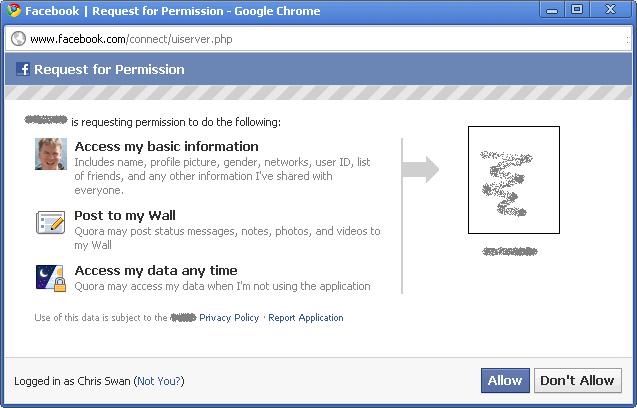
So some app that I’ve never used before wants to access a whole bunch of my data (at any time), and post as me, just so that I don’t have to remember another password. Not a fair trade. I’ve written about similar issues with the Google Apps Marketplace, but there’s a desperate need here for finer grained control.
Maintenance
You can review the apps using your Facebook ID by going to Account > Application Settings.
Under the hood
The original Facebook Connect has become deprecated in favour of OAuth, but developers still need to interact with the proprietary Graph API rather than something more open/standard such as OpenID. This recent Hacker News thread explores the pros and cons of this in some detail[2].
Persona
People are only supposed to have one Facebook account, and I’ve heard the Facebook team talk through the processes that they use to seek and destroy alternate personae. So Facebook doesn’t just not support persona – it actively discourages it. There’s no strong authentication either.
Overall
I’m not a fan, but I can see how people can get sucked into using it. It’s good in terms of not having to remember another set of credentials, but it’s bad in terms of all the (potentially) bad things that Facebook and its partners are doing with personal data. Hopefully it doesn’t discredit the whole concept of federated ID for consumers[3].
Next instalment… the rest.
Footnotes
[1] I mostly consume Facebook via Tweetdeck these days, and I must say that I find it very annoying to have to sign into Facebook just to read links that my friends have posted as I typically don’t have a Facebook tab open in Chrome.
[2] I was particularly amused by the suggestion that users might be obliged to pay a cash fee to register if they weren’t engaging in the ‘social contract’ implied by using Facebook.
[3] It seems to be popular, but still behind Google – Google Winning Sign-In War, But Facebook Close Behind.
Filed under: identity | Leave a Comment
Tags: Facebook, Facebook connect, federated, federation, Graph API, oauth, OpenID, persona, single sign on, SSO
When I registered thestateofme.com some years back it was for a project to allow synchronisation of RSS aggregator/reader state across a number of systems. I never wrote any code because things got overtaken by events. Firstly I discovered RSS Bandit, which had a mechanism to sync state via a WebDAV server (and a number of other means). Then along came Google Reader. At first it kind of sucked, and I kept on using RSS Bandit, but a year or so later I switched to Google Reader and I’ve never looked back.
But now state synchronisation is once again looming as a problem. I want to read ebooks, listen to audiobooks and watch videos on a range of devices, and I want to be able to pick up where I left off – regardless of which device I last used.
Despite knowing that ‘it’s a trap‘ I ordered a Kindle 3G a few days back, which should be delivered by the end of the month. I’ve accumulated so many O’Reilly ebooks recently that I reckoned it was worth having a dedicated device for them. But what if I get going on a novel using it, and then decide I’d like to read a few pages on my iPod touch, or my Tablet PC, or the Android phone I’ve yet to buy?
I recently got a bunch of audiobooks from Audible via a free promotion from a UK newspaper. I’d never tried the format before, but I kind of like it – I listened to a few chapters of Matter on the way to/from a reunion event at the weekend. The Kindle should pay those books too, so how do I start from the right place without laboriously writing down the chapter and time stamp?
I should also take this opportunity to moan about Windows Media Player’s lack of a ‘resume’ function. I like to watch videos on way train ride home, but I don’t always get to complete a whole episode. If I pause an episode then I can pick up again – provided that the machine hasn’t been restarted (which happens all too often with Windows). It’s also feasible that I’d start watching a video on my laptop, and want to finish it on a media player at home, or an iPod or whatever.
The answer to all of these questions is a bookmark service in the sky.
Of course it’s never that simple. People need to agree on APIs and data formats, but it’s also not rocket science. Just to make things a little more tricky though I’d like something that isn’t trapped inside a proprietary content/player silo.
Anybody out there interested in giving this a push forward?
Filed under: cloud, could_do_better, media, technology | 7 Comments
Tags: audiobook, bookmark, cloud, ebook, media, player, reader, state, sync, synchronisation, video
Identity Providers – Google
This is my second post in a series looking at how federated identity has becoming a reality (I first looked at Twitter).
The user experience
The basic premise of federated identity is first you sign into something that you use a lot, and then the platform reuses that sign in to get you into other applications. Outside of the enterprise where people sign into their machines using Active Directory then by far the best place to start is email as that’s typically the app that’s opened first and used the most. Whenever I open my first browser after restarting a machine I open three tabs: Gmail, Google Reader and Google Apps mail for my company domain. In this case Gmail gives me a token to access all of the apps that are federated with my consumer persona, and GApps gives me a token for all of the apps that are federated with my work persona. When I start those other apps I might see some info in the browser saying that it’s redirecting briefly to Google, but I don’t see a sign in page, I get taken straight there.
First time
The first time you visit a site that supports Google sign in you’ll see something like this:
and then you get asked to confirm:
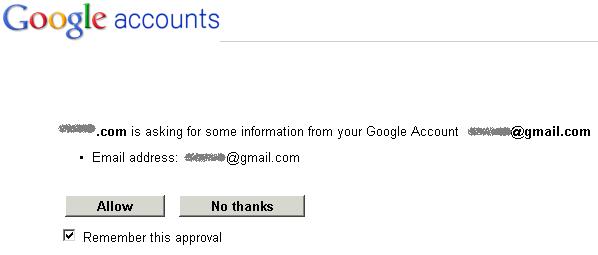
and after that things should be pretty seamless
Maintenance
You can review the applications using your Google ID by going into the My Account page and clicking on Change Authorized Web Sites [1]
Under the hood
There are two principle mechanisms at work:
1. OpenID for authentication
OpenID has been much maligned and is perceived to have many weaknesses. I would argue however that it isn’t a fundamentally weak protocol, and improvements have been made over time. I remember a few years back being stared at by a room full of identity geeks when I was the only one that said that I’d like the big company that was hosting us to support OpenID – oh how things have changed.
2. OAuth for authorisation
Sometimes authentication is enough in its own right, but there are many times when an associated authorisation is needed (e.g. to connect to contacts or calendar data). This is where OAuth comes in, and Google have been one of the driving forces behind the standard [2].
What about SAML?
The Google identity ecosystem, which has become the heart of Google Apps Marketplace is pretty much built on the ‘O’ protocols OpenID and OAuth, but there is a place for SAML. Basically it can be used to extend a Google based federation back into an enterprise – so first the user signs into their active directory or whatever [3] and then they get a Google issued token to sign into other apps. There’s a great diagram to illustrate how this works (thanks to Eric Sachs for pulling this together in the first place, and bringing it to my attention).
Persona
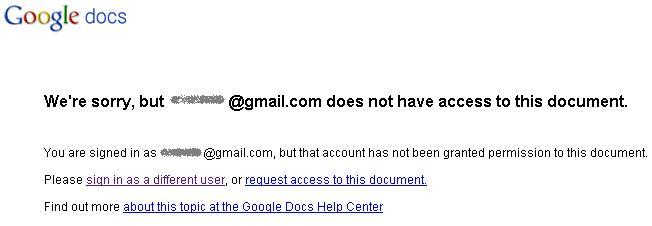
I already touched on the work/home persona piece above. Google certainly supports multiple personae, but there is trouble in paradise. A year ago I could be signed into multiple Google Apps domains, and my Gmail and everything behaved itself in isolation. These days I far too often see something like this:
and this:
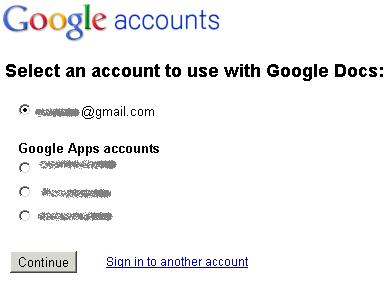
and far too often when I select an account it still fails to get me to the right document. This can be worked around by using another browser (or ‘porn mode’), but it’s pretty aggrevating.
Google have tried to fix this with multiple sign-on, but this seems to do more harm than good. I for one don’t feel that offline mail is a sacrifice worth making.
The key issue seems to be that Google haven’t figured out an elegant means to determine an anchor identity against which multiple personae (more than 3 please) can be attached. For what it’s worth I’d argue that this should be put in the hands of the user – if they have multiple Google personae then let them decide which is the parent account (the one that they sign into first) and which are the children. Of course this can get complicated when work life (and work security policies) encroach onto ‘home’ computers and devices, which brings us on to…
Strong authentication
Had I written this a day or two ago as planned then I’d be spouting about Tricipher (and how wise VMWare were to buy them) and Verisign VIP (and how it also works with eBay/Paypal).
That all changed yesterday when Google launched their own two factor authentication.
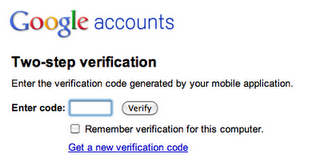
I’ve been using it for a day now with the BlackBerry application, so some early thoughts on the system:
- It’s a shame that I couldn’t use an existing OATH token like the VIP soft token that was already on my BlackBerry [4].
- The access codes mechanism for applications and devices that can’t live with two factors is ultimately a security by obscurity mechanism for single factor by the back door, but I accept that it’s a necessary evil (I’ve already had to generate 6 codes). It would be helpful if I could impose additional controls (e.g. source IP) for certain access codes, but this is going to be impractical for mobile – bring on SIM/TPM based keys.
- Strike codes are a good catch all for when people lose their token generator, but I fear that much better education will be needed to prevent disasters here. At least there isn’t a weak workaround (like there is with the eBay/Paypal VIP usage when you say you lost/misplaced your token).
- User choice is all well and good for private accounts, but company administrators want control. I don’t want to say to my team ‘you can use 2 factor if you feel like it, it’s more secure but a bit less convenient’, I want to say ‘our corporate data is the life blood of the company, and we need to keep it as secure as possible – you will now need to use 2 factor’. I also want to have the tools to help my users out when they have trouble with 2 factor, like the ability for domain admins to (re)generate strike lists. It feels to me like Google have developed this for Gmail, but soft launched it to GApps Premier Edition.
- I seem to be being prompted for my password (not my OTP) more often than I was before I turned two factor on. This is making things like Postini a bit more clumsy to use[5], and providing a lumpy user experience. I’m guessing that some parameters have been tightened up, but it would be good to have control over this (and for the user experience to be a bit more evened out).
Overall
It mostly works most of the time, which is certainly better than the alternative of having dozens of passwords to wrangle. There is however clearly room for improvement, especially around the new two factor support and persona. Two factor is good, but it’s also a bit of a pain, so I want to be able to use it as infrequently as possible. For that to happen Google really needs to nail down this thing I’ve termed the ‘anchor account’, and provide a means to spawn various personae off from that.
Next instalment… Facebook.
Updates
Update 1 (19 Jun 2012) – Google have now enabled GApps administrators to force 2 factor authentication.
Footnotes
[1] for Google Apps for domains you need to got to https://www.google.com/a/yourdomain/ManageAccount to do this stuff.
[2] There’s some excellent documentation of OAuth here.
[3] It is invariably AD, though the sign in can be using whatever mechanism the enterprise chooses – password, smartcard, OTP etc. Sadly there isn’t a good way of seeing how strong the initial authentication was and passing that through to an eventual relying party.
[4] Sorry Joe, but it seems you’re out of luck – though there is a glimmer of hope from within the Googleplex. C’mon guys – tell us how it’s done?
[5] I got an error message about cookies, when what it really wanted me to do was sign in (again).
Filed under: identity | 5 Comments
Tags: federated, federation, gapps, gmail, google, identity, OATH, oauth, OpenID, persona, single sign on, SSO, two factor
iOS 4 on iPod Touch 2G
I heard quite a few friends whining that iOS 4 wasn’t a good ‘upgrade’ on their iPhone 3G(S)s, with many reverting back to versions of 3.x that were considered faster or more stable. I was therefore somewhat sceptical about upgrading my iPod Touch 2G, and would have left it be if it wasn’t for so many apps demanding 4.x.[1]

After digging around the web, and asking around on Twitter I couldn’t find anybody that would say whether this would go well or badly. Eventually I caved in and went for it with 4.02. The process began with an obligatory upgrade to iTunes 10. For some lucky reason I didn’t need to turn off Ping, it was off by default – yay. The backup/upgrade/restore cycle took ages (most of a day).
No harm done – that would be my first impression.
Oh – and there’s an ‘airplane mode’ slider now in settings.
4.02 to 4.1 didn’t take so long – around half an hour. I’ll report back here if I find anything worthy of comment.
Bottom line – iOS 4 on the iPod Touch – probably necessary for new apps (and upgrades to old apps) that insist on 4.x, but otherwise Meh!
[1] This would seem to mark the end of the road for my old iPod Touch 1G. It will still fill my kitchen with music, but the apps world has left it behind
Filed under: technology | Leave a Comment
Tags: 2G, 4.x, iOS, ipod, iPod Touch, Touch
Identity Providers – Twitter
Federated identity seems to have sneaked up on us. A couple of years back federated identity was some huge enterprisey thing that was costly and took time to implement. Then a bunch of service providers started to be identity providers, but there were no relying parties making the whole effort somewhat useless. Now it seems that the relying parties have come. I’m going to start by taking a look at Twitter, and the sites that use it.
The user experience
I for one am sick of having to create a new account for every website I want to interact with, so it’s great when I can just click a button instead:

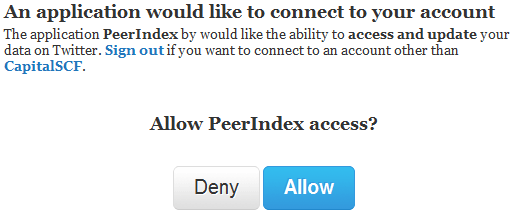
On first use there’s a splash screen asking if it’s OK for the web site (relying party) to interact with Twitter (identity provider) on behalf of that user, and that’s it, we’re done. Provided that you’re signed into Twitter using a browser you can get straight into the site in future.
We are what we Tweet
Using a Twitter identity to sign in to Twitter related sites makes perfect sense. There’s just no reason why users of that type of site wouldn’t already have a Twitter account to reuse, so for things like PeerIndex it’s perfect.
There is of course the anti-pattern of firstly getting people to sign in with Twitter, and then asking them to provide a password (for a presumably standalone account) – PlanCa.st – I’m looking at you (this is one user that you lost to identity management failure).
For sites that don’t revolve around Twitter it’s still nice to have the option not to create a new identity, and of course Twitter can sit alongside of other providers when that makes sense.
Persona
Having multiple Twitter identities seems to be something that’s broadly accepted. Certainly tools like TweetDeck make it easy to maintain several personae. Things get a bit tricky in the browser though, as you can only be signed into one identity per browser; though this is where ‘porn mode’ can come to the rescue by providing a cookie sandbox [1].
Overall
I’m glad to see that an ecosystem of relying parties has sprouted up around Twitter. It’s convenient, and it makes sense. I know that it aggregates some risk into my Twitter account, but I still feel that’s better than trying to manage a separate username and password for every web site.
Next instalment… Google.
Update 21 Sep 2010 – you can review the apps connected to your Twitter account in the settings/connections page
[1] Some experimentation with incognito windows on Chrome seems to indicate that you get a single cookie sandbox away from the main Chrome instance, so you can’t just open up fresh windows for each identity :(
Filed under: identity | Leave a Comment
Tags: federated, federation, identity, oauth, OpenID, PeerIndex, persona, PlanCa.st, twitter
It used to be that I could sling the kids bikes into the boot of the family car, and strap mine and my wife’s onto a cheap two bike carrier on the boot. Life isn’t that simple any more. Now that the kids have their own little mountain bikes they don’t fit into the boot any more, so I needed something that could manage 4 bikes, which turns out to be less straightforward than I hoped. A bit of research let me to two options:
Option 1 – Roof rack mounted
This was never my favoured approach. For some reason I keep getting visions of driving under a low bridge (and with many cycle tracks on disused railways there’s a lot of these about) and hearing and awful clattering noise. When I totted up the cost of rails, bars and bike holders it was far too much, and I was also put off by the fact that most of the packages seemed to be only for two bikes (though I’m pretty sure four would fit).

Option 2 – Tow hitch mounted
If you want more than two bikes on the back of your car then it seems to be obligatory to get a tow hitch. A friend of a friend showed me a neat setup with a detachable tow hitch and a Thule carrier that went onto the tow ball, but ‘detachable’ seems to add around £130 to the cost so I went down the cheaper route. A ‘flange’ tow bar from Towequipe [1] set me back £85, and then the Thule 9705 carrier was a further £65. The carrier comes with a plate that bolts on to the towbar (hence the name ‘BoltOn’), and then clips into that plate [2]. It’s a simple but effective arrangement.

Garage tidy
My favourite thing about the 9705 is that you can but extra mounting plates (part no 958). I’ve got no intention of putting the bikes on my little car (what’s the point of four bikes on a car that only holds two people?), but I thought it would be useful to put one on the wall in the garage. This turned out to be a great move. Not only do I have a place to store the carrier, but I can also sling a few of the extraneous bikes onto it so that the garage is less of a mess than it might otherwise be.
Conclusion
I’ve yet to try the carrier in anger. I’ve had a dry run, putting it onto the car and putting the bikes on, but the British summer weather has so far prevented a proper trial. I wouldn’t be surprised if it alters the handling of the car a little with so much extra weight so far behind the back wheels, but that shouldn’t be a surprise. With the caveat that it hasn’t yet had the ultimate test I’m very happy with my new carrier, especially when I go into my tidier garage.
Notes
[1] For some peculiar reason the version for my car at this price was only available on their eBay store.
[2] One of the clips didn’t seem to align properly. On further inspection it seemed that the holes weren’t quite true. Rather than go through the hassle of returns I did a bit of reaming with an 8mm HSS drill bit and all is now as it should be.
Filed under: review | 1 Comment
Tags: 9705, bike, bolt on, BoltOn, carrier, Thule, towbar
3D (in)Secure
It’s not news that the 3D Secure system that gets branded as ‘Verified by Visa’ is a steaming pile of something that should be scraped off shoes rather than presented on screens. Ben Laurie was the first serious voice of dissent (that I noticed), but then along came Ross Anderson and Steven Murdoch to ensure that we were left in no doubt – how online card security fails [paper].

There is however an insidious problem that none of these worthy security researchers seem to have noticed, which is that the system doesn’t deal with additional cards.
It’s common practice for couples to have joint bank accounts, but there’s not really such a thing as a joint credit card. With credit cards there’s an individual card hold, and there can be additional cards. My wife has a number of these additional cards that she considers to be joint, but they aren’t (even if they’re paid from our joint account) – I’m the cardholder. This is where 3D Secure breaks down (again), as purchases made with additional cards (e.g. my wife) lead to a request for authentication by the cardholder (i.e. me). If I’m not there to type in my password then she can’t buy stuff online, which is kind of inconvenient.
Of course I’m sure that many couples just share their 3D Secure password, this is after all what the banks tell them to do, sadly it’s also directly in contravention of the terms and conditions:
FAQ ‘Only the primary cardholder can enrol with xxx Secure. All other additional cardholders on the same account should use the same login and password as established by the primary cardholder.’
Ts&Cs – ‘You are responsible for keeping your password and username secret. You must not write down, store (whether encrypted or otherwise) on your computer or mobile phone handset or let anyone else know your password or username, and the fact that they are for use with this service.’
I’m sure that the banks don’t care much about this obvious conflict. As Ross and Steven point out the whole purpose of the scheme is to pass liability to the customer, and of course that customer becomes more liable the moment that they break the Ts&Cs (even if the FAQ tells them to).
Clearly whoever contrived the system (as it would be foolish to say that it was designed) forgot to have a conversation with a business analyst about additional cardholders.
Filed under: could_do_better, security | 2 Comments
Tags: 3D Secure, additional cardholder, cardholder not present, CNP, credit, credit card, joint account, liability, payments, phishing, security, Verified by Visa


 Chris Swan's Weblog