Yesterday I wrote about how Google Wallet is even worse than PayPal. A quick reminder:
- When I buy stuff on PayPal I don’t have to pretend to have a billing address in a different country. They’re quite happy for me to use my UK issued card for payments to US suppliers.
- I don’t recall ever having a PayPal transaction cause an issue with Amex.
- The PayPal resolution process only required me to submit one form of ID.
- The PayPal resolution process completed same day.
- I’m not dependent on PayPal for Google services (like renewing Google Apps domains or buying apps or content on my Android phone/tablet).
The saga continues…. The good news is that it didn’t take 3-5 days to get a response. The bad news is that they’ve rejected my proof of ID as being inadequate.
They asked for a scan of my credit card statement with the first 12 numbers blanked out:
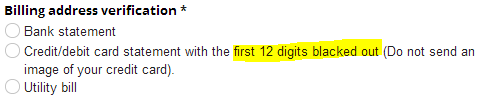
This I did. As it’s an Amex card, which has 15 digits, this left 3 digits showing.
Now they email saying that they want the last 4 numbers visible.
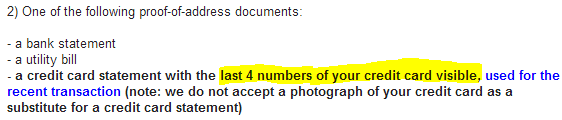
Make you minds up guys. If you don’t give me clear resolution instructions, then your response makes you look like dicks.
For extra irony I should point out that my full credit card number without any digits blacked out was at the bottom of the scan – where’s the harm – they have the whole number anyway.
There’s another possible twist here… As I used a supplementary card for the recent transaction I can’t possibly send a statement with that number. It just doesn’t exist – the statements only carry the number of the main card. (I’ve written before on the topic of additional cardholders being a weeping sore in the security model for online payments).
I’ll try a utility bill.
Congratulations Google – you’re the topic for my 300th blog post.
PS I should have added to my post yesterday that when I bought an iPad online from the US Apple Store and had it shipped to my friend in Virginia I had no trouble whatsoever (and Apple didn’t make me use iTunes to pay for it ).
Update 13 Sep 2013
Once again Google have replied within a day, but once again it’s not good news. They’re insisting on a statement showing the additional card number, which simply doesn’t exist:
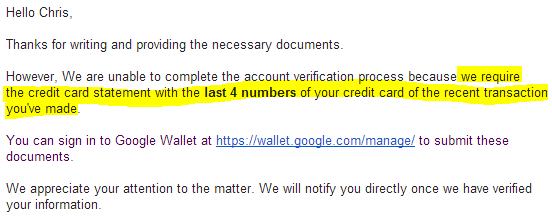
I’ve (once again) resubmitted my documents, this time with the following comment:
The last transaction on my account was made using an additional card. The numbers for additional cards are not shown on my statement, and therefore I have no way of supplying the information you’re now insisting on.
I’ve done my best to comply with this process, but you’re now asking for stuff that I (or anybody else ever using an additional card) cannot provide. So we meet an impasse.
I have proven my identity. I have proven my address. Amex approved the payment (second time around after I’d been through their fraud prevention false positive hoops).
What now? Do I have to abandon my Google Apps and stop using Android phones because I can’t pay for anything with Wallet any more?
I have a Google apps domain that’s due for renewal next Tuesday (17th) and I have no way to pay for that. Suggestions?
I predict this won’t end well.
My plans to get a Nexus 7 LTE (and a Galaxy S4 mini) are now on hold – what’s the point in having Google devices if they shut down the means to pay for anything?
Update 18 Sep
No word from Google – the daily back and forth seems to have stopped.
It seems that I’m not alone having this kind of problem when buying Nexus products. It also seems that Google is systematically unable to do anything about such issues.
Update 22 Sep
I’ve called Google Wallet support twice in the last couple of days. The first agent (Neysa) told me to send in a photo of my additional card. This didn’t help. The second agent (Jamie) told me that she couldn’t do anything to help as it was ‘a different department’.
Filed under: could_do_better, grumble | Leave a Comment
Tags: dicks, fail, fraud, geolocation, google, LTE, Nexus 7, payments, paypal, Play, resolution, store, wallet
I spent Saturday manning the @BrightonPi stand at Brighton Mini Maker Faire showing off various projects with Gareth James. It was great fun, and I really enjoyed talking to people about the potential of the Raspberry Pi.
There were a few questions that got asked a lot… hence this post.
The projects
I was showing off 80’s joystick with 80’s arcade game, OpenELEC, Ladder Board and a Sous Vide water bath. $son0 was adding the RPi camera to his alarm project (and generally messing around with Scratch). Gareth brought along his timetable and secret squirrel.
1. Where can I buy a ladder board?
The Raspberry Pi ladder kit is a great introductory physical computing project, and can easily be made by kids who’ve learned to do basic soldering. It’s available online from Tandy (though sadly out of stock at the time of writing).
2. What’s that game (being projected onto the wall)?

It’s Targ, and it should be available for download from the MAME web site ROMs page (though sadly the download link seems to be broken at the moment). The classic 80’s gameplay proved too difficult for many modern gamers, and nobody made it to level 3 on the day (or set a high score). Gareth and I were amused to see a succession of kids holding the joystick upside down..
If you want to run MAME (and other classic games emulators) on your Pi then the easiest way is probably PiMAME.
3. What WiFi adaptor are you using?
I use the Edimax EW-7811UN as it’s small, inexpensive, and works easily and reliably with Raspbian and OpenELEC.
Any more?
I think that’s it for the frequently asked questions. If you have any more then please ask in the comments.
Filed under: making, Raspberry Pi | Leave a Comment
Tags: BMMF, Brighton, ladder board, maker faire, MAME, Raspberry Pi, RPi, Targ, wifi
I’ve seen a ton of bad news stories about PayPal over the last few years – here are just the top three from my payments tag on pinboard.in. I’ve even run afoul of their over sensitive fraud detection myself in the last couple of months (whilst trying to buy Club Penguin subscriptions for my kids whilst travelling[1]). Today’s experience with Google Wallet is much worse than anything I’ve personally seen with PayPal.

I want to buy a new Nexus 7 LTE (as my original Samsung Galaxy Tab 3G is feeling very old and creaky these days, and the 2013 Nexus 7 has received rave reviews). I want the LTE version as I know from using 3G on my existing tab that I need data on the go. Having just been launched, the LTE version isn’t yet available for me at home in the UK. No problem, I’m over in the US at the end of the month, and I can get it shipped to one of my friends that I’ll be seeing. No problem perhaps with almost any retailer except Google Play. I should have known better from my last dreadful experience trying to buy Nexus 7s from the Play store.
The trouble started with ‘no supported payment method’ showing when I went to check out. Google Wallet doesn’t straight out tell you that you need a US billing address to order in the US, but it doesn’t take much searching to find that’s the case. Time for the supplementary card dodge (I’ve used this one before)… I register another card with a US address (of the company I work for) and now I can place my order.
Payment is declined, as the hair trigger of Amex’s fraud detection has been set off. This is sadly pretty much the norm, so I called up Amex, jumped through their security hoops and resubmitted the payment through Google Wallet. All looked good.
And then Google suspended my Google Wallet account and cancelled the order for my Nexus 7.
I’ve submitted scans of government issued ID and credit card statements (in a process not dissimilar to the one PayPal made me go through), and I’ll now wait the 3-5 business days for the issue to be resolved. Hopefully it will be at the early end of that scale as I need my account back in good standing for a domain renewal that’s due next Tuesday (4 business days away).
So how’s this worse than PayPal? Let’s count the ways:
- When I buy stuff on PayPal I don’t have to pretend to have a billing address in a different country. They’re quite happy for me to use my UK issued card for payments to US suppliers.
- I don’t recall ever having a PayPal transaction cause an issue with Amex.
- The PayPal resolution process only required me to submit one form of ID.
- The PayPal resolution process completed same day.
- I’m not dependent on PayPal for Google services (like renewing Google Apps domains).
Looks like I should just ask my friend to order my new tablet and pay him good old cash.
Notes
1. I suspect that PayPal use IP address geolocation as part of their fraud countermeasures, and that I mess things up by using a mix of US and UK IPs. It’s worth noting here that Google seem to treat Amazon EC2 IPs as being outside the US, so you can’t even try to buy things from the US Play store by using EC2 as a web proxy (but they’re fine with Google Compute Engine IPs – so they get my 2¢).
Filed under: could_do_better, grumble | 2 Comments
Tags: fail, fraud, geolocation, google, LTE, Nexus 7, payments, paypal, Play, resolution, store
Pi Pandora over the Pond
A friend of mine recently returned from working in the US for 3 years, where he’d got to like listening to Internet radio using Pandora. He wanted to get things set up so that he could listen to Pandora on his kitchen stereo.
Challenge #1 – be in the US
Pandora uses IP geolocation to restrict service to US IPs, so we needed a point of presence in the US. After signing up to Amazon Web Services (AWS) a t1.micro machine running in their free tier provided the requisite local IP address with access over SSH and OpenVPN.
We then configured FoxyProxy to send *.pandora.*/* to a SOCKS proxy running on PuTTY that was in turn connected to the Amazon machine and music streamed.
Challenge #2 – make it elegant
Getting Pandora on a laptop was fine, but it wasn’t connected to the kitchen stereo, and hooking it up would be a inelegant mess.
We tried repurposing some old iPhones, but they were too old to run the Pandora or OpenVPN apps.
We then tried using an Android tablet, which was able to work fine with the Pandora and OpenVPN apps from the Play store, but it looked a bit precarious sat up by the stereo, and I was worried that it was only a matter of time before the tablet would be hurtling towards the kitchen floor.
A Raspberry Pi tucked behind the stereo seemed like a much more elegant approach, and luckily my friend had one sat in a box waiting for its first project.
Three steps to success
To make the Raspbeery Pi work we needed network connectivity, VPN connectivity and a Pandora client:
1. Network connectivity
The kitchen stereo was nowhere near my friend’s router, so a cabled connection to the Pi wasn’t an easy option. I did suggest using some Powerline adaptors, but WiFi using a USB adaptor was going to be cheaper. Sadly he didn’t have an (ever reliable) Edimax EW-7811Un WiFi on hand, and I hadn’t brought one with me. We picked up a TPLink TL-WN725N from a local store after confirming that it worked with the Raspberry Pi.
Sadly the TL-WN725N we got didn’t work out of the box with (Jul 2013) Raspbian, but luckily putting the right drivers in place was not too hard (thanks to the pi3g blog):
wget http://resources.pichimney.com/Drivers/WiFi/8188eu/8188eu-20130209.tar.gz
tar -xvf 8188eu-20130209.tar.gz
sudo install -p -m 644 8188eu.ko /lib/modules/3.6.11+/kernel/drivers/net/wireless
sudo depmod -a
sudo modprobe 8188eu
sudo ifdown wlan0
sudo ifup wlan0
With that down the Pi was then available over WiFi.
2. OpenVPN
The OpenVPN client is a standard Raspbian repository, so:
sudo apt-get install -y openvpn
Then copy the client.ovpn file from the OpenVPN server to /etc/openvpn/client.conf
I didn’t want the openvpn to start on boot (as it was prompting for username and password) so the service was set to manually start:
sudo update-rc.d -f openvpn remove
With that done the tunnel could be brought up with:
sudo service openvpn start
and I could confirm that it was working by:
wget http://ipecho.net/plain -O – -q ; echo
and observing the US IP address of the AWS EC2 virtual machine.
3. Pandora client
There’s a command line client for Pandora called pianobar, which is part of the standard Raspbian respository:
sudo apt-get install -y pianobar
It needs a small config file in place before it works:
mkdir -p ~/.config/pianobar
echo ‘user = YOUR_EMAIL_ADDRESS‘ >> ~/.config/pianobar/config
echo ‘password = YOUR_PASSWORD‘ >> ~/.config/pianobar/config
Make sure to substitute your own email address and Pandora password in the lines above. The following needs to be entered on a single line:
fingerprint=`openssl s_client -connect tuner.pandora.com:443 < /dev/null 2> /dev/null | openssl x509 -noout -fingerprint | tr -d ‘:’ | cut -d’=’ -f2` && echo tls_fingerprint = $fingerprint >> ~/.config/pianobar/config
To make sure that audio comes out of the 3.5mm jack on the Pi:
sudo amixer cset numid=3 1
At this stage pianobar can be run (and if all is right a list of channels will appear):
pianobar
Success :)
With the Raspberry Pi plugged into the kitchen stereo we could now listen to my friend’s favourite stations.
Improvements
Adafruit make a Raspberry Pi WiFi radio kit that adds buttons for channel selection and a dot matrix screen to show track info. I should also investigate web and mobile clients, but a command line station selection seems good enough.
Conclusion
The Raspberry Pi makes a good receiver for Pandora Internet radio, wherever you might be.
‘
Filed under: howto, Raspberry Pi | 2 Comments
Tags: OpenVPN, Pandora, proxy, Raspberry Pi, RPi, SSH, tunnel
I got an email from my bank yesterday telling me that they’re rolling out two factor authentication (2FA) to protect their my money from fraudsters. It looks like a pretty standard one time password (OTP) based scheme that will have a choice between mobile and physical tokens. They’re being pretty inflexible about the deployment model by enforcing a one person one token approach, but that’s pretty normal behaviour[1]. They’re also offering a token free option for low risk transactions[2], but it’s unclear whether you have to choose ahead of time that you have no token or if you can do low risk transactions without using the token.
The problem with mobile tokens
The crypto wonks will tell you that mobile OTPs are less secure than physical ones because the mobile OS is vulnerable leaving the private key (aka seed) for the OTP vulnerable. This is mostly theoretical nonsense, and in the real world mobile OTPs have proven resilient whilst some physical schemes (I’m looking at you SecurID) have fallen victim to attacks.
The real problem with mobile tokens is that they break the separation between a second factor (something you have) and the transaction (something you’re doing). If the OTP is on my phone and somebody steals it (or pwns it) then they have the thing I’m supposed to have, and the whole scheme fails.
I spent a lot of time in my last job trying to figure out ways to elegantly combine mobile banking with something else that you might reasonably be expected to carry around (mobile, wallet, keys)[3], and NFC seems to be the way to go (if only Apple weren’t missing the point about NFC).
It’s not clear yet whether the mobile user experience will involve going to one part of the app to get an OTP then go to another part of the app to enter it, but too many systems do that. Another example of security theatre as an audience participation event.
How’s the Twitter scheme better?
Firstly I should point out that the Twitter scheme also relies on the mobile as token, so it does nothing to help with the stolen/pwned phone problem.
As explained in this Wired article (thanks to Bruce Schneier for the pointer) the Twitter scheme is able to carry a bunch of (transaction related) metadata that can be presented to the user as part of the authentication process. In many ways this is a software equivalent of schemes that use hardware tokens to sign transaction summaries.
Best of all the Twitter scheme doesn’t involve the user in reading off then typing in sequences of random numbers (which nobody likes doing, particularly on the glass keypad of a mobile device).
One perceived weakness of the Twitter scheme is that it relies on connectivity, but you can’t do online banking without connectivity, so that’s probably a false concern. Twitter also have a neat new take on strike lists as a fall back.
Why does this matter?
We’re entering a phase where the social networks are starting to do a better job of protecting our identity/security than the banks. This could be a sign that for the average person their online persona is more valuable than the contents of their chequeing account.
I think it also means that the banks are out of the game when it comes to federated identity, which is a shame as it means their ceding what was a natural advantage in stronger proofing mechanisms and customer trust[4].
Conclusion
Twitter are doing a better job of 2FA implementation than my bank, and I’m using my bank as a reference example of most banks – there are precious few that are even trying to be better. The social networks are winning on user experience and winning on security. This will have consequences in ecosystems based on trust.
Notes
[1] The exceptions I can think of are PayPal, which allows a number of Verisign Symantec OTPs to be registered (though it seems nobody told their mobile web/app designers, so it totally fails there), and systems like Google Authenticator where the private key is generated giving the opportunity to register the key with as many devices as you can reach at the time.
[2] Pretty much the universal definition of low risk transactions is making payments to previously registered payees (and viewing account statements/balances). Sending money to new people is (quite rightly) deemed high risk. Bad implementations that I’ve seen often make it so changing the reference for past payees is also considered high risk – not a problem if your reference is a customer number, a pain if your reference is an ever changing invoice number.
[3] There’s a problem looming here. In Singapore the trend is towards card entry for homes – no keys, and in Hong Kong the trend is towards card payment for everything – no wallet (the card is often placed in a mobile phone cover. The overall trend is towards leaving the home with just one thing – the phone – as it takes over the roles of keys and wallet.
[4] Though how much customer trust remains post 2008 is a different question.
Filed under: identity, security | 2 Comments
Tags: 2FA, banking, identity, NFC, online, OTP, security, twitter, user experience, UX
Sadly it’s fairly typical for corporate web filters to block ‘unusual’ ports, which means that if you’re trying to access a service that’s using anything other than port 80 for HTTP and port 443 for HTTPS then you might be in trouble.

CC image by Julian Schüngel
I recently came across a situation where somebody was trying to access an HTTPS service running on port 8000, which appeared to be blocked for them. Having previously used stunnel to connect and old POP3 client to gmail I thought it would be able to help, and indeed it did.
You will need
A box (VM) that you can install stuff on (with root access) beyond the firewall with an unblocked public IP that’s not already being used to host HTTPS – e.g. anything on a public cloud or VPS.
Installing stunnel
I used Ubuntu (12.04), so it was a simple matter of:
sudo apt-get install -y stunnel4
The installer doesn’t create any certificates, so you need to do this yourself:
sudo openssl req -new -out /etc/ssl/certs/stunnel.pem \
-keyout /etc/ssl/certs/stunnel.pem -nodes -x509 -days 365
Configuration file
Create a file /etc/stunnel/stunnel.conf with contents like this:
debug = debug
cert = /etc/ssl/certs/stunnel.pem[Tunnel_in]
client = yes
accept = host_ip:443
connect = localhost:54321[Tunnel_out]
client = no
accept = localhost:54321
connect = destination_server_ip:8000
host_ip should be the IP address of the server running stunnel
destination_server_ip is the IP address of the server running whatever it is on an unusual port that can’t be accessed (obviously if the unusual port isn’t 8000 then change that too).
What’s happening here?
stunnel is designed to go from HTTP-HTTPS or HTTPS-HTTP so to go from HTTPS-HTTPS we actually need two tunnels connected back to back: HTTPS-[Tunnel_in]-HTTP–HTTP-[Tunnel_out]-HTTPS
If I add in the port numbers then we have: HTTPS:443-HTTP:54321-HTTP:54321-HTTPS:8000
The choice of port 54321 for the intermediate tunnel is completely arbitrary.
Alternatives
There are plenty of HTTPS proxy services out there (e.g. myhttpsproxy) , but often these will be blocked by corporate web filters too. Also don’t trust these with anything – they are by design a man in the middle, so any passwords you type in could be scraped.
You could set up your own HTTPS proxy service using Glype, but that’s much more likely to lead to trouble with hosting providers (unless it’s very carefully locked down to prevent abuse) than a single point-point tunnel.
Update 10 Jan 20
Alexander Traud emailed me to note:
Tunnel_out has to be “client = yes”.
Tunnel_in has to be the server (default; “client = no” is possible).
“cert” should be in Tunnel_in.
Filed under: howto | 2 Comments
Tags: filter, howto, HTTPS, proxy, stunnel, tunnel, web
CohesiveFT video overview
For those of you wondering what I do in my day job:
Filed under: cloud, CohesiveFT, security | Leave a Comment
Tags: cloud, networking, security
I don’t need to write extensively here about the dangers of regulatory capture by corporate interests. Larry Lessig already wrote ‘One Way Forward‘, and he does a far better job than I ever could. My friend Robert Dunne recently made an astute observation in the wake of the PRISM scandal:

Access to material from the security services seems to be a feature of being part of the ‘ruling party’, which I’d add to what’s already been articulated by Charles Stross in ‘A Bad Dream – Is the United Kingdom a one party state?’ and Jon Evans with ‘Technology and the Ruling Party‘. I’d guess that access to intelligence reports is something like a drug for those in power[1]. It’s a hard habit to kick, but last week the US Congress had a try at putting the Obama regime on cold turkey with the Amash defence bill amendment.
The vote was pretty close at 217:205, and crossed party lines, which has inspired some deeper digging. It turns out that pro-NSA Congressional voters got twice the defense industry campaign contributions:

So if we accept that the votes were bought then it was remarkably cheap – 217 x ($41,635-$18,765) = $4.963m. Considering what the NSA is throwing around each year that seems like a total bargain – less than $5m in political contributions gets the Beltway bandits a Mulligan any time that they need one.
I’d like to see a more detailed analysis of the Congresscritters involved. Defence contributions is likely just another part of the ‘ruling party’ syndrome. My guess would be that the 217 cross party lines and get greater defence contributions because they’re time seasoned politicos who’ve had plenty of time (and money) to be coaxed away from any ideals they might have once held dear.
Of course things were different on Jimmy Carter’s watch. The US had functioning democracy then and FISA was brought in to protect citizens (without it seems much thought for those to whom the 4th amendment doesn’t apply – of course that was before the US hosted most of the entire planet’s communication infrastructure). What a shame Carter didn’t shore things up with some solid legislation to limit the effects of corporate contributions in politics.
On the bright side the perception of corruption in the US (and UK) is low. That’s what you get when the mass media is bought and paid for by the same people who own the ruling party.
Notes
[1] For a good account of how the SIGINT agency tail started to wag the foreign policy dog I can highly recommend ‘GCHQ‘ by Richard Aldrich.
Filed under: politics | Leave a Comment
Tags: Beltway bandits, bribery, corruption, FISA, Larry Lessig, one way forward, PRISM, regulatory capture, ruling party, SIGINT, spying
The web filter industry
There has been a LOT of noise over the past week about David Cameron’s proposals to have default on web filters for UK ISPs (which seems to be happening despite it not being part of official government policy, and entirely outside of any legislative framework). Claire Perry (Conservative MP for Devizes) has been leading the moral panic, though the meme has been bouncing around Westminster for some time and seems to cross party lines – I once heard Andy Burnham trotting out the same rhetoric (as Secretary of State for Culture, Media and Sport), but luckily nothing was done then. The politicians mostly seem to be responding to calls from the traditional press media (and particularly the Daily Mail) which boil down to:
People are doing things on the Internet that we don’t understand. We don’t like that, so make them stop.
The Open Rights Group (which I regularly donate to) have taken the lead on the fight against this. It’s an important fight, and I’ll do anything in my power to help.
The geek response – it’s somebody else’s problem
A lot of geeks see web filters and other sorts of censorship as the type of damage that the Internet was designed to route around.
Yes, people will use VPNs. Some might even follow my guide for setting up your own (which you can run free in the cloud).
Yes, people will use proxies. Some might even follow my guide for using EC2 as a web proxy.
It’s true that the filters will be trivial to circumvent, and that the knowledge to do that is reasonably widespread.
The problem – this blog will get classified as ‘web blocking circumvention tools’ and nothing I write here will be visible to the passive majority who’ll remain sat behind their filters.
Life behind the wall
I spent a little over a decade working for firms that imposed web filters, so I know what it’s like, how counter-productive it is and how to tunnel through.
I’ve seen the false positives, and fought through the exception processes.
The bottom line here is that China is pretty much the only place that runs things for itself. Everywhere else gets its lists of what’s good and what’s bad from the same handful of (US) security firms. Their biggest customers (and certainly those driving the most restrictive rules) tend to be oppressive Middle Eastern regimes.
It’s not just the filter rules that get imported
One of my favourite authors, Charles Stross, pointed to an interesting article this morning:

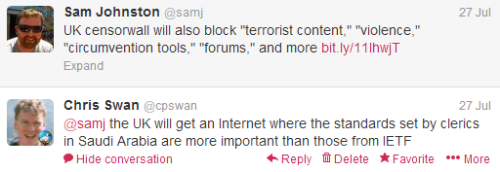
An important subtext in the article led to this brief Twitter conversation:

So the moral crusade seems to boil down to this…
We should import the moral values of Saudi Arabia, because that’s somehow better than the moral values of the United States.
Though of course it’s never described like that. It’s always ‘think of the children’.
The industry itself
This isn’t one of those times where I smell the whiff of corporate corruption in the halls of Whitehall. Web filtering is a few $M pimple on the behind of the multi $B global security industry. You don’t need to spend too long behind the curtain to find that pretty much everything is farmed out to bots with precious little human involvement. When you do get a human involved it quickly becomes clear who calls the shots – if Bahrain wants something on the list it stays on the list. I’ve usually found it easier to get the list source to deal with false positives (Bahrain requests notwithstanding) than to get local exceptions on corporate filters. I’d expect that dealing with ISPs will be much harder – they don’t want to do filtering in the first place, and won’t want to spend any more on running costly exception processes. Our web liberty is on the market to the lowest bidder.
Conclusion
I usually try to be optimistic – to see the use of technology as a driver towards utopia, but this time around I’ll leave the final words to my dystopian friend Robert Dunne:

When they flick the switch look for me on the darknet.
Filed under: politics | Leave a Comment
Tags: censorship, filter, moral panic, morals, open rights group, proxy, vpn, web


 Chris Swan's Weblog