Best roast beef ever
I cooked tri-tip with my Raspberry Pi controlled sous vide water bath today. It came out brilliantly – on a par with the best Chateaubriand I’ve had (which for the record was at Casa Ferlin in Zurich – well worth a visit if you’re ever in that neck of the woods).

The meat
I got my tri-tip from Donald Russell, where they call it Tafelspitz (though Wikipedia tells me that Tafelspitz is actually a dish made with this cut of meat).
The cooking
The temperature control went a little awry. I’m guessing that at some stage the system sent an off signal to the remote controlled socket that wasn’t received, and so the temperature went up much higher than my 56C target. Luckily everything came out well. Here’s the temperature profile (over around 5.5hrs):

I will add a check to the code to make sure that off commands are sent every loop so this doesn’t happen again. Next time I cook tri-tip I’ll set a target temperature of 60C, so that things should come out the same.
The result
The title for this post probably gave it away, but the result was outstanding. The meat texture was like best quality fillet steak, the taste was rich and beefy; even the fat tasted great. I’m looking forward to more tri-tip in the future, and trying out some other cuts in the water bath.
Filed under: cooking, Raspberry Pi | 1 Comment
Tags: beef, Raspberry Pi, Raspi, RPi, Sous vide, tafelspitz, tri-tip, tritip, water bath
HP 650 Business Laptop – review
Since the screen failed on my wife’s Lenovo s10e netbook (and I turned it into a TV attached media player) she’s been using my old s10e, but that’s been on its last legs for a while too. The time had come for something new, with a full sized keyboard and screen.
I’ve been looking around for value laptops recently for my father in law, so I already had an idea on what would fit the bill, so I ordered an Asus X401A (in Pink) from Argos, which seemed a bargain at £259.99.
Before it could be delivered to the local store I came across what looked like a better offer. ServersPlus emailed me to say that HP was offering £100 cashback on their 650 Business Laptop – in a deal similar to their MicroServer (so it would work out at £268.28). The laptop on offer was a Core i3 processor, could take 8GB of RAM and Windows 8 Pro (the Asus was only a Pentium B970, max 4GB and Windows 7 Home Premium).

Sadly the next day delivery turned into most of a week to wait – a combination of the long Easter weekend, and DPD deciding not to bother delivering even though it arrived at the depot on time, and they had a van driving past my house that day :(
Disk dilemma
I had a Samsung 830 128GB SSD that had found its way to the s10e, so I planned on dropping that straight into the 650 and installing a fresh build of Windows 8 Pro. That plan did not work.
I’d had no trouble at all putting a clean SSD into my Lenovo X230, but the HP 650 threw a few spanners into the works. When I put the SSD into the 650 it threw up a warning screen about SMART errors (it was fine in the last PC), worse it wouldn’t boot off my Windows 8 install USB.
I checked that the UEFI stuff was in the right place – all looked well.
I disabled secure boot – it didn’t help.
I tried to copy the HDD it came with using Partition Manager – it wouldn’t do GPT partitons. I copied it with another partition tool that did do GPT, and got boot errors.
In the end I proceeded with the original HDD, made a recovery USB and then swapped in the SSD and went through recovery. It was worth the trouble – subjective performance with the spinning disk was pretty miserable (no doubt not helped by Norton AV crapware). Subjective performance with the SSD is great, and worth every penny of the £72.99 I paid for it. It’s such a shame that SSD is still sold at such a premium for original machines.
The good bits
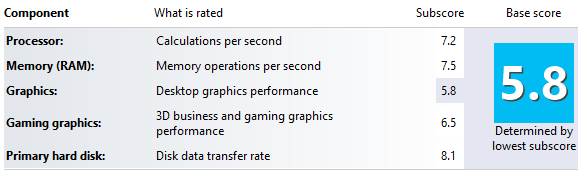
As I already mentioned, performance is very decent – particularly for a machine at this price point. For everyday productivity tasks it doesn’t seem much different from my X230 (which has a WEI of 5.8).
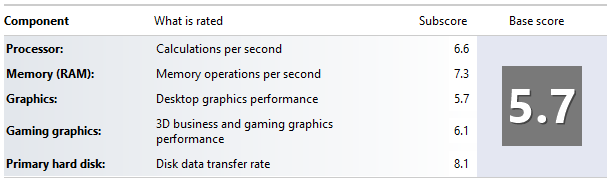 Although the battery seems small compared to the overall unit size endurance is good too, at about 5.5 hours.
The not so good bits
Perhaps I’ve been spoiled by the excellent screen and keyboard on my X230, but both of these aspects seem weak(er) on the HP. The 15.6″ screen seems like it should have a higher resolution (than 1366×768) given its size, and colours seem washed out. The HP keyboard is a good size, but somehow doesn’t seem very precise and accurate.
Windows 8 – at least it’s the Pro version, so the option is there for Hyper-V (though I’m preferring VirtualBox for its versatility). I’ve put Start8 on for a proper desktop experience, which is well worth the $4.99 (though it still stuns me that Microsoft have chosen to inflict Metro on their customers – this ‘feature’ could be free).
At 2.5kg it’s not throw in the bag light (though HP do throw in a nice enough laptop bag).
Conclusion
This is a lot of laptop for the money. There are certainly aspects that reflect the budget price, but it seems built to last, and the performance is great. Maybe not quite as much of an amazing bargain as the MicroServer was[1], but still another great deal from HP.
Notes
[1] There’s a new MicroServer out – the N54L with a 2.2GHz processor. HP are doing cashback again, but it’s only £50 this time.
Filed under: review, technology | 1 Comment
Tags: 650, business, EFI, HP, laptop, review, ssd, Start8, UEFI, WEI
Sous vide steak
After making my Raspberry Pi controlled hot water bath over the weekend I’ve been itching to try it out. I got my chance this evening when cooking some steak for dinner.
I get my steaks mail order from Donald Russell, so they come shock frozen and vacuum packed – so the ‘sous vide’ part is already taken care of:
 After getting the slow cooker and Raspberry Pi back from the kids’ play room where I’d been testing it I couldn’t connect via SSH. it turned out that the SD Card had got corrupted. After sorting out a fresh build of Raspbian I was ready to go once more:
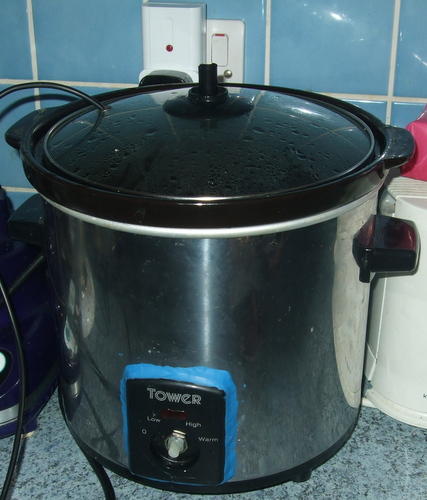 The SD card crisis meant that I only had time for 45 minutes in the water bath at 55C, but they came out looking good, and went into a hot pan for a quick sear:
 Once out of the pan I sliced with my ceramic knife. The rump steak tasted every bit as good as it looks:
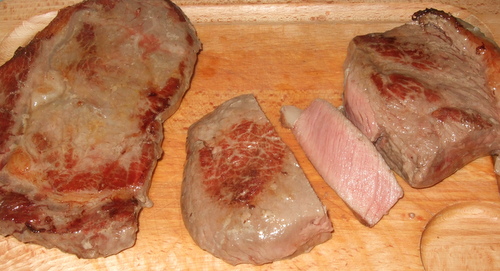 Sadly my ribeye was just a little on the chewy side. I think it could have done with a bit more time in the water bath. The verdict on the rump from my wife and son was ‘softer, but less flavour’. I tend to agree, those rumps are usually bursting with beefy flavour – though I’m prepared to treat this as a one off (and my creamy pink peppercorn sauce had flavour to spare).
So… first time out I think counts as a qualified success. I’ll give the steaks longer next time. Next up (perhaps this weekend) – tri-tip.
Filed under: cooking, making, Raspberry Pi | 3 Comments
Tags: Raspberry Pi, RPi, Sous vide, steak, water bath
Temperature control for a sous vide water bath is a popular application for hobbyist microcontroller kits, with lots of well documented projects out there. My favourite is the Sous Vader – if only for the attention to detail in the decal on the box.
I’ve been planning my own for a little while, and got some DS18B20 temperature probes a little while ago. The long Easter weekend break finally brought me some time to progress the project.
Danger – High Voltage
I have an old slow cooker that’s perfectly good for doing pot roast. It’s been falling to bits for some time, and I’ve patched it up with a Sugru sample I got at Monkigras. I had thoughts of hacking it directly (and perhaps even building in a Raspberry Pi), but common sense took hold and I decided on a route that didn’t involve directly manipulating mains electricity.
To turn the slow cooker on and off I got hold of a radio controlled mains socket from Maplin – they’re available without the controller (which I didn’t need) for £7.99.

I found a library to control the remote socket on github – Raspberry Strogonanoff (thanks Duncan McGregor, and a clever choice of project name). This uses a Sparkfun 434MHz RF Link Transmitter (which as suggested by Duncan I got from Protopic).
Getting Raspberry Strogonanoff working was the easier part of the whole set up. Having looked at the socket to establish that it was set to channel 4 button 1 I simply ran this line to turn it on:
sudo ./strogonanoff_sender.py --channel 4 --button 1 --gpio 0 on
and this to turn it off again:
sudo ./strogonanoff_sender.py --channel 4 --button 1 --gpio 0 off
Getting control
A water bath is a good example of a control system. The water and pot collectively have quite a high specific heat capacity, and there’s quite a bit of latency between turning off power and the rise in temperature stopping. The standard way of dealing with this is to use a PID Controller (see this explanation for a BBQ application for something more straightforward than the Wikipedia article). The Sous Vader seems to have worked with just a PI controller (effectively D=0), so I tried that first. There is a python implementation of a PID controller, which I didn’t spend the time to integrate.
Tuning the control loop
This is the tricky and time consuming part. In theory there should be a nice library out there that figures out correct settings for P, I and D based on observed data, but in practice it seems that most people resort to manual tuning.
The hardware
I started out with things on a breadboard using my usual home made Pi Cobbler, but as I want to use this in the kitchen I’ve created a more permanent setup using a Ciseco Slice of Pi, which at £3.90 is a very inexpensive small project board. I used one of the header strips in the Slice of Pi kit as a place to plug in the 434MHz transceiver and the temperature probes (so it would be easy to use parts in other projects). It was then simply a case of soldering some connecting wires to the appropriate power (5v for the transceiver and 3.3v for the DS18B20), GPIO (0 for the transceiver and 7 for the DS18B20) and GND:
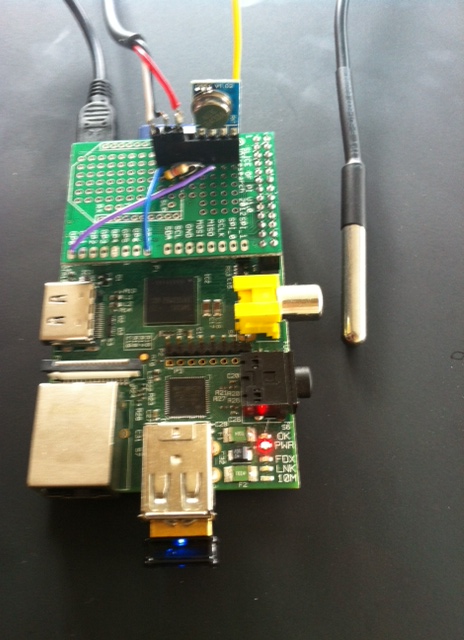 The system pictured above has an Edimax WiFi dongle so that I can control and monitor the whole thing when it’s in the kitchen.
The software
Update 14 Apr 2013 – the code (slightly improved over what’s below) is now available on GitHub along with (hopefully comprehensive) installation instructions.
It’s not especially pretty, but seems to be doing the job:
import os
from subprocess import Popen, PIPE, call
from optparse import OptionParser
from time import sleep

def tempdata():
    # Replace 28-000003ae0350 with the address of your DS18B20
    pipe = Popen(["cat","/sys/bus/w1/devices/w1_bus_master1/28-000003ea0350/w1_slave"], stdout=PIPE)
    result = pipe.communicate()[0]
    result_list = result.split("=")
    temp_mC = int(result_list[-1]) # temp in milliCelcius
    return temp_mC

def setup_1wire():
  os.system("sudo modprobe w1-gpio && sudo modprobe w1-therm")

def turn_on():
  os.system("sudo ./strogonanoff_sender.py --channel 4 --button 1 --gpio 0 on")

def turn_off():
  os.system("sudo ./strogonanoff_sender.py --channel 4 --button 1 --gpio 0 off")
#Get command line options
parser = OptionParser()
parser.add_option("-t", "--target", type = int, default = 55)
parser.add_option("-p", "--prop", type = int, default = 8)
parser.add_option("-i", "--integral", type = int, default = 2)
(options, args) = parser.parse_args()
target = options.target * 1000
print ('Target temp is %d' % (options.target))
P = options.prop
I = options.integral
# Initialise some variables for the control loop
interror = 0
pwr_cnt=1
pwr_tot=0
# Setup 1Wire for DS18B20
setup_1wire()
# Turn on for initial ramp up
state="on"
turn_on()

temperature=tempdata()
print("Initial temperature ramp up")
while (target - temperature > 3000):
    sleep(15)
    temperature=tempdata()
    print(temperature)

print("Entering control loop")
while True:
    temperature=tempdata()
    print(temperature)
    error = target - temperature
    interror = interror + error
    power = ((P * error) + ((I * interror)/100))/100
    print power
    if (power > 0):
        pwr_tot = pwr_tot + power
    pwr_ave = pwr_tot / pwr_cnt
    pwr_cnt = pwr_cnt + 1
    print pwr_ave
    # Long duration pulse width modulation
    for x in range (1, 100):
        if (power > x):
            if (state=="off"):
                state="on"
                print("On")
                turn_on()
        else:
            if (state=="on"):
                state="off"
                print("Off")
                turn_off()
        sleep(1)
Conclusion
I’ve not had the chance to use the water bath for cooking yet, but I’m very much looking forward to trying out a few steaks and maybe some Sunday roasts. I’ll report back on the results.
Filed under: code, making, Raspberry Pi | 24 Comments
Tags: 434MHz, control system, DS18B20, mains, PI, PID, python, Raspberry Pi, remote control, RPi, Sous vide, water bath
OpenELEC 3.0 Released
 OpenELEC 3.0.0 has been released, which means that this popular distribution for XBMC is now in a stable version on Raspberry Pi. Raspberry Pi downloads for an SD card image file (.img.zip) and a copy of the release bundle (.tar.bz2) are on the Pi Chimney resources site.
I’ve done some tidying up on the site, so all the old official images and dev builds are now tucked out of the way.
As previously posted I’m going to stop doing images for regular dev builds now. Anybody that wants to just use OpenELEC should be using the stable release, and anybody that wants to tinker should have the wherewithal to do their own image file (or can use the upgrade process from a stable image).
I’d like to thank the dev team over at OpenELEC.tv for all their hard work in pulling this together.
Filed under: Raspberry Pi | 25 Comments
Tags: 3.0, 3.0.0, download, image, openelec, Raspberry Pi, Raspi, release, RPi, stable, XBMC
Review – Lenovo X230
Shortly after starting my new job it became apparent that I’d need a new laptop. As most of the other CohesiveFT team use Macs (and iWork) I was very tempted by the 11″ Macbook Air, but its limited memory and need for dongles to connect to things like VGA and network dissuaded me. I may come to regret this (due to iWork related issues), but I instead went for a Lenovo X230 – it’s roughly the same travel weight as the MBA, can take 16GB RAM, and has proper ports on it.

Buying
For reasons I can’t fathom the X230 is loads cheaper in the US than the UK. I very nearly bought one last year in the Black Friday sale as it was pretty much half the price of an equivalent UK model. When I went looking again there was no sale, so I took to eBay and found a bargain i5-3320M based model that came with an Ultrabase.
Upgrades
Before I even started using it I upgraded to an SSD (a Samsung 840) and 16GB RAM, which ensures spectacular performance – the worst part is the built in HD4000 GPU (though even that isn’t too bad):
I then installed Windows 8 Pro so that I could use Hyper-V for Linux VMs.
Awesome keyboard
Having used an X220 for much of last year I was a bit skeptical about the new chiclet keyboard on the X230 (which I expected to be like the one on my son’s X121e). I shouldn’t have worried – the X230 keyboard is the best I’ve ever used on a laptop. It might even be quite simply the best keyboard I’ve ever used (and I’m usually quite fussy about my keyboards – mostly using nice old HP ones).
Not a tablet
I’ve hardly been using the tablet features of my previous Lenovo X201 Tablet, which is why I went for the straight X230 rather than the tablet version. I know that Windows 8 is designed for touch, but the X230 Tablet isn’t a touch screen anyway, and I’m using Start8 to make Windows 8 behave like a proper desktop operating system.
Battery life
My machine came with the 6 cell 44+, which seems good for 5 hours of real world use – not enough for a day on the road without a charger, but still pretty respectable. For serious endurance there’s a 9 cell battery (the 44++) and an Ultrabase style battery slice (the 19+).
Ultrabase
I like being able to connect to my large monitor, home network and KVM switch with minimum fuss, so it was cool that the machine came with an Ultrabase. I doubt I’ll ever much use the DVD writer it came with, but it’s there if need be. The new Ultrabase seems more plasticy than earlier models, but it gets the job done.

Unlike earlier Ultrabases I get the impression that this one is just for desktop docking, and isn’t really intended to be carried around – it’s not heavy, but there’s just too much bulk.
Screen
The screen is lovely and bright, and with a matt finish that keeps reflection down.
Minor annoyances
I kept touching the trackpad with my hand when using the trackpoint, so I installed the Synaptics drivers and disabled it (it’s also possible to turn it off in the BIOS).
I also found that the standard Windows drivers wouldn’t let me output audio through the Ultrabase, which was fixed with the Lenovo drivers.
Conclusion
The X230 is the best laptop I’ve ever used. It’s light, has good endurance, and spectacular performance. If I could run an OS-X VM in Hyper-V to get iWork then it would be perfect.
Filed under: review, technology | 9 Comments
Tags: lenovo, review, ssd, X230
Ruining the firework display
This is a cross post from the CohesiveFT corp blog.
For many years setting off fireworks was a labor intensive task, with people running around lighting blue touch papers. That’s been changed in recent years, and large displays are now automated. Somebody programs a script into a box, then presses the Go! button to set things off. Once in a while there is some horrible error in setting the timings (like mixing up seconds and milliseconds) and all of the fireworks go off pretty much at once (with some newsworthy examples in recent years from Oban and San Diego).
As you can see, the results can be pretty impressive, but it lacks the duration and drama of the planned event – particularly when it was expected to be set to music.
Filed under: cloud | Leave a Comment
Tags: automation, fireworks
Filed under: presentation, technology | Leave a Comment
Tags: architecture, consumerisation, consumerization, container, framework, html5, mobile, native, strategy, web
SDN – flow control and APIs
This is a cross post from the CohesiveFT corp blog.
A friend and former colleague recently asked me, “on the SDN front – anything you’d recommend reading in terms of positioning, and compare/contrast of quantum vs. openflow vs. onePK vs…….?”. This was my reply:
OK… based on my limited understanding (I don’t consider myself anything close to being an expert on this stuff yet – I have that mountain to climb in front of me).
OpenFlow is a protocol for describing L2 paths. It’s more of a policy definition than a language, and I met a professor at Princeton a while back who was looking into the issues involved in parsing OpenFlow (it isn’t pretty).
Quantum is the OpenStack API for L2/L3. There are various plugins available to a bunch of OpenFlow implementations (which will immediately give you an impression of how ‘standard’ OpenFlow itself is), plus plugins for other (virtual) networking gear.
onePK is a combination of APIs and management tools for Cisco gear. If it talks IOS then onePK can be stuck in front of it.
It looks like the world is splitting into 2×2 directions:
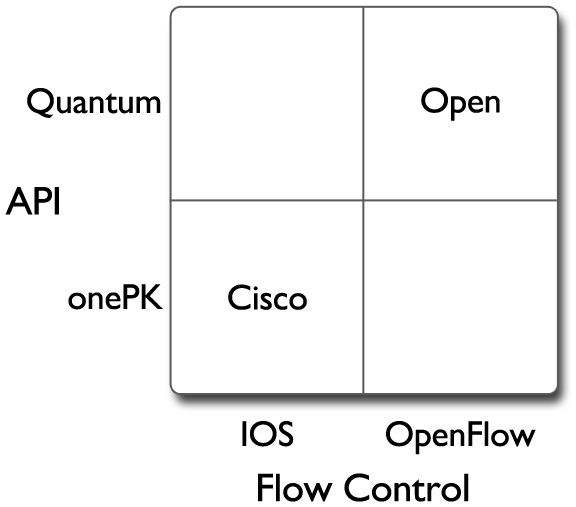
In one dimension it’s about flow control, and the players are OpenFlow and flow control protocol buried in IOS. The network equipment vendors that aren’t Cisco seem to be rushing to adopt OpenFlow, as it gives them leverage against IOS. Cisco itself would seem to have no interest in OpenFlow (why would it?) but I’m sure there will be others that come up with ways to parse OpenFlow into IOS incantations.
The other dimension is about APIs, and the players are Quantum and onePK, so again we see a Cisco versus rest of the world split, but also again there’s an incentive (for everybody except Cisco) to bring Cisco gear into the rest of the world fold. The twist here is that APIs aren’t exclusive (though Oracle are still trying to persuade a judge that they are), so onePK might well end up being the Trojan horse that Cisco has rolled up to its own gates (once somebody cranks out a Quantum to onePK adaptor).
As inevitably happens with these things the bottom left and top right corners are the interesting ones. Bottom left is anchored on Cisco with IOS and onePK. It’s a little more interesting than a past world of just IOS, but it’s about preserving the Cisco networking hegemony. Top right is OpenFlow and Quantum, and is where the real disruptive action is going on.
Filed under: CohesiveFT, technology | Leave a Comment
Tags: API, iOS, network, onePK, OpenFlow, OpenStack, protocol, Quantum, SDN
My New Job
I’ve started a new job as CTO for CohesiveFT. It’s a great company with a great team and some great products and services. As I’ve known many of the people since before the company was founded this post could be subtitled ‘a brief history of CohesiveFT’.
The people and pre-history

Alexis Richardson was the instigator. He’d seen that the financial services industry was building lots of software that did basically the same stuff (and added no differentiation or value to the firms involved), and though that open source was the answer – along the lines of JP’s open source first approach[1]. The idea was to bring together a syndicate of banks to create a mutualised open source platform (predominantly for the back office). This went by various names as he sought interest and investment (OpenClub is one I remember best). There was even some hope that firms might contribute existing platforms – I think the whole concept of technical debt was less well understood then, but the project had legs even if it was just for new stuff[2].
Alexis wore the title of ‘Founder’ when CohesiveFT came together. Later he teamed up with Matthias Radestock at LShift to create RabbitMQ, and implementation of the AMQP message oriented middleware protocol. RabbitMQ was spun out of the CohesiveFT/LShift partnership to be acquired by VMWare (in a for them classic engineering led infanticide deal), which took Alexis away from CohesiveFT to be an executive at VMWare. I’m sure he’s doing something pivotal for the Pivotal Initiative these days.
 I first met Craig Heimark in a pub near Liverpool Street. Alexis was camping in the offices of Evolution, where Craig was one of the advisors, and it had been suggested that Craig might be interested in the OpenClub project. With a background in trading, risk management and senior IT leadership Craig was the perfect person to see the potential of the project, and well placed to help find investors. Craig certainly was interested, and went on to become founding CEO of CohesiveFT.
 Shortly after the meeting with Craig and Alexis I saw a blog post from Patrick Kerpan announcing his departure from Borland (where I’d got to know him after they’d bought his source code management company Bedouin). I knew that Pat had worked in financial services before Bedouin, and thought he’d be a perfect addition to the OpenClub project. What I didn’t know at the time was that Craig and Pat had worked together back at O’Connor & Associates (and subsequently Swissbank following the [reverse] takeover), so at the same time I was introducing Alexis and Pat to each other Craig was doing the same.
Pat was interested enough in the project to come out to London and meet with people to discuss its potential, and I recall a lunch meeting in Canary Wharf where all four of us got together. Pat asked me what I thought was going to be hot in the industry and my answer was ‘software appliances’ (as that’s what I’d been calling them), though I noted that VMWare were holding their first ‘virtual appliance’ competition, so it seemed likely that would be the term that would take hold. Pat had made a comment to me years earlier that “installation is a software hate crime”, and it seemed that there was much to like in the idea of packaging stuff up into a deployable virtual machine. A few weeks later Pat called me (with some excitement in his voice) to say that he was going to make a virtual machine factory. Pat joined CohesiveFT as founding CTO, and their first product had been conceived.
Server3
Server3 (Server Cubed) was originally christened Elastic Server on Demand (ESoD), a name that lives on for its SaaS implementation elasticserver.com. As a virtual appliance factory it takes a ‘bill of materials’ (which might also be thought of as a recipe) for a virtual appliance, and then assembles that appliance to a given output specification. The end result is that functionally identical appliances can be put together for a range of different operating environments such as the virtualisation platforms used in many private clouds or the deployment packages used for public clouds (which Server3 can deploy to directly).
Since having a factory industrialises the process of putting together software for deployment it can borrow from other aspects of industrial design, so it’s possible for the appliances made by Server3 to have a common ‘chassis’ to provide consistent interfaces for monitoring and management.
I’ve used Server3 in the past for some of my own projects, often taking advantage of its ability to integrate directly with Amazon Web Services such as EC2 and S3. More recently Server3 has recently added support for IBM SmartCloud where it’s able to add diversity to the image library that comes as part of the standard service. Most exciting for me right now is that OpenStack support is imminent – it’s already showing on the site as ‘(coming soon)’, and I know the dev team are focussed on finishing that job. As more and more companies use OpenStack internally, and more and more providers choose OpenStack for their public services it’s going to be an important platform, and Server3 will provide an easy way for people to get the stuff they need running on it.
VNS3
Virtual Network Server cubed started its life as VPN-Cubed, but I think the change in name reflects that there’s much more to it than just a virtual private network. VNS3 is used to create overlay networks, and the overlays can be within a cloud, between clouds, between a private data center and a cloud (or clouds) or simply between multiple data centers.
Network overlays are useful for a number of reasons:
- Security by keeping network traffic inside of encrypted tunnels.
- Protocol Support for stuff that the native (service provider) network doesn’t do (e.g. multicast). I’ve used VNS3 myself to connect together a grid that depended on multicast where the network of the underlying service provider (Amazon) didn’t support it.
- Consistency of addressing schemes etc. It’s possible to run different collections of machines inside of VNS3 using the same IP allocation scheme, which can greatly simply migration between environments (e.g. dev->test->production), or troubleshooting (where an exact copy of a given environment can be cloned for fault finding).
The VNS3 overlay can connect into a typical network edge device to provide connectivity into regular corporate networks.

As the VNS3 managers have an API it makes it part of the movement towards software defined networking (SDN), which I plan to write more about in a subsequent post.
Context3
Context-Cubed is a system for the deployment and management of application topologies. If an application sits inside a single (virtual) server then things are pretty simple, but once an application spans multiple machines then it usually involves some degree of dependency management – the web server should wait for the app server should wait for the database. This type of dependency management also happens within a single system, and is dealt with using something like init; so Context3 is essentially init for distributed systems.
It isn’t just for managing startup dependencies, as it can also help with runtime scaling (up or down) so that within a multi tiered application there is enough resource to satisfy demand, but not too much (which might be running up a usage bill).
Wrapping up
I’ve only just started with CohesiveFT, but I’ve known the people and the products for long enough for it to feel something like a homecoming for me. The company has some great products and services to help people harness the power of cloud computing, and I’m looking forward to helping people understand that capability and get started with using it.
Notes
[1] Arguably financial services is a vertical market problem rather than a generic problem, and so should be served by the commercial community, but that clearly wasn’t working out.
[2] I think what’s subsequently happened at OpenGamma shows that open source can succeed in the financial services arena, but perhaps that ‘OpenClub’ was too broad in its ambition.
Filed under: cloud, CohesiveFT, technology | Leave a Comment
Tags: aws, deployment, factory, IBM. cloud, image, industrial design, management, multicast, network, open source, OpenStack, SDN, security, topology, virtual appliance, virtual machine, vpn


 Chris Swan's Weblog