One of the big tech news items today is the launch of the much anticipated Google eBooks. Sadly the service is only available in the US at the moment, so I thought I’d have a poke around and see what the hurdles were.
US Browsing
Browsing from my regular connection at home I could only see the free (out of copyright in the US) books that have been available for some time, along with a message that ‘The latest Google eBooks are not available for sale in your location, yet…Google is working with publishers around the world to let you buy the latest ebooks from top authors. In the meantime, you can still browse millions of free and public domain Google eBooks and read them effortlessly across your devices‘. Of course I’ve heard this song before (or one much like it) with Amazon. After firing up a US based proxy I was able to browse the new store. I put a copy of Clay Shirky’s ‘Cognitive Surplus’ into my basket (after reading JP’s review of it the other day, and being disappointed that I couldn’t get it as an ebook[1]).
Payments
The next hurdle was paying. I got a message that the seller (in this case Penguin) didn’t accept cards from my country. I briefly checked out various virtual credit card and prepay card options, but nothing seemed easy or attractive. The workaround I came up with was using an additional card that’s already on my Amex account, along with a US address (Google Checkout already had the details for my main Amex – and that was the card that it wouldn’t accept). I suspect that this may not work for Visa or Mastercard as they issue additional cards with the same number.
Downloading
I could now read my book online (even using a browser with no proxy), but I wanted it on my Kindle. The first step was to download the book. It seems that Google are using Adobe’s DRM (and supported device ecosystem), so I needed to follow the instructions for those devices[2]. After a few hiccups (which I initially thought were down to having my laptop ‘authorized’ to my work email address, but that no look as if they were just flaky DRM server issues) I had a DRMed ePub file in ‘My Documents\My Digital Editions’.
Removing DRM
I used the Python scripts from this guide to strip the DRM off my ePub file – a pretty painless process.
Converting ePub to mobi
The final step was to convert my ePub file to mobi format so that my Kindle could read it. For this I used Calibre, which looks like an excellent tool with lots of features I’ve not had the time to explore yet.

That’s it :)
I now have my $12.99 copy of ‘Cognitive Surplus’ on my Kindle despite Amazon, Google and Penguin trying to stop me (though Google and Penguin got my money this time, and Amazon only got 2¢).
Notes
[1] Update 8 Dec – It seems that in the last few days a UK Kindle Edition has become available. We can now look at the price arbitrage of £12.99 versus $12.99 (£8.54 [or £10.03 if VAT had been added]).
[2] I had to install Adobe Digital Editions for this part. I already had it on my laptop, but that initially refused to do the right thing with the .acsm file. Installing on my desktop failed in both Chrome (with Flash enabled) and Firefox (where I don’t run a Flash blocker). Thankfully Adobe do have a regular download link.
Filed under: howto, technology | 4 Comments
Tags: Adobe, amazon, Amex, Calibre, convert, Digital Editions, DRM, ebook, epub, google, Google books, kindle, mobi, payments, proxy, UK, US
Region locks – My 2¢
Since I started using Amazon EC2 as a web proxy I’ve found that I’m exploiting it pretty regularly. Every time that I see one of those ‘you can’t access that content from your country’ type messages I have a choice. I can give up and move on, or I can fork out 2¢ to spin up a machine, and get access. 2¢ isn’t a lot of money, so more often than not I pay.

Video
I pay to see video content. Of course my 2¢ goes to Amazon, and not the people who made the video (and don’t want me to watch it outside the US).

File lockers
I pay to get stuff from file lockers (when I’ve already exceeded my quota from my home IP). Of course my 2¢ goes to Amazon, and not the people running the file locker (and is a whole lot less than one of their subscription plans). Oddly it seems that downloading from some of the services is faster down an SSH tunnel from Amazon in the US than it is over my regular broadband connection (WTF?).
Amazon 2 : Other services 0
So – living proof that micro-payments work for stuff on the web. What a shame that the payments are going to the wrong place. If only those other service providers had a smart new business model like Amazon’s maybe they’d get my 2¢.
Filed under: could_do_better, media, technology | 2 Comments
Tags: amazon, aws, ec2, lock, micro payments, micropayments, payments, proxy, region, region lock, SSH, tunnel, video
A tale of two clouds
Over the past few weeks I’ve been kicking the tyres on two new(ish) entrants to the IaaS space. Both services are still in beta.
Savvis Virtual Private Datacenter

I first came across this back in June at the Cloud Computing World Forum, and I signed up straight away for a trial. Sadly there was some kind of issue with the first token that they sent out, and it wasn’t until a few weeks ago that this got fixed.
To be fair to Savvis it’s worth pointing out that VPDC isn’t meant to compete head on with the likes of Amazon Web Services (AWS) etc. It’s clearly a bridge product between dedicated hosting and public cloud for those who still have concerns around security and privacy. From a contractual and delivery perspective this makes the whole thing less ‘on demand’ than I’ve become accustomed to.
The main point of contact for the user of VPDC is a Flash application that’s used to design and deploy hardware architectures. I’m a Flash hater, so this was a bad start for me, but as Flash apps go it wasn’t too grim. The experience was somewhat reminiscent of early Sun N1 demos – drag and drop machines, click to configure, wire them together.
There are a few things regarding the firewall config that I could whine about, but at least it has one.
It was when I first hit the deploy button that disappointment really set in. AWS has made me expect (near) instant gratification, and VPDC doesn’t do that. I didn’t time the first deployment (of a single machine ‘essential’ configuration), but I had plenty of time to get on with other things. I did time the second deployment (of a three tier, three machine ‘balanced’ config) and it took over an hour. I guess an hour shouldn’t matter so much when you’re buying by the month, but it just felt wrong.
The next disappointment was the sign in process. Something else that AWS has spoiled me with is key based SSH that just works. VPDC is a bit old school, and emails out machine/usernames and passwords. Quite annoyingly it doesn’t bother to put the FQDN or IP into those emails, so you have to go back to the Flash app to figure those out from machine properties. The emails also say that a password change will be forced, but that isn’t the case.
Once I got this far I had a bare machine running Linux (Windows is also on offer). There isn’t (yet) some menu of middleware and persistence tiers that you can browse. Once again I suppose that the build of such machines from scratch might be a small issue if you’re keeping them for a long time, but Savvis desperately need to offer some choices and automation in this area (and something like CohesiveFT’s ElasticServer would be a great place to start).
Overall the trial served it purpose of illustrating to me the capabilities (and limitations) of the platform. I don’t think I’ll be rushing back with my company chequebook in hand, but I think I get what’s going on here.
Brightbox

I saw some cynical reactions on Twitter when Brightbox first announced their cloud platform as being a UK first (along with some mistaken impressions that AWS had UK based services), but I was intrigued, and signed up for the beta.
Brightbox have not taken the path of least resistance, and just thrown up something based on Eucalyptus (and the AWS APIs). This could be a problem in the long term as APIs settle down into standards, but in the short term it’s quite exciting to be able to try something new.
Brightbox’s background seems to be firmly rooted in the world of Ruby hosting, so it should be no surprise that their command line tools to access their API come as Ruby Gems. I ran into some trouble trying to get things going on my old Ubuntu 9.04 test VM, so I eventually caved and brought up a new 10.10 machine on which the CLI tools installation went without a hitch.
With the CLI in hand the getting started guide had me up and running in no time. It could be just a subjective opinion, but my sense is that the Ruby CLI runs faster than the Java based EC2 equivalents – it probably comes down to the startup times of the various language interpreters. The machine that I got felt much like an EBS backed small instance on EC2, though the storage usage pattern is quite different (no S3 here). I liked the snapshot facilities a lot (though it’s not a feature I’ve played with on AWS, so I can’t compare), though I did hit some trouble when I tried to use a snapshot that wasn’t completed. The exciting news on this front is that Hybrid Logic will be putting their beta within the Brightbox beta, offering fine grained snapshots to provide fault tollerance and scalability (check out the webcast demos to see how cool this is).
My one gripe about Brightbox at this stage is the lack of a firewall (besides IPtables on a machine). I feel like things are just a little too vulnerable if left out there on the Internet without something to filter out the lumps – it’s all too easy to configure extra services on a machine that increase the (unintended) vulnerability surface area. On the plus side they use public key authentication for SSH into machines.
Overall I must say that I liked my (so far) brief experience of Brightbox, and I look forward to seeing what pricing looks like and how the service develops.
Filed under: cloud | 1 Comment
Tags: API, aws, Brightbox, cloud, Hybrid Cluster, Hybrid Logic, iaas, Ruby, Savvis, snapshot, VPDC
email like it’s 1995
The old joke
There used to be a joke that people who didn’t ‘get it’ would send an email and then call the recipient up to check if it had been received.

Now the joke’s on us
Now, I am that joke. I think we all are. Email has reached a point where it’s just not reliable enough for business use.
Update 17 Dec – clearly I’m not the only one to notice this. Babbage over at The Economist shares my pain.
Spam
The heart of the problem is of course spam
False positives
The real trouble though is that the cure is maybe worse than the disease. Our reaction to spam, and the systems that we use to filter it out are destroying the utility of email.
I can think of numerous examples in the last year or so when I’ve emailed somebody and got no reply, only to hear sometimes weeks later that my message got caught in their ‘junk folder’.
Bacn
One of the problems with spam is how to define it. There’s obvious stuff from the peddlers of dodgy drugs, body enhancements and financial scams – the stuff that none of us really want to see in our inboxes. Then there’s the stuff from marketing droids, where you had to give your email address to register for an event, but never really want to hear from them again. Then there are the mailing lists that you chose to subscribe to, but don’t want to read right now (for which the term ‘Bacn‘ was coined – it’s fine for breakfast, but you don’t want to eat it all day).
Caught in the crossfire
The problem is when legitimate mail, that’s neither spam nor bacn get’s classified as junk. I noticed last week that a perfectly normal email from a colleague had found it’s way into my Postini quarantine. When I fished it out of limbo I had a look at the headers to see if anything odd was happening. I found this:
Received-SPF: error (google.com: error in processing during lookup of [email protected]: DNS timeout) client-ip=74.125.149.185; Authentication-Results: mx.google.com; spf=temperror (google.com: error in processing during lookup of [email protected]: DNS timeout) [email protected]
Oops – looks like it’s time for me to set up SPF.
SPF
Sender Policy Framework (SPF) is a system where a domain can nominate approved senders for its email as a means to cut down spam. Sadly Google Apps doesn’t configure this for us (hardly a surprise as they don’t manage our DNS), and nor do they have any tool to help you configure SPF. Luckily there’s a bunch of stuff out there on the web, which led me to the following settings (for our Postini outbound servers, and Blackberry):
@ TXT v=spf1 ip4:207.126.144.0/20 ip4:64.18.0.0/20 ip4:74.125.148.0/22 ptr:blackberry.com ~all
This seemed to work fine, and I started seeing the good news in email headers from colleagues:
Received-SPF: pass (google.com: domain of [email protected] designates 74.125.149.180 as permitted sender) client-ip=74.125.149.180;
Troubles not over
Sadly SPF doesn’t seem to cut it with Postini, and a few days later another colleague told me that an email I’d sent him had been quarantined (it was a reply to an old thread asking if he’d made any further progress). I could see nothing more that I could do, so I raised a support case with Google/Postini. Here’s their reply in its full horror:
Chris,This is a known issue and our team is working to correct the issue. The Problem is that you internal mail goes out to the internet and back in through Postini. The Postini system is designed to be very critical on spoofed mail, because a huge percentage of spoofed mail is spam. I have no ETA as to when this will be corrected, but we do have a work around.We have a feature called IP lock. Turning this feature on will allow you to specify the IP’s you allow to spoof your domain. Once you’ve turned this on and added the Google Apps IP ranges you can add your domain to the organization level approved senders list and not have to worry about unauthorized spoofed mail making it through to your end users.Here’s a link that provides configuration instructions for the IP Lock feature.http://www.postini.com/admindoc/secur_iplock.html
and here is are our IP ranges…
64.233.160.0/19
Range:
64.233.160.0 to
64.233.191.255
216.239.32.0/19
Range:
216.239.32.0 to
216.239.63.255
66.249.80.0/20
Range:
66.249.64.0 to
66.249.95.255
72.14.192.0/18
Range:
72.14.192.0 to
72.14.255.255
209.85.128.0/17
Range:
209.85.128.0 to
209.85.255.255
66.102.0.0/20
Range:
66.102.0.0 to
66.102.15.255
74.125.0.0/16
Range:
74.125.0.0 to
74.125.255.255
64.18.0.0/20
Range:
64.18.0.0 to 64.18.15.255
207.126.144.0/20
Range:
207.126.144.0 – 207.126.159.255
Regards,
Redacted
Technical Support Engineer III
Wow – how incredibly unhelpful is that?
Postini could have a system that works (and that respects SPF showing that mail has originated from their own servers) – but they don’t.
The support engineer could have configured IP Locks for me – but he didn’t.
The support engineer could have provided me with the script that I needed to run – but he didn’t.
So… off to the documentation, and a bit of trial and error to discover that I needed to run the following batch script in the Postini services console (Orgs and Users > Batch):
# add Postini IPs
addallowedip [capitalscf.com] Account Administrators, capitalscf.com:64.233.160.0/19
addallowedip [capitalscf.com] Account Administrators, capitalscf.com:216.239.32.0/19
addallowedip [capitalscf.com] Account Administrators, capitalscf.com:66.249.80.0/20
addallowedip [capitalscf.com] Account Administrators, capitalscf.com:72.14.192.0/18
addallowedip [capitalscf.com] Account Administrators, capitalscf.com:209.85.128.0/17
addallowedip [capitalscf.com] Account Administrators, capitalscf.com:66.102.0.0/20
addallowedip [capitalscf.com] Account Administrators, capitalscf.com:74.125.0.0/16
addallowedip [capitalscf.com] Account Administrators, capitalscf.com:64.18.0.0/20
addallowedip [capitalscf.com] Account Administrators, capitalscf.com:207.126.144.0/20
# add BlackBerry IPs
addallowedip [capitalscf.com] Account Administrators, capitalscf.com:206.51.26.0/24
addallowedip [capitalscf.com] Account Administrators, capitalscf.com:193.109.81.0/24
addallowedip [capitalscf.com] Account Administrators, capitalscf.com:204.187.87.0/24
addallowedip [capitalscf.com] Account Administrators, capitalscf.com:216.9.240.0/20
addallowedip [capitalscf.com] Account Administrators, capitalscf.com:206.53.144.0/20
addallowedip [capitalscf.com] Account Administrators, capitalscf.com:67.223.64.0/19
addallowedip [capitalscf.com] Account Administrators, capitalscf.com:93.186.16.0/20
addallowedip [capitalscf.com] Account Administrators, capitalscf.com:68.171.224.0/19
addallowedip [capitalscf.com] Account Administrators, capitalscf.com:74.82.64.0/19
addallowedip [capitalscf.com] Account Administrators, capitalscf.com:173.247.32.0/19
addallowedip [capitalscf.com] Account Administrators, capitalscf.com:178.239.80.0/20
# show what happened
showallowedips [capitalscf.com] Account Administrators
Note how complex the OrgName is compared to the examples in the documentation.
It’s also completely unclear to me whether IP Lock should be used in combination with having my domain as an ‘Approved Sender’ or not? For the time being I do (I can always tighten things up if a flood of spam ensues).
Fix this Google
I only use Postini for its ability to add footers with a disclaimer, and this whole thing has me wondering if it’s more trouble than it’s worth – after all the anti-spam in regular gmail is pretty good (and it’s a question for another day why that functionality isn’t better integrated into Postini quarantine – still, they’ve only had 3 years – how hard can it be?).
Or will Facebook fix it for us all?
There has been much fuss in the last few weeks about Facebook launching an integrated email/messaging service. I personally can think of few things I’d less like to do than use Facebook more. I don’t see them as a business service, and I’ve yet to hear anything about how they will deal will the spam problem. But many others seem to think what they’re doing is the shape of things to come – so I could be wrong.
[update 22 Nov] Google/Postini have now been in touch to say that I was apparently the victim of ‘a recent incident that we have since resolved’. PIR_11_Nov_16_Spam_Quarantine. This leaves me wondering how often this sort of thing happens and I don’t notice, and why the first support engineer went straight down the IP lock route?
[update 22 Nov #2] Looks like I missed a bunch of BlackBerry IP ranges first time around – one of the inherent problems with using such a fragile approach. The definitive list is here. At this stage I’m quite tempted to turn IP Lock off given that Google have come clean about their incident.
Filed under: could_do_better, grumble, howto, software | 7 Comments
Tags: bacn, batch, blackberry, business edition, DNS, email, fail, false positive, GABE, GAPE, gapps, google, Google Apps, IP Lock, Postini, premier edition, quarantine, spam, SPF, support
My friend Randy posted a few days ago on Grid, Cloud, HPC … What’s the Diff?. I started to make a comment on the blog, but it was getting too long so I moved it here.
Randy does a good job of pinning down both performance and scalability, but in my experience productivity trumps both. This is another way of saying that there are sometimes smarter ways of reaching an outcome than brute force. There’s a DARPA initiative spun up around this – High Productivity Computer Systems, which I think came about when somebody looked at what Moore’s law implied for the energy and cooling characteristics of a Hummvee full of C4I kit.
A crucial point when considering productivity is to look at the overall system (which can be a lot more than what’s in the data centre). Whilst it may be possible to squeeze the work done by hundreds of commodity machines onto a single FPGA that has implications for development and maintenance time and effort. In a banking environment where the quants that develop this stuff are far from cheap it may actually be worth throwing a few $m at servers and electricity rather than impacting upon developer productivity.

I’d argue that the lines between message passing interface (MPI) workloads and embarrassingly parallel problems (EPP) are blurrier than Randy makes out. It’s all about the ratio of compute to data, and dependency has a lot of importance – if the outcome of the next calculation depends on the results of an earlier one then you can end up shovelling a lot of data around (and high speed, low latency interconnect might be vital). On the other hand if the results of the next calculation are independent of previous results then there’s less data to be wrangled. Monte Carlo simulation, which is used a lot in finance, tends to have less data dependency than other types of algorithm.
Most ‘EPP’ are low in data dependency (usually with just initial input variables and an output result), and so the systems are designed to be stateless (in an effort to keep them simple). This causes a duty cycle effect where some time is spent loading data versus the time spent working on the data to produce a result (and if the result set is large there may also be dead time spent moving that around). Duty cycles can be improved in many cases by moving to a more stateful architecture, where input data is passed by reference rather than value and cached (so if some input data is there already from a previous calculation it can be reused immediately rather than hauled across the network). This is what ‘data grid’ is all about.
Getting back to the question of ‘grid’ versus ‘cloud’, I agree with Randy that there’s a big overlap, and it’s encouraging to see services like Amazon’s Cluster Computer Instance (and it’s new cousin the Cluster GPU instance). I will however return to a point I’ve made before – Cloud works despite the network, not because of it. The ‘thin straw’ between any data and the cloud capability that may work on it remains painful – making the duty cycle worse than it might otherwise be. For that reason I expect that even those with ‘EPP’ type problems will have to think more carefully about the question of stateful versus stateless than they may have done before. It matters a lot for the overall productivity of many of these systems.
Filed under: cloud, technology | 1 Comment
Tags: cloud, grid, MPI, parallel processing, performance, productivity, scalability
It seems that our politicians are easily fooled by the telecos and their regulatory capture. Just yesterday the UK’s Culture minister Ed Vaizey announced his support for a ‘two-speed‘ internet. The idea is superficially attractive – content providers pay a premium to have their stuff delivered faster, and the consumer benefits from improved service. It’s like the company you buy petrol from also paying your road tolls.
The problem – there is no faster. There is only slower.
This isn’t about BT etc. building the online equivalent of the M6 Toll. This is about BT etc. building the online equivalent of the M4 bus lane.


For sure it would be nice if somebody was building the extra physical infrastructure to bring me a faster internet. But that’s not what’s happening here. The UK’s ambitions are still set desperately low at providing 2Mbps services for all, and now our politicians want to allow the open part of that to be slowed down even more.
Let’s also figure out who pays, and for what… ‘Heavy bandwidth’ services (anything that distributes video) are singled out as ‘most likely to be hit with higher charges’. These services already pay for big fat pipes, and it’s fair to ask why should they pay again? It’s also fair to ask who does the paying? With YouTube and ITV.com charges could be passed back to advertisers, but I fail to see the win here. With BBC iPlayer it would seem that there’s an expectation that a part of the TV license fee should be used as a telco subsidy (having failed to get a ‘broadband tax’ into the last finance bill). Nice money if you can get it. I wonder how much BT spends on lobbying, and how many fibre to the home roll-outs that would buy?
Filed under: technology | 2 Comments
Tags: broadband, net neutrality, network, neutrality, telco
My Kindle died two days ago :(

Thankfully Amazon were pretty prompt in dealing with this. I called their Kindle helpline[1], a new one was sent out, and it arrived this morning :)
It didn’t take long for me to restore all of my content, and things like bookmarks seem to be intact :)
Unfortunately there doesn’t seem to be any way to backup/restore collections. I’d only had my original Kindle for a few weeks – enough time to accumulate 7 pages worth of content, which I’d organised into collections that neatly fitted onto the home page. Sadly those collections were gone with my old Kindle, and it took me about 20 minutes of repetitive clicking and cursoring to get things back how I like them. I dread to think what that process would be like if I’d been an early adopter and spent years curating content into collections. Amazon – this needs fixing.
After a bit of searching around I did find Adrian Colegate’s Kindle Collection Manager, which would probably have been handy in speeding up the process of recreating my collections. Sadly it doesn’t yet have the ability to backup/restore collections (and it also doesn’t seem to handle audiobooks and pictures [or mp3s?]).
[1] Who were quick, courteous, and didn’t make me jump through loads of hoops before determining that a warranty replacement was needed.
Filed under: could_do_better, did_do_better, grumble, technology | 4 Comments
Tags: amazon, backup, collections, ebook, export, import, kindle, restore
Using Amazon EC2 as a web proxy
I’ve been meaning to try this out for some time, and my recent trials with Amazon’s US Kindle Store prodded me into action.
The theory
Popular SSH clients (like OpenSSH and Putty) have features that allow tunneling. Amazon Machine Images (AMIs) normally have some way of being administered over SSH. So… start up an EC2 instance where you want a tunnel end point (in my case the US) SSH into it, and let some web traffic hitch a ride.
The practice
Finding an AMI
There are LOTS of AMIs out there, and the requirement for this is nothing more than an SSH daemon. For the purpose of my test I used one of my old AMIs that I made with CohesiveFT Elastic Server.
Make sure that SSH ports are open
The security group that you will start your machine in should be reachable on port 22 from your IP. This can be set in the AWS console or using ec2-auth:
ec2auth securitygroup -P tcp -p 22 -s your_physical_machine_IP/32
Start your AMI
From the AWS console or EC2 API Tools (or whatever your preferred higher level tool is).
SSH into your EC2 instance
For this you will need an instance name (like ec2-50-16-32-41.compute-1.amazonaws.com) or its IP (50.16.32.41) a username and password (and in some cases you may also need a correctly configured private key). There are two methods that I’ll illustrate (and I’ll use 9999 as the proxy port, but you could use anything – 8000, 8080 and 8888 are other popular choices)
Using OpenSSH
On Windows you’ll need Cygwin to get OpenSSH. On most Linux distros it should be there already.
ssh -D 9999 username@instance_name
Using Putty
Put the instance name in:

Then add an SSH Tunnel before clicking Open:
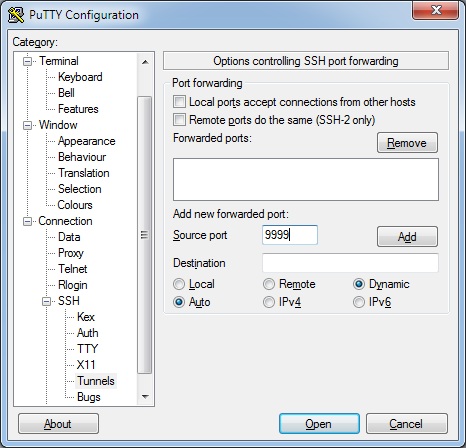
Once you sign in you should have a working tunnel, now to use it.
Configuring Firefox to use the tunnel
I use Chrome as my main browser, and tend to use Firefox for experimental stuff like this.
To set a proxy select Tools -> Options then Advanced, Network, Settings:
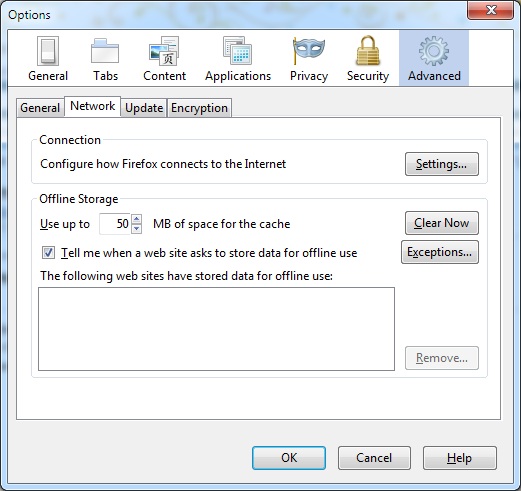
Once there you want to select Manual proxy configuration and define a SOCKS Host of localhost:9999 with No Proxy for localhost, 127.0.0.1:
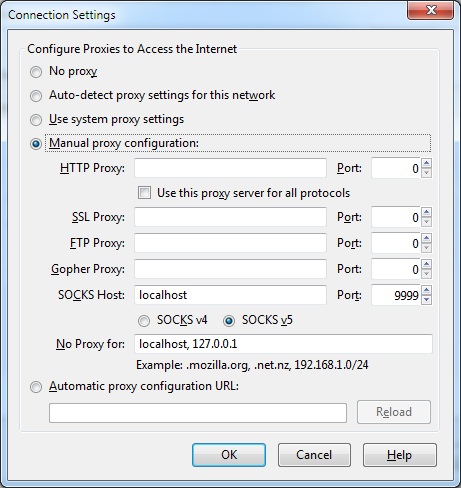
That’s it :)
When you OK back to the browser you should now be connected to the web via the EC2 instance. Don’t forget to shut it down when you’re done and revert Firefox back to ‘No proxy‘.
NB I’ve read that sites within the Amazon cloud (like the AWS site itself) may not behave as expected when your source IP is within EC2. I can say for sure that it works fine with the Amazon Kindle store (though as soon as I sign in I get pointed back to the .co.uk site)
NB2 I’m well aware that there are other means/services for doing this. EC2 is probably optimal for short term low bandwidth usage. Other approaches (see below) may be better if you want to move a lot of material around over a longer period of time.
Todo
This is fine for browsing and other stuff that lets you define a SOCKS proxy. There are circumstances where that’s not enough, and I’ll post some other day on how something like OpenVPN might be used to do this (or you could read @samj’s version)
Updates
Update 1 – 13 Dec 2010 – I got sick of fiddling with Proxy settings in Firefox, so I’ve now started using Wyzo for all of my proxied browsing. It’s pretty much a skinned Firefox, so the user experience is the same, but it saves me much clicking.
Update 2 – 14 Dec 2010 – Wyzo set of my anti malware software (I use Prevx). I’m pretty certain that it’s a false positive, but when you list out the things that a browser does to a machine it looks pretty evil (and I am disappointed that it made itself default browser without asking – that’s just rude, but also easy to fix):
WYZO.EXE has been seen to perform the following behavior:
- The Process is packed and/or encrypted using a software packing process
- This Process Deletes Other Processes From Disk
- Can communicate with other computer systems using HTTP protocols
- Executes a ProcessCreates a TCP port which listens and is available for communication initiated by other computers
- Registers a Dynamic Link Library FileThis process creates other processes on disk
- Can make outbound communication to other computers, IM chat rooms and other services using IRC protocols
- Communicates with other computers using FTP connections
- Executes Processes stored in Temporary Folders
- Adds products to the system registry
- Writes to another Process’s Virtual Memory (Process Hijacking)
- Adds an ActiveX component changing or modifying the function of your browser
- Deletes an ActiveX componentWYZO.EXE has been the subject of the following behavior:
- Created as a process on disk
- Executed as a Process
- Terminated as a ProcessHas code inserted into its Virtual Memory space by other programs
- Deleted as a process from disk
- Executed by Internet Explorer
- Changes to the file command map within the registry
Update 3 – 14 Dec 2010 – I should also mention that I’ve had issues with PeerBlock getting in the way of connections to EC2. For some reason somebody involved in maintaining the IP blacklist has decided that one of the Amazon ranges is ev1L. Now that I’m aware of the issue it’s simple to put an exception in place and restart my Putty session.
Update 4 – 30 Jun 2011 – After a few machine rebuilds and the discovery of FireFox profiles I’ve stopped using Wyzo. I’ve used ‘firefox.exe -ProfileManager’ to create a new profile called Proxy, and then set that profile up to use my proxy. Then I created a shortcut to FireFox with ‘-p Proxy’ appended (and pinned it to the taskbar).
Filed under: cloud, howto | 18 Comments
Tags: amazon, AMI, ec2, howto, OpenSSH, proxy, Putty, SOCKS, SSH, web
Is zero weight a feature?
As I’ve spent more time with my Kindle I’ve been paying more attention to eBook prices. My conclusion is that zero weight (or perhaps just the novelty of eBooks) is a feature, and one that the supply chain thinks is worth a premium.
Pricing
Typical pricing for eBooks seems to be the same (or just below) the price of a hardcover book for a new release, and similarly just below the cost of the paperback when that comes along a little later. There are some egregious exceptions, but that’s the typical pattern. It’s a pattern that makes intuitive sense to most buyers, as eBooks don’t incur physical printing and shipping costs (though they may attract taxes such as VAT that don’t apply to dead tree books[1]).
Can’t buy used
What I can’t do with an eBook is buy a used one, which is a shame, as presumably condition would always be ‘excellent’ – no scuffed corners, yellowed edges or coffee stains. There’s also no effective grey/discount market for ‘new’ ebooks – DRM and tight control of the channel put paid to that. This has some important implications for the long tail, which are probably best illustrated by an example. I’ll use Charles Stross’s Halting State to illustrate this one:

The Kindle edition seems good value against the paperback at 22p cheaper, but by going the dead tree route I could have a new paperback from elsewhere for £3.30 (almost a pound less than the eBook) or a used one in ‘Very Good’ condition for £2.76 (a saving of £1.51 [35%] against the eBook). So if all I want to do is read the words then there are clearly cheaper routes than the eBook.
But I have a fancy new toy in my bag, and I don’t want to lug around a space gobbling weighty chunk of dead tree, so maybe I will swallow that eBook premium (though not this time – I have enough books that I haven’t read, so I’m not in the market for eBooks of stuff that I’ve read already[2] – I was only even looking at Halting State as I was recommending it to a friend).
An international detour
Something that I’m starting to find quite annoying is the opacity of eBook pricing from country to country. If I browse the Amazon.com site (from the UK) I can’t see what an eBook costs in the US, I just get:

and:
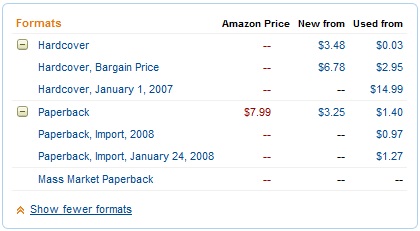
So I have price transparency for many varieties of paper versions, but not the eBook (and it seems that the UK price is OK for a $1.5/£1 FX rate).
I sent the US link to my friend (in the US) and he gets:

and:

So the price for the Kindle edition that I can’t see, and he can’t buy is $6.99 (~£4.67 – a little more than the UK version). Confused? I am.
Amazon say that it will (soon) become possible to buy stuff for Kindle on people’s wish lists, so maybe these issues will go away. but I’m not holding my breath.

Back on topic
Which brings me back to my original point. I want stuff on my Kindle (and want other people to be able to buy wish list stuff for my Kindle) because I think zero weight probably is a useful feature.
Notes
[1] A prize for anybody who can offer a rational explanation why pure information in digital form is taxable, whilst information pressed onto smashed up dead trees isn’t?
[2] There’s an exception here for reference books, which typically aren’t read cover to cover in the first place. I recently bought the eBook versions of pretty much everything I’ve ever owned from O’Reilly that’s made it to the new format (using their $4.99 eBook upgrade offer).
Filed under: could_do_better, technology | 4 Comments
Tags: amazon, DRM, ebook, grey market, international, kindle, pricing, second hand, used
Identity Providers – the rest
This is my fourth and final post in a series looking at how federated identity has broken into the mainstream (I previously looked at Twitter, Google and Facebook).
MyOpenID (JanRain)
When I first needed an OpenID identity provider (IDP) this was the service that I was pointed to (thanks @psd). From a security perspective there’s a lot to like, with options for SSL client certs, information cards and CallVerifID™. I haven’t used it for ages though, as the service I initially needed it for died, and most new things seem to work with Google and/or Twitter (stuff that I’m likely to be signed into already).
Yahoo!
Yahoo! were one of the first big players to announce that they were becoming an OpenID IDP, which wasn’t much use at the time given that there were so few relying parties[1]. I don’t personally use Yahoo! services all that much (with the exception of del.icio.us), and so I don’t pay it much attention. One issue is that the default identifiers are pretty ugly/scary (e.g. https://me.yahoo.com/a/mXMO4bEmxe76x8UaQwZTFo.rrGU-), but there is at least the option to get friendlier URIs (like https://me.yahoo.com/cp_swan).
Flickr
Flickr is part of the larger Yahoo! system from an identity point of view, but I wanted to take this opportunity to point out the absurdity of some of the applications that I’ve recently tried to use with Flickr[2].

Err. NO THANKS. I can see why I might want some apps to do these things, but in some cases all I want to do is link profiles together. I don’t want to hand over the power to screw with my stuff, pretend that you’re me etc.
It’s also worth pointing out that such an authorisation screen would be much better if those ticks were check boxes, handing me some control over the situation.
Microsoft
Live
I started with a Hotmail account, and for a while this became a Passport, but then plans for world domination seemed to be called off and as the service became MS only it went through the latest rebrand. Although OpenID support was announced some time ago it never seems to have made it out of a test environment. This therefore leaves Live as a necessary thing for signing into MS services like MSDN, but otherwise isolated from the rest of the identity ecosystem.
Information Cards
I mentioned these already, and I’ve been a fan since I first heard of CardSpace. What I liked was the effort that had gone into the user ritual to make hard PKI stuff seem simple at the point of consumption. Sadly it became clear a couple of years later that MS wasn’t even ‘dogfooding’ it (by making Information Cards an option for Live services), and I’ve seen no progress since, which is sad. Hopefully the identity selector will find its way into HTML5 sooner rather than later and all that great user experience work won’t have been for naught.
WordPress
The blog platform that I’m writing this on is also an OpenID provider, and one that I frequently use when commenting on other people’s blogs. Hereabouts probably lies the seed of the ‘OpenID is only good for blog comments’ argument. Whilst OpenID is good for blog comments, and an OpenID provided by a blog platform is the right place to anchor comments, I think the space more broadly has moved on. These days I would prefer it if I could sign into WordPress with my Google ID, though I’d like them to sort out all that anchoring/persona stuff that I mentioned before (so that I can leave breadcrumbs back here rather than to my Google Profile, which is not where I live on the web).
I should also take this opportunity to have a quick moan about the WordPress account setup routine. If I want somebody to contribute to a blog (such as my firm’s corporate blog) then they need a WordPress.com account. To have an account they need to have a blog, but they may not want to set up an empty blog just to contribute to an existing blog – this causes (in the words of the Fat Controller) ‘confusion and delay’.
Others
This is by no means an exhaustive list, and I’m sure to have missed stuff out. I’m reasonably confident that I’ve covered the main services that I’ve found useful. What am I missing?
Footnotes
[1] Though it seems that the service is still marked as ‘beta’.
[2] About.me and Gravatar – I’m talking about you, though maybe you just went with dumb defaults.
Filed under: blogging, could_do_better, identity | Leave a Comment
Tags: about.me, cardspace, federation, Flickr, google, Gravatar, identity, identity management, idm, information card, JanRain, Live, login, Microsoft, MyOpenID, OpenID, WordPress, WordPress.com, Yahoo!


 Chris Swan's Weblog